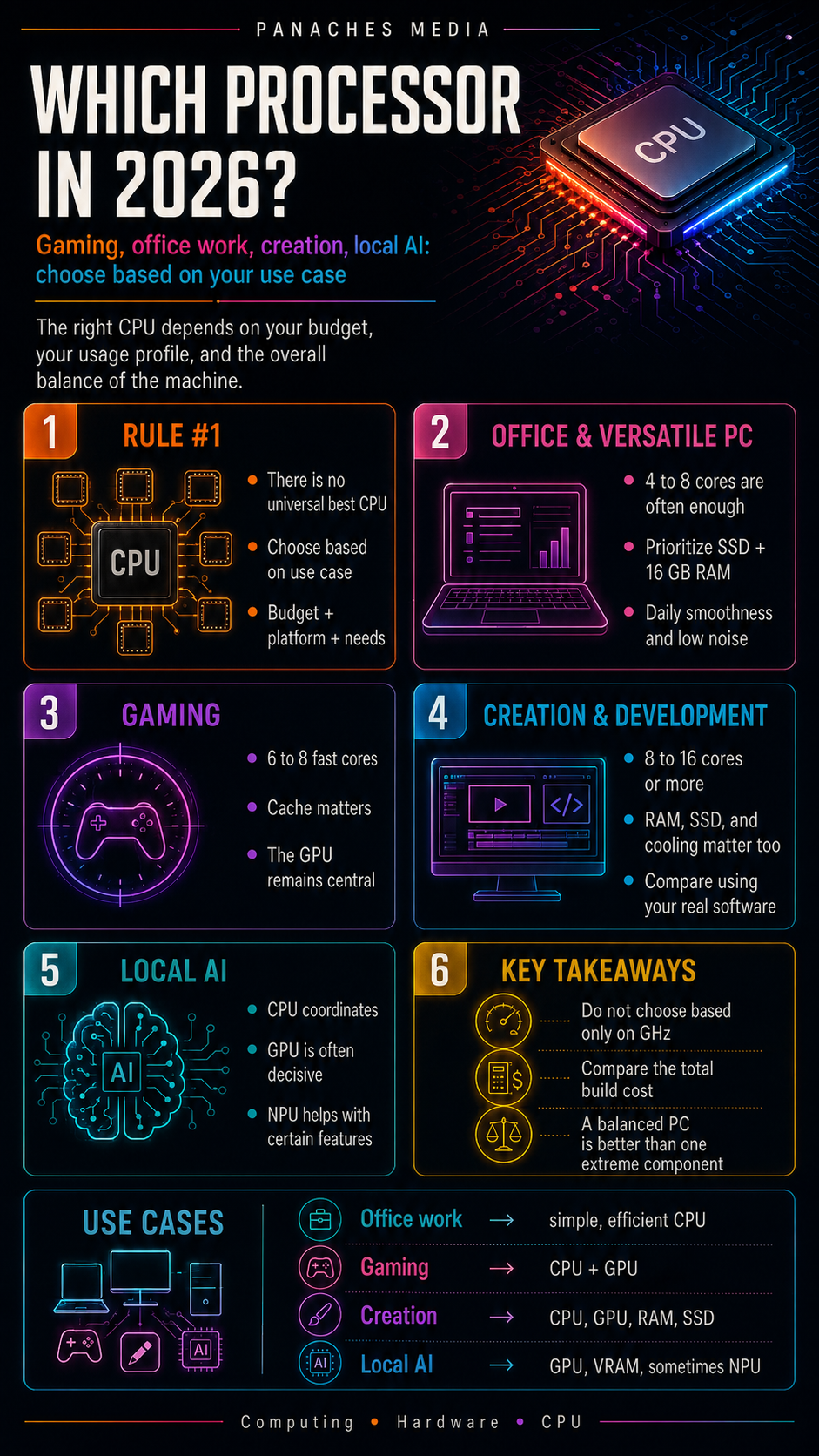
The best processor does not really exist
When looking for a new processor, it is tempting to ask a simple question: what is the best CPU right now?
The problem is that this question is often badly framed.
The best processor for gaming is not necessarily the best for video editing. The best processor for a high-end desktop PC is not necessarily the best choice for a quiet laptop. The best processor for compiling code is not necessarily the one you need for browsing the web, writing, watching videos and managing files.
In 2026, choosing a processor is therefore less about finding “the most powerful” model and more about understanding your real use case.
A good CPU must be consistent with:
- your budget;
- your motherboard;
- your RAM;
- your graphics card;
- your cooling system;
- your software;
- your level of multitasking;
- your possible need for local AI;
- the expected lifespan of the machine.
The right processor is not the one that looks the most impressive on a spec sheet. It is the one that offers the best balance between performance, price, power consumption, platform and concrete needs.
In 2026, the CPU market must be read by use case
The processor market has become more complex, but also more interesting.
On one side, AMD continues to focus on Ryzen processors, the AM5 platform, X3D models with 3D V-Cache and strong energy efficiency. These processors are especially visible in gaming, where cache can play a major role.
On the other side, Intel is pushing its Core and Core Ultra ranges, with hybrid architectures combining performance cores and efficiency cores. This approach can be interesting for multitasking, productivity and machines that need to distribute many different workloads.
Alongside the classic AMD versus Intel comparison, another topic is taking hold: local AI.
Recent computers are no longer compared only by their cores, GHz or cache. We also look at the presence of an NPU, GPU capability, video memory, available RAM and software compatibility.
But despite this complexity, the rule remains simple:
You do not choose a processor in the abstract. You choose it for a use case.
For office work: no need to aim too high
For office work, the processor does not need to be spectacular.
If you mostly use your computer to browse the web, write documents, manage emails, watch videos, organize files, do light accounting or use online tools, a modern entry-level or mid-range CPU is more than enough.
In this context, you should mainly look for a smooth, quiet and balanced machine.
The important criteria are:
- 4 to 6 modern cores;
- good per-core responsiveness;
- a fast SSD;
- at least 16 GB of RAM if possible;
- a sufficient integrated graphics part;
- reasonable power consumption;
- quiet operation.
For this use case, it is generally not useful to pay a lot for a high-end processor. You will feel the difference more with enough RAM, a good SSD and a clean system than with an extreme CPU.
A recent Intel Core i3/i5, Intel Core Ultra 5, AMD Ryzen 3 or Ryzen 5 processor can already be very comfortable depending on the machine and generation.
The priority is not raw power. The priority is everyday smoothness.
For a versatile family PC: aim for balance
A family PC often has to do a bit of everything.
It may be used for browsing, working, watching films, managing photos, playing light games, opening many tabs, using school software, launching simple creative tools or storing documents for the whole household.
In this case, the processor should be more comfortable than a basic entry-level CPU, but it does not need to be extreme.
A good profile often sits around:
- 6 to 8 cores;
- a good boost frequency;
- a recent architecture;
- integrated graphics if you do not have a dedicated graphics card;
- at least 16 GB of RAM;
- an NVMe SSD;
- an upgradeable platform if possible.
AMD Ryzen 5 / Ryzen 7 and Intel Core i5 / Core Ultra 5 or 7 processors typically fit this logic, depending on generation and current pricing.
For a family PC, the most important thing is to avoid imbalances. A very good processor with only 8 GB of RAM can disappoint. A decent CPU with an old hard drive will make the machine feel slow. A configuration that is too compact and poorly cooled can become noisy.
You therefore need to think of the computer as a whole.
For gaming: the CPU matters, but the GPU remains central
For video games, the processor is important, but it never works alone.
In many gaming configurations, the graphics card remains the main component, especially at 1440p or 4K. It calculates most of the images, textures, visual effects, 3D and rendering.
The CPU prepares the work: game logic, physics, character AI, scripts, user inputs, communication with the graphics card and system management.
A weak processor can limit an excellent graphics card. But an overly expensive processor will not compensate for a weak graphics card.
For gaming, you should therefore look for:
- good fast cores;
- a recent architecture;
- generous cache;
- at least 6 to 8 cores for a modern configuration;
- good balance with the GPU;
- decent RAM;
- stable cooling.
This is why AMD Ryzen X3D processors are so present in gaming discussions. Their 3D V-Cache can help some games maintain very good FPS and stronger stability.
Models such as Ryzen 7 X3D chips are therefore very interesting for a gaming-oriented PC. The Ryzen 7 9800X3D remains a strong reference point, while the Ryzen 7 9850X3D pushes this logic further in the 2026 generation. For players who also create content, a Ryzen 9 X3D can be more versatile.
On Intel’s side, Core Ultra 7 and Core Ultra 9 remain solid options, especially if your use case mixes gaming, multitasking and productivity. But for pure gaming, results must be compared game by game, with the target graphics card and resolution.
The right question is not:
“Which CPU has the most cores?”
But rather:
“Which CPU + GPU pair gives the best result in the games I play?”
For content creation: cores, RAM, GPU and SSD
Content creation completely changes the priorities.
If you do video editing, heavy photo editing, animation, 3D rendering, streaming, computer-assisted music production or large creative projects, the processor becomes important, but it is only one part of the configuration.
A good creative CPU should offer:
- 8 to 16 cores or more depending on the software;
- many threads;
- strong performance under long workloads;
- controlled power consumption;
- serious cooling;
- a stable platform;
- enough RAM;
- a fast SSD;
- a GPU suited to the software used.
For video editing, some software uses the GPU very well. Other software relies more heavily on the CPU. Codecs, effects, resolution, file formats and plugins can all change the needs.
For 3D rendering, the GPU can be central if the rendering engine uses it. For other engines or certain calculations, the CPU keeps an important role.
For graphic creation, smoothness often depends on a balance between CPU, RAM, GPU and storage. A powerful processor is not enough if files are heavy, RAM is lacking or the drive is slow.
In this profile, AMD Ryzen 7 / Ryzen 9 and Intel Core Ultra 7 / Core Ultra 9 are families to look at first. Ryzen 9 X3D processors can be interesting for combining creation and gaming. High-end Intel processors can be very solid for multitasking and certain productive workloads.
Above all, you need to check performance in your real software: Premiere Pro, DaVinci Resolve, Blender, Photoshop, After Effects, Unreal Engine, Unity, audio tools, 3D engines or production suites.
A general benchmark is not enough. A creator must look at application-based tests.
For development: compilation, VMs and multitasking
For development, needs vary enormously.
A light web developer does not have the same needs as a developer who compiles large projects, runs several containers, uses virtual machines, works with heavy IDEs, manipulates local databases or experiments with AI.
For comfortable development, you should look at:
- number of cores;
- threads;
- per-core performance;
- amount of RAM;
- SSD speed;
- multitasking stability;
- Linux or Windows compatibility depending on the environment;
- virtualization;
- heat during long sessions.
For web development, a good 6 to 8-core processor can be more than enough if the RAM follows.
For heavy compilation, containers, virtualization or complex environments, 8 to 16 cores become more comfortable. RAM can even become more important than the CPU: 32 GB is often more useful than a slightly faster processor with only 16 GB.
For developers working with local AI models, the GPU and VRAM also become important. The CPU prepares and orchestrates, but heavy calculations may depend on the graphics card.
In this case, the right choice is not just “a big CPU”. It is a coherent machine: multi-core CPU, plenty of RAM, fast SSD, GPU if needed and a stable system.
For local AI: do not confuse CPU, GPU and NPU
Local AI is one of the most misleading topics in 2026.
Many spec sheets highlight AI, TOPS, NPUs, accelerators and new platforms. But these elements do not serve the same use cases.
For certain light functions, such as enhanced video calls, noise reduction, background effects, integrated assistants or some system features, the NPU can be useful. It can run specialized tasks with good energy efficiency.
For heavier models, such as certain local large language models, image generation, massive processing or creative AI workflows, the GPU often remains much more important. VRAM then becomes a critical criterion.
The CPU keeps an orchestration role: it launches the environment, prepares data, manages the system and coordinates components. But it is not always the best choice for performing the heaviest AI calculations.
For a machine oriented toward local AI, you therefore need to look at:
- the CPU;
- the GPU;
- the amount of VRAM;
- system RAM;
- the possible presence of an NPU;
- compatible frameworks;
- software used;
- the operating system;
- thermal dissipation.
A PC with an NPU is not automatically a powerful machine for all local AI. And a PC without an NPU can remain very capable if its graphics card is strong.
The real question is therefore:
“What kind of local AI do I want to run?”
For integrated and efficient features, the NPU makes sense. For heavy models, the GPU is often the main issue.
For a workstation: stability before spectacle
A workstation is not chosen like a gaming PC.
It must be stable, reliable, able to sustain long workloads, handle large projects and sometimes work for several hours or days on heavy calculations.
Relevant uses may include:
- complex 3D rendering;
- simulation;
- scientific computing;
- professional editing;
- advanced virtualization;
- heavy development;
- massive compilation;
- audiovisual production;
- demanding local AI;
- large database processing.
In this context, you need to look at high-end processors, or even professional platforms.
AMD Ryzen 9, Threadripper, Intel Core Ultra 9 or Xeon processors can fit this logic depending on the needs. But the choice depends heavily on the software used.
A workstation should also have:
- lots of RAM;
- fast and reliable storage;
- a suitable graphics card;
- a strong power supply;
- serious cooling;
- a robust motherboard;
- good connectivity;
- a real backup strategy.
For this profile, the CPU alone is never enough. Overall stability matters as much as raw performance.
Desktop or laptop: the same processor name does not tell the same story
One important point: processor names can sometimes be close between desktops and laptops, but real-world performance can be very different.
A processor in a desktop PC generally has more thermal headroom, better power delivery and stronger cooling. It can maintain its frequencies for longer.
In a laptop, everything depends on the chassis, ventilation, battery and power limits. Two laptops with a similar processor can give different results if one is better cooled than the other.
For a laptop, you therefore need to look at:
- the processor;
- the cooling system;
- battery life;
- noise;
- sustained real power;
- whether there is a dedicated GPU;
- the amount of soldered or upgradeable RAM;
- available ports;
- weight;
- the screen.
A very thin laptop with a powerful CPU may look attractive, but it can reduce its performance during long workloads if it gets too hot.
For a desktop PC, you have more freedom: cooling choice, future upgrades, graphics card replacement, RAM expansion, storage replacement. It is often more durable and easier to adapt.
AMD or Intel in 2026?
The AMD versus Intel question always comes back. But in practice, overly simplistic answers should be avoided.
AMD is particularly strong in:
- Ryzen X3D processors for gaming;
- the AM5 platform;
- energy efficiency on some models;
- gaming + creation configurations;
- Ryzen 5 / Ryzen 7 / Ryzen 9 options depending on budget.
Intel remains interesting for:
- multitasking;
- certain productive workloads;
- hybrid architectures with P-cores and E-cores;
- Core Ultra ranges;
- certain creative or versatile configurations;
- machines where the CPU + motherboard price is competitive.
The real choice depends on current pricing, motherboard, RAM, software and your use case.
You should not choose a brand by reflex. You need to compare a complete platform.
An AMD configuration may be better at a given moment for gaming. An Intel configuration may be more interesting for a productive use case or a specific price point. An ARM laptop may also be relevant if your priority is battery life and your software is compatible.
In 2026, the right reflex is simple: compare use cases, not logos.
Total cost matters more than CPU price
A common mistake is comparing only the price of the processor.
That is not enough.
A processor must be paired with a compatible motherboard, compatible RAM, a suitable cooling system and sometimes a stronger power supply.
The real cost is therefore:
CPU + motherboard + RAM + cooling + possible power supply.
A cheaper processor can become less interesting if the compatible motherboard is expensive. A more powerful model may require better cooling. A new platform may force you to move to DDR5. A high-end configuration may require a more serious power supply.
You should also think about upgradeability.
A recent platform may allow you to change the processor later. A platform at the end of its life may be cheaper today, but less upgradeable tomorrow.
The right purchase is therefore not simply the cheapest. It is the one that offers the best balance across the whole configuration.
Quick table by use case
| Main use case | Recommended CPU type | Watch out for |
|---|---|---|
| Office work / web | 4 to 6 modern cores | RAM, SSD, silence |
| Family PC | 6 to 8 cores | iGPU, upgradeability, storage |
| Gaming | 6 to 8 fast cores, good cache | GPU, resolution, cooling |
| High-end gaming | Ryzen X3D or high-end Core Ultra | CPU/GPU balance |
| Content creation | 8 to 16 cores or more | RAM, GPU, SSD, software |
| Development | Comfortable 8 cores, more for VM/compilation | RAM, SSD, virtualization |
| Light local AI | Modern CPU + possible NPU | Software compatibility |
| Heavy local AI | Solid CPU + GPU with VRAM | GPU, VRAM, RAM |
| Workstation | Ryzen 9, Core Ultra 9, Threadripper, Xeon depending on need | Stability, cooling, RAM |
This table is a starting point, not an absolute truth. Prices, software and configurations change quickly.
Mistakes to avoid before buying
The first mistake is choosing the most powerful processor “just in case”. If your use case does not use it, you are paying for unnecessary performance.
The second mistake is neglecting the graphics card in a gaming or creative configuration. The CPU cannot compensate for a GPU that is too weak.
The third mistake is underestimating RAM. For many modern uses, 16 GB is a comfortable minimum, and 32 GB becomes preferable for creation, development, heavy multitasking or local AI.
The fourth mistake is forgetting the SSD. A good processor with slow storage will give you a frustrating machine.
The fifth mistake is looking only at global benchmarks. You need to look for tests that match your software and games.
The sixth mistake is ignoring cooling. A powerful processor with poor cooling becomes noisy, hot and less efficient.
The seventh mistake is believing that an NPU automatically turns a PC into an AI machine. The NPU is useful in some cases, but the GPU and memory remain essential for heavy workloads.
The processor in a modern workspace
Computer use has become more hybrid.
We no longer simply do “office work” or “gaming”. Many users write, browse, watch videos, handle PDFs, organize files, use creative tools, test AI, work with several windows and constantly switch from one context to another.
In this type of use, the processor must mainly contribute to a general feeling of smoothness.
A unified workspace like Panaches illustrates this evolution well: several modules can coexist in the same environment, with browsing, documents, notes, files, PDFs, creation and specialized tools. In that case, comfort does not depend on a single number on the CPU spec sheet. It depends on the balance between processor, RAM, storage, possible GPU and good software management.
For this kind of machine, a homogeneous configuration is better than a spectacular component surrounded by compromises.
What buying strategy should you use in 2026?
The best strategy is to start from your main use case.
If you mostly do office work, there is no need to buy a high-end gaming CPU.
If you play games, first choose the target resolution, graphics card and desired FPS level, then choose a coherent CPU.
If you create content, look at tests in your real software.
If you develop software, prioritize multi-core CPU, RAM and SSD.
If you use local AI, first look at memory, GPU, VRAM and software, then CPU and NPU.
If you want a durable machine, also look at the platform: socket, memory, motherboard and upgrade options.
The right method is therefore:
- define the main use case;
- set a global budget;
- choose the platform;
- balance CPU, RAM, SSD and GPU;
- check cooling;
- compare benchmarks linked to your use case;
- avoid paying for unnecessary power.
Key takeaways
In 2026, choosing a processor is not about taking the most expensive or most spectacular model.
For office work, a simple and efficient modern CPU is enough. For a family PC, balance matters more than raw power. For gaming, cache, fast cores and especially the CPU/GPU pair are essential. For creation, cores, threads, RAM, GPU and SSD must be considered together. For development, multitasking, memory and storage are often as important as the CPU. For local AI, you need to distinguish between NPU, GPU, VRAM and the real workload.
The best processor is therefore not universal.
It is the one that matches your use case, your budget, your platform and the lifespan you expect from your machine.
A good CPU does not do everything. But when chosen well, inside a balanced configuration, it turns the computer into a smooth, durable and pleasant tool to use.