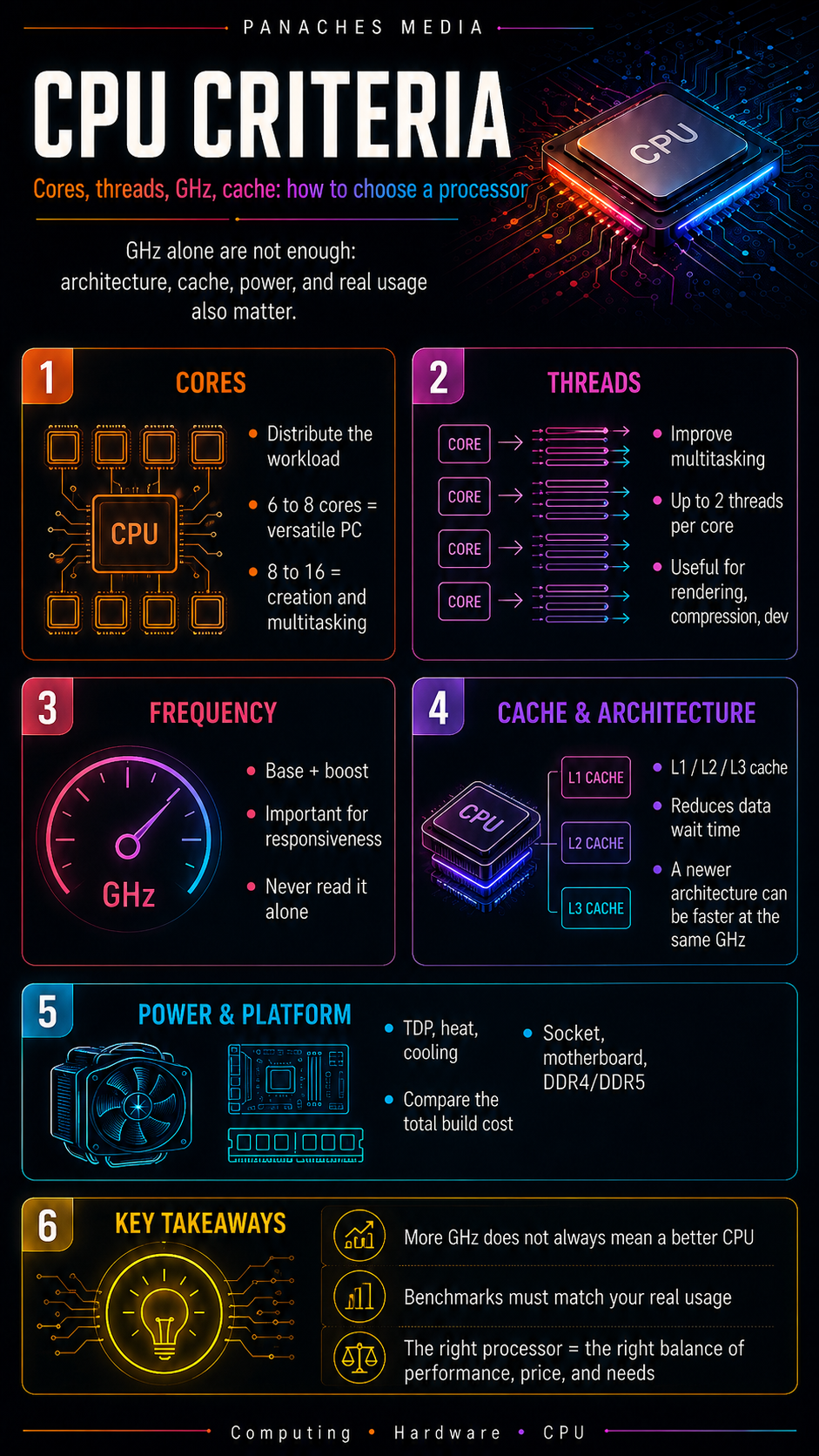
Why GHz is not enough to choose a processor
For a long time, many users compared processors using one single number: frequency in GHz.
A 5 GHz processor seemed automatically better than a 4 GHz processor. On paper, the idea sounds logical: the higher the frequency, the more cycles the processor can perform per second. But in real life, CPU performance depends on many more factors.
A modern processor is not just its clock speed. You also need to look at its architecture, number of cores, threads, cache memory, power consumption, temperature, platform, memory compatibility and the software you use.
Two processors can show similar frequencies and still deliver very different results. A newer model may complete more work during each cycle. Another may have more cache, handle multitasking better or consume less power. A third may look powerful on the spec sheet, but run hotter and require better cooling.
Choosing a processor is therefore not about looking for the biggest number. It is about understanding what each specification actually means.
Core count: the ability to distribute tasks
A core is a computing unit capable of executing instructions. The more cores a processor has, the more it can distribute certain tasks in parallel.
A modern CPU can have 4, 6, 8, 12, 16 cores or more depending on its range. This evolution has deeply changed how computers are used. Where older processors had to handle tasks one after another, multi-core models can distribute work more efficiently.
This becomes useful when several applications run at the same time: a browser with many tabs, a video player, photo editing software, messaging apps, cloud sync, antivirus, a code editor or a creative tool.
But there is one common mistake to avoid: more cores does not always mean more performance in every situation.
Some software uses many cores very well. This is true for 3D rendering, video encoding, compression, some code compilation tasks and virtual machines. Other software mostly relies on a few fast cores. This is still the case for many everyday applications, and also for part of the video game world.
For simple use, a processor with 4 to 6 modern cores can already be very comfortable. For a versatile PC, 6 to 8 cores often offer a good balance. For creation, heavy development or advanced multitasking, 8 to 16 cores become more interesting.
Threads: organizing execution more efficiently
Threads are execution flows. They allow a processor to organize several streams of work in parallel.
Some processors can handle two threads per core. A CPU with 8 cores can therefore display 16 threads. This technology does not magically double performance, but it can improve efficiency in software that can use it.
Threads are especially useful for:
- multitasking;
- video rendering;
- file compression;
- some development tasks;
- long calculations;
- professional applications;
- environments with several open programs.
In everyday use, threads mainly help maintain good responsiveness when the system is doing several things at once. You can have a browser open, a document in progress, a download, a communication app and an antivirus scan without everything freezing at the slightest effort.
But again, it all depends on the software. An application poorly optimized for parallelism will not fully benefit from a large number of threads.
Frequency: important, but never alone
A processor’s frequency is expressed in GHz. It indicates the number of cycles the CPU can perform per second.
Two values are often listed:
- the base frequency, which corresponds to a stable operating speed;
- the boost frequency, which corresponds to a higher frequency reached temporarily depending on workload, temperature and available power.
Frequency still matters. A processor with fast cores can perform very well in tasks that do not scale efficiently across many cores. This includes some everyday applications, part of the gaming world, and software that prioritizes immediate responsiveness.
But frequency should never be read alone.
A recent 4.5 GHz processor can be faster than an older 5 GHz processor because it executes more instructions per cycle, uses its cache better, manages memory more efficiently or benefits from a stronger architecture.
So the right question is not only:
“How many GHz?”
But rather:
“How much real work can this processor complete during each cycle, in the software I actually use?”
Architecture: the invisible but essential criterion
A processor’s architecture refers to the way it is designed: internal organization, core efficiency, cache management, memory communication, power consumption, supported instructions, manufacturing process and general optimizations.
It is one of the most important criteria, but also one of the least visible for the general public.
Two processors can have the same number of cores and a similar frequency, while belonging to two different generations. The newer one can be significantly faster simply because its architecture is better.
Architecture influences:
- the number of instructions executed per cycle;
- electrical consumption;
- heat;
- multitasking performance;
- per-core performance;
- compatibility with certain recent technologies;
- support for new memory types or interfaces.
This is why it is better to compare processors from similar generations. An older high-end model can sometimes remain solid, but it is not automatically better than a more recent mid-range model.
Cache: the ultra-fast memory that can change everything
Cache memory is a small amount of very fast memory integrated directly into the processor. It keeps frequently used data close to the CPU.
Why does this matter? Because a processor is extremely fast, but system memory is slower than the CPU. Every time the CPU has to wait for data, it loses time. Cache reduces these waiting periods.
There are usually several levels:
- L1 cache: very fast, very close to the cores, but small;
- L2 cache: larger, slightly slower;
- L3 cache: even larger, often shared between several cores.
Cache can have a huge impact in some situations. Video games, for example, can benefit greatly from a large cache because they often manipulate many repeated data points: positions, textures, scene logic, physics calculations, scripts, objects and interactions.
This is one reason why some gaming-oriented processors with a very generous L3 cache can deliver excellent performance, even against models with more cores or higher frequency.
Cache is not everything, but it can transform performance stability. In games, it can help improve average FPS, but also reduce sharper drops, creating a smoother feeling.
TDP and power consumption: power, heat and cooling
TDP is often presented as an indication of consumption or heat to dissipate. In practice, it should be read carefully, because calculation methods vary depending on manufacturers and product ranges.
What matters most for the user is this: a powerful processor may consume more power, heat up more and require a better cooling system.
A high-performance CPU with poor cooling can automatically reduce its frequency to avoid overheating. This is called thermal throttling. In that case, you do not get the theoretical performance advertised.
Power consumption also affects:
- the choice of air cooler or liquid cooling;
- machine noise;
- internal case temperature;
- the required power supply quality;
- stability under long workloads;
- energy costs for some intensive uses.
For a quiet, compact PC or a machine used all day, energy efficiency becomes very important. A slightly less powerful but more efficient processor can sometimes provide a better everyday experience.
Per-core performance: essential for responsiveness
Per-core performance refers to the power available on one core or on a small number of cores.
It remains crucial, because not all software can use 12 or 16 cores efficiently. Many everyday actions still depend on the speed of one or a few cores: opening an application, manipulating an interface, loading certain pages, executing a short task, or handling part of a game’s logic.
A processor with fewer cores but very strong cores can therefore feel more responsive than a model with more but slower cores.
This is especially important for:
- web browsing;
- office work;
- older software;
- some games;
- interactive creative applications;
- the general feeling of smoothness.
Per-core performance is often linked to frequency, but not only. Architecture, cache and processor generation also matter a lot.
The platform: socket, motherboard, memory and upgrade path
A processor is never chosen alone. It must be compatible with a motherboard, a socket, a chipset and a type of memory.
The socket is the physical slot where the processor is installed on the motherboard. An AMD CPU and an Intel CPU generally do not use the same socket. Even within the same brand, generations can change platform.
The motherboard also determines the available features:
- type of RAM;
- number of M.2 ports for SSDs;
- USB connectivity;
- Ethernet or Wi-Fi networking;
- PCIe compatibility;
- quality of CPU power delivery;
- upgrade possibilities;
- BIOS updates.
Memory matters too. Some processors work with DDR4, others with DDR5, sometimes only with the latter. RAM speed and latency can influence performance, especially in certain games and memory-sensitive applications.
This is why you need to look at the total cost:
processor + motherboard + RAM + cooling.
A processor that looks affordable can become less attractive if the compatible motherboard is expensive. Conversely, a slightly more expensive processor can be more profitable if it fits into a durable and upgradeable platform.
Integrated GPU: useful or unnecessary depending on the profile
Some processors include a graphics part. This is often called an iGPU, for integrated GPU.
An integrated GPU allows a computer to be used without a dedicated graphics card. It is very practical for office work, web browsing, streaming, quiet small PCs, family machines or troubleshooting.
It can be enough to:
- display the desktop;
- watch videos;
- use common software;
- do office work;
- browse the Internet;
- sometimes play lightweight games.
But for modern gaming, 3D, heavy video editing, accelerated rendering or ambitious local AI, a dedicated graphics card is often still necessary.
Also be careful: some processors do not have integrated graphics. In that case, a dedicated graphics card is required to display an image.
Benchmarks: useful, but only when read intelligently
Benchmarks make it possible to compare the performance of several processors. They are useful, but they should not be read without context.
There are several types of tests:
- synthetic benchmarks;
- video game tests;
- application tests;
- 3D rendering;
- video encoding;
- compression;
- compilation;
- power consumption;
- temperature;
- noise under load.
A processor can be excellent in a synthetic benchmark but less impressive in your real software. Another can dominate in games but be less suited for video rendering. A third can be very powerful, but with high power consumption.
The right reflex is to look for tests close to your usage.
For video editing, look at editing and export tests. For gaming, look at tests with real games, different resolutions and a coherent graphics card. For development, look for compilation or virtualization measurements.
A general ranking can help you get oriented, but it never replaces usage-based reading.
Choose according to your real use
The right processor depends first and foremost on what you do with your computer.
For office work, web browsing, streaming and simple use, there is no need to aim for a very high-end processor. A modern entry-level or mid-range CPU with 4 to 6 cores can be more than enough.
For a versatile PC used for work, browsing, file management, video watching, light creation and several open applications, 6 to 8 cores often provide good comfort.
For gaming, you need to look at per-core performance, cache, architecture and balance with the graphics card. Many games do not need a processor with a huge number of cores, but they benefit from a fast and well-designed CPU.
For content creation, video editing, 3D rendering or streaming, the number of cores and threads becomes more important. But you also need enough RAM, a fast SSD and sometimes a solid graphics card.
For development, virtual machines, compilation or complex environments, a comfortable multi-core processor can save a lot of time. RAM also becomes a critical point.
For local AI, you need to be careful: the CPU can help, but the GPU and sometimes the NPU play an important role depending on the models and use cases. A modern processor is useful, but it is not always enough for heavy AI workloads.
Common mistakes to avoid
The first mistake is choosing only based on GHz. It is the most common trap. Frequency matters, but it does not tell the whole story.
The second mistake is buying too many cores for a use case that does not benefit from them. Someone who mainly does web browsing, office work and streaming does not need a workstation processor.
The third mistake is neglecting cooling. A powerful CPU must be able to maintain its frequencies without overheating. Otherwise, it becomes noisy or loses performance.
The fourth mistake is forgetting the platform cost. A configuration is judged as a whole, not only by the price of the processor.
The fifth mistake is poorly balancing CPU and GPU. For a gaming PC, investing too much in the processor and not enough in the graphics card can create an unbalanced machine.
The sixth mistake is ignoring RAM and storage. A very good CPU with too little RAM or an old hard drive can create a disappointing experience.
The processor in a modern workspace
Today, many users no longer work with only one piece of software open. They move from a browser to a document, from a PDF to a note, from a file to an image, from a communication tool to a spreadsheet or a creative project.
In this kind of environment, the processor must maintain overall responsiveness. It does not do everything, but it contributes to the balance of the machine.
A unified workspace like Panaches illustrates this logic well: several modules can coexist in the same environment, with browsing, documents, notes, files, PDFs, creation or specialized tools. In this context, comfort depends on a coherent whole: CPU, RAM, SSD, possible GPU and good software management.
The processor remains important, but it should be seen as one part of a complete system.
Key takeaways
Choosing a processor is not about taking the one with the most GHz or the largest number of cores.
The real criteria are more numerous:
- number of cores;
- threads;
- real frequency;
- architecture;
- cache memory;
- per-core performance;
- power consumption;
- cooling;
- platform;
- compatible memory;
- real usage.
A good processor is an adapted processor. For gaming, per-core performance, cache and balance with the graphics card are essential. For creation, cores and threads become more important. For everyday use, efficiency, silence and overall configuration coherence often matter more than raw power.
The spec sheet is useful, but it must be read intelligently. The numbers are not there to impress: they help you understand how the processor will behave in your machine, with your software, your habits and your needs.