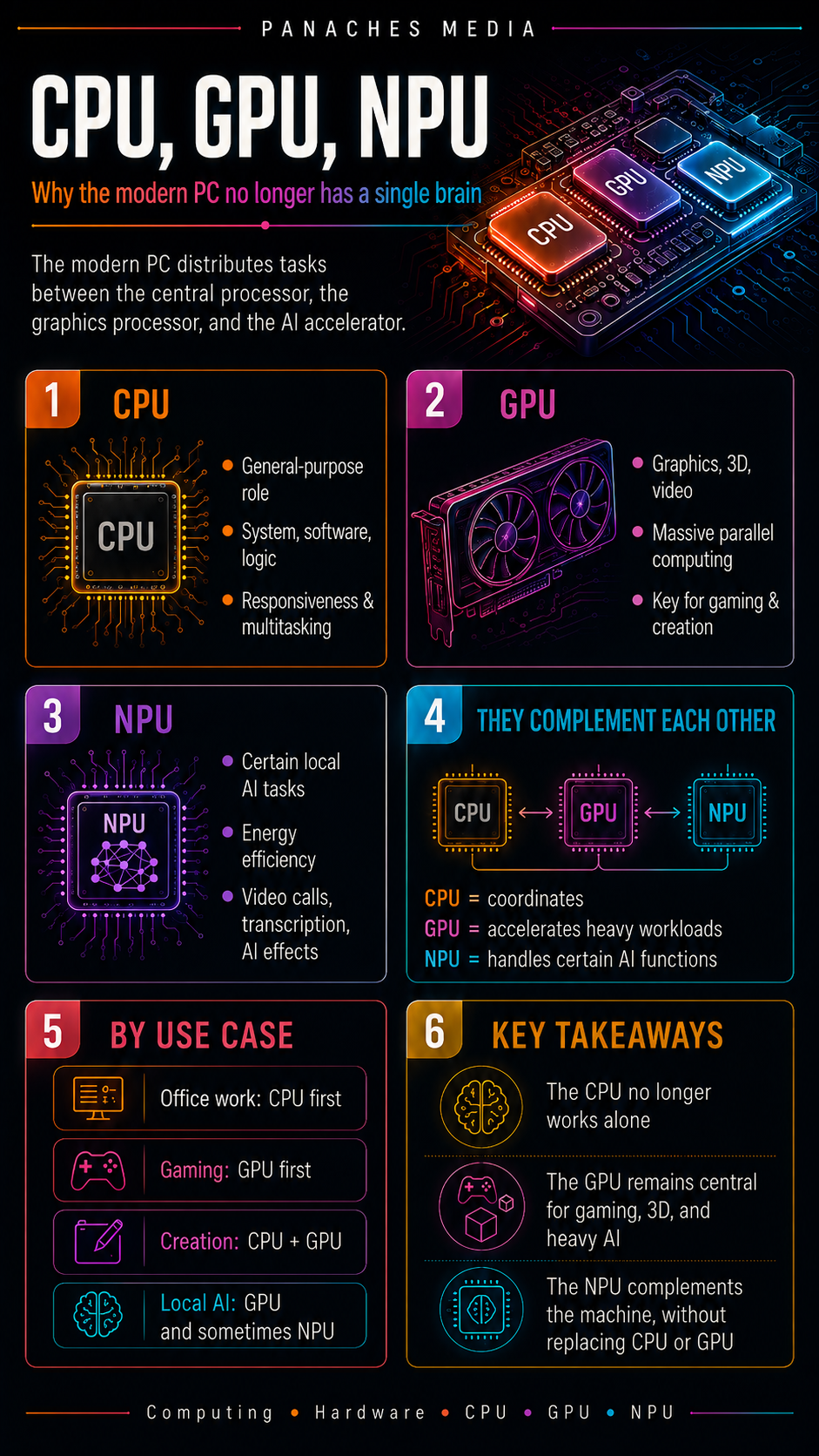
The modern PC no longer relies on a single processor
For a long time, the computer was summarized by its central processor. The CPU was presented as the brain of the machine: the component that runs programs, coordinates hardware and sets the general rhythm of the system.
That image is still useful, but it is no longer enough.
A modern computer does not work with a single “brain”. It relies on several specialized units that divide tasks between them: the CPU, the GPU, sometimes the NPU, not to mention RAM, storage and the many controllers integrated into the platform.
The CPU remains essential. But it is no longer alone at the center of everything. The GPU handles graphics, 3D, video and many parallel operations. The NPU, meanwhile, is appearing in recent machines to accelerate certain tasks related to local artificial intelligence.
Understanding this distribution has become essential when choosing a computer, especially if you play games, create content, edit video, develop software or experiment with local AI.
The CPU: the generalist that coordinates the system
The CPU, or Central Processing Unit, is the computer’s central processor.
Its role is general-purpose. It executes program instructions, manages the operating system, coordinates components and handles a large part of the machine’s logic.
It is involved in almost every everyday action:
- opening an application;
- browsing the web;
- managing files;
- launching software;
- processing keyboard or mouse input;
- organizing multitasking;
- coordinating memory access;
- sending instructions to other components.
The CPU is highly flexible. It can execute a wide variety of different instructions. That is what makes it essential: it is not always the fastest component for a specialized task, but it can manage almost everything.
You can compare it to a conductor. It does not play every instrument, but it organizes the overall flow, assigns roles and keeps the system coherent.
The strengths of the CPU
The CPU’s main strength is versatility.
It excels at tasks that require:
- general logic;
- quick decisions;
- good responsiveness;
- varied operations;
- strong software compatibility;
- efficient system management;
- balanced multitasking.
The CPU is especially important for everyday software, office applications, web browsing, development tools, file management, scripts, some games and all tasks that do not parallelize easily.
A good CPU makes a computer feel more responsive. It helps open software faster, switch between tasks smoothly, manage multiple windows and maintain a sense of fluidity.
But it also has a limit: it is not designed to do everything optimally.
Some tasks involve thousands of similar operations running in parallel. For that, another component is often better suited: the GPU.
The GPU: the specialist in parallel computing
The GPU, or Graphics Processing Unit, is the graphics processor.
Originally, its main role was to handle display and graphics. It calculated the images sent to the screen, visual effects, textures, shadows, 3D scenes and animations.
Today, its role is much broader.
The GPU remains central for gaming, 3D and display, but it also accelerates video editing, rendering, certain simulations, scientific computing and many artificial intelligence workloads.
Why? Because the GPU is designed for parallel computing.
Where a CPU has a few very powerful and very flexible cores, a GPU has a large number of more specialized units capable of processing many similar operations at the same time.
That is exactly what is needed to display a 3D scene, process an image, apply a video effect or perform massive matrix calculations, which are widely used in artificial intelligence.
The strengths of the GPU
The GPU is especially efficient for tasks where the same type of operation can be repeated across a large amount of data.
It is essential for:
- video games;
- real-time 3D;
- graphics rendering;
- accelerated video editing;
- video encoding and decoding;
- certain creative effects;
- simulations;
- artificial intelligence;
- generative models;
- heavy parallel computing.
In a video game, the GPU calculates the images displayed on screen. The higher the resolution, the more detailed the textures and the more numerous the effects, the more the GPU is used.
In creative software, it can accelerate previews, exports, video effects, 3D rendering and certain graphical operations.
In local AI, the GPU is often the most important component for running heavy models. Its video memory, also called VRAM, then becomes a crucial criterion.
This is why a computer intended for gaming, 3D, video editing or AI cannot be evaluated only by looking at its CPU.
CPU and GPU: two complementary logics
The CPU and GPU are not direct competitors. They do not do the same work.
The CPU is general-purpose, flexible and very good at varied logic. It makes decisions, organizes tasks, runs the system and handles complex but diverse operations.
The GPU is specialized, massive and very good at parallel computing. It processes many similar data points at the same time, with impressive efficiency when the task is suitable.
In a video game, for example, the CPU can manage part of the game logic: character AI, physics, scripts, user inputs and data preparation. The GPU then produces the images to display.
In video editing, the CPU organizes the software, manages the interface, files, codecs and certain operations. The GPU can accelerate effects, preview or export depending on the software and format.
In local AI, the CPU can load the environment, prepare data and manage the general execution. The GPU often handles the heavy calculations of the model.
A good PC is therefore a balance. An excellent CPU with a weak GPU can be disappointing in gaming or visual creation. A large GPU with a limited CPU can also create bottlenecks, especially in certain games or software.
The NPU: the accelerator dedicated to certain AI tasks
The NPU, or Neural Processing Unit, is a unit specialized in certain calculations related to artificial intelligence.
It is increasingly present in recent computers, especially laptops and platforms designed for local AI. Its role is not to replace the CPU or the GPU, but to complement them.
An NPU is designed to run certain AI tasks with good energy efficiency. Depending on the machine and software, this may include:
- audio noise reduction;
- background blur or replacement during video calls;
- certain transcription features;
- certain image optimizations;
- lightweight local assistants;
- recognition tasks;
- embedded AI models;
- certain system features related to AI.
The NPU is interesting because it can perform these tasks while consuming less power than a CPU or GPU in certain scenarios. On a laptop, this can help preserve battery life and reduce heat.
But let’s be clear: the NPU is not a magic card.
What the NPU does not replace
The NPU does not replace the CPU.
The CPU remains necessary to run the system, applications, general tasks and the main logic of the computer.
The NPU also does not replace a powerful graphics card.
For large local AI models, heavy image generation, certain computing workloads or large language models, the GPU often remains much more important. The amount of available VRAM can even become more decisive than the presence of an NPU.
The NPU is therefore mainly relevant for targeted AI tasks, integrated into the system or applications, with an efficiency-focused logic. It is useful, but it should not be confused with a complete solution for every form of AI.
In practice, a PC with an NPU can be very interesting for certain modern features. But for ambitious local AI, you always need to look at the whole machine: CPU, GPU, RAM, VRAM, storage and software compatibility.
TOPS: a useful number, but not enough on its own
When talking about NPUs, the term TOPS often appears. It stands for Tera Operations Per Second. It indicates a theoretical number of operations per second.
On paper, the higher the number, the more powerful the accelerator seems. But as with CPU GHz, this number does not tell the whole story.
Real-world performance also depends on:
- the type of calculation;
- the precision used;
- available memory;
- drivers;
- the operating system;
- supported frameworks;
- software optimization;
- the application’s ability to actually use the NPU.
An NPU heavily promoted on a spec sheet may be of little use if the software you use cannot take advantage of it. Conversely, a well-optimized feature can feel genuinely smooth, even on a limited task.
TOPS should therefore be read as an indicator, not as a universal promise.
Why local AI is changing the hardware balance
Local artificial intelligence is pushing computers to evolve.
Before, for many users, the main criteria were simple: CPU, RAM, SSD, and GPU if gaming or creative work was involved. Today, AI adds new questions.
Can the machine run certain AI features without relying on the cloud? Does the GPU have enough video memory? Is the NPU supported by the software? Can the system efficiently distribute tasks between CPU, GPU and NPU?
This evolution does not only concern AI enthusiasts. It also affects everyday uses: video calls, local search, summarization, image generation, writing assistance, automation, transcription, document sorting and interaction with integrated assistants.
The modern PC is therefore becoming less centralized. It looks more like a small team of specialized components, each with its own role.
The case of laptops
On a laptop, the distribution between CPU, GPU and NPU is particularly important.
A laptop must be powerful, but also quiet, cool and energy-efficient. The CPU cannot consume as much power as a desktop chip for long periods. The GPU is often limited by heat and power. The NPU can then become useful for certain light or continuous AI tasks.
This is one of the major advantages of the NPU: performing specialized tasks without heavily mobilizing the CPU or GPU.
For everyday use, this can make intelligent features more discreet, more efficient and better integrated. But once again, it all depends on the software and the quality of the integration.
A recent laptop with an NPU is not automatically better for every use case. For editing, gaming, 3D or heavy AI, the GPU and its thermal envelope remain decisive.
The case of desktop PCs
On a desktop PC, priorities can be different.
Power consumption and battery life are less critical than on a laptop. You can install a more powerful dedicated graphics card, better cooling, more RAM and larger storage.
In this context, the NPU can be an interesting bonus, but it is not always the main criterion.
For a gaming PC, the CPU + GPU pair remains the priority. For a creative workstation, you need to look at the CPU, GPU, RAM, SSD and the software being used. For heavy local AI, the graphics card and VRAM are often more important than the NPU.
The NPU may still become more important over time if more software learns to use it efficiently. But today, it is better to avoid choosing a machine based only on that argument.
CPU, GPU, NPU depending on the use case
For office work, the CPU remains the most important component. An integrated GPU is often enough, and the NPU can add some modern features if the system uses it.
For multimedia, the CPU and integrated or dedicated GPU work together. Video decoding, display and smoothness depend on the overall balance of the machine.
For gaming, the GPU is often the main component, especially at high resolution. The CPU remains important to feed the graphics card properly, manage game logic and avoid certain slowdowns.
For content creation, the CPU, GPU, RAM and SSD all matter. The GPU can accelerate editing, effects and 3D. The CPU remains important for encoding, multitasking and certain heavy operations.
For development, the CPU and RAM are often priorities. Compilation, containers, virtual machines and complex environments benefit from a good multi-core processor. The GPU becomes important if the development work involves 3D, computing or AI.
For local AI, light and heavy tasks must be separated. The NPU can help with certain integrated or efficient features. The GPU often remains central for more demanding models. The CPU coordinates everything.
A balanced machine is better than one extreme component
A common mistake is to look for “the best processor” or “the best graphics card” without considering the overall balance.
A modern PC works as a system. If one component is very powerful but the others do not follow, the experience can still be disappointing.
A high-end CPU with too little RAM can slow down in large projects. A powerful GPU with a weak processor can be limited in certain games. A slow SSD can make the whole machine feel heavy. Poor ventilation can reduce performance. A recent NPU can remain useless if the software does not use it.
The right question is therefore not:
“What is the most powerful component?”
But rather:
“What balance matches my use case?”
This is especially true in modern work environments, where browsing, documents, files, images, notes, PDFs, creative tools, development and sometimes local AI are mixed together.
A workspace like Panaches illustrates this logic well: several modules can coexist in the same environment, and comfort depends less on one single component than on the balance between CPU, RAM, SSD, possible GPU and software management.
How to read a modern spec sheet
When you look at a spec sheet in 2026, it is no longer enough to find the processor name.
You need to read several lines:
- the CPU: model, generation, cores, threads, frequency, cache;
- the GPU: integrated or dedicated, performance, video memory;
- the NPU: presence, theoretical performance, software compatibility;
- RAM: amount, type, speed, upgrade options;
- storage: SSD, capacity, speed;
- cooling: especially for laptops and compact PCs;
- power supply: especially for desktop PCs;
- software used: because not all software takes advantage of hardware in the same way.
A spec sheet can look impressive, but it must always be connected to real use.
For writing, browsing, organizing files and watching videos, a balanced machine is enough. For gaming, the graphics card becomes central. For creation, you need to look at CPU, GPU, RAM and storage together. For local AI, available memory and hardware acceleration become critical.
Key takeaways
The CPU remains the central processor of the computer. It executes instructions, manages the system and coordinates general operations.
The GPU specializes in parallel computing. It is essential for display, gaming, 3D, accelerated video editing, rendering and an important part of local AI.
The NPU is an accelerator specialized in certain artificial intelligence tasks. It can improve energy efficiency and accelerate targeted features, but it does not replace the CPU or a powerful GPU.
The modern PC therefore no longer has a single brain. It works through several complementary units, each adapted to a type of work.
To choose a good machine, you should not look for the most spectacular component. You need to understand how CPU, GPU, NPU, RAM and storage work together.
That balance is what determines the real smoothness of a modern computer.