The processor, the computer’s decision center
When we talk about computer components, the processor almost always comes first. It is also called the CPU, for Central Processing Unit.
Its role is easy to understand: it executes program instructions. Every time you open a browser, write a document, launch a game, edit an image, watch a video or move a window, the processor takes part in the operation.
It is often described as the brain of the computer. The image is useful, but it needs a little nuance. A modern computer does not rely only on its CPU: it also works with RAM, storage, the graphics card, sometimes an NPU for artificial intelligence, and many integrated controllers. Still, the processor remains the component that coordinates a large part of the system.
Without it, programs cannot truly “run”. They exist as files, data and instructions, but the CPU turns those instructions into concrete actions.
What does a processor actually do?
The processor is used to process instructions sent by the operating system and software.
These instructions can be very simple:
- add two numbers;
- compare two values;
- move data in memory;
- open a file;
- handle a user interaction;
- launch a background task;
- coordinate the sending of an image to the screen.
A computer performs millions, sometimes billions, of these operations every second. Most of them are invisible to the user. Yet they allow the system to feel smooth, responsive and capable of running several tasks at the same time.
When you use a complete work environment, with a browser, documents, files, notes, PDFs or creative tools open in parallel, the CPU plays an essential role in that feeling of fluidity. It does not do everything alone, but it orchestrates a large part of the machine.
How does a CPU work?
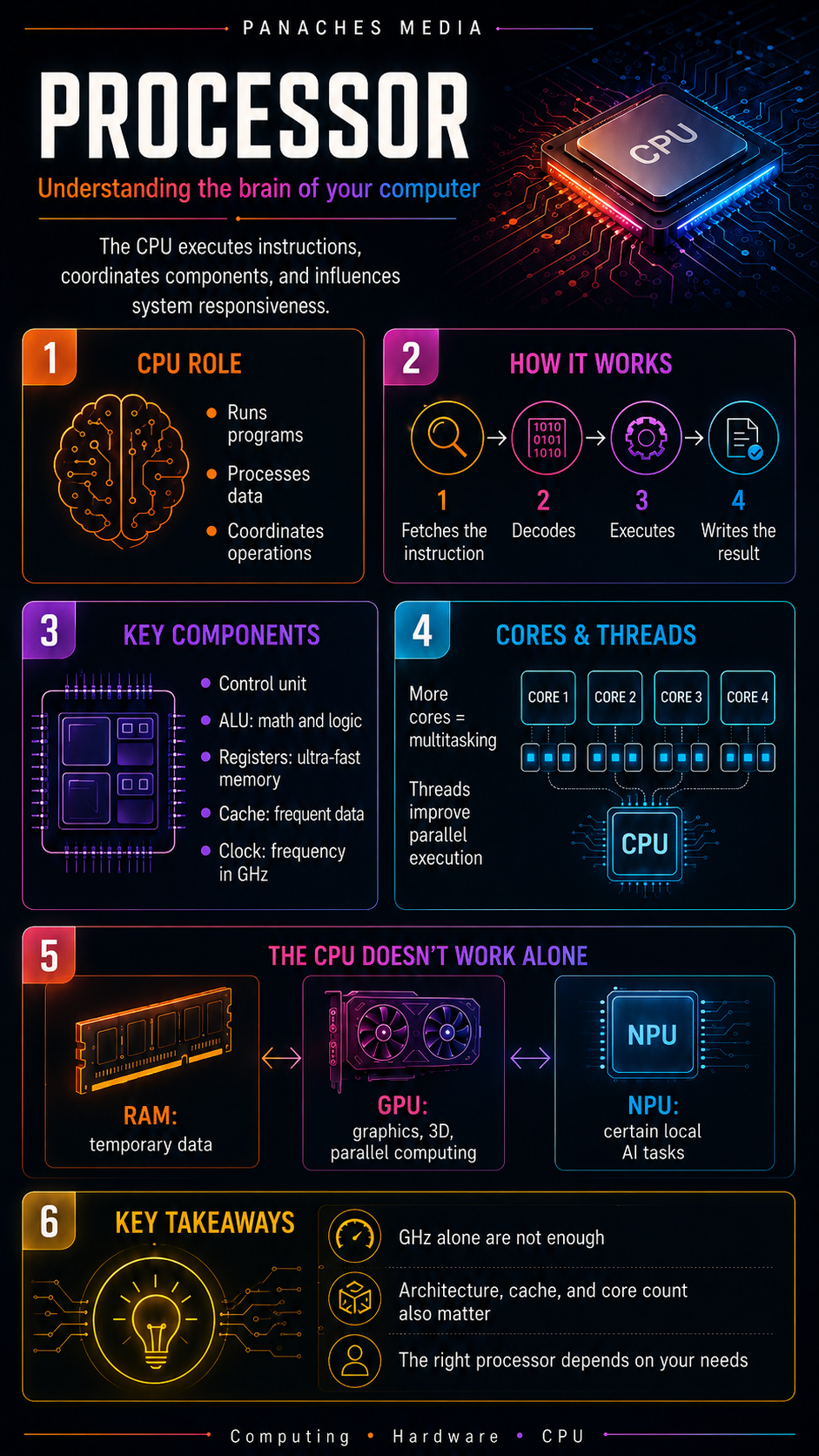
A processor works through a cycle that repeats constantly. It can be summarized in four steps:
-
Fetch the instruction The processor retrieves an instruction from memory.
-
Decode the instruction It understands what the instruction is asking for: a calculation, a comparison, data movement, memory access, and so on.
-
Execute the instruction It performs the requested operation.
-
Write the result It stores the result in a register, in memory, or sends it to another component.
This cycle may sound simple, but it runs at extremely high speed. That is what allows a computer to respond almost instantly to our actions.
A mouse click, a keyboard input or the opening of an application actually triggers an impressive series of instructions. The processor handles them in coordination with the rest of the system.
The main parts of a processor
A processor is not a magic block. It is made of several specialized elements that work together.
The control unit
The control unit organizes the flow of operations. It fetches instructions, decodes them and directs the other parts of the processor.
You can think of it as a conductor: it does not play every instrument itself, but it tells each part what to do, in what order, and at what moment.
The arithmetic logic unit
The ALU, for Arithmetic Logic Unit, performs mathematical and logical operations.
It can, for example:
- add;
- subtract;
- compare two values;
- check whether a condition is true or false;
- perform binary operations.
These operations form the foundation of almost everything a computer does.
Registers
Registers are very small memory areas built directly into the processor. They are extremely fast.
The CPU uses them to temporarily store data it needs immediately. The closer data is to the processor, the faster it can be used.
Cache memory
Cache memory is very fast memory integrated into the processor. It stores frequently used data so the CPU does not have to fetch it from the slower system memory as often.
There are usually several levels of cache:
- L1: very fast, very close to the cores, but small;
- L2: larger, slightly slower;
- L3: even larger, often shared between several cores.
Cache plays an important role in performance, especially in video games, demanding applications and repetitive tasks.
The clock
The clock synchronizes the processor’s operations. Its frequency is expressed in GHz, meaning billions of cycles per second.
A 5 GHz processor can theoretically perform 5 billion cycles per second. But be careful: frequency alone does not determine real-world performance.
A newer processor with a lower frequency can outperform an older model with more GHz, simply because its architecture is more efficient.
Cores and threads: why modern processors can do several things at once
For a long time, processors had only one core. Today, most CPUs are multi-core.
A core is a unit capable of processing instructions. The more cores a processor has, the more it can distribute certain tasks.
A modern processor may have:
- 4 cores for simple use;
- 6 to 8 cores for a versatile PC;
- 8 to 16 cores for gaming, creation or heavy multitasking;
- many more for professional workstations.
Threads are execution flows. Some processors can handle several threads per core, which improves multitasking and performance in certain software.
However, “more cores” does not automatically mean “better in every situation”. Some software uses many cores very well, such as rendering tools, video editing software or compression tools. Other applications, including some games or simple programs, benefit more from fast cores, strong cache and an efficient architecture.
The processor never works alone
Even though the CPU is central, it is only one part of a larger system.
A balanced computer also depends on several other components.
RAM
RAM temporarily stores the data used by open programs. If there is not enough RAM, the system can slow down, even with a good processor.
Having an excellent CPU with too little RAM is like having a powerful engine in a car without enough space to carry what it needs.
Storage
The SSD strongly affects system responsiveness: boot time, software launch, file loading and project access.
An old hard drive can make a computer feel slow, even if its processor is still decent.
The graphics card
The GPU mainly handles display, 3D, graphical rendering, video games, accelerated editing and many parallel computing tasks.
For games, 3D work, video or some artificial intelligence tasks, the graphics card can be as important as the processor, and sometimes even more important.
The NPU
The NPU, or Neural Processing Unit, is an accelerator specialized in certain artificial intelligence calculations.
It does not replace the CPU. It also does not replace a powerful graphics card for heavy AI workloads. Its main value is running some local AI features more efficiently, with lower power consumption.
It is becoming increasingly common in recent machines, especially laptops and platforms designed for embedded AI.
CPU, GPU, NPU: three different roles
To understand a modern computer, we should avoid reducing everything to the processor.
The CPU is general-purpose. It handles the system, applications, varied instructions, multitasking and the main logic.
The GPU specializes in parallel computing. It excels at displaying images, handling 3D, accelerating some video rendering tasks and running certain large-scale computations.
The NPU specializes in certain artificial intelligence calculations, often with a focus on energy efficiency.
These three components do not do the same thing. They complement each other.
A good computer is not simply the one with the most powerful processor. It is the one whose components match the real use case: office work, gaming, creation, development, video editing, local AI or everyday productivity.
Why GHz does not tell the whole story
For a long time, many users compared processors only by their frequency.
A 5 GHz CPU seemed automatically better than a 4 GHz CPU. In reality, it is much more subtle.
Performance also depends on:
- architecture;
- number of cores;
- cache;
- power consumption;
- temperature;
- memory used;
- software optimization;
- processor generation.
Two processors with similar frequencies can deliver very different performance. A newer model can execute more instructions per cycle, manage cache better, consume less energy or distribute tasks more efficiently.
That is why you should avoid choosing a processor based on a single number.
How do you know if a processor fits your needs?
The right processor is not necessarily the most expensive one. It is the one that matches your usage.
For office work, web browsing, streaming and simple tasks, a modern entry-level or mid-range processor is more than enough.
For a versatile family PC, it is better to choose a balanced CPU that can handle several open applications without slowing down.
For gaming, you need a fast processor, with a good architecture and efficient cache, but also a suitable graphics card. A very powerful CPU paired with a weak GPU will not perform miracles.
For content creation, video editing, heavy photo editing, 3D rendering or streaming, the number of cores becomes more important. RAM, SSD speed and the GPU also matter a lot.
For development, compilation, virtual machines or complex work environments, a comfortable multi-core CPU can save a lot of time.
For local AI, the processor can help, but you also need to look at the GPU, available memory and, depending on the machine, the presence of an NPU.
The CPU in a modern work environment
A computer is no longer just a machine that launches one program at a time. Many users now work with several windows, multiple files, a loaded browser, documents, images, notes, communication tools and sometimes AI assistants.
In this context, the CPU has to manage constant circulation: it coordinates, distributes, prioritizes and responds to system requests.
This is especially visible in unified work environments. A tool like Panaches, for example, can bring together browsing, documents, PDFs, notes, files, creation and specialized modules in a single space. In this kind of usage, smoothness does not depend only on the processor, but the CPU directly contributes to the overall comfort, especially when several modules are used at the same time.
That is also why a good hardware choice must always be global. The processor matters, but it needs enough RAM, fast storage and a balanced system around it.
Key takeaways
The processor is one of the most important components in a computer. It executes instructions, coordinates operations and directly affects system responsiveness.
But it should not be reduced to a simple GHz number. To understand a CPU, you need to look at its architecture, cores, threads, cache, power consumption and role within the whole machine.
A modern processor never works alone. It communicates with RAM, storage, the GPU, sometimes the NPU, and the entire system.
Choosing a good processor is therefore not about finding the most impressive model on paper. It is about choosing a chip adapted to your real use: working, playing, creating, developing, learning or exploring new digital tools.
The CPU remains the logical heart of the computer. But in a modern machine, the balance between all components is what truly makes the difference.