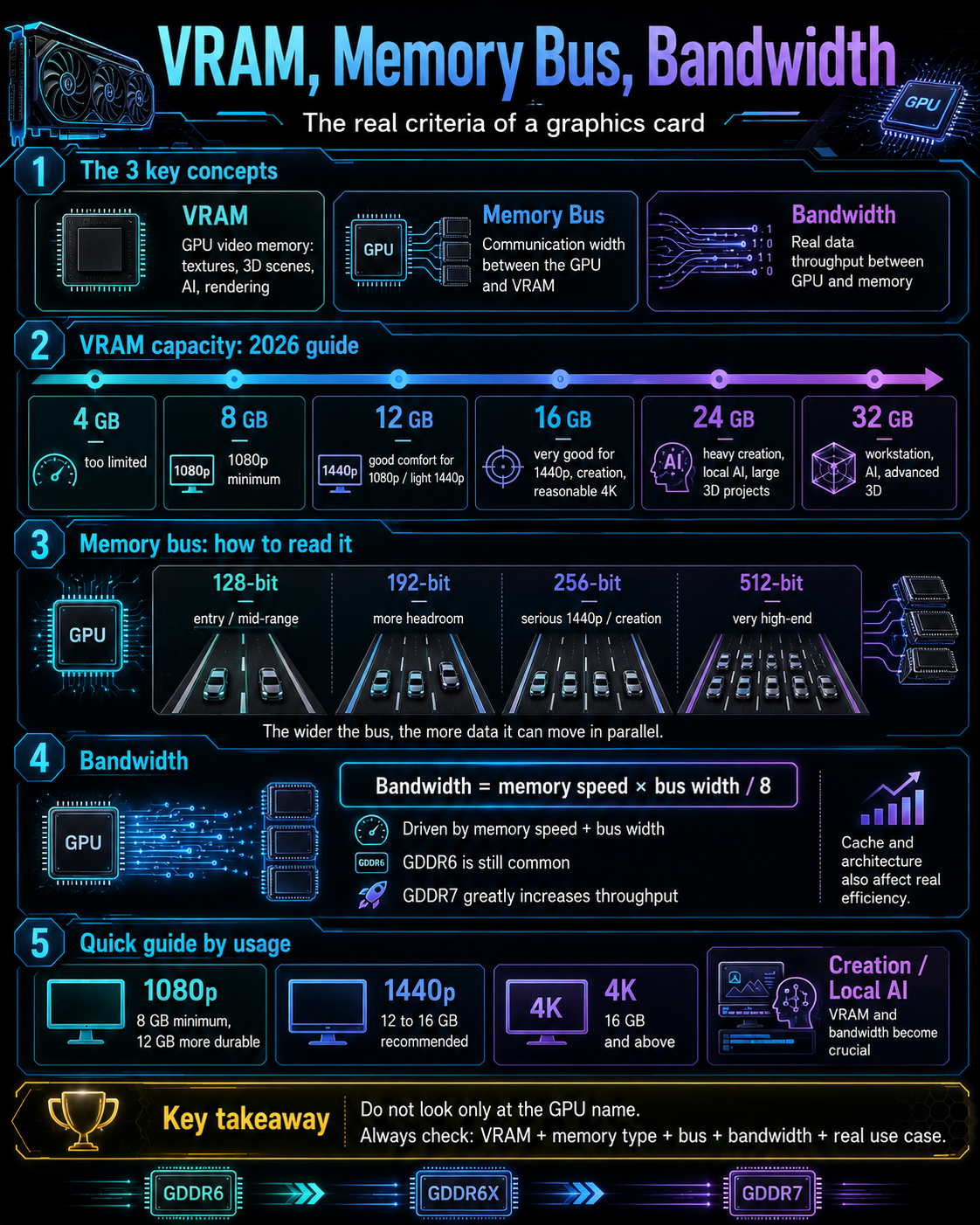
GPU spec sheets are not just about the card name
When choosing a graphics card, people often look at the model name first.
RTX 5070.
RX 9070 XT.
Arc B580.
RTX 5080.
RX 9060 XT.
These names give an idea of the range, but they are not enough to understand what the card can actually do.
Two cards can have similar performance in some games, but behave very differently depending on:
- resolution;
- textures;
- ray tracing;
- VRAM amount;
- memory bus width;
- bandwidth;
- cache;
- drivers;
- software used;
- upscaling technologies;
- power consumption level;
- cooling.
To choose a graphics card properly, you therefore need to learn how to read a few technical criteria.
The most important ones are:
VRAM, memory bus and bandwidth.
These three elements do not tell the whole story, but they already help avoid many bad purchases.
A graphics card is not judged only by its computing power.
It is also judged by its ability to quickly feed the GPU with the right data.
VRAM: the GPU’s working memory
VRAM is the graphics card’s video memory.
It allows the GPU to store the data it needs to produce the image or accelerate certain calculations.
It can contain:
- textures;
- images;
- buffers;
- 3D scenes;
- rendering data;
- ray tracing information;
- effects;
- video caches;
- interface elements;
- editing data;
- some AI models;
- resources needed by the game engine.
VRAM does not replace the PC’s RAM.
System RAM is used by the operating system, applications and general multitasking.
VRAM is used directly by the GPU.
When a graphics card lacks VRAM, it sometimes has to fetch some data elsewhere, especially from system RAM or storage. This can cause slowdowns, stutters, textures loading poorly or a less smooth experience.
VRAM is therefore essential for keeping graphics data close to the GPU.
Why VRAM matters so much in 2026
VRAM matters more and more because workloads are becoming heavier.
Modern games use more detailed textures, larger worlds, more complex effects, ray tracing, high-resolution assets and sometimes 1440p or 4K modes.
Creative software handles larger images, heavier timelines, GPU effects, 3D scenes and high-resolution exports.
Local AI tools can load models directly onto the graphics card, which sometimes requires a lot of video memory.
VRAM therefore strongly influences:
- comfort in 1440p;
- comfort in 4K;
- texture quality;
- FPS stability;
- 1% lows;
- 3D scenes;
- some GPU rendering workflows;
- some video workflows;
- some AI models;
- the lifespan of a card.
A card can be fast on average, but less pleasant if it lacks memory in heavy scenarios.
That is what makes VRAM so important: it does not always show in average FPS, but it can strongly influence real smoothness.
4 GB, 8 GB, 12 GB, 16 GB, 24 GB, 32 GB: how to read VRAM capacity
Not every amount of VRAM matches the same use.
In 2026, you can use this simple guide:
| VRAM | Practical reading |
|---|---|
| 4 GB | Too limited for a modern gaming card |
| 8 GB | 1080p minimum, but little headroom |
| 12 GB | Good comfort in 1080p, reasonable 1440p |
| 16 GB | Very good baseline for 1440p, creation, reasonable 4K |
| 24 GB | Heavy creation, local AI, large 3D projects |
| 32 GB | Very high end, AI, heavy 3D, workstation |
This guide is not an absolute law.
A light game can run perfectly well with 8 GB.
An AI or 3D project can exceed 16 GB.
A poorly optimized game can require more than expected.
A powerful card with limited VRAM can age less comfortably.
But for choosing a modern card, this reading gives a good baseline.
The main trap is believing that 8 GB automatically remains enough for everything.
In 1080p, 8 GB can still work.
In 1440p, it becomes more debatable.
In 4K, creation or local AI, you need to aim higher.
VRAM does not do everything
Still, be careful: more VRAM does not automatically mean more performance.
A card with 16 GB of VRAM but a weak GPU will not necessarily beat a card with 12 GB and a much more powerful chip.
VRAM is a reserve.
It allows the GPU to keep more data available.
But the GPU must still be powerful enough to use it.
So VRAM must be read together with the rest of the card:
- GPU power;
- architecture;
- memory bandwidth;
- memory bus;
- cache;
- drivers;
- power consumption;
- cooling;
- upscaling technologies;
- software used.
The right question is not only:
“How much VRAM?”
The real question is:
“Is the VRAM coherent with the card’s power and my use case?”
A balanced card is often better than a card that puts everything on one number.
The memory bus: the width of the highway
The memory bus indicates the width of the communication between the GPU and its video memory.
It is generally measured in bits:
- 64-bit;
- 96-bit;
- 128-bit;
- 192-bit;
- 256-bit;
- 320-bit;
- 384-bit;
- 512-bit.
To simplify, you can compare the memory bus to a highway.
The wider the bus, the more data it can move in parallel.
A 256-bit bus can carry more data at the same memory frequency than a 128-bit bus.
But the bus does not do everything.
A card with a narrower bus can partly compensate with:
- faster memory;
- better compression;
- more efficient cache;
- more modern architecture;
- better memory access management.
That is why you should not judge a card only by the width of its bus.
But a bus that is too narrow can become a limit, especially at high resolution or with many textures.
128-bit, 192-bit, 256-bit, 512-bit: what do these numbers mean?
A 128-bit bus is common on entry-level or mid-range cards.
It can be coherent for 1080p or some reasonable uses, especially if the memory is fast and if the GPU is not too ambitious.
A 192-bit bus gives more headroom.
It often allows a more comfortable amount of VRAM, such as 12 GB, and stronger bandwidth. This is interesting for comfortable 1080p or reasonable 1440p depending on GPU power.
A 256-bit bus is often more reassuring for cards targeting serious 1440p, creation or reasonable 4K.
It provides more comfortable bandwidth, especially with fast memory.
A 384-bit or 512-bit bus is usually found on very high-end or professional cards.
It can provide a huge amount of data to the GPU, which becomes important for heavy 4K, ray tracing, large scenes, advanced creation or AI.
The simple rule:
The more powerful the GPU is, the more quickly it needs to be fed with data.
A large GPU with memory that is too slow or a bus that is too narrow can be bottlenecked.
Memory bandwidth: the real available throughput
Memory bandwidth is the data throughput the card can exchange between the GPU and its VRAM.
It is generally expressed in GB/s.
It is one of the most important numbers for understanding graphics memory.
Bandwidth mainly depends on two elements:
- memory speed;
- memory bus width.
A simplified formula helps understand it:
bandwidth = memory speed × bus width / 8
For example, very fast memory on a narrow bus can provide decent bandwidth.
Slower memory on a wide bus can also provide good bandwidth.
That is why you should avoid looking only at “GDDR6” or “GDDR7”.
You need to look at the whole picture:
memory type + speed + bus + cache + architecture.
Bandwidth is the real available throughput for feeding the GPU.
And a GPU that is hungry for data can lose efficiency if the memory cannot keep up.
GDDR6, GDDR6X, GDDR7: generations of graphics memory
Modern graphics cards generally use GDDR memory.
GDDR stands for Graphics Double Data Rate.
It is memory designed to provide a lot of bandwidth to GPUs.
The most important recent generations are:
- GDDR6;
- GDDR6X;
- GDDR7.
GDDR6 remains widely used. It still equips many modern gaming cards, including some recent cards.
GDDR6X was used on some high-end NVIDIA cards from previous generations, with higher bandwidth than classic GDDR6.
GDDR7 represents a newer generation, designed to further increase throughput and support very fast modern GPUs.
But here too, the name is not enough.
A GDDR7 card with a 128-bit bus can behave very differently from a GDDR7 card with a 256-bit or 512-bit bus.
Memory generation matters, but it must always be read together with the bus.
GDDR7: why this generation matters
GDDR7 brings an important evolution for modern graphics cards.
It increases possible bandwidth and uses more advanced signaling, notably PAM3, to transfer more data.
The idea is simple: recent GPUs need more and more throughput.
1440p, 4K, ray tracing, high-resolution textures, AI and creative workloads require a lot of data.
GDDR7 therefore helps increase throughput without only widening the bus.
But it does not automatically make every card perfect.
A card with little VRAM remains limited by its capacity.
A card with a narrow bus remains limited by its possible throughput.
A card with a modest GPU remains limited by its computing power.
GDDR7 is an important step forward.
But it remains one element of a whole.
GPU cache: the other piece of the puzzle
A graphics card’s memory is not limited to VRAM.
Modern GPUs also use different levels of cache.
Cache keeps certain data very close to the GPU to avoid fetching too often from VRAM.
A good cache can help reduce pressure on memory bandwidth.
This is especially important when:
- the memory bus is narrower;
- resolution increases;
- textures are heavy;
- memory accesses are numerous;
- the game or software engine uses cache well.
AMD has communicated a lot in recent years around Infinity Cache on some generations. NVIDIA and Intel also use their own cache organizations, even though names and approaches vary.
The important point is simple:
Two cards with the same memory bus do not necessarily behave the same if their cache and architecture are different.
That is why spec sheets do not tell the whole story.
They give a direction, but real-world tests remain necessary.
Memory compression and architecture
Raw bandwidth is not the only thing that matters.
Modern GPUs also use data compression and optimization techniques.
The goal is to reduce the amount of data that actually needs to be moved.
If a card compresses certain information better, it can use its bandwidth more efficiently.
The GPU architecture therefore strongly influences memory performance.
This explains why two cards with similar numbers can behave differently in games or software.
You need to take into account:
- architecture;
- cache;
- compression;
- drivers;
- game engine;
- API used;
- resolution;
- textures;
- ray tracing;
- type of workload.
A spec sheet gives the skeleton.
The architecture shows how that skeleton works.
VRAM and textures: the most visible link in gaming
In video games, the link between VRAM and textures is very important.
Textures are the images applied to objects, characters, environments, weapons, vehicles or surfaces.
The more detailed they are, the more memory they take.
When a game offers “Ultra” textures, it can require far more VRAM than “High” or “Medium”.
If the card does not have enough memory, several problems can appear:
- textures loading slowly;
- blurry textures;
- stuttering;
- lower 1% lows;
- micro-freezes;
- more visible loading;
- needing to reduce settings;
- less stable experience.
That is why a card can seem sufficient on average, but become unpleasant with certain settings.
The problem is not always the average FPS number.
Sometimes it is the regularity of the experience.
VRAM and resolution: 1080p, 1440p, 4K
Resolution directly influences GPU needs.
In 1080p, needs remain more reasonable.
A card with 8 GB can still work in many games, especially with reasonable settings.
In 1440p, the load increases.
Textures, buffers and effects require more memory and more bandwidth. 12 GB becomes more reassuring, and 16 GB gives more comfortable headroom.
In 4K, the load becomes much heavier.
The card must handle many more pixels, often with higher textures and sometimes ray tracing. 16 GB becomes a more serious base, and more can be useful depending on games, mods or creative uses.
Resolution does not determine everything, but it gives a clear direction.
The more demanding the screen is, the more VRAM and bandwidth matter.
VRAM and ray tracing
Ray tracing can also increase memory pressure.
It requires additional data to manage rays, acceleration structures, reflections, shadows, illumination and certain effects.
In practice, enabling ray tracing can increase:
- GPU load;
- VRAM consumption;
- bandwidth needs;
- dependency on upscaling;
- sensitivity to raw power.
That is why a card that is correct in rasterization can become much less comfortable with ray tracing enabled.
Ray tracing does not only require “more power”.
It also requires memory and architecture that can keep up.
For heavy ray tracing in 1440p or 4K, you therefore need to look at:
- ray tracing power;
- VRAM;
- bandwidth;
- DLSS / FSR / XeSS;
- driver quality;
- game support.
Ray tracing is beautiful when it is well sized.
But it quickly exposes a card’s limits.
VRAM and video creation
In video editing, VRAM can play an important role depending on software and effects.
It can be used for:
- previewing;
- GPU-accelerated effects;
- color grading;
- transitions;
- noise reduction;
- export;
- some AI processing;
- high-resolution timelines;
- 4K or higher media;
- multiple video streams.
For simple Full HD editing, a modest card can be enough.
For 4K with effects, multicam, color grading or advanced tools, VRAM becomes more important.
But you need to stay balanced.
Video editing also depends on:
- CPU;
- system RAM;
- SSD;
- codec;
- video encoder;
- software;
- drivers;
- resolution;
- effects used.
VRAM helps, but it does not replace a coherent PC.
For a video creator, you need to look at the amount of VRAM, video encoders, software stability and real-world performance in the software used.
VRAM and 3D
3D is one of the fields where VRAM can become decisive.
A 3D scene can contain:
- objects;
- textures;
- materials;
- lights;
- simulations;
- particles;
- caches;
- heavy geometry;
- environments;
- imported assets;
- rendering data.
If a scene does not fit in VRAM, GPU rendering can slow down heavily, switch to another method or become impossible depending on the engine used.
To learn 3D, 8 or 12 GB can be enough depending on projects.
For regular production, 16 GB becomes more comfortable.
For heavy scenes, high-resolution textures or professional workflows, 24 GB or 32 GB can be justified.
In 3D, VRAM is not only about going faster.
Sometimes it is about being able to open and render the project at all.
VRAM and local AI
Local AI has given video memory a new importance.
When a model runs on GPU, it often needs to fit in VRAM.
This notably concerns:
- image generation;
- local language models;
- vision models;
- upscaling;
- embeddings;
- video generation;
- RAG;
- creative AI workflows;
- tools such as Stable Diffusion or ComfyUI.
The larger the model, the more VRAM it requires.
Optimizations exist: quantization, offload, CPU/RAM, lighter models, low VRAM modes, reduced batch size.
But the rule remains simple:
The more VRAM you have, the more headroom you have for heavy models and workflows.
For light testing, 8 or 12 GB can allow many things.
For comfortable work, 16 GB becomes very interesting.
For large models, heavy generation, AI video or several tools running in parallel, 24 GB or 32 GB can become very useful.
For local AI, VRAM is often more important than in classic gaming.
Bandwidth and AI: another criterion not to forget
In local AI, VRAM capacity is often the first wall.
But bandwidth can also matter.
A model that fits in memory then needs to be fed quickly.
Depending on workloads, memory access speed can influence:
- generation;
- inference;
- image processing;
- batch size;
- interface smoothness;
- speed of certain calculations.
So you should not look only at “how many GB”.
You also need to look at:
- memory type;
- bandwidth;
- bus;
- architecture;
- software support;
- drivers;
- precision used;
- CUDA / ROCm / OpenVINO / DirectML compatibility.
For local AI, an ideal card is a card with enough VRAM, good bandwidth and a software ecosystem compatible with the tools used.
Why average FPS is not enough
Many comparisons show average FPS.
It is useful, but incomplete.
A card can have good average FPS and still feel less smooth if the drops are significant.
You should also look at:
- 1% lows;
- 0.1% lows;
- frametime;
- micro-stutters;
- texture loading;
- stability during long sessions;
- behavior with ray tracing;
- behavior with saturated VRAM;
- noise;
- temperature.
Memory often influences these elements, which are invisible in a simple average.
A card with more VRAM or better bandwidth can sometimes provide a more regular experience, even if the raw average is not hugely different.
Real smoothness is not limited to the big number on screen.
It depends on consistency.
How to read a GPU spec sheet
When looking at a spec sheet, do not stop at the name.
At minimum, look at:
- exact GPU model;
- VRAM amount;
- memory type;
- bus width;
- bandwidth;
- power consumption;
- recommended power supply;
- connectors;
- physical size;
- number of slots;
- cooling;
- video outputs;
- supported technologies;
- drivers;
- performance in your games or software.
For memory, the ideal reading is:
VRAM + memory type + bus + bandwidth.
Example:
- 8 GB GDDR6 / 128-bit;
- 12 GB GDDR6 / 192-bit;
- 16 GB GDDR6 / 256-bit;
- 16 GB GDDR7 / 256-bit;
- 32 GB GDDR7 / 512-bit.
These combinations do not tell everything, but they already indicate the category of the card.
An 8 GB / 128-bit card does not target the same world as a 16 GB / 256-bit or 32 GB / 512-bit card.
Simple reading examples
Here are a few simple readings.
A card with 8 GB of VRAM and a 128-bit bus can suit 1080p, especially if the GPU is coherent and settings remain reasonable. But it is not the most reassuring choice for lasting in heavy 1440p.
A card with 12 GB of VRAM and a 192-bit bus can offer a good compromise for comfortable 1080p or reasonable 1440p, depending on GPU power.
A card with 16 GB of VRAM and a 256-bit bus becomes much more interesting for serious 1440p, creation, reasonable 3D and sometimes 4K depending on the card.
A card with 24 GB or 32 GB of VRAM targets heavier uses: advanced creation, local AI, 3D, demanding 4K, heavy ray tracing or workstation.
You always need to put these numbers back into context.
But they already help avoid a big mistake: buying a card that is too limited for the target screen or software.
1080p: what should you look at?
For 1080p, you do not necessarily need to buy a huge card.
But you should avoid buying too little.
The important criteria are:
- 8 GB of VRAM minimum;
- 12 GB appreciated for longevity;
- coherent bus;
- good energy efficiency;
- reasonable noise;
- performance in the target games;
- good real-world price.
For light e-sport games, a modest card is enough.
For recent AAA games at high quality, you need more power and VRAM.
For 1080p at 144 Hz or 240 Hz, you also need to look at the CPU, because very high FPS can depend heavily on the processor.
The right 1080p card balances price, VRAM, noise, consumption and performance.
Not necessarily the biggest card.
1440p: the real territory of modern VRAM
1440p is now one of the most interesting resolutions.
It offers a much sharper image than 1080p, without being as heavy as 4K.
But it requires a stronger card.
For comfortable 1440p, you need to look at:
- 12 GB of VRAM as a comfortable minimum;
- 16 GB more reassuring;
- solid memory bus;
- correct bandwidth;
- good ray tracing behavior if desired;
- DLSS / FSR / XeSS depending on games;
- cooling;
- power consumption;
- real-world price.
It is often at this resolution that differences between cards become more visible.
A card with too little VRAM can still produce good FPS in some games, but become less stable in others.
For a PC you want to keep for several years, 16 GB becomes a very comfortable benchmark in 1440p.
4K: power, VRAM and bandwidth
4K is much more demanding.
It requires more pixels, more bandwidth, more memory, more GPU power and often better upscaling technologies.
To play or create in 4K, you need to look at:
- 16 GB of VRAM as a serious base;
- more VRAM depending on games or projects;
- high bandwidth;
- comfortable memory bus;
- strong GPU power;
- upscaling technologies;
- cooling;
- power consumption;
- power supply;
- quality of the exact model.
In 4K, a spec sheet that is too light shows quickly.
Limits appear with:
- ultra textures;
- ray tracing;
- open worlds;
- mods;
- 3D scenes;
- heavy timelines;
- AI;
- multi-monitor;
- large files.
4K is not as forgiving as 1080p.
The choice must be much more carefully considered.
Gaming card or creation card: the criteria are not the same
A graphics card can be excellent in gaming and less ideal in creation.
The opposite can also happen.
For gaming, you mainly look at:
- FPS;
- 1% lows;
- ray tracing;
- upscaling;
- VRAM;
- resolution;
- noise;
- power consumption;
- price.
For creation, you also look at:
- software compatibility;
- render engines;
- encoders;
- driver stability;
- VRAM;
- bandwidth;
- export time;
- project size;
- CUDA / ROCm / OpenVINO support depending on tools;
- behavior under long sustained load.
That is why a spec sheet is not enough.
You need to know what you want to do with the card.
A card for 1080p e-sport is not chosen like a card for Blender, DaVinci Resolve or ComfyUI.
Laptop cards: beware of similar names
On laptops, you need to be even more careful.
A mobile GPU does not necessarily match the desktop version with a similar name.
The constraints are different:
- limited power consumption;
- compact cooling;
- thinner chassis;
- higher temperature;
- noise;
- variable configured power;
- sometimes different VRAM;
- performance depending on the exact laptop.
Two laptops with the same GPU name can have different performance depending on cooling and allowed power.
So you should avoid reading only the GPU name.
On laptops, you need to look at:
- exact model;
- configured power;
- VRAM;
- cooling;
- real-world tests;
- screen;
- noise;
- temperature;
- battery life;
- impossible or limited upgradeability.
The mobile GPU is a component integrated into a complete thermal balance.
It is not judged like a desktop PC card.
Common mistakes to avoid
The first mistake is believing VRAM is enough to judge a card.
A card with a lot of VRAM but a weak GPU can remain limited.
The second mistake is believing GPU power is enough.
A fast card that is too limited in VRAM can age less well.
The third mistake is confusing system RAM and VRAM.
Having 32 GB of RAM does not replace a graphics card with too little video memory.
The fourth mistake is ignoring the memory bus.
Two cards with the same VRAM can have very different throughput.
The fifth mistake is looking at GDDR6 or GDDR7 without looking at bus width.
The sixth mistake is thinking average FPS tells the whole story.
The seventh mistake is choosing an 8 GB card for heavy 1440p or creation while thinking “it will be fine for a long time”.
The eighth mistake is choosing a card for local AI without checking VRAM and software compatibility.
The ninth mistake is comparing laptop and desktop GPUs as if they were identical.
The tenth mistake is following a recommendation without looking at real-world price, screen and software used.
Summary table
| Criterion | What it means | Why it matters |
|---|---|---|
| VRAM | Amount of video memory | Textures, resolution, 3D, AI, creation |
| Memory bus | Width of GPU ↔ VRAM communication | Influences possible throughput |
| Bandwidth | Real throughput between GPU and VRAM | Feeds the GPU with data |
| Memory type | GDDR6, GDDR6X, GDDR7 | Influences speed and efficiency |
| GPU cache | Fast memory close to the GPU | Reduces pressure on VRAM |
| Architecture | Internal organization of the GPU | Impacts real efficiency |
| Drivers | GPU software layer | Stability, compatibility, performance |
| Resolution | 1080p, 1440p, 4K | Determines graphics load |
| Software | Games, creation, AI, 3D | Needs change depending on use |
This table shows one essential thing: a graphics card is a balance.
No single criterion is enough on its own.
The right method for choosing
To choose a graphics card correctly, you need to follow a simple method.
First, determine the main use:
- gaming;
- creation;
- video;
- 3D;
- local AI;
- streaming;
- office work;
- workstation.
Then determine the resolution:
- 1080p;
- 1440p;
- ultrawide;
- 4K;
- multi-monitor.
Then look at the required VRAM.
Only then compare:
- bandwidth;
- memory bus;
- real-world performance;
- ray tracing;
- upscaling;
- power consumption;
- noise;
- size;
- real-world price;
- software compatibility.
The right card is not the one with the most impressive number.
It is the one whose characteristics match your use.
Key takeaways
A graphics card is not judged only by its name.
To understand its real performance, you need to look at video memory.
VRAM determines the amount of data the card can keep close to the GPU. It matters for textures, resolution, 3D, creation and local AI.
The memory bus indicates the width of communication between the GPU and its memory. The wider it is, the more data it can carry at equal speed.
Bandwidth indicates the real available throughput between the GPU and VRAM. It depends on both memory speed and bus width.
GDDR6 remains very common, while GDDR7 brings more bandwidth on the newest generations.
But no number is enough on its own.
A good graphics card must balance:
- GPU;
- VRAM;
- memory bus;
- bandwidth;
- cache;
- architecture;
- drivers;
- power consumption;
- cooling;
- price;
- real use.
In 1080p, 8 GB can still be enough, but 12 GB gives more headroom.
In 1440p, 12 to 16 GB becomes more reassuring.
In 4K, creation, 3D or local AI, 16 GB and more becomes much more important.
For heavy workflows, 24 GB or 32 GB can be justified.
The right reflex is simple:
Do not look only at the model.
Look at memory, bus, bandwidth and real use.
That is often where the real difference hides between a card that looks powerful… and a card that remains comfortable over time.