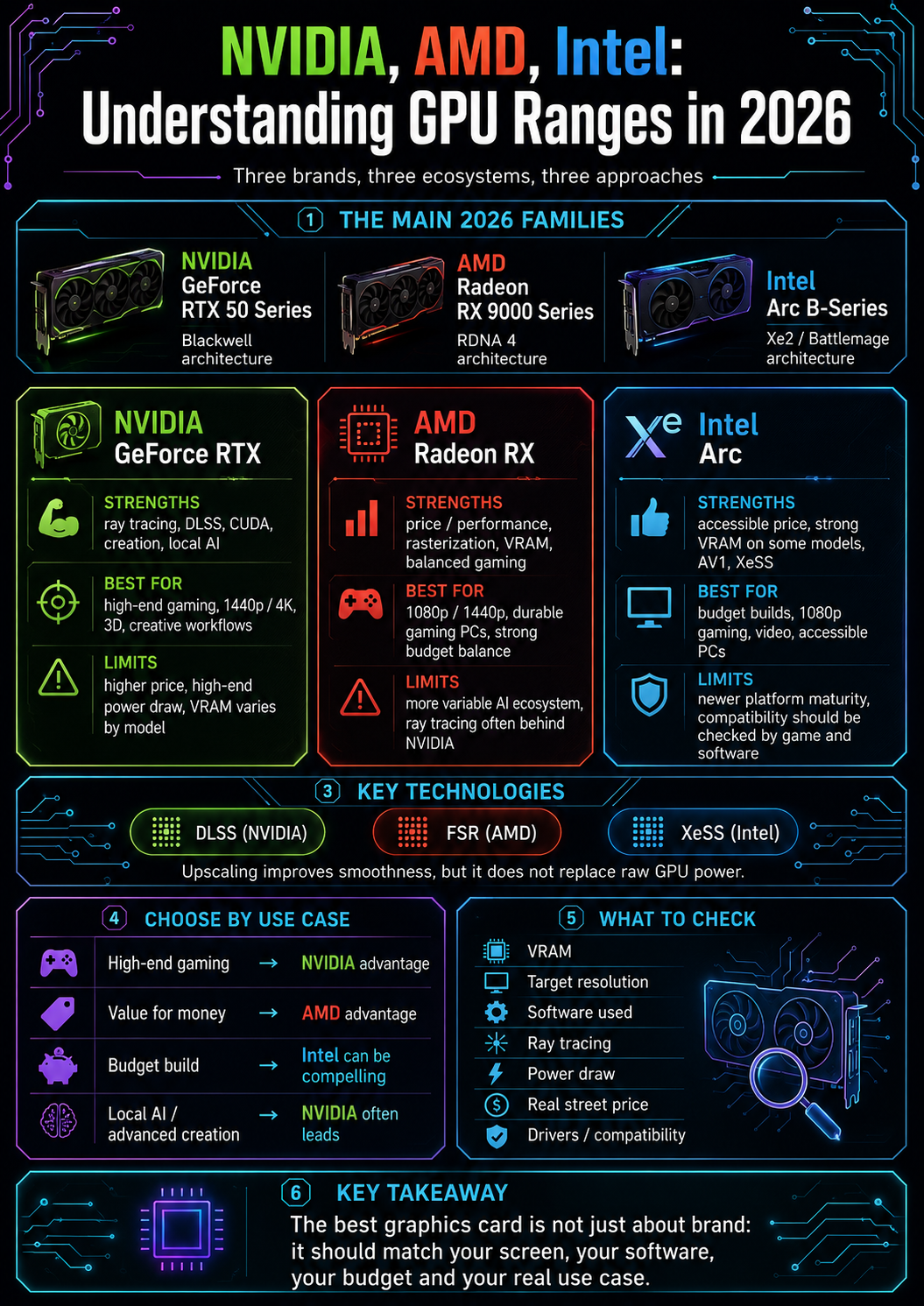
Three brands, three ecosystems
Choosing a graphics card is not only about comparing numbers.
You can look at FPS, VRAM amount, power consumption, price, ray tracing or upscaling technologies. But behind every card, there is also an ecosystem.
In 2026, the consumer dedicated graphics card market is mainly structured around three players:
- NVIDIA, with GeForce RTX;
- AMD, with Radeon RX;
- Intel, with Arc.
These three brands do not differ only through their models.
They also differ through:
- their architectures;
- their drivers;
- their software technologies;
- their ray tracing behavior;
- their price / performance ratio;
- their amount of VRAM depending on the range;
- their compatibility with creative software;
- their relevance for local artificial intelligence;
- their power consumption;
- their gaming or creation positioning.
So there is one classic mistake to avoid:
Choosing a brand only out of habit.
The right question is not only:
“NVIDIA, AMD or Intel?”
The real question is rather:
“Which card best matches my screen, my games, my software, my budget and my level of expectation?”
The GPU market in 2026
In 2026, the most important recent ranges are mainly:
- NVIDIA GeForce RTX 50 Series, based on the Blackwell architecture;
- AMD Radeon RX 9000 Series, based on the RDNA 4 architecture;
- Intel Arc B-Series, based on the Xe2 / Battlemage architecture.
NVIDIA remains very strong in the high end, ray tracing, local AI, CUDA, DLSS and many creative workflows.
AMD remains very competitive in price / performance, rasterization, certain VRAM amounts, gaming configurations and the openness of certain technologies.
Intel is still younger in the dedicated graphics card market, but offers interesting Arc cards on some accessible segments, especially when price and VRAM are attractive.
These three brands should not be seen as three identical answers.
Each has its own logic.
NVIDIA often targets maximum performance, software ecosystem and advanced technologies.
AMD often targets a balance between price / performance and a good gaming experience.
Intel is mainly trying to establish itself with accessible, modern cards and increasingly well-supported drivers.
NVIDIA GeForce RTX: the most complete ecosystem
NVIDIA GeForce RTX cards are very common in gaming PCs, creation machines, personal workstations and local AI configurations.
In 2026, the most visible recent range is the GeForce RTX 50 series, based on the Blackwell architecture.
NVIDIA highlights several pillars:
- high performance;
- ray tracing;
- DLSS;
- frame generation;
- neural rendering;
- CUDA;
- video creation;
- encoding;
- local AI;
- software compatibility.
It is often the easiest ecosystem to recommend when users want to do many different things: play, create, edit, stream, test AI models, use Blender, ComfyUI, Stable Diffusion or certain CUDA-accelerated software.
This does not mean NVIDIA is always the best choice.
It means its ecosystem is extremely broad.
RTX 50 Series: Blackwell, DLSS 4 and AI graphics
The GeForce RTX 50 series strongly emphasizes the Blackwell architecture.
This generation is built around a mix of traditional graphics power, ray tracing, AI acceleration and modern rendering technologies.
Recent RTX cards are therefore not only used to produce more frames per second.
They also rely on technologies such as:
- DLSS;
- Ray Reconstruction;
- Frame Generation;
- Multi Frame Generation depending on models and games;
- AI acceleration;
- modern video encoders;
- support for creative workflows.
NVIDIA’s message is clear: modern rendering is becoming increasingly hybrid.
Part of the image is calculated traditionally.
Another part can be reconstructed, enhanced or smoothed by AI models.
This matters a lot for 1440p gaming, 4K gaming or ray tracing.
But there is one nuance to keep in mind: these technologies do not fully replace raw power.
A weak card does not magically become high-end thanks to DLSS.
A powerful card simply becomes more usable in heavy scenarios.
NVIDIA’s strengths
NVIDIA’s first major strength is its software ecosystem.
In many creative, 3D or AI applications, NVIDIA benefits from very strong support.
This is partly due to CUDA, which is widely used in GPU computing, rendering, AI and creative tools.
NVIDIA is often very solid for:
- high-end gaming;
- ray tracing;
- DLSS;
- video creation;
- encoding;
- GPU rendering;
- Blender;
- local AI;
- Stable Diffusion;
- ComfyUI;
- certain local language models;
- CUDA workflows;
- compatible professional applications.
Its second strength is the maturity of RTX technologies.
Ray tracing, DLSS and related tools have been present for several generations. Many games and software applications support them.
Its third strength is the feeling of safety.
When you do not yet know exactly which creative or AI tools you will use, NVIDIA often remains the most compatible choice.
It is not always the most economical.
But it is often the least risky for mixed gaming + creation + AI use.
NVIDIA’s limits
NVIDIA also has limits.
The first one is often price.
GeForce RTX cards can be very powerful, but recent and high-end models can be very expensive.
The second limit is VRAM amount on certain models.
Not all RTX cards are equal. A card that looks powerful on paper can become less interesting if its VRAM amount is too tight for certain future uses.
The third limit is power consumption on high-end models.
A large NVIDIA card can require:
- a solid power supply;
- a good case;
- excellent cooling;
- suitable connectors;
- real thermal headroom.
The fourth limit is the risk of paying for technologies you do not use.
If the user does not do ray tracing, local AI, creation or 4K, a large RTX card can be oversized.
NVIDIA is excellent, but not automatically rational for every budget.
AMD Radeon RX: the very competitive alternative
AMD offers Radeon RX cards.
In 2026, the important recent generation is the Radeon RX 9000 series, based on the RDNA 4 architecture.
AMD often positions itself as a very serious alternative for players looking for a good balance between performance, price and VRAM.
Radeon cards are especially interesting when the user wants to:
- play in 1080p or 1440p;
- get strong rasterization performance;
- avoid paying too much;
- have a comfortable amount of VRAM depending on the model;
- benefit from FSR;
- stay in a more open ecosystem;
- build a balanced gaming PC.
For a long time, AMD was mainly known for its price / performance ratio in classic rendering.
With RDNA 4, AMD is also strengthening ray tracing, upscaling, AI and its software ecosystem.
Radeon RX 9000: RDNA 4 and FSR 4
The Radeon RX 9000 series is based on RDNA 4.
This architecture improves several aspects:
- performance per compute unit;
- ray tracing;
- AI acceleration;
- energy efficiency;
- display technologies;
- FSR 4;
- modern gaming experience.
AMD highlights FSR 4, a machine-learning-accelerated upscaling technology on compatible Radeon RX 9000 cards.
Like DLSS from NVIDIA, FSR aims to improve smoothness while keeping good image quality.
The important difference is that FSR has often been designed with a more open logic, even though certain advanced versions or features may depend on specific GPU generations.
In practice, for a player, AMD can be very interesting if the price is good and the card offers enough VRAM for the target resolution.
AMD’s strengths
AMD’s first major strength is often the price / performance ratio.
At similar performance levels, a Radeon can sometimes offer better value depending on current prices.
Its second strength is VRAM.
Depending on generations and models, AMD has often offered cards with a comfortable amount of video memory compared with some competitors.
This point becomes important in 2026, because VRAM matters more and more for:
- high-resolution textures;
- 1440p;
- 4K;
- AAA games;
- creation;
- 3D;
- light to medium local AI.
Its third strength is rasterization.
Rasterization is classic graphics rendering, without necessarily enabling heavy ray tracing. In many games, it is still what matters most.
Its fourth strength is coherence with certain gaming PCs.
For a player looking for a good card in 1080p or 1440p, without necessarily targeting extreme ray tracing, AMD can be an excellent choice.
AMD’s limits
AMD also has limits.
The first concerns the AI ecosystem and certain professional software.
NVIDIA often keeps the advantage in CUDA workflows, which are very present in local AI, certain GPU rendering workflows and some creative tools.
AMD is progressing with ROCm and its tools, but compatibility depends heavily on the software, operating system and exact workflow.
The second limit concerns ray tracing.
AMD has progressed, but NVIDIA often keeps a very strong image in high-end ray tracing and associated technologies.
The third limit is variation depending on games and software.
Some Radeon cards can be excellent in one specific use and less interesting in another.
The fourth limit is software support in creative tools.
For very specific creation work, you always need to check the software: Blender, DaVinci Resolve, Premiere Pro, Unreal Engine, render engines, AI tools, plug-ins, GPU accelerations.
AMD can be excellent.
But you need to choose with the right use case in mind.
Intel Arc: the third player to watch
Intel is newer in consumer dedicated graphics cards.
With Intel Arc, the brand is gradually trying to establish itself against NVIDIA and AMD.
In 2026, Arc B-Series cards are the most important ones to watch.
They do not dominate the market, but they can be interesting in certain segments:
- small budget;
- 1080p;
- reasonable 1440p;
- good VRAM amount for the price;
- video encoding;
- AV1;
- curious users;
- balanced configurations;
- accessible PCs.
The best-known example is the Intel Arc B580, often noticed for its comfortable video memory and aggressive price positioning.
Intel is not necessarily targeting the very high-end consumer market.
Its interest is rather to offer a modern alternative in budget ranges where NVIDIA and AMD can sometimes leave gaps.
Arc B-Series: XeSS, AV1 and equipment / price ratio
Intel Arc B-Series cards highlight several modern elements:
- Xe2 architecture;
- XeSS;
- XeSS Frame Generation depending on compatible games;
- low latency;
- modern media engines;
- video encoding and decoding;
- AV1 support;
- interesting VRAM amount depending on models;
- accessible price.
Intel can therefore be very interesting for certain profiles.
For example, a user looking for a modern, affordable card with VRAM and good video engines may look at Arc with interest.
But Intel also requires more caution.
Drivers have improved, but the experience can vary depending on games, older titles, software and platforms.
Intel Arc is more mature than it was at launch, but it is not yet the most universal option.
Intel Arc’s strengths
Intel Arc’s first strength is price.
Arc cards can offer good value when their price is aggressive.
Its second strength is equipment.
Some Intel cards offer an interesting amount of VRAM for their segment, which can be very valuable in the long term.
Its third strength is video.
Intel strongly emphasizes media engines, encoding, decoding and modern formats such as AV1.
This is interesting for:
- streaming;
- video editing;
- content creation;
- transcoding;
- playback of recent formats.
Its fourth strength is XeSS.
XeSS allows Intel to offer its own upscaling solution, which helps in compatible games.
Its fifth strength is competition.
Even if Intel does not take first place, its presence can push the market to offer better cards at low and mid-range budgets.
Intel Arc’s limits
Intel Arc also has important limits.
The first is maturity.
NVIDIA and AMD have far more experience in consumer dedicated GPUs. Intel is progressing, but its track record is shorter.
The second limit is compatibility with certain games or older titles.
Performance can be very good in some scenarios and more variable in others.
The third limit is the software ecosystem.
For local AI, creation or specialized tools, Intel can be interesting with OpenVINO or certain workflows, but it must be checked case by case.
The fourth limit is brand perception.
Many users still automatically think NVIDIA or AMD. Intel therefore has to prove its reliability over time.
The fifth limit is the high end.
Intel Arc is mainly interesting on accessible and mid-range segments. For extreme 4K configurations, heavy ray tracing or demanding local AI, NVIDIA and AMD remain more present.
Intel Arc is not the universal choice.
But it is an option that should no longer be ignored.
Rasterization, ray tracing and AI technologies
To compare NVIDIA, AMD and Intel, you need to understand three concepts.
The first is rasterization.
This is classic graphics rendering. In many games, it is still the core of performance. A card that is very strong in rasterization will deliver good FPS in many titles, even without enabling ray tracing.
The second is ray tracing.
This is a more realistic rendering of certain light behaviors: reflections, shadows, illumination, transparency. It can improve the image, but it is expensive in performance.
The third is AI or spatial / temporal upscaling.
DLSS, FSR and XeSS make it possible to produce a higher-resolution final image from a lighter internal render. Some versions can also generate intermediate frames to increase perceived smoothness.
These three dimensions do not always favor the same brand.
NVIDIA is often very strong in ray tracing and AI technologies.
AMD can be very strong in rasterization and price / performance.
Intel can offer an interesting solution if the game uses XeSS well and if the card is priced correctly.
The right choice therefore depends on the type of game and the settings used.
DLSS, FSR, XeSS: three answers to the same problem
Modern games are becoming heavier and heavier.
1440p, 4K, ray tracing and high-resolution textures require a lot of power.
To answer this problem, each brand offers a central technology:
- DLSS from NVIDIA;
- FSR from AMD;
- XeSS from Intel.
The general principle is similar: render a lighter internal image, then reconstruct or enhance the final image.
This often allows:
- more FPS;
- better smoothness;
- more accessible 1440p;
- more playable 4K;
- more usable ray tracing;
- better card longevity.
But there are limits.
Quality depends on the game, the implementation, the selected mode, the resolution, on-screen motion and the technology used.
You should therefore avoid two extremes.
First extreme:
“Upscaling is useless.”
That is false. Used well, it can change the experience.
Second extreme:
“Upscaling replaces the card’s power.”
That is also false. A card that is too weak remains limited.
DLSS, FSR and XeSS are powerful bonuses, not excuses to ignore the GPU, VRAM and resolution.
NVIDIA, AMD, Intel for gaming
For gaming, you first need to start from the screen.
In 1080p, many cards can be enough.
The choice mainly depends on:
- budget;
- refresh rate;
- games used;
- VRAM;
- desired technologies.
In 1440p, the choice becomes more serious.
You need more power and a more comfortable amount of VRAM. This is often the most interesting ground for comparing NVIDIA and AMD, with Intel as an alternative on some budgets.
In 4K, you need to move strongly upmarket.
Ray tracing, heavy textures and recent AAA games can require a lot of power. NVIDIA often keeps a strong position in the very high end, but some Radeon cards can offer a good performance / price ratio depending on prices.
The simple rule:
For gaming, do not choose a brand. Choose a card suited to your resolution.
NVIDIA, AMD, Intel for creation
For creation, the question becomes more complex.
You need to look at the software.
A creator may use:
- Premiere Pro;
- DaVinci Resolve;
- After Effects;
- Blender;
- Photoshop;
- Lightroom;
- Unreal Engine;
- Unity;
- Stable Diffusion;
- ComfyUI;
- 3D software;
- render engines;
- AI tools.
In some workflows, NVIDIA is often favored thanks to CUDA and very broad software support.
In other workflows, AMD can be perfectly coherent, especially if the card offers enough VRAM and good performance in the software used.
Intel can be interesting for video, encoding, certain AV1 uses and certain compatible workflows, but it requires more careful checking.
For creation, the right choice does not depend only on FPS.
It depends on:
- VRAM;
- video encoder;
- driver stability;
- software support;
- render engines;
- project resolution;
- file size;
- effects used;
- time spent exporting;
- noise and heat.
A creation GPU is chosen software by software.
NVIDIA, AMD, Intel for local AI
For local AI, GPU choice can become decisive.
Possible uses are numerous:
- image generation;
- local language models;
- RAG;
- embeddings;
- vision;
- transcription;
- upscaling;
- video generation;
- local agents;
- creative AI tools.
In this field, NVIDIA often keeps an important advantage thanks to CUDA and compatibility with many tools.
Many open-source projects, scripts, libraries and interfaces are first designed for NVIDIA.
AMD is progressing with ROCm, but compatibility depends on the GPU model, system, software and level of support.
Intel can be relevant through OpenVINO or certain compatible tools, but it is not the simplest choice for everything.
For local AI, three criteria come before the logo:
- VRAM;
- Software compatibility;
- Workflow stability.
A theoretically powerful card that is poorly supported by your tools can become frustrating.
Conversely, a less spectacular but perfectly compatible card can be much more pleasant.
VRAM depending on the brand
VRAM has become one of the big topics of modern graphics cards.
It influences:
- textures;
- resolution;
- ray tracing;
- 3D;
- creation;
- local AI;
- card lifespan.
NVIDIA, AMD and Intel do not always make the same VRAM choices depending on the range.
So you should not compare only names.
A card may seem faster on average, but be less durable if its VRAM is too limited.
Conversely, a card with a lot of VRAM but a weaker chip is not automatically better.
The right reading is:
VRAM must be coherent with GPU power and intended use.
For light 1080p, 8 GB can still work.
For comfortable 1440p, 12 to 16 GB become more reassuring.
For 4K, creation, 3D or local AI, 16 GB and more can become very important.
For heavy workflows, 24 GB or 32 GB can be justified.
VRAM does not do everything.
But lacking it can ruin everything.
Drivers and stability
Drivers are an often underestimated element.
A graphics card is not just hardware. It is also software that allows the system and applications to use it correctly.
Drivers influence:
- performance;
- stability;
- game compatibility;
- software compatibility;
- encoding;
- displays;
- VRR;
- HDR;
- consumption;
- bugs;
- available features.
NVIDIA has long experience and very broad software support.
AMD has greatly improved its drivers and offers complete Radeon software.
Intel has progressed quickly since the first Arc cards, but some cases may still require more verification.
For an advanced user, drivers are not a detail.
A very powerful card with unstable drivers can become less pleasant than a slightly slower card that is more reliable in the software used.
Real price matters more than suggested price
You should also be careful with theoretical prices.
Graphics cards often have variable prices depending on:
- availability;
- country;
- taxes;
- partner models;
- cooling;
- factory overclocking;
- promotions;
- stock;
- time of year;
- demand;
- video memory;
- rarity.
A recommendation that is valid at one price can become bad if the price increases.
For example, a card can be excellent at €350, average at €450, and not very interesting at €550.
So you always need to reason with the real current price.
The best brand on paper is not always the best deal.
A good purchase is often the one that offers:
- enough performance;
- enough VRAM;
- good compatibility;
- reasonable consumption;
- a coherent price;
- real availability.
Which brand should you choose depending on the profile?
Here is a simple reading.
| Profile | NVIDIA | AMD | Intel |
|---|---|---|---|
| Simple office work | Often unnecessary as dedicated GPU | Often unnecessary as dedicated GPU | Often unnecessary as dedicated GPU |
| 1080p gaming | Very good, sometimes expensive | Very good price / performance | Interesting if well priced |
| 1440p gaming | Very solid, DLSS useful | Very competitive depending on model | Possible depending on card and games |
| 4K gaming | Very strong high end | Possible depending on model | Less suited |
| Heavy ray tracing | Often NVIDIA advantage | Improving | Variable |
| Video creation | Very good ecosystem | Very good depending on software | Interesting for video / AV1 |
| 3D / GPU rendering | Very strong via CUDA | Depends on engine and support | To verify |
| Local AI | Often the most compatible | Improving, to verify | Specific cases |
| Small budget | Sometimes less interesting | Often a good choice | Very interesting depending on price |
| VRAM / price ratio | Variable | Often solid | Often interesting |
This table does not replace tests.
It gives a general direction.
To choose correctly, you will always need to look at the exact model, price, VRAM, consumption, performance and software used.
NVIDIA: for whom?
NVIDIA is often the right choice for users who want a very versatile card.
It is especially suitable if you do:
- high-end gaming;
- ray tracing;
- 1440p or 4K;
- streaming;
- video creation;
- 3D;
- GPU rendering;
- local AI;
- Stable Diffusion;
- ComfyUI;
- CUDA software;
- varied creative workflows.
It is also a reassuring choice if you do not yet know exactly which software or AI tools you will use.
But NVIDIA is less obvious if your budget is tight, if you only play light 1080p games, or if you do not use its advanced technologies.
In that case, you need to compare carefully with AMD or Intel.
AMD: for whom?
AMD is often very interesting for players looking for a good balance.
A Radeon can be an excellent choice for:
- 1080p gaming;
- 1440p gaming;
- good performance / price ratio;
- balanced configurations;
- comfortable VRAM depending on model;
- players who do not use extreme ray tracing;
- durable gaming PCs without blowing up the budget.
AMD can also suit creation, but you need to check the software.
For some workflows, everything will work very well. For others, NVIDIA will keep an advantage thanks to CUDA.
AMD is therefore a very good choice when the price is coherent, VRAM is sufficient and the software used is compatible with your needs.
Intel: for whom?
Intel Arc mainly targets users who want a good equipment / price ratio.
It is interesting for:
- small budget;
- 1080p gaming;
- reasonable 1440p depending on model;
- users who want a lot of VRAM for the price;
- streaming;
- video encoding;
- AV1;
- secondary PC;
- curious users;
- accessible configurations.
However, Intel Arc requires more caution.
You need to check games, drivers, software and real-world performance in the intended uses.
For a user who wants a simple, high-end and ultra-compatible solution, NVIDIA or AMD can be more reassuring.
For a user who likes optimizing the price / equipment ratio, Intel can become very interesting.
Common mistakes to avoid
The first mistake is choosing a brand like a religion.
NVIDIA, AMD and Intel each have strengths and limits.
The second mistake is looking only at average FPS.
1% lows, stability, VRAM, consumption, noise and real smoothness matter too.
The third mistake is forgetting software.
A card that is excellent in games can be less suited to a creative or AI workflow.
The fourth mistake is underestimating VRAM.
In 2026, it is one of the most important criteria for a card’s lifespan.
The fifth mistake is believing DLSS, FSR or XeSS solve everything.
These technologies are useful, but they do not replace a properly sized card.
The sixth mistake is choosing a card without looking at the power supply and case.
The seventh mistake is confusing range and exact model.
Two cards with the same GPU can have very different cooling, noise and prices.
The eighth mistake is following a recommendation without checking the real price at the time of purchase.
The ninth mistake is forgetting the screen.
A graphics card must match the targeted resolution and refresh rate.
The tenth mistake is believing there is one perfect brand for everyone.
The right choice always depends on context.
Key takeaways
In 2026, choosing a graphics card also means choosing an ecosystem.
NVIDIA GeForce RTX remains very strong for the high end, ray tracing, DLSS, CUDA, creation, 3D and local AI.
AMD Radeon RX is very competitive for gaming, price / performance, rasterization, certain VRAM amounts and balanced configurations.
Intel Arc is becoming an interesting alternative on some budgets, with modern cards, VRAM, XeSS and good video engines, but still requires checking compatibility depending on games and software.
You should not choose only a brand.
You need to look at:
- the screen;
- resolution;
- games;
- software;
- VRAM;
- ray tracing;
- DLSS, FSR or XeSS;
- local AI;
- power supply;
- case;
- noise;
- real price.
The best graphics card is not the one that wins every debate on the Internet.
It is the one that truly matches your use.
For a competitive player, the priority may be FPS.
For a creator, the priority may be VRAM and software compatibility.
For local AI, the priority may be CUDA, ROCm, OpenVINO or video memory.
For a small budget, the priority may be the best possible compromise.
NVIDIA, AMD and Intel offer three different paths.
The right choice is to take the one that matches your machine, your tools and the way you work.