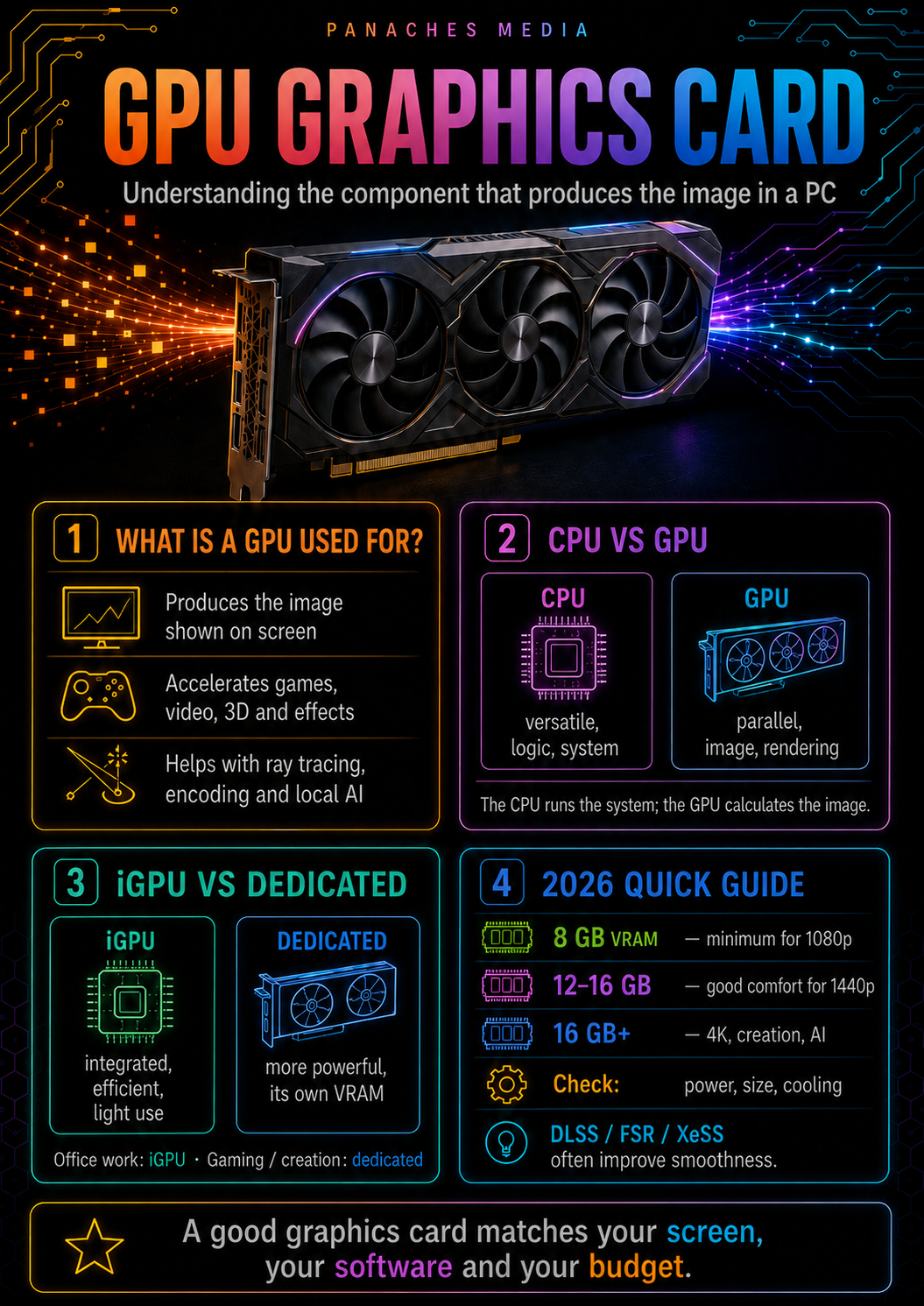
The graphics card, the component that turns data into images
In a computer, everything does not come down to the processor.
The CPU executes general instructions.
RAM keeps active data available.
The SSD stores files.
The motherboard connects the components.
And the graphics card produces the image you see on the screen.
The graphics card, often called the GPU as a shortcut, is the component responsible for processing visual data, calculating images and sending them to a display.
Without it, no modern display would be possible: no Windows or Linux desktop, no games, no smooth video, no 3D rendering, no accelerated interface, no comfortable video editing, no local AI accelerated by GPU.
It can be very simple, integrated directly into the processor.
Or, on the contrary, very powerful, as a dedicated card with its own memory, cooling system, power connectors and video outputs.
In a modern PC, the graphics card is no longer just “the gamer component”.
It has become an essential accelerator for images, creation, video, 3D, streaming, certain scientific calculations and local artificial intelligence.
GPU and graphics card: an important nuance
In everyday language, people often use “GPU” and “graphics card” as if they meant exactly the same thing.
That is not entirely wrong in casual conversation, but technically there is a difference.
The GPU, for Graphics Processing Unit, is the graphics chip itself. It is the specialized processor that performs graphics and parallel calculations.
The graphics card, on the other hand, is the complete component.
It generally includes:
- the GPU;
- video memory, called VRAM;
- the printed circuit board;
- power delivery components;
- the cooling system;
- fans;
- video outputs;
- power connectors;
- sometimes a shroud, LEDs or a reinforced support.
The GPU is therefore the computing core.
The graphics card is the complete object installed in the PC.
In this article, we will sometimes use “GPU” as shorthand, because that is common usage. But it is useful to keep this nuance in mind.
What is a graphics card used for?
The first mission of a graphics card is to produce an image that can be displayed on a screen.
It calculates what needs to be displayed: the system interface, windows, images, videos, effects, animations, games or 3D scenes.
It then sends the signal to the screen through outputs such as:
- HDMI;
- DisplayPort;
- USB-C video on some machines;
- sometimes older connectors on older machines.
But its role no longer stops at display.
A modern graphics card can also accelerate:
- video games;
- ray tracing;
- 3D rendering;
- video editing;
- video encoding;
- video decoding;
- visual effects;
- streaming;
- artificial intelligence;
- certain scientific calculations;
- certain creative tasks;
- heavy graphical interfaces.
The GPU is very effective at performing many calculations in parallel.
Where a general-purpose processor excels at varied and complex tasks, the GPU excels at massively parallel calculations: pixels, textures, light, shadows, matrices, filters, effects, graphics data or AI models.
This specialization is what makes it so important.
CPU and GPU: two different forms of power
The processor and the GPU do not do exactly the same work.
The CPU is versatile. It manages the system, applications, program logic, general tasks and a large part of the machine’s organization.
The GPU specializes in parallel calculations. It can process a huge number of similar operations at the same time.
To simplify:
The CPU is a very versatile conductor.
The GPU is an army of small specialized calculators.
In a video game, the CPU can handle game logic, scripts, physics, character AI, keyboard/mouse input and communication with the system.
The GPU calculates the image: geometry, textures, shadows, light, effects, post-processing, ray tracing, resolution and final display.
In creative software, the CPU can manage the application, files, certain calculations and overall logic.
The GPU can accelerate display, effects, the timeline, rendering, 3D or certain processing tasks.
The two components therefore work together.
A very good GPU with a weak CPU can be bottlenecked.
A very good CPU with a weak GPU can be limited in games, 3D or video.
A good PC is a matter of balance.
Dedicated graphics card and integrated graphics
Not every computer necessarily has a dedicated graphics card.
There are two major situations:
- integrated graphics;
- dedicated graphics card.
Integrated graphics, often called an iGPU, are directly integrated into the processor or the computer’s main chip.
They generally share system memory with the rest of the PC. They consume less power, take up less space and are enough for many simple uses:
- desktop display;
- web browsing;
- video;
- office work;
- small edits;
- light games;
- compact machines;
- thin laptops.
A dedicated graphics card is a separate component. In a desktop PC, it usually plugs into a PCIe slot on the motherboard. In a gaming or creative laptop, it is integrated into the machine, but remains separate from the main processor.
It generally has its own video memory, its own power system and its own cooling.
It is much better suited to heavy uses:
- modern gaming;
- 3D rendering;
- video editing;
- visual creation;
- local AI;
- streaming;
- virtual reality;
- GPU computing.
Integrated graphics are enough for display and light work.
A dedicated card becomes important when images or graphics calculations become demanding.
VRAM: the graphics card’s memory
A graphics card often has its own memory: VRAM, or video memory.
It should not be confused with system RAM.
System RAM is used by the operating system, applications and general multitasking.
VRAM is used by the GPU.
It stores, among other things:
- textures;
- images;
- buffers;
- rendering data;
- 3D models;
- scenes;
- graphics effects;
- video information;
- data needed for ray tracing;
- certain AI models;
- elements used by the GPU during calculation.
The higher the resolution, the heavier the textures, the more complex the scene, the more important VRAM becomes.
A 1080p game with medium textures does not require the same video memory as a 4K game with high-resolution textures and ray tracing.
A small 3D project does not require the same amount as a complex scene with many textures.
A local AI tool does not require the same thing depending on the size of the model you want to load on the GPU.
VRAM has therefore become one of the central criteria of a modern graphics card.
System RAM and VRAM: two complementary memories
RAM and VRAM do not simply add up.
A PC can have:
- 32 GB of system RAM;
- 8 GB, 12 GB, 16 GB, 24 GB or 32 GB of VRAM depending on the graphics card.
These two types of memory do not do the same work.
Having 32 GB of RAM does not turn an 8 GB graphics card into a 16 GB graphics card.
Having 16 GB of VRAM does not fully compensate for a lack of system RAM.
For gaming, VRAM mainly helps the graphics card manage textures, resolution, effects and the data needed for the image.
For creation, it can limit the size of scenes or projects accelerated by the GPU.
For local AI, it can determine which models can be loaded directly onto the graphics card.
System RAM supports the complete environment.
VRAM supports the GPU.
A balanced PC must therefore have both in coherent amounts.
Why the graphics card matters so much for gaming
Gaming is the most well-known use of graphics cards.
In a game, the GPU calculates the image in real time.
It must produce dozens, sometimes hundreds of frames per second, depending on the screen and settings.
The more demanding the graphics are, the more the GPU works.
Many elements load the graphics card:
- resolution;
- texture quality;
- shadows;
- reflections;
- anti-aliasing;
- draw distance;
- lighting effects;
- particles;
- ray tracing;
- post-processing;
- target frame rate;
- upscaling or frame-generation technologies.
A game at 1080p and 60 frames per second does not require the same card as a game at 1440p and 144 Hz, or a game in 4K with ray tracing.
That is why choosing a graphics card always starts with one simple question:
Which screen do you want to drive?
Resolution, refresh rate and target graphics quality strongly determine the GPU you need.
1080p, 1440p, 4K: resolution changes everything
Screen resolution is one of the most important criteria.
1080p, or Full HD, remains light compared with higher resolutions. It is well suited to competitive games, more accessible PCs and configurations that aim for many frames per second.
1440p, or QHD, now represents an excellent balance between image sharpness and performance. It requires significantly more power than 1080p, but remains much more accessible than 4K.
4K requires far more calculation, especially with high settings, heavy textures and ray tracing. It requires a high-end graphics card to play recent titles comfortably.
You should therefore avoid choosing a graphics card without taking the screen into account.
A very powerful card can be underused on a 1080p 60 Hz screen.
A card that is too modest can struggle on a 4K screen.
The right choice is the one that matches the real resolution, refresh rate and games used.
Ray tracing: more realistic light, but more expensive
Ray tracing is a technology that simulates certain behaviors of light more realistically.
It can improve:
- reflections;
- shadows;
- global illumination;
- transparency;
- lighting effects;
- visual atmosphere;
- realism in certain scenes.
But ray tracing is very expensive in terms of computation.
Turning on ray tracing can strongly reduce performance if the graphics card is not powerful enough.
That is why modern upscaling and frame-generation technologies have become important.
DLSS from NVIDIA, FSR from AMD and XeSS from Intel aim to improve the balance between image quality and performance, but they do not completely replace the GPU’s raw power.
Ray tracing can look beautiful.
But it must be chosen with a coherent GPU, resolution and settings.
DLSS, FSR, XeSS: technologies that have become central
Modern graphics cards are no longer judged only by their raw power.
Associated software technologies matter a lot.
The best-known ones are:
- DLSS from NVIDIA;
- FSR from AMD;
- XeSS from Intel.
These technologies can improve performance by reconstructing a high-quality image from a lighter internal render.
Some can also generate intermediate frames to increase perceived fluidity, depending on the card, the game and the version.
This can transform the experience in 1440p, in 4K or with ray tracing.
But it is important to stay realistic.
These technologies depend on:
- the game;
- the implementation;
- the graphics card;
- the resolution;
- the quality mode selected;
- latency;
- the type of motion on screen;
- the player’s preference.
They are very useful, but they should not be used to hide every compromise.
A good graphics card must remain coherent even without permanent software magic.
The graphics card for content creation
The GPU is also very important for creation.
In modern software, the graphics card can accelerate:
- timeline display;
- certain video effects;
- encoding;
- decoding;
- previewing;
- rendering;
- 3D;
- filters;
- color grading;
- certain AI processing;
- exports depending on the software.
For a video editor, a good graphics card can improve workflow smoothness, especially with heavy media, effects, multicam or high resolutions.
For a 3D creator, it can accelerate the viewport, GPU rendering or manipulation of complex scenes.
For a graphic designer, it can help with certain effects, transformations, displays or accelerated tools.
But here too, everything depends on the software.
Some workflows depend more on the CPU.
Others heavily use the GPU.
Some mainly require a lot of RAM or VRAM.
Others require a fast SSD.
The GPU is essential, but it is never alone.
The graphics card for video and streaming
A modern graphics card is not only used to calculate pixels.
It also has specialized blocks for video.
These blocks can accelerate:
- video decoding;
- video encoding;
- playback of modern formats;
- streaming;
- recording;
- video export;
- certain compression tasks.
This matters for creators, streamers and users who handle a lot of video.
A good GPU encoder can help stream or record without putting too much load on the processor.
Recent generations of graphics cards also highlight modern formats such as AV1, depending on the model and brand.
For a streamer or video editor, you should therefore not look only at FPS in games.
You should also look at:
- encoding quality;
- software compatibility;
- codec support;
- export performance;
- driver stability;
- VRAM;
- noise and temperature.
A graphics card can be excellent in games, but less interesting for a precise video workflow if the software ecosystem does not follow.
The graphics card for 3D
In 3D, the graphics card can be decisive.
It is involved in:
- scene display;
- viewport navigation;
- GPU rendering;
- textures;
- materials;
- simulations depending on the software;
- render engines;
- previews;
- heavy scenes.
The more objects, textures, lights and effects a scene contains, the more the GPU can be used.
VRAM then becomes very important.
If a scene does not fit into VRAM, the workflow can slow down heavily, or even become impossible depending on the render engine.
To learn 3D, a modest card can be enough.
To produce regularly, a stronger card is needed.
For heavy scenes, VRAM and GPU power become central.
3D is one of the fields where you need to look at all of the following:
- raw power;
- VRAM;
- software compatibility;
- render engines;
- stability;
- cooling;
- drivers;
- power consumption.
The graphics card for local AI
Local artificial intelligence has made GPUs even more important.
Many AI tools can use the graphics card to accelerate calculations.
This is especially true for:
- image generation;
- local language models;
- upscaling;
- transcription;
- video generation;
- embeddings;
- image processing;
- creative workflows;
- vision models;
- research and experimentation.
In these uses, VRAM can become a decisive criterion.
A model often needs to fit in the card’s video memory to run efficiently on GPU.
The heavier the model, the more VRAM it requires.
But the software ecosystem also matters.
NVIDIA remains very strong in many local AI workflows thanks to CUDA and its associated software ecosystem. AMD and Intel are progressing, but depending on the tools, compatibility can vary.
For local AI, you should therefore not only look at theoretical power.
You need to check:
- VRAM;
- software compatibility;
- CUDA / ROCm / OpenVINO / DirectML support depending on the case;
- drivers;
- operating system;
- model size;
- system RAM;
- storage;
- cooling.
A GPU for AI is chosen differently from a GPU used only for gaming.
NVIDIA, AMD, Intel: three ecosystems
The consumer graphics card market is mainly structured around three players:
- NVIDIA;
- AMD;
- Intel.
NVIDIA is very strong in the high end, ray tracing, AI, CUDA, DLSS and creative uses where its software ecosystem is well supported.
AMD offers Radeon cards, often with a competitive logic around rasterization performance, VRAM amount depending on the model, and price/performance ratio.
Intel is more recent in dedicated consumer GPUs, but its Arc B-Series can be interesting in certain accessible segments.
The choice between these brands therefore depends on the use case.
For pure gaming, you need to compare performance, VRAM, price and the technologies available in the games you use.
For creation, you need to check the software.
For local AI, you need to check the ecosystem.
The best card is not always the same depending on the profile.
Video outputs: connecting the screen
A graphics card is also used to connect displays.
The most common outputs are:
- HDMI;
- DisplayPort.
The choice depends on the screen, its resolution, refresh rate and the features you want.
For a classic 1080p screen, almost all modern cards are enough.
For 1440p at a high refresh rate, you need to check HDMI or DisplayPort versions.
For 4K at 120 Hz, 144 Hz or more, connectivity becomes important.
For multiple monitors, you also need to look at the number of available outputs.
A graphics card can be powerful but poorly suited to your screen if the connectivity does not follow.
Before buying, you therefore need to check:
- number of screens;
- resolution;
- refresh rate;
- HDMI or DisplayPort;
- cable compatibility;
- HDR or VRR support depending on your needs;
- ports actually present on the chosen model.
The GPU calculates the image, but connectivity allows it to be displayed properly.
Compatibility: a graphics card is not chosen alone
A modern graphics card must be compatible with the rest of the PC.
The PCIe x16 slot is very standard on modern motherboards. It is generally not the first problem.
The real compatibility points are often elsewhere:
- power supply;
- PCIe connectors;
- recommended wattage;
- card length;
- slot thickness;
- case airflow;
- cable clearance;
- temperature;
- physical support;
- noise;
- processor;
- screen.
A high-end graphics card may be too long for a case.
It may require a more powerful power supply.
It may occupy three or four slots.
It may produce a lot of heat.
It may be noisy in a poorly ventilated case.
It may be bottlenecked by an old processor.
It may be unnecessary if the screen cannot take advantage of it.
A graphics card must therefore be chosen as part of a whole, not as an isolated component.
Power supply and consumption: a major criterion
Modern graphics cards can consume a lot of energy.
The higher you go in the range, the more seriously you need to take the power supply.
You need to check:
- total power supply wattage;
- quality of the unit;
- certification;
- available connectors;
- required cables;
- safety margin;
- CPU consumption;
- total PC consumption;
- manufacturer recommendations;
- 12V-2x6 or PCIe connector depending on the card.
A power supply that is too weak or poor quality can cause:
- instability;
- shutdowns;
- restarts;
- noise;
- heat;
- hardware risk;
- inability to use the card properly.
You should not only look at the announced wattage.
A good reliable power supply is better than a very powerful but mediocre unit.
For high-end cards, this point becomes critical.
A powerful graphics card must be powered properly.
Size, cooling and noise
The physical size of the card is another essential criterion.
Some cards are very long. Others are very thick. Some occupy two, three or even more slots.
Before buying, you need to check:
- maximum length accepted by the case;
- available height;
- slot thickness;
- space around fans;
- space around radiators;
- cable routing;
- anti-sag support;
- airflow;
- temperature under load.
Cooling also matters enormously.
A powerful graphics card produces heat. If the case is poorly ventilated, the card can become noisy, hot or reduce its frequencies to protect itself.
Good cooling allows:
- better sustained performance;
- less noise;
- longer lifespan;
- less throttling;
- more stability.
You therefore need to look at the GPU, but also at the exact card model: cooling system, fans, heatsink, design quality and behavior under load.
Not all RTX or Radeon cards from the same family are equal in noise and temperature.
Desktop graphics card and laptop GPU
A laptop GPU should not be compared directly with a desktop graphics card carrying a similar name.
The constraints are not the same.
In a laptop, the GPU must respect:
- a limited thermal envelope;
- limited power delivery;
- compact cooling;
- a thinner chassis;
- noise management;
- a global temperature that is harder to control.
Two laptops with the same GPU name can also have different performance depending on their allowed power and cooling.
A mobile GPU can therefore be very powerful, but it is not automatically equivalent to its desktop version.
To buy a gaming or creative laptop, you need to look at:
- exact GPU model;
- configured power;
- cooling;
- real-world tests;
- noise;
- temperature;
- VRAM;
- screen;
- battery life;
- chassis thickness.
On a desktop PC, there is more headroom.
On a laptop, everything depends on integration.
Which graphics card for simple use?
Not everyone needs a large graphics card.
For simple use, integrated graphics may be enough.
Examples:
- browsing;
- email;
- office work;
- videos;
- streaming;
- documents;
- video calls;
- small edits;
- very light games;
- school use;
- family PC.
In these cases, it may be better to invest in:
- a good processor;
- 16 or 32 GB of RAM;
- a fast SSD;
- a good screen;
- a quiet machine;
- good battery life on a laptop.
Buying a large graphics card for simple office work does not make much sense.
A dedicated graphics card becomes useful when you play, create, edit, render, encode, stream or use local AI.
The right choice therefore depends on the real need.
Which graphics card for gaming?
For gaming, you need to start with the screen.
The important questions are:
- 1080p, 1440p or 4K?
- 60 Hz, 144 Hz, 165 Hz, 240 Hz?
- competitive games or AAA games?
- important ray tracing or not?
- need for streaming?
- heavy mods?
- required VRAM?
- total budget?
- available power supply?
For competitive gaming in 1080p, a mid-range card may be enough.
For comfortable 1440p, you need to move up in power and aim for more comfortable VRAM.
For 4K or heavy ray tracing, the high end often becomes necessary.
You should also avoid sacrificing the rest of the PC.
A very large graphics card with a weak processor, limited power supply, little RAM or a poorly ventilated case can create a poor experience.
Gaming is a matter of balance.
Which graphics card for creation?
For creation, you need to start from the software.
The important questions are:
- Premiere Pro?
- DaVinci Resolve?
- Blender?
- Photoshop?
- After Effects?
- Unreal Engine?
- Unity?
- Stable Diffusion?
- ComfyUI?
- 3D software?
- AI tools?
- video formats?
- resolution?
- project size?
Some software strongly favors NVIDIA thanks to CUDA or specific optimizations.
Others work very well with AMD or Intel depending on the features used.
VRAM can matter more than FPS.
A creator therefore needs to look at:
- software compatibility;
- VRAM;
- performance in real software;
- driver stability;
- video encoders;
- power consumption;
- noise;
- cooling;
- number of screens;
- budget.
A creation graphics card is not chosen like a purely gaming card.
Which graphics card for local AI?
For local AI, the graphics card can become the central component.
But the choice is more complex than for gaming.
You need to look at:
- VRAM;
- CUDA, ROCm, OpenVINO or other framework compatibility;
- software support;
- operating system;
- FP16 / BF16 / INT8 performance depending on use;
- stability;
- power consumption;
- cooling;
- system RAM;
- storage;
- model size.
NVIDIA often keeps the advantage in many local AI tools thanks to CUDA and its ecosystem.
AMD can be interesting depending on the software, especially when the VRAM / price ratio is good.
Intel can be relevant for certain uses with OpenVINO or compatible workflows.
But you need to check tool by tool.
For local AI, the most important sentence is simple:
Do not choose only a brand. Choose a card compatible with your tools.
The graphics card in a modern workspace
Modern uses are no longer cleanly separated.
The same computer can be used to play games, create, edit video, retouch images, display multiple screens, develop, test AI, manage files, read PDFs, stream and keep several tools open in parallel.
In this context, the graphics card contributes to overall comfort.
A unified workspace like Panaches illustrates this logic well. When several modules coexist — browser, documents, notes, files, PDFs, media, creative tools, development or local AI — the GPU can intervene in display, visual smoothness, acceleration of certain processing tasks, video, 3D or creative workflows.
The GPU does not replace the CPU, RAM or SSD.
But in a modern machine, it often becomes the component that turns raw power into a visual experience.
Common mistakes to avoid
The first mistake is choosing a graphics card only because it has the biggest name or highest price.
The second mistake is buying a card that is too powerful for a screen that cannot use it.
The third mistake is underestimating VRAM, especially in 1440p, 4K, creation, 3D or local AI.
The fourth mistake is confusing system RAM and VRAM.
The fifth mistake is forgetting the power supply and required connectors.
The sixth mistake is not measuring the available space inside the case.
The seventh mistake is believing that all cards with the same GPU have the same noise and temperatures.
The eighth mistake is neglecting software technologies such as DLSS, FSR or XeSS, but also believing they solve everything.
The ninth mistake is choosing a card for creation or AI without checking software compatibility.
The tenth mistake is forgetting that the best GPU is the one that matches the whole machine.
Key takeaways
The graphics card is the component responsible for producing the image and accelerating visual or parallel calculations.
The GPU is the graphics chip. The graphics card is the complete component that contains the GPU, VRAM, cooling, power delivery and video outputs.
It is essential for gaming, but also for creation, video, 3D, streaming and local AI.
Choosing a graphics card depends first on the use case:
- simple display;
- competitive gaming;
- AAA games;
- 1440p;
- 4K;
- ray tracing;
- video creation;
- 3D;
- local AI;
- workstation.
It also depends on the screen, resolution, VRAM, budget, power supply, case, cooling and software used.
In 2026, recent ranges are notably organized around NVIDIA GeForce RTX 50, AMD Radeon RX 9000 and Intel Arc B-Series on some segments. But the brand is not enough: you need to look at the ecosystem, real-world performance, available technologies and compatibility with your uses.
A good graphics card is not necessarily the most expensive one.
It is the one that matches your screen, your software, your case, your power supply, your budget and the way you use the PC.
The CPU calculates.
RAM keeps the work active.
The SSD stores.
The motherboard connects.
The graphics card turns all of this into images, motion and sometimes creative acceleration.
It is one of the most visible components in a PC.
And when it is chosen well, it immediately changes the feeling of power.