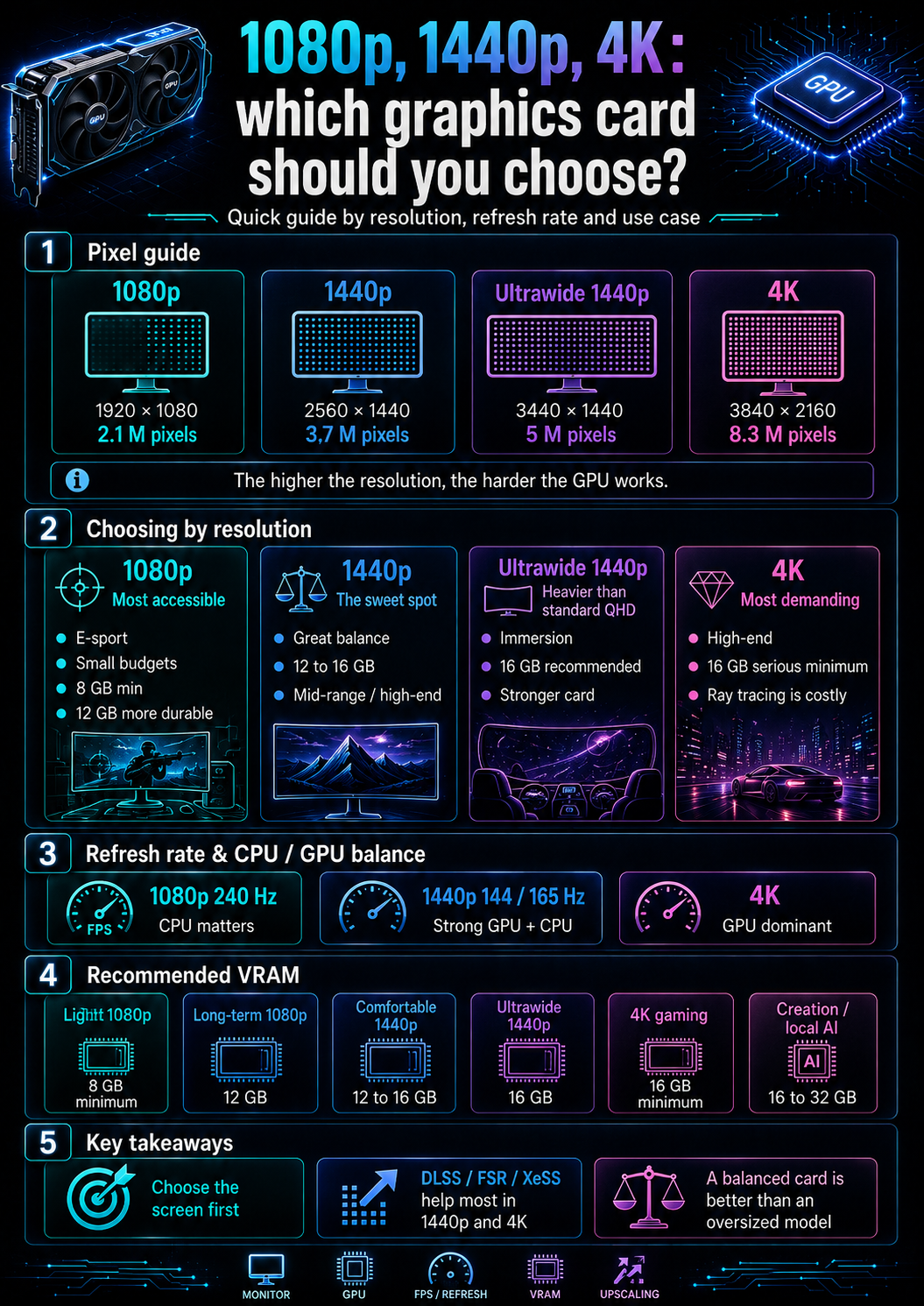
Screen resolution changes everything
Choosing a graphics card without talking about the screen is like choosing an engine without knowing the car.
A graphics card does not work in a vacuum.
It must produce an image for a specific screen, with a specific resolution, a specific refresh rate and a targeted level of graphics quality.
A 1080p 60 Hz screen does not require the same thing as a 1440p 165 Hz screen.
A 4K 144 Hz screen does not require the same thing as a 1080p 240 Hz e-sport screen.
An ultrawide screen does not require the same thing as a classic QHD screen.
Resolution directly influences:
- the number of pixels to calculate;
- the amount of VRAM needed;
- memory bandwidth;
- GPU power;
- the possible level of ray tracing;
- the usefulness of DLSS, FSR or XeSS;
- power consumption;
- budget.
That is why choosing a graphics card properly always starts with one simple question:
What resolution do you actually want to use?
Before choosing between NVIDIA, AMD or Intel, before comparing FPS, even before looking at price, you need to know which screen the card will have to drive.
1080p, 1440p, 4K: how many pixels need to be calculated?
The difference between resolutions is not only aesthetic.
It is mathematical.
| Resolution | Common name | Approximate pixel count |
|---|---|---|
| 1920 × 1080 | Full HD / 1080p | 2.1 million |
| 2560 × 1440 | QHD / 1440p | 3.7 million |
| 3440 × 1440 | Ultrawide QHD | 5 million |
| 3840 × 2160 | Ultra HD / 4K | 8.3 million |
1440p requires about 77% more pixels than 1080p.
4K requires about four times more pixels than 1080p.
This does not mean the card must be exactly four times more powerful, because game engines, upscaling technologies and settings change the real load.
But it gives the general idea:
The higher the resolution, the harder the graphics card has to work.
That is why a very decent card in 1080p can become average in 1440p, then insufficient in 4K.
Refresh rate matters too
Resolution is not the only criterion.
You also need to look at the screen’s refresh rate:
- 60 Hz;
- 75 Hz;
- 120 Hz;
- 144 Hz;
- 165 Hz;
- 180 Hz;
- 240 Hz;
- 360 Hz and more on some e-sport displays.
A 60 Hz screen can display up to 60 frames per second.
A 144 Hz screen can display up to 144 frames per second.
A 240 Hz screen targets even higher fluidity, especially in e-sport.
This completely changes the choice.
A game in 1080p at 60 FPS does not require the same card as a game in 1080p at 240 FPS.
Similarly, playing in 1440p at 60 FPS is much more accessible than targeting 1440p at 165 FPS in recent games.
So the right question is not only:
“Do I play in 1080p or 1440p?”
But rather:
“At what resolution, at what refresh rate, with which games and which settings do I play?”
1080p: the most accessible resolution
1080p, or Full HD, remains the most accessible resolution for gaming.
It is still widely used because it offers a good balance:
- affordable screens;
- reasonable GPU load;
- very good FPS possible;
- smooth e-sport;
- cheaper graphics cards;
- lower power consumption;
- simpler compact configurations.
For many users, 1080p is still more than enough.
It is especially suited to:
- competitive games;
- small budgets;
- family PCs;
- accessible gaming laptops;
- 24-inch screens;
- quiet configurations;
- players who prioritize FPS over image sharpness.
In 1080p, an entry-level or mid-range graphics card can already provide an excellent experience.
But be careful: 1080p does not mean “no requirements”.
A light e-sport game has nothing to do with a recent AAA game in ultra settings with ray tracing.
1080p e-sport: aiming for many FPS
For competitive games, the goal is often to get as many frames per second as possible.
Examples:
- Counter-Strike 2;
- Valorant;
- Fortnite;
- Apex Legends;
- Overwatch;
- Rocket League;
- League of Legends;
- Rainbow Six Siege.
In these games, the priority is often:
- fluidity;
- low latency;
- stability;
- solid 1% lows;
- 144 Hz, 165 Hz or 240 Hz screen;
- competitive settings;
- good keyboard / mouse response.
The graphics card matters, but the processor matters a lot too.
At very high FPS, the CPU can become limiting. A more powerful graphics card is not always enough if the processor cannot keep up.
For competitive 1080p, a moderate graphics card can be enough, especially if settings are not pushed to the maximum.
Simple guide:
| 1080p e-sport use | Recommended card |
|---|---|
| 1080p 60 / 75 Hz | modest GPU or solid iGPU depending on games |
| 1080p 144 Hz | entry / mid-range dedicated card |
| 1080p 240 Hz | solid dedicated card + good CPU |
| serious competitive 1080p | priority to stable FPS and latency |
For this profile, you do not necessarily need to buy the biggest card.
You need a balanced card, a good CPU and a suitable screen.
1080p AAA: beware of recent games
1080p can also become demanding in recent AAA games.
As soon as you enable:
- high textures;
- high shadows;
- draw distance;
- volumetric effects;
- ray tracing;
- path tracing;
- mods;
- texture packs;
- open worlds;
- ultra settings;
the GPU load increases sharply.
This is where 8 GB cards can show their limits in some scenarios.
In 1080p, 8 GB of VRAM remains a usable minimum. But for longevity, 12 GB or 16 GB can be more reassuring, especially if the card is meant to last several years.
For comfortable 1080p AAA gaming, you need to look at:
- VRAM;
- rasterization power;
- FPS stability;
- whether ray tracing is desired or not;
- available upscaling;
- noise;
- power consumption;
- real-world price.
A very decent card for e-sport may be less comfortable in a heavy AAA game.
The type of game matters as much as the resolution.
Which cards should you target for 1080p?
For 1080p, you need to avoid two extremes.
First extreme: buying too weak.
A card that is too limited may quickly force you to lower textures, reduce effects or tolerate stutters.
Second extreme: buying far too powerful.
A high-end card on a 1080p 60 Hz screen can be largely underused.
In 2026, for 1080p, you can use this logic:
| 1080p profile | GPU reference |
|---|---|
| Office work / video / very light games | integrated graphics possible |
| Light e-sport | small dedicated card or solid iGPU depending on games |
| Comfortable 1080p gaming | modern entry / mid-range card |
| High-quality 1080p AAA | stronger mid-range card |
| 1080p 240 Hz | solid card + capable CPU |
| 1080p ray tracing | more powerful card, useful upscaling |
Examples of coherent families depending on price:
- NVIDIA GeForce RTX 5060 / 5060 Ti;
- AMD Radeon RX 9060 XT;
- Intel Arc B580;
- some previous-generation cards if the price is good.
The exact model depends on the real-world price.
A card can be excellent at one price, then lose all interest if it is sold too high.
1440p: the best modern balance
1440p, or QHD, is often the best balance for a modern gaming PC.
It offers a noticeably sharper image than 1080p, without being as heavy as 4K.
It is a very pleasant resolution on:
- 27-inch screens;
- 32-inch screens depending on viewing distance;
- AAA gaming;
- immersive solo games;
- light creation;
- multitasking;
- versatile use.
1440p is more demanding than 1080p, but it remains accessible with a good mid-range / high-end card.
It often represents the real sweet spot:
sharp enough to be very pleasant,
reasonable enough to stay smooth.
But it requires a more serious card.
A card designed only for 1080p can be limited in 1440p, especially with high textures, ray tracing or a 144 / 165 Hz screen.
1440p 60 Hz: accessible with a good card
Playing in 1440p at 60 FPS is much more accessible than targeting 1440p at 165 FPS.
For 1440p 60 Hz, a solid mid-range card can be enough in many games, especially if you accept some high settings rather than ultra.
The important criteria are:
- 12 GB of VRAM as a comfortable base;
- 16 GB more reassuring for longevity;
- good bandwidth;
- stable performance;
- useful upscaling;
- reasonable power consumption;
- correct cooling.
1440p 60 Hz is well suited to players who prioritize:
- visual quality;
- solo games;
- RPGs;
- action-adventure;
- strategy;
- narrative games;
- good image quality rather than extreme FPS.
In this case, it is not always necessary to choose a very high-end card.
You mostly need a coherent, well-balanced card with enough VRAM.
1440p 144 / 165 Hz: the truly demanding zone
1440p at 144 Hz or 165 Hz is much more demanding.
It is now one of the most popular configurations among demanding players.
It requires:
- a good graphics card;
- a solid CPU;
- enough RAM;
- comfortable VRAM;
- a suitable screen;
- well-chosen settings.
In e-sport games, reaching 144 or 165 FPS in 1440p can be fairly realistic with a solid card.
In recent AAA games, it is much harder in ultra settings, especially with ray tracing.
So you often need to accept a compromise:
- high rather than ultra;
- DLSS / FSR / XeSS;
- reduced ray tracing;
- textures adapted to VRAM;
- shadows or effects adjusted.
For high-refresh 1440p, aiming for 16 GB of VRAM becomes very comfortable, even if some 12 GB cards can still work well depending on the games.
High-refresh 1440p is an excellent goal, but it should not be underestimated.
Which cards should you target for 1440p?
For 1440p, you need to move upmarket compared with 1080p.
In 2026, the general logic is:
| 1440p profile | GPU reference |
|---|---|
| 1440p 60 Hz | solid mid-range |
| 1440p 144 Hz | mid-range / high-end |
| High-quality 1440p AAA | solid card with 12 to 16 GB of VRAM |
| 1440p ray tracing | more powerful card + upscaling |
| durable 1440p | 16 GB of VRAM very reassuring |
Examples of coherent families depending on price:
- NVIDIA GeForce RTX 5070;
- NVIDIA GeForce RTX 5070 Ti;
- AMD Radeon RX 9070;
- AMD Radeon RX 9070 XT;
- Intel Arc B580 for more reasonable 1440p depending on games;
- some older high-end cards if the price is interesting.
You need to remain careful with names.
An RTX 5070 with 12 GB can be very coherent for many 1440p games, but less comfortable than a 16 GB card in some future, creative or texture-heavy uses.
A 16 GB Radeon can be very interesting if its price is good.
An Intel card can be relevant on a budget, but you need to check games and drivers.
1440p is often the resolution where the price / performance ratio really plays out.
1440p ultrawide: heavier than classic QHD
Ultrawide is a special case.
A 3440 × 1440 screen displays about 5 million pixels.
That is heavier than classic 1440p, but lighter than 4K.
In practice, ultrawide requires a graphics card closer to high-end 1440p than simple QHD.
You need to look at:
- 16 GB of VRAM if possible;
- good bandwidth;
- solid GPU;
- ultrawide game support;
- DLSS / FSR / XeSS;
- CPU power depending on games;
- screen connectivity;
- screen refresh rate.
Ultrawide is excellent for immersion, simulations, solo games, productivity and creation.
But it should not be considered “just 1440p”.
It is an intermediate format.
It deserves a stronger card than a classic 2560 × 1440 screen.
4K: the most demanding resolution
4K, or Ultra HD, represents a big jump.
It displays about 8.3 million pixels.
That is about four times 1080p.
In 4K, the graphics card must handle:
- many more pixels;
- high-resolution textures;
- heavy effects;
- anti-aliasing sometimes less necessary but still present;
- very expensive ray tracing;
- significant bandwidth;
- higher VRAM;
- higher power consumption;
- more serious cooling.
4K is beautiful on a large screen.
It is very interesting for:
- immersive solo games;
- large 32-inch and larger screens;
- gaming TVs;
- creation;
- video;
- image work;
- productivity;
- consoles and high-end PCs.
But it requires a real GPU budget.
You should not aim for modern 4K with a card that is too modest while thinking “it will be fine”.
Yes, upscaling helps a lot.
But the hardware foundation must remain solid.
4K 60 Hz: already demanding
Playing in 4K at 60 FPS may seem reasonable.
But in recent games, it is already a significant load.
For comfortable 4K 60 Hz, you need to look at:
- 16 GB of VRAM as a serious base;
- high-end or near high-end GPU;
- solid bandwidth;
- good cooling;
- suitable power supply;
- useful DLSS / FSR / XeSS;
- ray tracing to adjust;
- quality of the exact model.
4K 60 Hz is coherent for players who prefer:
- very sharp image;
- solo games;
- large screens;
- high graphics;
- less focus on extreme FPS.
But even at 60 FPS, you need a solid card.
Ray tracing can quickly push the configuration toward a much higher-end requirement.
4K 120 / 144 Hz: very high-end territory
4K at 120 Hz or 144 Hz is a very demanding goal.
It requires a very powerful graphics card.
In some optimized competitive games, it can be accessible with a good card.
In recent AAA games at high quality, it is much more complicated.
To target high-refresh 4K, you often need:
- a very high-end card;
- 16 GB of VRAM minimum;
- 24 or 32 GB useful depending on creation / AI / long-term use;
- high-quality upscaling;
- optimized settings;
- solid power supply;
- very well-ventilated case;
- compatible screen;
- suitable cable;
- coherent CPU.
High-refresh 4K is not only a GPU choice.
It is a complete platform choice.
If the budget is limited, it is often more rational to target excellent 1440p than frustrating 4K.
Which cards should you target for 4K?
For 4K, you need to be realistic.
In 2026, the general logic is:
| 4K profile | GPU reference |
|---|---|
| 4K office work / video | iGPU or small card enough depending on connectivity |
| light 4K gaming | mid-range / high-end card depending on games |
| 4K 60 FPS AAA | high-end recommended |
| 4K ray tracing | very high-end + upscaling |
| 4K 120 / 144 Hz | very high-end, large budget |
| 4K creation / AI | significant VRAM, 16 GB minimum, more depending on workflow |
Examples of coherent families depending on price and use:
- NVIDIA GeForce RTX 5080;
- NVIDIA GeForce RTX 5090;
- NVIDIA GeForce RTX 5070 Ti for some reasonable 4K uses;
- AMD Radeon RX 9070 XT for reasonable 4K depending on games and price;
- older high-end cards if they remain competitive and well priced.
The RTX 5090 stands out above all for its very high power and very large VRAM.
The RTX 5080 is a more rational card for many 4K players, but with less VRAM.
The RX 9070 XT can be interesting depending on games, prices and the desired level of ray tracing.
The right choice depends on the accepted compromise between quality, FPS, ray tracing, upscaling, noise, power consumption and budget.
4K and ray tracing: beware of the real cost
Ray tracing is expensive.
4K is expensive.
The two together are very expensive.
When you enable ray tracing in 4K, the graphics card must handle:
- many pixels;
- realistic lighting effects;
- acceleration structures;
- reflections;
- shadows;
- global illumination;
- denoising;
- upscaling;
- sometimes frame generation.
This is one of the most demanding scenarios for a gaming graphics card.
In this context, DLSS, FSR or XeSS become almost essential depending on the games.
But these technologies do not turn a card that is too weak into a high-end card.
They mostly make an already coherent card more comfortable.
For 4K ray tracing, you therefore need to aim high, or accept lowering some settings.
The best choice is not always “ultra everywhere”.
Often, the right setting is the one that keeps a beautiful image while maintaining stable smoothness.
The case of 1080p 240 Hz and higher screens
A very high-refresh 1080p screen is a special case.
It does not require as many pixels as 1440p or 4K, but it requires many frames per second.
This profile mainly concerns:
- competitive players;
- e-sport;
- FPS games;
- fast games;
- users sensitive to latency;
- 240 Hz, 360 Hz or higher screens.
In this case, the GPU matters, but the CPU often becomes very important.
To reach very high FPS, you need:
- powerful processor;
- fast and properly configured RAM;
- sufficient graphics card;
- competitive settings;
- low latency;
- suitable screen;
- clean drivers;
- optimized system.
A high-end graphics card can help, but it is not always enough.
If the game becomes CPU-limited, adding more GPU does not change much.
For e-sport, CPU / GPU balance is therefore essential.
The case of 1440p 240 Hz screens
1440p 240 Hz is one of the best high-end formats for competitive players who also want a beautiful image.
But it is demanding.
It requires both:
- more pixels than 1080p;
- many FPS;
- a solid GPU;
- a powerful CPU;
- controlled settings;
- good VRAM;
- excellent stability.
In e-sport games, this type of screen can be very pleasant.
In AAA games, it will rarely be fully used at maximum quality.
So you need to choose the card according to your priority games.
For a Valorant / CS2 / Apex player, the logic is not the same as for a Cyberpunk / Alan Wake / Starfield / recent AAA player.
A 1440p 240 Hz screen is versatile, but it requires a serious machine.
Upscaling changes the game, but does not replace everything
DLSS, FSR and XeSS have become very important.
These technologies allow the game to render at a lower internal resolution, then reconstruct a sharper image.
This can help enormously in:
- 1440p;
- 4K;
- ray tracing;
- AAA games;
- mid-range cards;
- laptops;
- configurations that need to last.
Upscaling can transform an unplayable experience into a smooth one.
But it should not become an excuse for buying too weak.
These technologies depend on:
- the game;
- the quality of implementation;
- the starting resolution;
- the selected mode;
- the graphics card;
- latency;
- fast motion;
- possible artifacts.
In 1080p, upscaling can sometimes be less convincing, because the internal resolution quickly becomes low.
In 1440p, it often becomes very useful.
In 4K, it can be excellent, because the reconstruction base contains more information.
Upscaling is therefore a powerful tool.
But it should accompany a coherent card, not hide a bad decision.
Frame Generation: useful, but needs to be understood
Frame generation can increase perceived smoothness.
It creates intermediate frames between frames that are actually rendered.
This can be impressive in some games.
But you need to understand its limits.
Frame generation:
- does not replace good base FPS;
- can add latency depending on conditions;
- depends on the game;
- depends on the technology;
- works better when the base is already quite smooth;
- is not ideal for every competitive game.
For a solo game, it can be very pleasant.
For a competitive game, the priority often remains latency and frames that are actually rendered.
So, when choosing a graphics card, you should not only look at:
“How many FPS with Frame Generation?”
You also need to look at:
“How many real FPS without generation?”
Frame generation is a bonus.
Not a standalone foundation.
VRAM according to resolution
VRAM should increase with resolution and use.
Here is a simple guide for 2026:
| Resolution / use | Recommended VRAM |
|---|---|
| light 1080p | 8 GB minimum |
| durable 1080p | 12 GB appreciated |
| comfortable 1440p | 12 to 16 GB |
| durable 1440p / creation | 16 GB |
| ultrawide 1440p | 16 GB recommended |
| 4K gaming | 16 GB serious minimum |
| heavy 4K / ray tracing | 16 GB and more |
| 3D / creation / local AI | 16 to 32 GB depending on projects |
This guide is not absolute.
But it gives a reliable direction.
It is better to avoid choosing a card that is too tight in VRAM for an ambitious resolution.
Lack of VRAM does not always show in average FPS, but it can cause stutters, degraded textures or a less stable experience.
Should you choose a card based on average FPS?
Average FPS is useful, but incomplete.
It allows you to quickly compare several cards in a game.
But it does not tell the whole story.
You also need to look at:
- 1% lows;
- 0.1% lows;
- frametime;
- micro-stutters;
- long-session stability;
- heat;
- noise;
- power consumption;
- VRAM used;
- ray tracing;
- upscaling;
- behavior in heavy scenes.
A card can show a good average, but have frequent drops.
Another can have a slightly lower average, but more stable smoothness.
For real comfort, consistency matters enormously.
The right GPU is not only the one that displays the biggest average number.
It is the one that remains stable in your games, at your resolution, with your settings.
Graphics settings change the need a lot
You should not believe that every game must be set to ultra.
Ultra mode is often very costly for a visual gain that can sometimes be small.
Some settings consume a lot:
- shadows;
- ray tracing;
- volumetrics;
- reflections;
- draw distance;
- textures;
- anti-aliasing;
- hair / particle quality;
- ambient occlusion;
- post-processing.
Moving from ultra to high can sometimes provide much more FPS for a minimal visual loss.
This is especially true in 1440p and 4K.
The right card choice therefore also depends on your tolerance for compromise.
A player who accepts optimized high settings can choose a more reasonable card.
A player who wants ultra + ray tracing + high refresh rate must aim much higher.
The graphics card must be coherent with the CPU
Resolution also influences CPU / GPU balance.
In very high-FPS 1080p, the CPU can be very important.
In 1440p, the load shifts more toward the GPU, but the CPU remains important for high FPS and some games.
In 4K, the GPU often becomes the dominant factor.
This gives a simple rule:
| Resolution / objective | Main risk |
|---|---|
| very high-FPS 1080p | possible CPU limit |
| balanced 1440p | CPU + GPU both important |
| 4K | frequent GPU limit |
| simulation / strategy games | CPU often important |
| ray tracing / ultra / 4K | GPU and VRAM critical |
Buying a very large graphics card with an old CPU can limit performance, especially in 1080p or CPU-dependent games.
Conversely, an excellent CPU with a GPU that is too weak will not be enough for 4K or ray tracing.
Resolution therefore helps you understand where to place the budget.
Budget: better to aim for coherent than spectacular
A graphics card can quickly become the most expensive component in a PC.
So you need to avoid spending in the wrong place.
For a 1080p 60 Hz screen, a high-end card is rarely rational.
For a 1440p 165 Hz screen, a card that is too weak can become frustrating.
For a 4K screen, underinvesting in the GPU can make the experience disappointing.
A good purchase aligns:
- screen;
- GPU;
- CPU;
- RAM;
- power supply;
- case;
- budget;
- uses;
- desired lifespan.
A balanced machine is better than a machine with a huge graphics card and the rest too weak.
A spectacular graphics card in a poorly balanced PC can deliver an average experience.
A well-chosen card in a coherent configuration can be much more pleasant.
Which resolution should you choose depending on budget?
Before choosing the card, you sometimes need to choose the resolution.
For a tight budget, 1080p remains very logical.
It allows you to keep good smoothness without buying a card that is too expensive.
For an intermediate budget, 1440p is often the best choice.
It offers a major visual improvement over 1080p while remaining reasonable.
For a large budget, 4K becomes possible.
But it requires a powerful card, especially if you want ray tracing, 120 Hz or high settings.
Simple reading:
| Budget | Often coherent resolution |
|---|---|
| small budget | 1080p |
| balanced budget | 1440p |
| high budget | high-FPS 1440p or 4K |
| very large budget | high-FPS 4K / ray tracing |
| creation / AI | depends on software, often VRAM priority |
Sometimes, an excellent 1440p screen with a good card provides a better experience than overly ambitious 4K that is poorly powered.
Laptop PC: beware of mobile GPUs
On laptops, you need to be even more careful.
A mobile graphics card does not necessarily behave like a desktop card with the same name.
Performance depends on:
- configured power;
- cooling;
- chassis thickness;
- temperature;
- noise;
- VRAM;
- built-in screen;
- power delivery;
- performance mode;
- drivers;
- thermal limitation.
Two laptops with the same GPU name can have different performance.
For a 1080p laptop, a mid-range mobile card may be enough.
For a 1440p laptop, you need to aim higher.
For a 4K gaming laptop, the load is very heavy and noise / heat can become significant.
So you need to read tests of the exact model, not only the GPU sheet.
On laptops, integration matters as much as the chip.
Creation: working resolution is not enough
For creation, screen resolution is only one criterion among others.
A creator can have a 1440p screen, but work on:
- 4K videos;
- very high-resolution images;
- heavy 3D scenes;
- 8K textures;
- multicam timelines;
- GPU effects;
- local AI;
- heavy exports.
In that case, you need to choose the card according to the projects, not only according to the screen.
For creation, the important criteria are:
- VRAM;
- software compatibility;
- video encoders;
- bandwidth;
- drivers;
- stability;
- noise;
- power consumption;
- CUDA / ROCm / OpenVINO support depending on tools;
- file size;
- media resolution.
A 1440p screen does not mean the needs are “1440p gaming”.
The real workflow can be much heavier.
Local AI: resolution is not the main criterion
For local AI, screen resolution matters little.
What matters most is:
- VRAM;
- software compatibility;
- compute power;
- bandwidth;
- CUDA / ROCm / OpenVINO / DirectML;
- system RAM;
- SSD;
- model size;
- generation type;
- batch;
- quantization;
- possible offload.
A card chosen for 1080p gaming may be insufficient for some AI uses.
Conversely, a card that is excellent for AI may be oversized for a simple 1080p screen.
So you need to separate the uses.
For gaming, you start from resolution.
For local AI, you start from VRAM and tools.
This is an important difference.
Summary table
| Resolution / profile | Recommended VRAM | Type of card | Notes |
|---|---|---|---|
| 1080p office work / video | shared or low | iGPU possible | Check video outputs |
| 1080p e-sport | 8 GB minimum | entry / mid-range | CPU important for high FPS |
| 1080p AAA | 8 to 12 GB | mid-range | 12 GB more durable |
| 1440p 60 Hz | 12 GB | solid mid-range | Good quality / price balance |
| 1440p 144 / 165 Hz | 12 to 16 GB | mid-range / high-end | Very good sweet spot |
| 1440p ultrawide | 16 GB | high 1440p | Heavier than classic QHD |
| 4K 60 Hz | 16 GB minimum | high-end | Upscaling often useful |
| 4K 120 / 144 Hz | 16 GB and more | very high-end | Large budget and solid power supply |
| 4K ray tracing | 16 to 32 GB | very high-end | DLSS / FSR / XeSS very important |
| Creation / local AI | 16 to 32 GB | depending on software | Screen resolution is not enough |
This table gives a baseline.
You then need to adjust depending on games, software, real-world price and accepted compromises.
Common mistakes to avoid
The first mistake is buying a graphics card without looking at screen resolution.
The second mistake is aiming for 4K with too low a GPU budget.
The third mistake is underestimating 1440p ultrawide, which requires more than classic QHD.
The fourth mistake is believing that 1080p never requires a solid card. In high-FPS e-sport or AAA ultra, it can become demanding.
The fifth mistake is looking only at average FPS without checking 1% lows and stability.
The sixth mistake is believing DLSS, FSR or XeSS fully replace raw power.
The seventh mistake is choosing a card with too little VRAM for an ambitious resolution.
The eighth mistake is forgetting the CPU in very high-FPS 1080p.
The ninth mistake is comparing a laptop GPU to a desktop card as if they were identical.
The tenth mistake is confusing gaming, creation and local AI use.
The right method for choosing
To choose a graphics card according to resolution, you need to follow a simple method.
First, identify the screen:
- resolution;
- refresh rate;
- size;
- connectivity;
- HDR or not;
- VRR or not;
- number of screens.
Then identify the games:
- e-sport;
- AAA;
- simulation;
- strategy;
- ray tracing;
- mods;
- VR;
- older games;
- recent games.
Then define the target:
- 60 FPS;
- 100 FPS;
- 144 FPS;
- 165 FPS;
- 240 FPS;
- high quality;
- ultra quality;
- ray tracing or not.
Only then choose the card according to:
- GPU power;
- VRAM;
- bandwidth;
- DLSS / FSR / XeSS technologies;
- power consumption;
- noise;
- size;
- power supply;
- real-world price.
The right choice is the one that aligns all these elements.
Not the one that only displays the biggest name.
Key takeaways
Screen resolution is one of the most important criteria when choosing a graphics card.
1080p remains the most accessible. It is very well suited to small budgets, competitive games and configurations that aim for many FPS without blowing up the budget.
1440p is often the best modern balance. It offers a sharper image than 1080p while remaining much more reasonable than 4K. For many players, it is the real sweet spot.
Ultrawide 1440p is more demanding than classic QHD. It requires a stronger card, especially with a high refresh rate.
4K is beautiful, but much heavier. It requires a high-end card, a lot of VRAM, good bandwidth, good cooling and often help from DLSS, FSR or XeSS.
For very high-FPS e-sport, the CPU remains important.
For 1440p and 4K, the GPU becomes central.
For creation and local AI, VRAM and software compatibility can matter more than screen resolution.
The right reflex is simple:
Choose the screen and use case first.
Only then choose the graphics card.
A good graphics card is not necessarily the most powerful one.
It is the one that matches your resolution, your refresh rate, your games, your software, your budget and your real compromises.