Why you should not collect AI tools
In 2026, the problem is no longer finding artificial intelligence tools. They are everywhere.
General-purpose assistants for writing and thinking. Search engines with sources. Image, video, voice, and music generators. Coding assistants. Applications for notes, documents, meetings, presentations, automation, and agents.
The temptation is simple: test everything that comes out.
One subscription here. One free trial there. One new tool recommended on social media. One platform that promises to replace all the others. One model that is faster, more creative, smarter, more spectacular.
But this logic often creates the opposite of what we are looking for.
Instead of saving time, we become scattered. Instead of working better, we spend our energy comparing interfaces. Instead of building a workflow, we accumulate accounts, credits, limits, and fragmented habits.
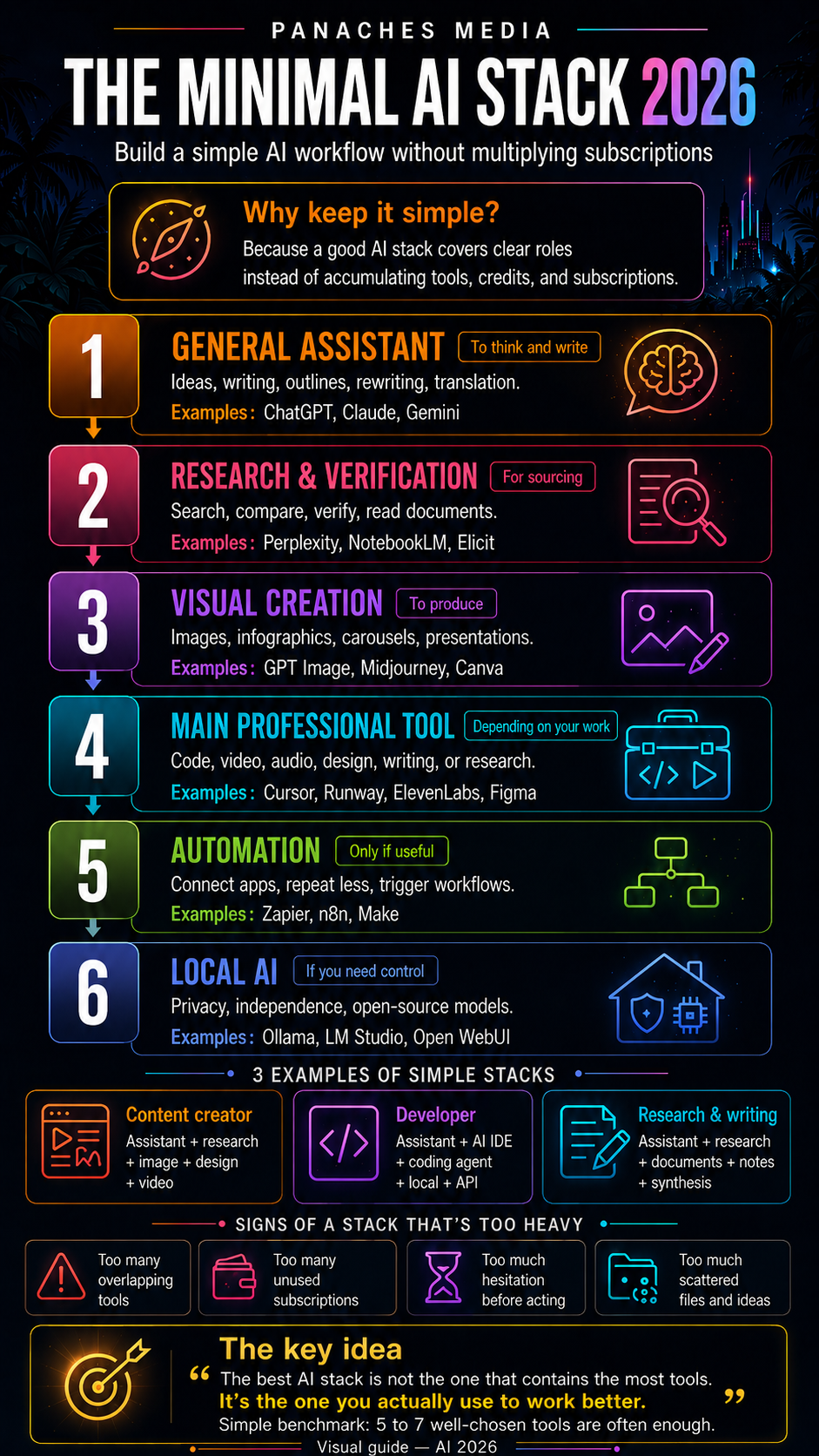
Real maturity with AI does not mean using as many tools as possible. It means building a minimal stack: a simple combination of tools that actually covers your needs.
What is an AI stack?
An AI stack is the set of artificial intelligence tools you regularly use to work.
It can be very simple:
- one assistant to write, think, and organize;
- one tool to search and verify information;
- one tool to create visuals;
- one tool adapted to your main profession;
- optionally, one automation solution;
- optionally, one local solution for sensitive data.
The important word is not “stack”. The important word is coherence.
A good AI stack is not a showcase filled with impressive applications. It is a system where each tool has a clear role.
Each tool should answer one simple question:
At what moment in my work does this tool truly help me?
If the answer is unclear, the tool may not belong in your stack.
The basic principle: one tool per role
To avoid confusion, you need to start by separating roles.
A general-purpose assistant does not always replace a research tool. An image generator does not replace a design tool. A coding agent does not necessarily replace a full IDE. A multi-model aggregator does not always replace a specialized application. Local AI does not always replace the best cloud models.
Each family has its own function.
The right reflex is to build your stack like a small team.
One tool to think. One tool to verify. One tool to produce. One tool for your main profession. One tool to automate when necessary. One local tool if privacy becomes important.
This is the logic that keeps the system efficient.
Brick 1: a general-purpose assistant
The first brick of an AI stack is often a general-purpose assistant.
This is the tool used to:
- clarify an idea;
- write a text;
- rewrite a message;
- structure a plan;
- translate;
- summarize;
- prepare a decision;
- compare options;
- unlock a problem.
In this category, the main references remain ChatGPT, Claude, Gemini, Copilot, and Grok. Each has its strengths, limits, ecosystem, and style.
The goal is not necessarily to use five of them. For most users, one or two well-mastered assistants are more than enough.
The right choice depends on your dominant use.
For long-form writing, structure, and high-quality text, Claude is often appreciated. For versatility, files, integrated tools, and ecosystem, ChatGPT remains a very strong choice. For users deeply anchored in Google Workspace, Gemini can make sense. For Microsoft users, Copilot becomes relevant inside Office, Teams, or Outlook.
The simple rule:
Choose one main assistant, then optionally a second one to compare answers on important tasks.
Beyond that, the risk is spending more time choosing the model than doing the work.
Brick 2: a research and verification tool
A general-purpose assistant can help you think, but it is not always enough to search for reliable information.
This is where the second brick comes in: a source-based research tool.
Its role is different:
- find sources;
- compare information;
- verify a claim;
- follow current developments;
- read several pages quickly;
- prepare a monitoring workflow;
- avoid publishing approximate information.
Perplexity, NotebookLM, Elicit, Consensus, Semantic Scholar, and You.com all belong to this broad family, with different uses.
Perplexity is useful for quickly searching the web with sources. NotebookLM is particularly interesting when the subject relies on your own documents: PDFs, notes, reports, transcripts, research files. Elicit, Consensus, and Semantic Scholar are better suited to academic and scientific use cases.
In a minimal stack, the simplest combination is often:
- one source-based web research tool;
- one tool for reading personal documents.
This avoids mixing two very different needs: searching the internet and working on your own corpus.
Brick 3: a visual creative tool
The third brick depends on your profile, but it is becoming increasingly important: visual creation.
Even when writing, coding, or organizing, you often need to produce visuals:
- article images;
- infographics;
- carousels;
- thumbnails;
- presentations;
- concepts;
- moodboards;
- illustrations;
- social media assets.
Here, it is important to distinguish two families.
On one side, image generators such as Midjourney, GPT Image, Ideogram, Firefly, Flux, Leonardo, or Stable Diffusion. They are used to create images, styles, scenes, characters, illustrations, or concepts.
On the other side, design tools such as Canva, Adobe Express, Recraft, or Figma AI. They are used to compose, lay out, adapt, export, repurpose, and publish.
For a content creator, a good minimal stack can therefore combine:
- one image generation tool;
- one design or layout tool.
Generation creates the raw material. Design turns that material into publishable content.
This is an important difference.
A beautiful image is not necessarily a good infographic. A good infographic is not just an image: it is structure, hierarchy, message, and format.
Brick 4: a main professional tool
The fourth brick is the one that must be chosen with the most care.
It is the AI tool directly connected to your main activity.
For a developer, it will be a coding tool: Cursor, Claude Code, Codex, GitHub Copilot, Windsurf, Replit, or a local environment.
For a writer, journalist, or researcher, it will more likely be a tool for documents, notes, research, and synthesis: NotebookLM, Claude Projects, ChatGPT Projects, Obsidian with plugins, Notion AI, or Heptabase.
For a video creator, it will be Runway, Kling, Veo, Sora, Luma, Pika, CapCut, Descript, HeyGen, or Synthesia.
For a musician or audio creator, it will be Suno, Udio, ElevenLabs, Descript, Murf, or other specialized tools.
For a designer, it will be Midjourney, Firefly, Recraft, Canva, Figma AI, Krea, or Stable Diffusion.
For an entrepreneur, it may be a simpler combination: general assistant, presentation tool, CRM tool, email tool, automation tool.
This professional brick is what gives the stack its value.
Without it, you remain in generic usage. With it, AI truly enters everyday work.
Brick 5: automation only if it solves a real need
Automation is tempting. It gives the impression that everything can be connected, summarized, sent, sorted, transformed, and executed automatically.
But it is not always the first brick to install.
Before automating, you need a stable process.
Automating a blurry workflow does not make it better. It only makes the disorder faster.
Tools such as Zapier, Make, n8n, Lindy, Dify, Flowise, or some specialized agents become very useful when the need is clear:
- receive a form and create a task;
- summarize emails;
- send an alert;
- synchronize data;
- classify files;
- trigger a publication;
- generate a recurring report;
- connect several business applications.
In a minimal stack, automation should therefore come after one simple question:
Which repetitive task truly deserves to be automated?
If the answer is not obvious, it is better to wait.
Brick 6: a local solution for sensitive data
The last brick is not necessary for everyone, but it is becoming important: local AI.
Tools such as Ollama, LM Studio, Jan, Open WebUI, llama.cpp, or vLLM make it possible to use models locally or on controlled infrastructure.
The benefits are clear:
- more control over data;
- less dependence on the cloud;
- the ability to test open-source models;
- offline use in some cases;
- better cost control for certain uses;
- integration into custom software or workflows.
But local AI should not be idealized.
It can require hardware, configuration, quality compromises, adapted models, memory, and sometimes technical knowledge.
It becomes especially relevant when privacy, independence, or local integration matter.
For general public use, a cloud assistant can be simpler. For a local-first software product, sensitive document work, or a controlled creative environment, local AI becomes much more interesting.
Three examples of simple AI stacks
To make this more concrete, here are three examples.
Content creator stack
A content creator can start with:
- one general assistant to write and structure;
- one source-based research tool;
- one image generation tool;
- one design tool;
- one short-form video tool;
- optionally, one voice or music tool.
Example logic:
ChatGPT or Claude for ideas and scripts. Perplexity or NotebookLM for research. GPT Image, Midjourney, or Firefly for visuals. Canva for carousels and infographics. Runway, Kling, or CapCut for short videos. ElevenLabs or Suno for audio.
The goal is not to have everything. The goal is to cover the chain: idea, verification, creation, formatting, distribution.
Developer stack
A developer can build a more technical stack:
- one general assistant for architecture and decisions;
- one coding agent for complex tasks;
- one AI IDE for daily development;
- one local tool to test models or preserve some data;
- optionally, one multi-model or API platform.
Example logic:
Claude Code or Codex for agentic tasks. Cursor, Windsurf, or GitHub Copilot for daily work. ChatGPT or Claude for thinking, complex bugs, and plans. Ollama or LM Studio for local tests. OpenRouter to compare or integrate several models.
A good developer stack is not the one that automatically writes the most code. It is the one that helps you keep control over a real project.
Research, writing, and documentation stack
A profile focused on writing, monitoring, or documentation can start with:
- one assistant to structure ideas;
- one source-based research tool;
- one document reading tool;
- one note-taking space;
- one synthesis or presentation tool.
Example logic:
Claude or ChatGPT for writing and organization. Perplexity for research. NotebookLM for analyzing documents. Obsidian, Notion, or a local note system to keep ideas. Gamma or Canva to turn a synthesis into a visual support.
In this case, the heart of the stack is not spectacular generation. It is the quality of reading, sorting, synthesis, and presentation.
How to know if your AI stack is too heavy
A stack becomes too heavy when tools add more friction than value.
Some signs are easy to spot:
- you no longer know where information is stored;
- you pay for several tools that do almost the same thing;
- you hesitate too long before choosing which tool to use;
- you spend more time testing than producing;
- your files, notes, and projects are scattered everywhere;
- you do not have a stable workflow;
- you keep subscriptions “just in case”.
In that situation, you need to reduce.
Removing a tool can sometimes improve the whole system.
A good AI stack should be simple enough to use without thinking, but complete enough to cover real needs.
A simple method to choose
Before adding a new AI tool, ask five questions.
1. What problem does it solve?
If it does not solve a clear problem, it may become a gadget.
2. Does it replace an existing tool or add a real capability?
If it does almost the same thing as a tool you already use, it must be significantly better to justify its place.
3. Does it fit into my workflow?
A good tool that is poorly integrated can become a source of friction.
4. Is it useful every week?
For a minimal stack, rarely used tools should be treated with caution.
5. What happens if I stop using it?
If you can stop using it without any impact, it may not be central.
These questions help you avoid choosing under the influence of novelty.
Inside Panaches
Panaches fits into this logic of a coherent stack.
The goal is not to pile up isolated tools, but to bring together the essential bricks of a creative workflow in one space: writing, documents, media, organization, code, research, moodboards, notes, and AI assistance.
A useful AI stack is not limited to the model being used. It also depends on where the work happens.
If your ideas are in one application, your PDFs in another, your notes elsewhere, your images in a separate folder, your prompts in a forgotten document, and your code in another environment, AI can help, but it does not solve all the fragmentation.
The value of a unified workspace is precisely to reduce that fragmentation.
In Panaches, AI can become an assistance layer integrated into the work: understanding a document, supporting writing, organizing ideas, preparing content, exploring an image, structuring a project, or working locally with more control.
A good stack is therefore not just a list of subscriptions. It is a work architecture.
Conclusion: fewer tools, more coherence
In 2026, it is easy to be impressed by the number of AI tools available.
But real efficiency does not come from quantity.
It comes from a simpler choice: building a small, solid stack adapted to your real uses.
One assistant to think. One tool to verify. One tool to create. One tool for your profession. One automation when it truly adds value. One local solution when data control becomes important.
The rest can wait.
The best AI stack is not the one with the most famous names. It is the one you actually use to work better.
FAQ
What is an AI stack?
An AI stack is the set of artificial intelligence tools regularly used in a workflow. It can include a general assistant, a research tool, a creative tool, a professional tool, automation, and optionally a local solution.
How many AI tools should I use?
For most users, five to seven well-chosen tools are more than enough. Beyond that, the risk is multiplying interfaces, subscriptions, and fragmentation.
Should I choose only one AI assistant?
One main assistant is often enough. A second one can be useful to compare answers, handle certain texts, or verify important decisions.
Do multi-model aggregators replace specialized applications?
Not always. They are useful for comparing several models or avoiding some subscriptions, but a specialized application can remain better for a precise workflow such as design, code, video, or document research.
When should I use local AI?
Local AI becomes interesting when privacy, independence, data control, or integration into local software matters.
How can I reduce an AI stack that has become too complicated?
Identify the tools you actually use every week, remove duplicates, keep one main assistant, one research tool, one central professional tool, and cancel subscriptions that do not solve a clear problem.