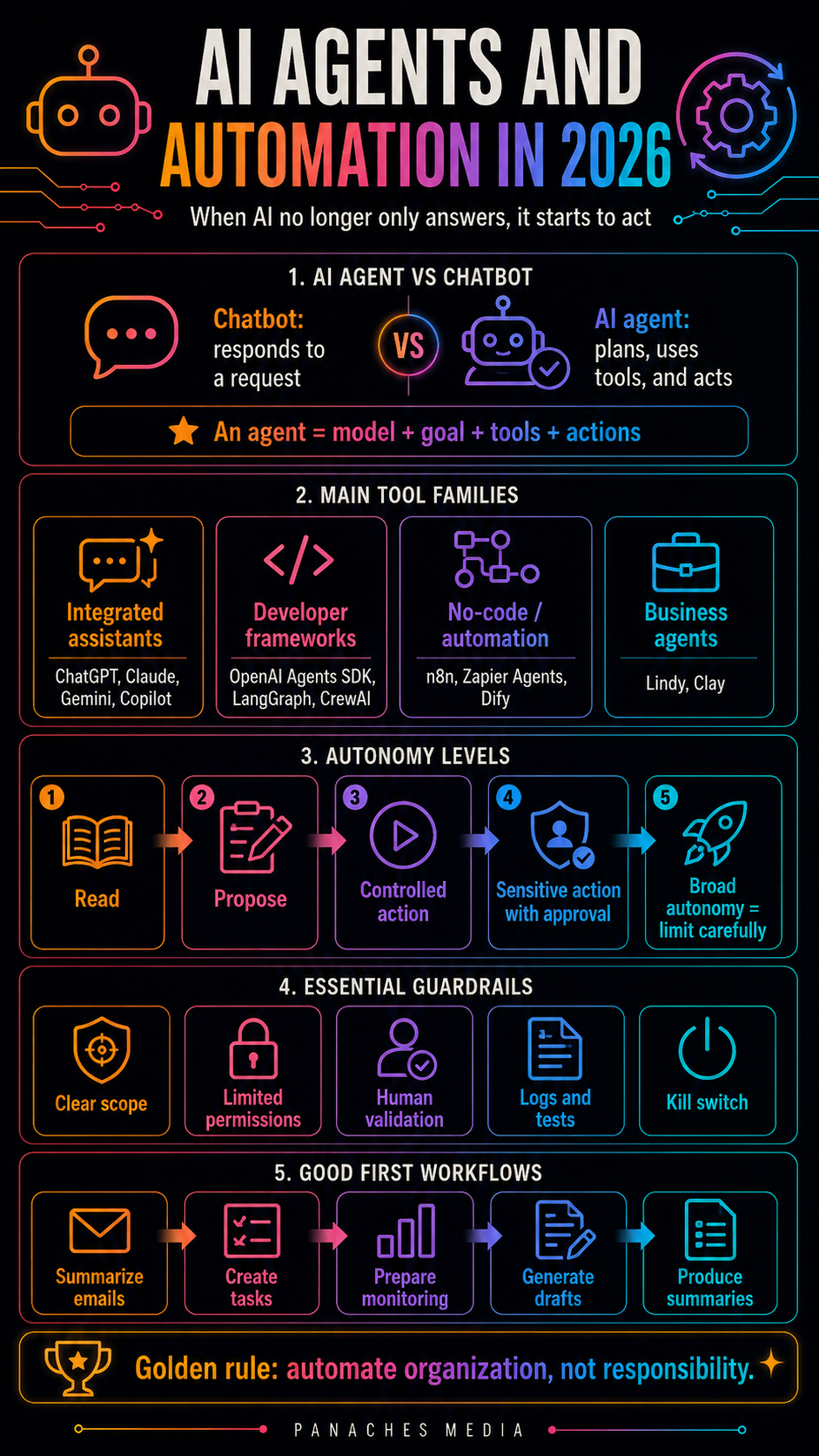
Why AI agents change the nature of automation
For a long time, generative AI was mostly used as a response tool.
You asked a question.
It answered.
You asked for a summary.
It summarized.
You wanted an outline.
It proposed a structure.
You gave it a text.
It rewrote it.
That was already powerful.
But with AI agents, we enter a different logic.
AI no longer only produces a response. It can receive a goal, plan a sequence of steps, choose tools, query files, call an API, send information, create a task, modify a document, run a command, monitor a condition, or trigger a workflow.
The difference is fundamental.
A chatbot answers.
An agent acts.
That does not mean it always acts well.
That does not mean everything should be delegated to it.
That does not mean it replaces organization, judgment, or human responsibility.
But it does mean that AI is gradually leaving simple conversation and entering the field of execution.
In 2026, this evolution already affects several families of tools: OpenAI Agents SDK, Microsoft Copilot Agents, LangGraph, CrewAI, AutoGen, n8n, Zapier Agents, Dify, Lindy, Make, Flowise, StackAI, and agents integrated into assistants such as ChatGPT, Claude, Gemini, or Copilot.
The topic is therefore becoming central.
The real question is not only:
Which AI agent should I use?
The real question is:
Which tasks can be automated without losing control?
An AI agent is not just a smarter chatbot
We need to clarify one point first.
An AI agent is not simply a more powerful model.
It is a system that combines several elements:
- a language model;
- a goal;
- instructions;
- memory or context;
- tools;
- data;
- possible actions;
- sometimes scheduling;
- sometimes multiple steps;
- sometimes human validation;
- sometimes a correction loop.
A classic chatbot produces a response inside a conversation.
An agent can produce a response, then decide it needs to search for information, call a tool, read a file, ask for validation, execute an action, and continue.
This ability to act changes everything.
An agent can help:
- process emails;
- summarize meetings;
- classify documents;
- monitor news;
- generate reports;
- enrich data;
- create tickets;
- reply to customers;
- prepare publications;
- trigger automations;
- orchestrate several tools;
- assist a development workflow;
- produce several formats from the same source.
But the more an agent can act, the higher the risk.
A bad summary is a problem.
A bad email sent automatically is a bigger problem.
A bad action on customer data is even more serious.
A command run without control can become dangerous.
An API called with the wrong permissions can expose sensitive information.
That is why AI agents must be treated as work systems, not as conversational gadgets.
The main families of AI agents
To see things clearly, several families need to be distinguished.
The first family is agents integrated into general assistants. ChatGPT, Claude, Gemini, and Copilot increasingly offer agentic features: search, files, actions, projects, connectors, automations, tools, or specialized agents.
The second family is enterprise agents. Microsoft Copilot Agents, Salesforce Agentforce, ServiceNow, HubSpot, Zendesk, and other platforms make it possible to create agents connected to business data and workflows.
The third family is developer frameworks. OpenAI Agents SDK, LangGraph, Microsoft Agent Framework, AutoGen, CrewAI, Semantic Kernel, and LlamaIndex allow developers to build custom agents connected to tools, APIs, document bases, or workflows.
The fourth family is no-code / low-code automation platforms. n8n, Zapier Agents, Make, Dify, Flowise, and StackAI make it possible to build workflows with AI, tools, conditions, connectors, and actions.
The fifth family is specialized business agents. Lindy, Clay, Replit Agent, Devin, Manus, some coding agents, support agents, and sales agents target very concrete use cases.
The sixth family is local or self-hosted agents. With Ollama, Open WebUI, self-hosted Dify, self-hosted n8n, LangGraph, or local RAG systems, some users try to keep more control over their data and automations.
These families are not equivalent.
A Copilot agent inside Microsoft 365 does not serve the same purpose as an n8n workflow.
A LangGraph agent does not have the same audience as a Zapier agent.
A coding agent does not have the same risk level as an email agent.
A local agent does not have the same constraints as a SaaS agent connected to twenty applications.
A good strategy therefore starts with the right classification.
OpenAI Agents SDK: building agents with tools and orchestration
OpenAI Agents SDK belongs to the family of developer tools.
Its goal is to make it possible to build agents capable of using tools, managing steps, orchestrating model calls, and integrating into applications.
This type of approach becomes useful when you want to go beyond a simple API call.
A developer may want to create:
- a document assistant;
- a support agent;
- a file analysis agent;
- an agent that uses a database;
- an agent that calls business APIs;
- a research assistant;
- a content generation workflow;
- an agent capable of delegating some steps to specialized tools.
The logic is more technical than in a no-code tool.
Tools, permissions, inputs, outputs, guardrails, possible errors, validations, and product integration all need to be defined.
The value is control.
The risk is complexity.
A developer agent must be treated as a real part of the software. Logs, tests, monitoring, security, error handling, action limits, permissions, and human supervision all need to be considered.
An agent is not magic added to an application.
It is a new application layer.
Microsoft Copilot Agents: agents inside the work environment
Microsoft Copilot Agents follows a different logic.
Here, the core topic is integration into Microsoft 365, Microsoft Graph, Teams, Outlook, Word, Excel, SharePoint, OneDrive, and enterprise tools.
For an organization, an AI agent often needs to operate inside an existing framework:
- users;
- groups;
- permissions;
- documents;
- emails;
- meetings;
- workflows;
- internal data;
- security;
- compliance;
- history;
- collaboration.
Copilot Agents becomes interesting when a company wants to create agents that work with its data and tools.
Examples include:
- HR agent;
- internal support agent;
- meeting synthesis agent;
- document agent;
- sales agent;
- onboarding agent;
- compliance agent;
- project agent;
- agent that retrieves information inside the Microsoft environment.
The major strength is integration.
But this strength comes with a requirement: governance.
An enterprise agent must not improvise inside internal data. It must respect permissions, avoid exposing sensitive information, cite its sources, ask for validation on important actions, and stay within a clear scope.
In a company, the AI agent is not only a productivity tool.
It is also a matter of security, compliance, and responsibility.
LangGraph: orchestrating reliable and controllable agents
LangGraph has become an important reference for structured agentic workflows.
Its value lies in treating the agent not as a simple conversation, but as a graph of steps, states, decisions, and transitions.
This is useful because real agents do not always follow a straight line.
They may need to:
- search for information;
- verify a source;
- call a tool;
- ask for human validation;
- go back;
- correct an error;
- follow several branches;
- keep state;
- resume an interrupted task;
- manage long-running steps.
LangGraph is therefore especially interesting for developers who want to build more robust agents.
The challenge is not only to make AI “act.”
The challenge is to make the action visible, controllable, and repairable.
In a serious workflow, you need to know:
- where the agent is;
- why it chose an action;
- which data it is using;
- which tool it is calling;
- what happens in case of failure;
- when a human should intervene;
- how to resume after interruption.
This is the logic that separates an experimental agent from a truly usable agent.
CrewAI and AutoGen: making several agents work together
CrewAI and AutoGen represent another family: multi-agent systems.
The idea is not to give all the work to one agent, but to distribute roles.
For example:
- one agent searches;
- one agent writes;
- one agent critiques;
- one agent verifies;
- one agent plans;
- one agent codes;
- one agent tests;
- one agent summarizes.
This approach can be interesting for complex tasks.
It can simulate a small team, with specialized roles.
For a content workflow, one could imagine:
- research agent;
- article outline agent;
- writing agent;
- SEO agent;
- translation agent;
- video script agent;
- verification agent;
- publishing agent.
For a development workflow:
- bug analysis agent;
- fix proposal agent;
- test agent;
- documentation agent;
- review agent.
But multi-agent systems can also become unnecessarily complex.
The more agents there are, the more internal conversations, costs, latency, possible errors, and difficulty understanding what actually happened.
So several agents should not be created just to look impressive.
Multi-agent systems are useful only when roles are clear, outputs are verifiable, and the steps are necessary.
Otherwise, a good simple workflow is better than a fake team of agents talking into the void.
n8n: visual automation and agents connected to tools
n8n is a very important tool because it sits between automation, connectors, visual logic, and AI agents.
Its value is enabling workflows that combine:
- triggers;
- conditions;
- data;
- APIs;
- applications;
- AI models;
- agents;
- human validation;
- storage;
- notifications;
- actions.
This is very useful for automating concrete tasks.
Examples include:
- monitoring an RSS feed;
- summarizing an email;
- creating a task;
- classifying an attachment;
- sending a notification;
- enriching a customer record;
- generating a draft;
- publishing content;
- creating a weekly report;
- processing a support request.
n8n is also valuable because of its flexibility.
You can start with simple automations, then gradually add AI blocks, memory, tools, conditions, or validation steps.
But that is precisely why caution matters.
An automated workflow can quickly become opaque if you do not document:
- the trigger;
- incoming data;
- possible actions;
- errors;
- validations;
- logs;
- permissions;
- secrets;
- edge cases.
A well-designed n8n agent can save a lot of time.
A poorly designed agent can send wrong information, act too early, manipulate sensitive data, or create noise.
No-code automation does not remove architecture responsibility.
It simply makes it accessible to more people.
Zapier Agents: agents connected to everyday applications
Zapier Agents follows Zapier’s historical logic: connecting applications to one another.
The difference is that AI adds a layer of understanding and decision-making.
Instead of only creating a fixed rule like “if this, then that,” an agent can receive a goal, consult data, choose an action, and work across several applications.
This is interesting for non-developers who want to automate tasks without building a technical architecture.
Examples include:
- tracking leads;
- summarizing emails;
- preparing drafts;
- updating a CRM;
- creating tasks;
- answering certain requests;
- monitoring information;
- enriching data;
- triggering marketing workflows;
- coordinating several SaaS tools.
Zapier’s strength is access to a very large number of applications.
But the more connected an agent is, the more attention permissions require.
An agent with access to Gmail, a CRM, Slack, Notion, Drive, Stripe, or Sheets can become useful, but also dangerous if it acts without control.
A good approach is to start with low-risk actions:
- summarize;
- classify;
- suggest;
- prepare;
- notify;
- create a draft.
Then, only when the workflow is reliable, authorize stronger actions:
- send;
- modify;
- delete;
- publish;
- invoice;
- update a critical database.
Autonomy should be progressive.
Dify, Flowise, and StackAI: building AI applications and visual workflows
Dify, Flowise, and StackAI represent another important category: platforms for building AI applications and visual workflows.
They often allow users to combine:
- models;
- prompts;
- document bases;
- RAG;
- agents;
- tools;
- APIs;
- interfaces;
- deployment;
- monitoring;
- workflows.
These platforms are interesting for teams that want to create custom assistants or agents without coding everything manually.
One can imagine:
- document chatbot;
- support assistant;
- internal agent;
- file analysis tool;
- writing assistant;
- qualification workflow;
- report generation tool;
- AI application connected to a knowledge base.
Their value is reducing the time between idea and prototype.
But they still require a product method.
A visual agent is not automatically reliable because it is easy to build.
You need to define:
- the audience;
- the data;
- permissions;
- expected answers;
- limits;
- tests;
- metrics;
- acceptable errors;
- human validations.
No-code accelerates building.
It does not replace design.
Lindy, Clay, and business agents
Some tools focus less on the technical construction of agents and more on business use cases.
Lindy targets personal or professional agents capable of executing tasks across different tools. Clay is widely used for data enrichment, prospecting, and certain sales workflows. Other platforms specialize in support, recruiting, sales, operations, or customer relations.
These tools are interesting because they do not require starting from scratch.
They offer agents closer to the field:
- email assistant;
- prospecting agent;
- CRM agent;
- support agent;
- qualification agent;
- research agent;
- scheduling agent;
- customer follow-up agent.
For freelancers and small teams, this type of tool can be simpler than a developer framework.
But the risk is allowing an agent to act in sensitive areas without enough control.
Emails, customers, invoices, personal data, CRM, commercial messages: all of this directly affects human relationships.
So one principle should remain clear:
A business agent can prepare, filter, and propose. It should not decide everything alone.
Especially at the beginning.
Coding agents: automating development carefully
Coding agents deserve a separate place.
Cursor, Claude Code, Codex, Devin, Replit Agent, and Windsurf are not only conversational assistants. They can read a codebase, modify several files, run commands, create tests, propose refactors, or prepare contributions.
These agents are powerful because they act directly on a project.
They can help:
- fix a bug;
- write tests;
- refactor a function;
- analyze an architecture;
- generate a feature;
- prepare documentation;
- run commands;
- propose a diff;
- automate some maintenance tasks.
But they require strict discipline.
A coding agent can introduce a regression, add an unnecessary dependency, modify a file outside the scope, remove important logic, or produce a solution that looks clean but weakens the architecture.
A good workflow requires:
- a limited task;
- a clear scope;
- tests;
- a visible diff;
- human review;
- possible rollback;
- automated validations;
- an explanation of changes.
The closer an agent acts to production, the stronger the supervision must be.
Simple automation or autonomous agent: do not confuse them
One important point: not everything needs to be an agent.
Many tasks can be automated with simple rules.
For example:
- rename a file;
- move an attachment;
- send a notification;
- create a task when a form is submitted;
- back up a document;
- convert a format;
- publish at a scheduled time.
For these tasks, classic automation is often enough.
An agent becomes useful when the task requires interpretation:
- classify an email based on its content;
- summarize a document;
- choose between several actions;
- extract variable information;
- answer a non-standard request;
- verify a condition;
- adapt a message;
- decide which source to query;
- plan several steps.
The danger is putting AI everywhere.
A simple rule is more reliable than an agent when the task is deterministic.
The right reflex is therefore:
Use a simple rule when it is predictable. Use an agent when it needs to understand, choose, or adapt.
The autonomy levels of an agent
Not all agents should have the same level of autonomy.
We can think in five levels.
Level 1: reading
The agent reads, summarizes, classifies, extracts, but does not act.
This is the safest level.
Level 2: proposal
The agent proposes an action, but does not execute it.
Example: preparing an email reply, but waiting for validation.
Level 3: controlled action
The agent performs low-risk or reversible actions.
Example: creating a task, adding a label, generating a draft.
Level 4: sensitive action with approval
The agent can prepare an important action, but must ask for confirmation.
Example: sending a customer email, modifying a shared document, publishing a post.
Level 5: broad autonomy
The agent acts alone across several systems.
This is the riskiest level. It should be reserved for workflows that are heavily tested, well limited, monitored, and reversible.
This simple grid prevents many problems.
Not all agents should be autonomous.
By default, it is better to start at level 1 or 2.
Essential guardrails
A reliable AI agent needs guardrails.
Not only a good prompt.
Concrete guardrails.
1. A clear scope
The agent must know what it can do and what it must not do.
2. Limited permissions
An agent should not have access to more tools than necessary.
3. Human validations
Sensitive actions should require confirmation.
4. Logs
You need to know what the agent did, when, with which data, and why.
5. Tests
An agent should be tested on normal cases, but also on strange, ambiguous, or hostile cases.
6. Structured outputs
When possible, the agent should produce structured data rather than free text.
7. Fallbacks
You need to plan what happens when the agent fails.
8. Monitoring
An agent in production must be observed.
9. A kill switch
You must be able to stop the agent quickly.
10. Environment separation
A test agent should not act directly on critical data or systems.
These rules may seem heavy, but they become essential as soon as an agent touches real tools.
Frequent mistakes with AI agents
The first mistake is delegating too quickly.
An agent that works twice in testing is not ready to act alone in production.
The second mistake is giving too much access.
An email agent does not need full access to the CRM, Drive, Stripe, and Slack just to summarize a request.
The third mistake is not planning error cases.
What happens if an API fails?
If data is missing?
If the message is ambiguous?
If the user asks for a forbidden action?
If the model invents information?
The fourth mistake is forgetting logs.
Without an action log, it is impossible to understand what the agent did.
The fifth mistake is confusing a demo with a reliable workflow.
An agentic demo can be spectacular. A reliable workflow must survive real-world edge cases.
The sixth mistake is automating a bad process.
If the human workflow is already confused, the agent will accelerate the confusion.
The seventh mistake is forgetting the human.
A good agent does not always replace the human. It can relieve, prepare, filter, summarize, propose, and execute under control.
The eighth mistake is believing that more agents means more intelligence.
Sometimes, one well-framed agent is better than a team of agents talking into the void.
Which workflows should be automated first?
To begin, it is better to choose simple, useful, low-risk workflows.
Examples:
- summarize non-urgent emails;
- classify attachments;
- prepare drafts;
- generate a meeting report;
- extract information from a form;
- create a task in a project tool;
- monitor a page or feed;
- prepare monitoring;
- turn an article into a script;
- produce a checklist;
- create a draft version of a post;
- generate a weekly synthesis.
These tasks have three qualities:
- they save time;
- they are verifiable;
- they do not break everything if the agent makes a mistake.
You should avoid starting with:
- automatically sending sensitive emails;
- deleting data;
- modifying critical files;
- replying alone to important customers;
- running system commands;
- processing payments;
- making legal, medical, or financial decisions;
- publishing without review.
Autonomy is earned gradually.
AI agents and content creation
For Panaches Media, agents can become very useful.
Not to replace creation.
To organize the chain.
An agent could help:
- monitor sources;
- prepare watch reports;
- summarize documents;
- extract the key notions from an article;
- propose an infographic structure;
- turn an article into a video script;
- prepare EN and ES versions;
- generate post ideas;
- create a publishing checklist;
- archive sources;
- prepare an editorial calendar.
But one point must remain clear.
The agent should not decide the editorial line alone.
It can accelerate repetitive steps, but creative intention must remain human.
For Panaches, the ideal use of agents would be:
automate organization, not personality.
This is a very important distinction.
A media brand needs a voice, a vision, and consistency. An agent can help produce, but it should not become the invisible editor-in-chief.
AI agents and local-first work
The local-first question is becoming important.
Many SaaS agents are powerful, but they require connecting services, sending data, giving permissions, and depending on an external platform.
For some uses, that is not a problem.
For others, it is sensitive.
Private documents.
Customer data.
Proprietary code.
Personal notes.
Project files.
Strategy.
Accounting.
Internal sources.
Archives.
A local-first workflow tries to keep more control.
This can involve:
- local storage;
- local models;
- self-hosted agents;
- self-hosted n8n;
- self-hosted Dify;
- Ollama;
- Open WebUI;
- local RAG;
- limited permissions;
- human validation.
The goal is not to do everything locally at all costs.
The goal is to choose where data should circulate.
A good agentic system should be able to distinguish:
- public data;
- work data;
- sensitive data;
- critical data;
- data that should never leave the environment.
That is where local-first workspaces have a role to play.
Inside Panaches
Panaches can approach AI agents differently.
Not as a simple race toward full autonomy.
But as a way to organize creative and technical work.
A Panaches project can contain:
- articles;
- notes;
- PDFs;
- images;
- moodboards;
- scripts;
- translations;
- code;
- media;
- exports;
- sources;
- tasks;
- decisions;
- local files;
- AI assistance.
In this context, an agent could help connect the steps.
For example:
- identify unclassified documents;
- propose a project summary;
- generate a pre-publication checklist;
- turn an article into an infographic outline;
- prepare a short script from an article;
- check whether EN and ES versions exist;
- flag missing files;
- remind remaining steps;
- help document a decision;
- prepare a project report.
The difference is that the agent would act inside a work environment, not in a vacuum.
It would not only be a chatbot that answers.
It would become an organization layer.
But with one strong rule: the user stays in control.
For Panaches, the ideal agent is not a robot that goes off doing anything.
It is an assistant that helps keep the project clean, readable, and usable.
Conclusion: AI agents are powerful, but they must remain governable
In 2026, AI agents are becoming one of the most important topics in the ecosystem.
OpenAI Agents SDK, Microsoft Copilot Agents, LangGraph, CrewAI, AutoGen, n8n, Zapier Agents, Dify, Lindy, Clay, and coding agents all point in the same direction: AI no longer only answers. It starts to act.
But acting is not trivial.
An agent can save time.
It can also make a mistake faster than a human.
It can automate a useful workflow.
It can also automate a bad process.
It can connect tools.
It can also expose data.
It can relieve a team.
It can also create noise, monitoring burden, and operational debt.
The right strategy is therefore not to make everything autonomous.
The right strategy is to build agents that are useful, limited, observable, verifiable, and reversible.
A good AI agent should have:
- a clear objective;
- a limited scope;
- well-chosen tools;
- minimal permissions;
- logs;
- human validations;
- tests;
- a kill switch;
- real business value.
The future of AI will not only be a smarter conversation.
It will be a more assisted organization of work.
But only if we keep control.
FAQ
What is an AI agent?
An AI agent is a system that combines a model, instructions, tools, context, and sometimes memory to reach a goal. Unlike a classic chatbot, it can plan, use tools, and execute actions.
What is the difference between a chatbot and an AI agent?
A chatbot mainly responds to a request. An agent can go further: search for information, call an API, modify a file, create a task, ask for validation, or chain several steps.
What are the main AI agent tools in 2026?
Important tools include OpenAI Agents SDK, Microsoft Copilot Agents, LangGraph, CrewAI, AutoGen, n8n, Zapier Agents, Dify, Lindy, Clay, as well as agents integrated into coding tools such as Claude Code, Codex, Cursor, or Replit Agent.
Should every task be automated with agents?
No. Simple and predictable tasks are often better handled by classic automations. Agents are most useful when interpretation, choice, adaptation, or multi-step execution is needed.
What are the risks of AI agents?
The main risks are wrong actions, overly broad permissions, exposure of sensitive data, undetected errors, costs, opaque workflows, prompt or context-based attacks, and lack of human supervision.
How should you start with AI agents?
It is better to start with low-risk tasks: summaries, drafts, classification, notifications, information extraction, or report preparation. Sensitive actions should remain subject to human validation.
What role can agents play in Panaches?
In Panaches, agents could help organize projects, summarize sources, prepare checklists, turn articles into scripts or infographics, check versions, and reduce fragmentation while keeping the user at the center of decisions.