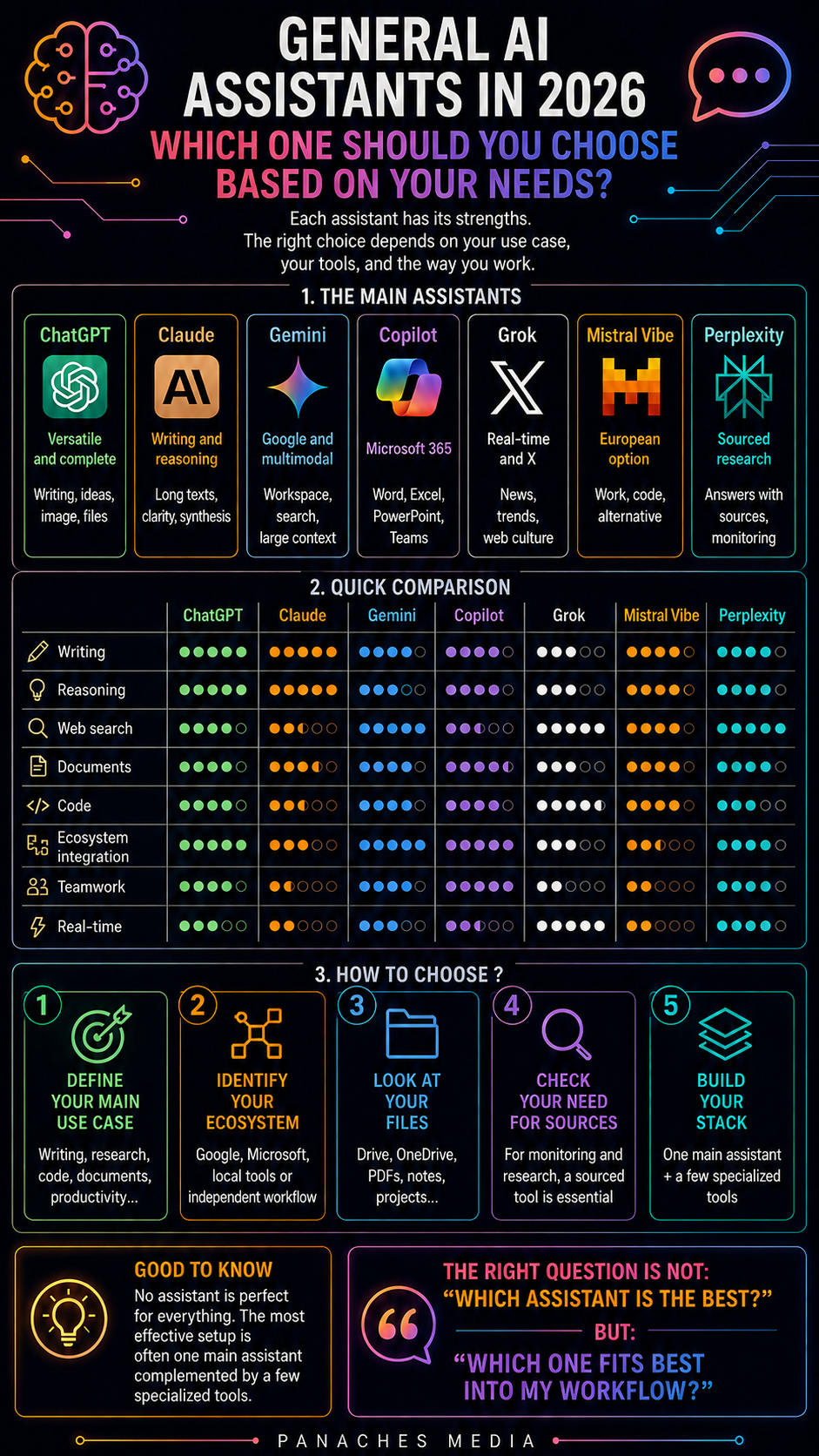
Why general AI assistants remain the main entry point
In 2026, the AI ecosystem has become enormous.
There are tools for research, coding, image generation, video production, music creation, task automation, document analysis, app building, and local model usage.
But despite this explosion of specialized tools, general AI assistants often remain the main entry point.
Why?
Because they are the most versatile tools.
You can ask them to write a text, reformulate an idea, summarize a document, prepare an outline, explain a concept, translate, fix code, compare options, help make a decision, or turn a confused thought into a clear structure.
ChatGPT, Claude, Gemini, Microsoft Copilot, Grok, and Mistral Vibe are no longer just chatbots. They are conversational workspaces, sometimes connected to files, tools, search engines, images, documents, business applications, or agents.
So the question is no longer whether you should use an AI assistant.
The real question is:
Which general assistant best fits my everyday work?
There is no need to look for an absolute winner. What matters is understanding the strengths of each assistant.
General assistant does not mean universal assistant
A general AI assistant can do many things, but that does not mean it is the best at everything.
One assistant may be excellent at structuring an article, but less convenient for working inside Google Drive.
Another may be very good with documents, but less natural for image creation.
Another may be deeply integrated into an office suite, but less pleasant for creative writing.
Another may be useful for following current events, but less suited to long editorial work.
Another may be interesting for sovereignty or the European ecosystem, but less dominant in some consumer-facing features.
Several criteria therefore need to be distinguished:
- writing quality;
- reasoning;
- web search;
- document work;
- multimodality;
- code;
- office integration;
- memory and projects;
- voice;
- image;
- price;
- privacy;
- ecosystem;
- model availability;
- ease of use.
A good general assistant is not only a powerful model.
It is a combination of model, interface, tools, memory, files, integrations, and workflow.
ChatGPT: the default versatile choice
ChatGPT remains one of the most versatile general assistants.
Its main value is its ability to cover many use cases inside one interface.
It can help with:
- writing;
- rewriting;
- translation;
- structuring ideas;
- analyzing documents;
- working with files;
- generating images;
- researching;
- coding;
- preparing tables;
- reasoning through complex problems;
- producing scripts, outlines, posts, articles, or summaries.
ChatGPT is often the right choice when you want a central assistant capable of moving from one task to another.
For a content creator, it can help prepare an article, generate an infographic, structure a short video, or adapt a text into several formats.
For a developer, it can help understand a bug, design an architecture, produce a script, or analyze an error.
For a freelancer, it can become a general work assistant: writing, research, organization, communication, strategy, synthesis.
Its strength is versatility.
Its limit is also that versatility: when a use case becomes very specialized, a dedicated tool can be more effective. For rigorous source-based research, Perplexity or NotebookLM may be better suited. For a full codebase, Cursor, Claude Code, or Codex can go further. For editable design, Canva or Firefly will be more practical.
ChatGPT is therefore an excellent center of gravity.
But it does not replace an entire stack.
Claude: long-form writing, clarity, and reasoning
Claude is often appreciated for the quality of its writing, its ability to structure thought, and its comfort with long documents.
It is especially interesting for:
- writing articles;
- improving style;
- summarizing documents;
- structuring analysis;
- thinking through strategy;
- correcting text;
- preparing a synthesis;
- working on long-form content;
- explaining complex topics;
- helping with code and refactoring.
Claude often gives a strong sense of writing fluency. It is useful when you are looking for natural, well-organized text, less mechanical phrasing, or a response that takes the time to build a line of reasoning.
For a writer, editor, consultant, trainer, or editorial creator, Claude can be a very strong companion.
It is also excellent at transforming raw material into a clear plan: notes, ideas, discussions, documents, source feedback, briefs, or long articles.
Its main limitation is workflow. Depending on the use case, ChatGPT may be more versatile in terms of integrated tools, image, or ecosystem; Gemini may be more natural inside Google; Copilot may be more integrated with Microsoft; and specialized tools may be more powerful in their own domains.
Claude is therefore excellent when the quality of reflection, synthesis, and writing is central.
It is less obvious if your main need is deep integration into an office suite or a specific business tool.
Gemini: the natural assistant for the Google ecosystem
Gemini makes a lot of sense for users already anchored in the Google ecosystem.
Its value is linked to several dimensions:
- integration with Google Workspace;
- documents, emails, calendar, and Drive depending on the plan;
- Google search and services;
- multimodality;
- processing of large context volumes;
- natural connection with NotebookLM;
- mobile and Android use;
- video, image, audio, and specialized Google models.
For someone who works a lot with Gmail, Google Docs, Google Sheets, Slides, Drive, or NotebookLM, Gemini can become very practical.
It is especially interesting for:
- summarizing documents;
- preparing replies;
- organizing research;
- working on Google files;
- using NotebookLM;
- connecting assistant, documents, and productivity;
- using multimodal capabilities.
Gemini is also important for use cases where multimodal analysis matters: text, image, audio, video, long documents, large context.
Its limitation is that its value depends strongly on your ecosystem.
If you mostly work in Google, it can become natural. If you are more Microsoft-based, local-first, working in separate creative tools, or inside a specific development environment, it may be less central.
Gemini is therefore very interesting for Google-first profiles and for document or multimodal workflows.
Microsoft Copilot: the assistant for Microsoft organizations
Microsoft Copilot is not just a chatbot.
Its main value is its integration into Microsoft 365: Word, Excel, PowerPoint, Outlook, Teams, OneDrive, SharePoint, and enterprise environments.
For an organization already built around Microsoft, Copilot can be much more useful than an isolated assistant.
It can help with:
- summarizing meetings;
- preparing emails;
- working in Word;
- analyzing Excel sheets;
- producing presentations;
- retrieving information inside the work environment;
- supporting teams;
- integrating agents;
- respecting administrative, security, and compliance frameworks.
Copilot becomes especially relevant when AI needs to be connected to the real work of a team.
In a company, the problem is not only having a good model. It is also about managing rights, files, data, identities, compliance, history, permissions, and existing tools.
That is where Copilot is strong.
Its limitation is that it is less interesting if you are not already using Microsoft 365. For a solo creator, writer, artist, or independent developer who does not live inside Outlook, Teams, Word, or Excel, ChatGPT, Claude, Cursor, NotebookLM, or other tools may feel more natural.
Copilot is therefore less a “universal” general assistant than an ecosystem general assistant.
It is very strong when Microsoft is already the center of work.
Grok: real-time information, X, and news culture
Grok occupies a different position.
Its main value comes from its connection with xAI, X, and real-time-oriented use cases.
Grok is especially interesting for:
- following trends;
- understanding what circulates on X;
- exploring current events;
- reacting quickly to a topic;
- analyzing public discussions;
- producing responses or angles linked to web culture;
- combining web research and social context.
For some users, this is a real advantage.
If your work depends heavily on news, trends, debates, memes, weak signals, or what happens on X, Grok can have a specific usefulness.
But it is not necessarily the best assistant for every use case.
For long, highly structured writing, Claude may feel more pleasant. For a very complete workflow with images, files, and tools, ChatGPT may be more central. For Google Workspace, Gemini will be more natural. For Microsoft 365, Copilot will be more integrated.
Grok is therefore interesting as an assistant for monitoring, news, real-time signals, and network culture.
It is less obvious as a single main assistant if your work is mostly documentary, long-form creative, or office-based.
Mistral Vibe: the European option oriented toward work and code
Mistral has long been associated with its models. With Vibe, the approach becomes more directly usable as an assistant for work and code.
The value of Mistral Vibe lies in bringing a European alternative into the AI assistant landscape, with an orientation toward work, code, agents, and professional use cases.
It is interesting for:
- users who want to follow the European AI ecosystem;
- teams sensitive to technological sovereignty;
- developers curious about Mistral models;
- organizations looking for alternatives to major American players;
- use cases combining chat, work, and code.
Vibe may not have the same mainstream visibility as ChatGPT, Claude, or Gemini, but it is worth watching.
In a landscape where dependence on a single provider becomes a real topic, European alternatives matter strategically.
Its limitation is that, depending on the use case, its ecosystem and integrations may be less dominant than those of OpenAI, Google, or Microsoft.
Mistral Vibe is therefore an interesting choice for profiles looking for diversity, openness, European sensitivity, and work/code use cases.
Perplexity: more of a research assistant than a complete generalist
Perplexity deserves a separate place.
It may look like a general assistant, but its real strength remains source-based research.
It is very useful for:
- asking a question with sources;
- exploring a topic;
- comparing information;
- following current events;
- finding references;
- preparing monitoring work;
- quickly verifying a lead.
But Perplexity is not exactly in the same category as ChatGPT, Claude, Gemini, or Copilot.
It is less a complete general assistant than a research assistant.
In an AI stack, it combines very well with a main assistant.
For example:
- ChatGPT or Claude for writing and structuring;
- Perplexity for research and verification;
- NotebookLM for working with your own documents.
This distinction matters.
For research, Perplexity can be better than a general assistant. But for long writing, project organization, or a complete workflow, it is not necessarily the ideal center.
Which assistant should you choose depending on your profile?
The right choice depends on your profile.
For a content creator, ChatGPT and Claude are often the two main references. ChatGPT brings versatility and image. Claude brings strong writing quality. Perplexity or NotebookLM can complement them for research.
For a writer, editor, or journalist, Claude is very strong for long texts, structure, and nuance. ChatGPT remains excellent for variants, formats, ideas, and broader workflows.
For a developer, ChatGPT, Claude, or Gemini can help with thinking, but the real professional tools will often be Cursor, Claude Code, Codex, Copilot, or Windsurf. The general assistant should then be used for reasoning, explanation, and planning.
For a Google user, Gemini becomes very logical, especially if the work relies on Gmail, Docs, Drive, Sheets, Slides, or NotebookLM.
For a Microsoft company, Copilot is often the natural choice because it integrates with the tools teams already use.
For someone who follows news and X trends closely, Grok can be relevant as a complement.
For a profile sensitive to the European ecosystem, Mistral Vibe deserves to be tested.
For research and monitoring, Perplexity should be considered an essential complement rather than a simple competitor.
Should you use one assistant or several?
The most realistic answer is: one main assistant, then one or two complements.
Using five assistants in parallel every day can quickly become counterproductive.
You spend time comparing.
You hesitate before every request.
You scatter your conversations.
You multiply subscriptions.
You lose context.
You stop building a stable workflow.
For most users, the best setup is simpler:
- one main assistant;
- one source-based research tool;
- one specialized tool for your profession;
- optionally, a second assistant to compare or improve important answers.
For example:
ChatGPT + Perplexity + Canva for a creator.
Claude + NotebookLM + Obsidian for a writer.
Gemini + NotebookLM + Google Workspace for a Google profile.
Copilot + Teams + Office for a Microsoft company.
ChatGPT or Claude + Cursor + Claude Code for a developer.
Mistral Vibe + local tools for a more sovereignty/open-source profile.
The goal is not to collect assistants.
The goal is to build a coherent workflow.
The criteria that really matter
Before choosing an AI assistant, you should ask a few simple questions.
1. What is my main use case?
Writing? Research? Code? Documents? Productivity? Meetings? Creation? Monitoring? Training?
The main use case should guide the choice.
2. Where is my data?
In Google Drive? Microsoft 365? Local files? Notion? PDFs? A Git repository? Conversations?
The most useful assistant is often the one that best integrates with where the work already exists.
3. Do I need sources?
If the answer is yes, you need a research tool or a verification method. A well-written assistant is not always enough.
4. Do I need to work on long documents?
In that case, file handling, context, projects, and sources become central.
5. Do I need image, voice, or multimodality?
Some assistants are more complete than others for those use cases.
6. Do I need a team solution?
The needs of a freelancer and a company are not the same. Administration, compliance, permissions, history, and integrations become important.
7. Do I need privacy or local control?
If yes, you should also look at local, open-source, or data-conscious solutions.
These questions matter more than a general ranking.
Frequent mistakes to avoid
The first mistake is looking for “the best AI assistant” without specifying the use case.
An assistant can be excellent in one area and average in another.
The second mistake is changing assistants every week.
Testing is useful, but constant switching prevents you from building habits, prompts, projects, and a method.
The third mistake is believing that a general assistant replaces every specialized tool.
For code, image, video, audio, scientific research, or automation, dedicated tools are often more effective.
The fourth mistake is not verifying answers.
Even an excellent assistant can be wrong, invent information, misdate something, or summarize too quickly.
The fifth mistake is ignoring the ecosystem.
A very powerful assistant that is poorly integrated with your files, tools, and method can become less useful than a less spectacular assistant placed more naturally inside your workflow.
The sixth mistake is multiplying subscriptions without a clear use case.
Each tool must have a function.
Otherwise, the stack becomes heavier than the problem it was supposed to solve.
Inside Panaches
Panaches follows a different logic from an isolated general assistant.
An assistant can help think, write, summarize, or explain. But real work is not limited to a conversation.
A creative or technical project often involves:
- notes;
- documents;
- PDFs;
- images;
- screenshots;
- moodboards;
- code;
- articles;
- files;
- ideas;
- translations;
- exports;
- social content.
The problem is rarely only “which assistant should I choose?”
The problem is often:
Where does all my work come together?
That is where a workspace like Panaches becomes interesting.
The AI assistant can be a work layer, but it needs to be connected to an environment: documents, notes, media, code, organization, references, content, and projects.
In this logic, the best assistant is not necessarily the one that answers best in an isolated conversation.
It is the one that best integrates into a complete creative workflow.
Panaches aims precisely at that kind of environment: a local space to write, read, organize, code, create, document, and work with AI without scattering the whole project across fifteen interfaces.
Conclusion: choosing an assistant means choosing a work center
In 2026, ChatGPT, Claude, Gemini, Copilot, Grok, Mistral Vibe, and Perplexity are not simply competing chatbots.
They represent different ways of working with AI.
ChatGPT is the versatile choice.
Claude is very strong for writing, clarity, and documents.
Gemini becomes natural inside the Google ecosystem.
Copilot makes the most sense in Microsoft 365.
Grok is interesting for real-time information, X, and trends.
Mistral Vibe brings a European alternative oriented toward work and code.
Perplexity remains an excellent source-based research companion.
The right choice depends on your use case, your files, your ecosystem, your verification requirements, and your way of working.
So the question is not:
Which AI assistant is the best?
The real question is:
Which assistant can become the reliable center of my workflow?
A good assistant should not only answer.
It should help you think better, produce better, and organize your work better.
FAQ
What is the best general AI assistant in 2026?
There is no single best assistant. ChatGPT is very versatile, Claude is excellent for writing and documents, Gemini is strong inside the Google ecosystem, Copilot inside Microsoft 365, Grok for real-time information, and Mistral Vibe as a European option oriented toward work and code.
Should I use ChatGPT or Claude?
ChatGPT is often better as a versatile assistant with many integrated tools. Claude is often appreciated for long texts, writing quality, clarity, and structure. The two can complement each other.
Is Gemini mainly useful for Google users?
Yes. Gemini becomes especially interesting if you already work with Gmail, Google Docs, Drive, Sheets, Slides, or NotebookLM. Its value increases with integration into the Google ecosystem.
Is Microsoft Copilot useful for a freelancer?
It can be if the freelancer works heavily inside Microsoft 365. But its main value remains integration with Word, Excel, PowerPoint, Outlook, Teams, and Microsoft professional environments.
Can Grok replace ChatGPT or Claude?
Not necessarily. Grok is especially interesting for real-time information, X, trends, and some current research. For long-form writing, documents, or a complete creative workflow, ChatGPT or Claude may be better suited.
Is Perplexity a general assistant?
Perplexity can answer many questions, but its real strength is source-based research. It is often better as a complement to a main assistant than as the only work assistant.
How many AI assistants should you use?
For most users, one main assistant is enough, supported by a research tool and specialized tools depending on the profession. A second assistant can be useful to compare important answers.