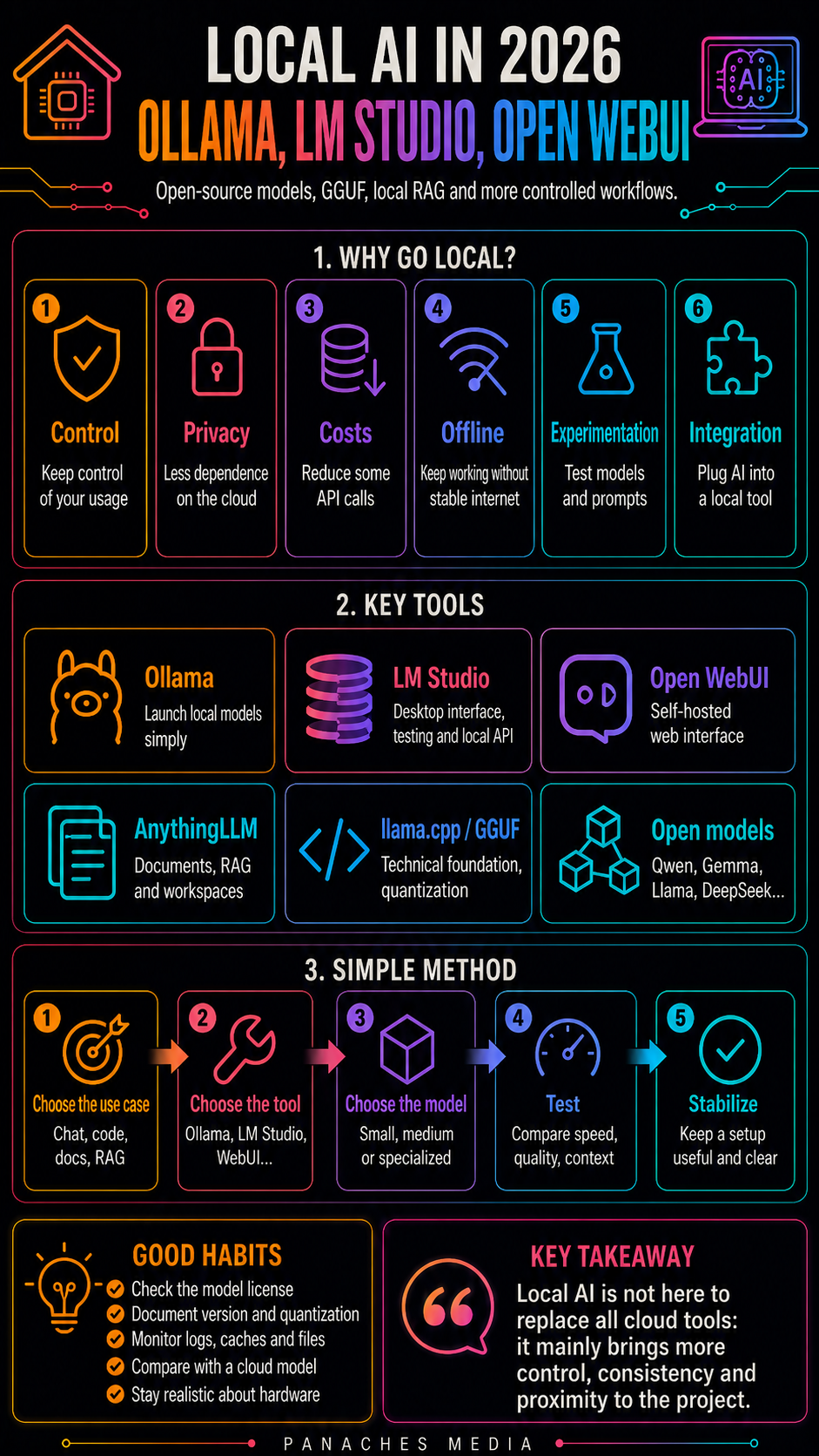
Why local AI is coming back to the center of the game
For several years, generative AI was mostly associated with the cloud.
You opened ChatGPT, Claude, Gemini, or Copilot.
You wrote a request.
The computation happened on remote servers.
The result came back in the interface.
This approach remains very powerful.
The best cloud models are fast, often highly capable, easy to use, regularly updated, and integrated into complete tools. For many use cases, they remain the most practical choice.
But in 2026, another path is becoming increasingly important: local AI.
The idea is simple.
Instead of sending every request to an external service, you run a model directly on your computer, personal server, or controlled machine.
This model can be used to chat, summarize, code, analyze notes, query documents, test prompts, run a private assistant, prototype a feature, or integrate AI into software.
Local AI does not replace all cloud AI.
But it answers different needs:
- keeping more control over your data;
- working offline or with less dependency;
- avoiding some API costs;
- testing open-source or open-weight models;
- integrating AI into local software;
- creating private workflows;
- experimenting without multiplying subscriptions;
- understanding how models actually work.
So the right question is not:
Is local AI better than cloud AI?
The real question is:
In which use cases does local AI bring more control, comfort, or coherence?
Local AI does not mean magical AI
Two opposite mistakes should be avoided.
The first mistake is believing that local AI is useless because the best cloud models are more powerful.
That is false.
Even a smaller local model can be very useful for writing, summarizing, coding, rewriting, classifying, working on notes, preparing prompts, running document RAG, or integrating AI into a local tool.
The second mistake is believing that local AI is automatically better, more reliable, more private, and more sovereign in every case.
That is false too.
A local model can be less capable.
It can hallucinate.
It can be slow.
It can lack context.
It can be poorly quantized.
It may not follow instructions correctly.
It can leave traces on the machine.
It can require configuration.
It can be difficult to update.
It can consume a lot of memory.
Local AI is a matter of trade-offs.
You gain control.
You sometimes lose raw power.
You gain independence.
You sometimes lose simplicity.
You gain relative privacy.
You still need to manage files, histories, caches, models, and settings.
Local AI is therefore not a magic button.
It is an architecture choice.
The main building blocks of local AI
To understand local AI, you need to distinguish several building blocks.
The first block is the model.
This is the engine: Llama, Gemma, Qwen, DeepSeek, Mistral, Phi, GLM, Kimi, or other model families. Some are small, others huge. Some are good at code, others at writing, reasoning, or multilingual work.
The second block is the model format.
Locally, formats such as GGUF are often used with engines like llama.cpp. Quantization reduces the model’s size and memory needs, at the cost of a quality loss that may be more or less visible depending on the compression level.
The third block is the runtime.
This is what runs the model: llama.cpp, Ollama, LM Studio, vLLM, MLX, Transformers, ExLlama, or other engines. The runtime affects speed, compatibility, CPU/GPU usage, server options, and sometimes stability.
The fourth block is the interface.
This is what the user sees: LM Studio, Open WebUI, AnythingLLM, Jan, GPT4All, a custom app, a terminal, or an interface integrated into software.
The fifth block is the document workflow.
If you want to query PDFs, notes, or folders, you often need to add RAG: document chunking, embeddings, indexing, retrieval, citations, and context injected into the model.
The sixth block is the integration.
A local model can be used alone, but also inside software, an editor, a notes tool, a local server, an internal API, or a workspace like Panaches.
Local AI is therefore not one single tool.
It is a chain.
Ollama: the simple terminal tool for running local models
Ollama has become one of the most popular tools for quickly running local models.
Its main value is simplicity.
You install Ollama, download a model, then run it locally with a command or through tools that connect to its server.
Ollama is especially useful for:
- quickly testing a model;
- running local AI in the terminal;
- serving a model to another interface;
- connecting Open WebUI;
- prototyping a local application;
- using different models without reconfiguring everything;
- creating a simple base for developer workflows.
For developers, Ollama is very practical because it exposes a simple way to use models locally in scripts, apps, or interfaces.
For advanced users, it helps make “running a model” concrete.
But Ollama is not always the most comfortable interface for everyone.
Some people prefer a graphical application.
Others want to compare models easily.
Others want to manage settings visually.
Others want to chat with files, presets, or an interface closer to a classic assistant.
Ollama is therefore an excellent local building block.
But it is often even better when combined with an interface such as Open WebUI, AnythingLLM, or a custom tool.
LM Studio: the simple and visual desktop approach
LM Studio answers another need: making local AI more accessible from a desktop application.
Its value is providing a graphical interface to search, download, load, and use local models.
This is often more comfortable for users who do not want to live in the terminal.
LM Studio is useful for:
- discovering models;
- chatting with a local model;
- testing several models;
- adjusting settings;
- managing presets;
- launching a local server;
- exposing a local API compatible with known formats;
- experimenting without writing code.
For a creator, writer, freelancer, or curious user, LM Studio can feel more natural than Ollama.
You can see the models.
You can load them.
You can test.
You can compare.
You can adjust.
It is a good entry point for understanding the difference between model, quantization, context, temperature, speed, and memory consumption.
LM Studio is also interesting for workflows where you want to use a local model as a service.
For example, an application can call LM Studio’s local API like it would call a cloud API, but while staying on the machine or local network.
Its main limitation remains the same as local AI in general: performance depends on hardware, model, quantization, and settings.
LM Studio makes the experience simpler.
But it does not turn a small computer into an unlimited AI server.
Open WebUI: a self-hosted web interface for local and hybrid models
Open WebUI is another important building block.
Its value is offering a modern, self-hostable web interface that can connect to Ollama and compatible APIs.
This makes it possible to create an experience closer to a web assistant, but controlled by the user or team.
Open WebUI can be useful for:
- chatting with local models;
- connecting Ollama;
- connecting cloud or local APIs;
- managing several users depending on the setup;
- adding tools;
- working with a web interface;
- centralizing several models;
- creating a hybrid local/cloud environment.
Its value is especially strong for people who want a more complete local interface than a terminal.
It is also interesting for technical teams that want a self-hosted space to test, compare, integrate, or deploy models.
Open WebUI shows an important evolution.
Local AI is no longer just a command line.
It can become a complete interface, connected to several engines, with a workspace logic, tools, and sometimes knowledge features.
But like any self-hosted tool, it requires maintenance.
Installing, updating, securing, backing up, managing access, controlling connectors, and understanding where data is stored remain essential.
AnythingLLM: documents, RAG, and more accessible local agents
AnythingLLM occupies an interesting place because it focuses heavily on document use.
Its goal is to let users work with their documents, use RAG, query files, create workspaces, and sometimes connect agents or tools.
This matters because many users do not only want to chat with a model.
They want to ask questions to their own documents.
AnythingLLM can be useful for:
- creating a document assistant;
- querying PDFs;
- working with a note base;
- doing RAG without coding everything;
- creating workspaces;
- combining documents and models;
- using local or remote models depending on the case;
- experimenting with more private document AI.
For a freelancer, small team, or advanced user, AnythingLLM can be a good compromise between simplicity and control.
It avoids having to build the whole RAG chain manually.
But one important caution remains.
A RAG tool does not automatically guarantee truth.
You still need to check sources, document chunking, retrieval quality, citations, answers, and model limitations.
A good RAG system can help retrieve and synthesize.
A bad RAG system can give a very confident answer based on the wrong passage.
llama.cpp and GGUF: the technical foundations of lightweight local AI
Behind many local tools, you find more technical building blocks such as llama.cpp and the GGUF format.
llama.cpp matters because it helped make local inference accessible on a wide range of machines.
Its goal is simple: run language models efficiently, with minimal dependencies, on local or server hardware.
GGUF has become a very common format for distributing quantized models usable locally.
Why does this matter?
Because not everyone has a machine with several powerful GPUs.
Quantization makes it possible to run models with less memory. A model that would otherwise be too heavy can become usable in a more compact form.
That is what makes local AI possible on consumer machines.
But there is a trade-off.
The more you compress, the more quality you may lose.
The bigger the model, the more memory it needs.
The longer the context, the more it consumes.
The more speed you want, the more hardware matters.
Understanding llama.cpp, GGUF, and quantization helps avoid a lot of confusion.
File size is not the only issue.
The real issue is available memory, speed, context, model quality, and inference engine.
Open-source, open-weight models and licenses: be careful with the words
People often talk about “open-source models,” but the term is sometimes used too quickly.
Several situations need to be distinguished.
Some models are truly open source, with code, weights, an open license, and permissive conditions.
Others are more accurately open-weight: the weights are accessible, but the license may impose limits.
Others are free for some uses, but not free in the strict sense.
Others are available for download, but with commercial restrictions.
This distinction matters.
For personal users, it may seem secondary.
For a company, commercial software, a distributed product, or a public project, it becomes essential.
Before integrating a local model into a workflow or product, you need to check:
- the license;
- commercial rights;
- usage restrictions;
- attribution obligations;
- redistribution limits;
- data-related rules;
- compatibility with the project.
A local model is not automatically free of rights.
Downloadable does not mean free.
Which local model should you choose?
There is no single best local model.
The choice depends on hardware, use case, and tolerance for trade-offs.
You can think in families.
Small models are useful for:
- fast answers;
- rewriting;
- simple tasks;
- extraction;
- classification;
- tests;
- lightweight integration;
- modest machines.
Medium models are often a good balance for:
- writing;
- synthesis;
- simple code;
- personal assistants;
- short documents;
- creative workflows;
- everyday local use.
Large models are more interesting for:
- more complex reasoning;
- more serious code;
- denser analysis;
- longer tasks;
- better understanding;
- more difficult instructions.
But they require much more memory and power.
Some models are specialized:
- code;
- reasoning;
- multilingual work;
- vision;
- embeddings;
- agents;
- instruction following;
- long context.
So the right choice is not made only from rankings.
It is made by testing.
A good method is to keep three models:
- a small fast model;
- a balanced main model;
- a heavier model for difficult tasks.
This avoids trying to do everything with the same engine.
Hardware: RAM, VRAM, CPU, and realistic expectations
Local AI depends heavily on hardware.
The issue is not only the model’s size on disk.
What really matters is:
- RAM;
- VRAM;
- CPU;
- GPU;
- memory bandwidth;
- quantization;
- context size;
- backend used;
- operating system;
- execution settings.
A model may weigh only a few gigabytes, but consume more memory depending on context and parameters.
A CPU can run a model, but slowly.
A GPU can greatly accelerate it, but only if the model fits in VRAM or if offloading is handled well.
Large RAM lets you load more things, but does not guarantee fast generation.
A large context window consumes more memory.
More aggressive quantization reduces needs, but can reduce quality.
For reasonable use, it is better to avoid chasing the largest possible model.
A well-chosen, well-quantized, well-configured medium model can be more useful than a huge model that is too slow.
The right question is not:
What is the largest model I can launch?
But:
What is the most useful model I can use comfortably?
Where local AI is truly useful
Local AI is especially interesting in several cases.
1. Personal notes
If you want to work on private notes, drafts, ideas, journals, or notebooks, local AI can provide psychological and practical comfort.
2. Sensitive documents
Contracts, client files, internal documents, private sources, archives, confidential projects: some files should not be sent anywhere casually.
3. Development
A local model can help explain code, generate scripts, document, test, or function inside a development environment without systematically relying on an external API.
4. Experimentation
Testing models, prompts, embeddings, RAG, agents, or integrations is often freer locally.
5. Costs
For frequent but simple uses, local AI can avoid continuous API consumption.
6. Offline use
Some workflows can continue even without a stable connection.
7. Local-first software
If the product itself is local, integrating local AI can be coherent with the software’s philosophy.
8. Training and understanding
Running a local model helps concretely understand AI constraints: memory, speed, model, context, parameters, hallucinations.
Local AI is therefore very useful when control matters as much as raw performance.
The limits of local AI
Local AI also has clear limits.
The first limit is power.
The best cloud models often remain superior for complex reasoning, advanced multimodality, difficult code, long contexts, and integrated tools.
The second limit is speed.
A local model can be slow if the machine is not adapted.
The third limit is configuration.
You need to choose a model, quantization, runtime, interface, settings, and sometimes embeddings and a document base.
The fourth limit is maintenance.
Models evolve, tools change, versions break, files accumulate.
The fifth limit is reliability.
A local model can hallucinate as much as a cloud model, sometimes more.
The sixth limit is local security.
Data may not leave for the cloud, but it exists on the machine: histories, caches, models, logs, vector databases, temporary files.
The seventh limit is integration.
A local model alone does not automatically create a good assistant. You need an interface, method, tools, and workflow.
Local AI is therefore powerful, but it requires more user responsibility.
Local RAG: working with documents without sending everything to the cloud
Local RAG is one of the most important uses of local AI.
The principle is simple.
Instead of asking the model to answer only from its general memory, you give it passages extracted from your documents.
The workflow often looks like this:
- collect documents;
- split them into chunks;
- create embeddings;
- store these embeddings in a database;
- retrieve relevant passages when a question is asked;
- send those passages to the model;
- generate an answer;
- verify the sources.
This is useful for:
- project documentation;
- personal notes;
- PDFs;
- internal bases;
- articles;
- reports;
- manuals;
- archives;
- research folders;
- local knowledge bases.
But local RAG must be designed carefully.
If documents are badly chunked, the answer will be poor.
If retrieval finds the wrong passage, the model will answer off-target.
If citations are not visible, trust decreases.
If documents are outdated, the answer will be outdated.
If the model is too weak, it may misuse the context.
A good local RAG system must therefore be verifiable.
It must allow you to return to the original documents.
Otherwise, it gives an impression of control without real reliability.
Cloud, local, or hybrid: the best strategy is often mixed
Cloud and local should not be opposed blindly.
In practice, the best strategy is often hybrid.
Cloud is useful for:
- difficult reasoning;
- very powerful models;
- advanced multimodality;
- complex agents;
- web search;
- integrated tools;
- speed;
- maximum quality.
Local is useful for:
- drafts;
- sensitive documents;
- tests;
- notes;
- private workflows;
- repetitive tasks;
- software integration;
- controlled RAG;
- independence.
Hybrid means choosing based on sensitivity and difficulty.
For example:
- local drafts;
- final validation with a powerful cloud model;
- sensitive documents locally;
- web research in a sourced tool;
- local synthesis for a private folder;
- image or video generation in specialized tools;
- critical code with human review.
A good stack is not ideological.
It is pragmatic.
A simple method for getting started with local AI
To start properly, avoid installing everything at once.
1. Choose the use case
Before choosing a model, choose the use case.
Personal chat?
Code?
Documents?
RAG?
Project assistant?
Software integration?
Experimentation?
2. Choose the entry tool
For a simple interface: LM Studio.
For developer use: Ollama.
For a self-hosted web interface: Open WebUI.
For accessible documents and RAG: AnythingLLM.
For very technical control: llama.cpp.
3. Choose a reasonable model
Start with a medium model rather than a monster.
The goal is to get a smooth experience.
4. Test three real tasks
Not abstract prompts.
Test:
- a summary;
- a rewrite;
- a code task;
- note analysis;
- a question on a document;
- a short script;
- extraction.
5. Adjust settings
Temperature, context, token count, threads, GPU offload, quantization, prompt format: these settings can strongly change the experience.
6. Compare with a cloud model
Local should not be evaluated in isolation.
Comparing the same task with ChatGPT, Claude, or Gemini helps understand strengths and limits.
7. Stabilize a workflow
When a model and tool work well, keep them for a specific use.
Changing models every day prevents you from building a method.
Pitfalls to avoid
The first pitfall is wanting to run the largest possible model.
A huge but slow model will quickly be abandoned.
The second pitfall is confusing size and quality.
A small, well-trained model can be more useful than a larger but poorly adapted one.
The third pitfall is neglecting quantization.
Two versions of the same model may behave differently depending on compression.
The fourth pitfall is forgetting context.
A model may be good on a short question and worse on a long folder.
The fifth pitfall is believing local means totally private.
Data may stay on the machine, but it can also be stored in histories, caches, or local files.
The sixth pitfall is never updating.
Models and tools evolve quickly. A local setup must be maintained.
The seventh pitfall is wanting to replace every cloud tool.
Local AI is a strategic complement, not necessarily a total replacement.
The eighth pitfall is not documenting your setup.
Model, version, quantization, settings, tool, date: keep track of what works.
Local AI and creation: why it matters for artists and writers
For creators, local AI can change the relationship to the tool.
It makes it possible to work with AI closer to a studio than to a remote service.
It can help:
- explore ideas;
- rewrite drafts;
- prepare character sheets;
- classify notes;
- generate variants;
- summarize documents;
- prepare scripts;
- transform articles;
- keep private archives;
- work on narrative worlds;
- experiment without cost pressure.
For writers, artists, or independent creators, this logic matters.
Not every draft is meant for the cloud.
Not every idea should be sent to an external tool.
Not every project is ready to be exposed.
Not every workflow needs the best model in the world.
Sometimes, you simply need a local assistant that is available, discreet, sufficient, and integrated into the project.
That is what makes local AI interesting for creation.
Not because it is always stronger.
But because it can be more intimate, more controlled, and more coherent with the workspace.
Inside Panaches
Panaches has a direct connection with this topic.
From the beginning, Panaches was not designed as a simple website or web application. It is a local-first desktop workspace: a place to write, read, organize, code, view documents, manage media, prepare content, work with references, and integrate AI into the workflow.
In this logic, local AI is not a gadget.
It is coherent with the very idea of the software.
An assistant like Ambre AI can help:
- summarize a document;
- rewrite a note;
- prepare an outline;
- analyze a file;
- explain an excerpt;
- support an article;
- structure an infographic;
- help with code;
- work without sending every draft to an external service.
The point is not to pretend that a local model will outperform the best cloud models.
The point is to provide an AI layer integrated into the workspace.
For Panaches, this means:
- AI can be disabled;
- the model is not imposed;
- a model can be downloaded;
- local logic;
- respect for the user’s project;
- no total dependency on a single provider;
- possible cloud use as a complement when needed.
This is an important position.
In a world where everything pushes toward subscriptions, platforms, and remote services, a local workspace with integrated AI recalls a simple idea:
The project should remain with the user.
AI should help the creator.
It should not become the place where all work becomes scattered.
Conclusion: local AI is about control, not nostalgia
In 2026, local AI is no longer a curiosity reserved for enthusiasts.
With Ollama, LM Studio, Open WebUI, llama.cpp, AnythingLLM, GGUF, open-source models, and RAG workflows, it becomes possible to run useful assistants on personal machines or controlled environments.
But local AI must be understood correctly.
It is not always more powerful than the cloud.
It is not automatically private.
It is not maintenance-free.
It is not free in time, energy, or complexity.
It does not replace every specialized tool.
Its real value lies elsewhere.
It provides more control.
It enables experimentation.
It protects certain workflows.
It reduces some dependencies.
It makes it possible to integrate AI into local-first software.
It helps build assistants closer to documents, notes, files, and projects.
The right strategy is therefore not choosing local against cloud.
The right strategy is knowing what should stay local, what can go to the cloud, and how to keep a coherent workflow.
For a project like Panaches, this is a central question.
Local AI is not only a technology.
It is a way to defend a workspace that is more personal, more controlled, and closer to the creator.
FAQ
What is local AI?
Local AI means running a model directly on your computer, server, or controlled infrastructure instead of sending every request to a cloud service.
What are the best tools to start with local AI?
Ollama is very practical for launching models simply. LM Studio is more accessible with its desktop interface. Open WebUI provides a self-hosted web interface. AnythingLLM is interesting for documents and RAG. llama.cpp is a major technical building block for local inference.
What is the difference between Ollama and LM Studio?
Ollama is widely appreciated as a simple runtime, often used in the terminal or as a local server. LM Studio offers a more visual approach with a desktop interface, model management, and the ability to serve a local API.
What is GGUF?
GGUF is a file format used to distribute models optimized for local inference, especially with engines such as llama.cpp. It is often associated with quantized models.
Is local AI totally private?
Not automatically. Requests can stay on the machine if the setup is fully local, but tools can create histories, caches, logs, or local files. You need to understand where data is stored.
Can local AI be used with documents?
Yes. With tools such as AnythingLLM, Open WebUI, Dify, Obsidian, or RAG systems, it is possible to query local documents. But answers must remain verifiable with a return to sources.
Should ChatGPT or Claude be replaced by local AI?
Not necessarily. The most realistic approach is often hybrid: local for drafts, notes, sensitive documents, or tests; cloud for very complex tasks, web search, the most powerful models, or specialized tools.
Why is local AI important for Panaches?
Because Panaches is designed as a local-first workspace. A local AI such as Ambre AI can integrate directly into the user’s project, help with notes, documents, articles, files, and content, without turning every task into a cloud dependency.