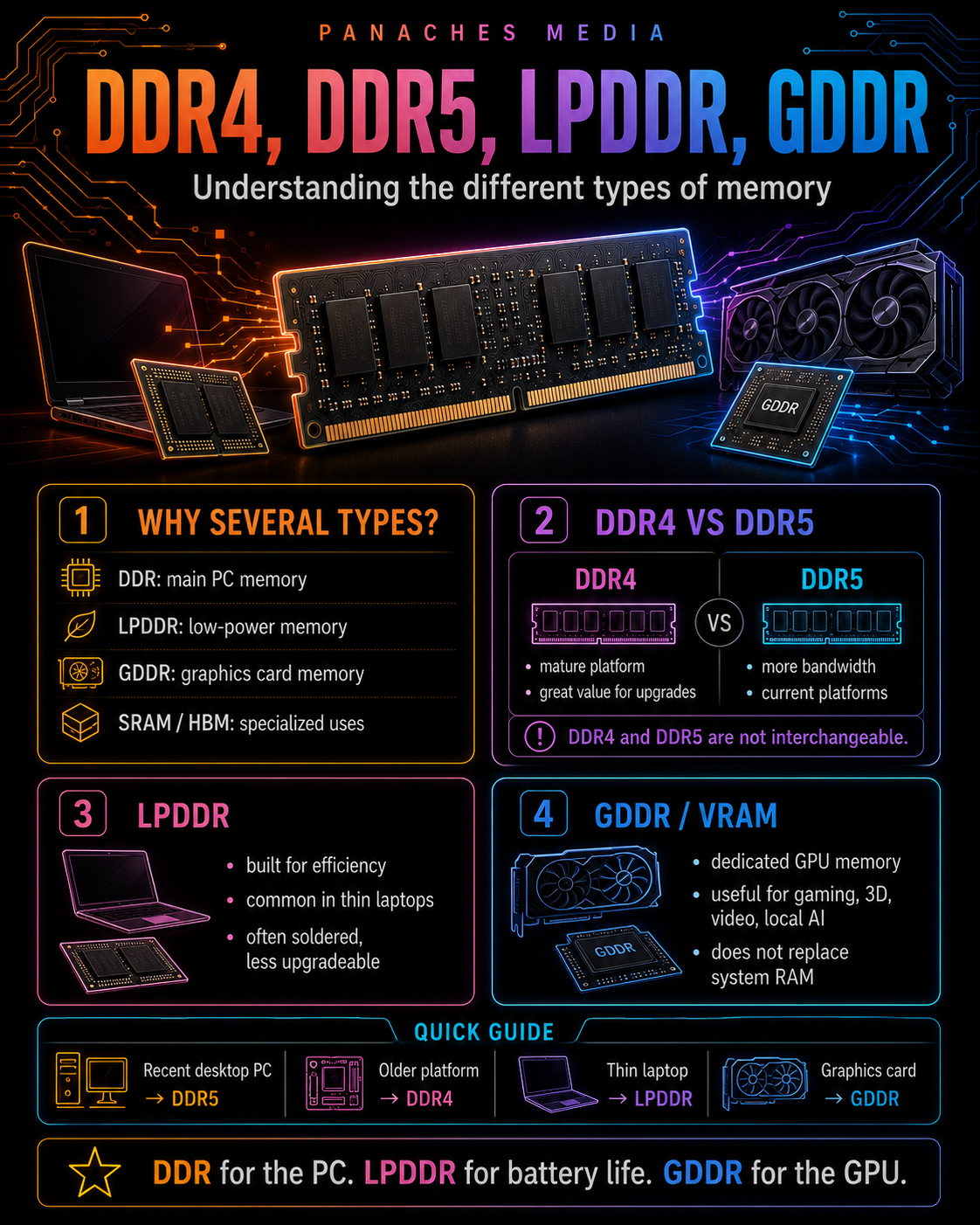
Why are there several types of memory?
When people talk about RAM, they often picture a memory stick installed on a motherboard.
That is true for many desktop PCs. But it is only part of the story.
In computing, there are several families of memory, each designed for a different purpose:
- DDR, used as main memory in desktop PCs and some laptops;
- LPDDR, optimized for mobile devices and thin machines;
- GDDR, used as graphics memory on GPUs;
- SRAM, used in processor caches;
- and sometimes specialized memory such as HBM, mainly used in professional GPUs and AI hardware.
All of these memory types are designed to bring data closer to the component that needs it.
But they do not answer the same constraints.
A desktop PC often looks for a good balance between capacity, price, bandwidth and upgradeability. A laptop also needs battery life and compactness. A graphics card mainly needs massive bandwidth. A processor needs ultra-fast cache memory, even if it is expensive and limited in capacity.
That is why “RAM” is not a single block.
It is a family of technologies.
DDR: the main memory of PCs
The memory installed in a desktop PC is usually DDR SDRAM.
DDR stands for Double Data Rate.
The idea is simple: DDR memory can transfer data twice per clock cycle. This technology increased bandwidth compared with older SDRAM memory.
Over the years, several generations appeared:
- DDR;
- DDR2;
- DDR3;
- DDR4;
- DDR5.
Each new generation generally brings:
- more bandwidth;
- better energy efficiency;
- higher capacities;
- lower voltages;
- internal architectural changes;
- better theoretical transfer rates.
But there is one essential point: these generations are not interchangeable.
A DDR4 stick does not work on a DDR5 motherboard. A DDR5 stick does not work on a DDR4 motherboard.
The connector, notch, electrical management and architecture are not the same.
The motherboard therefore decides which RAM generation can be used.
DDR3, DDR4, DDR5: generations of progress
RAM evolves by generations, a bit like processor sockets or PCIe standards.
DDR3 was very common on PCs from the 2010s. It is still present in older machines, but it is no longer a relevant choice for building a modern PC.
DDR4 dominated many consumer, gaming and professional PCs for several years. It is still very present, especially on AMD AM4 platforms and some Intel LGA1700 platforms.
DDR5 is the current generation for recent platforms. It accompanies AMD AM5 and Intel LGA1851 in particular, and it is becoming the standard for new configurations.
Moving from one generation to another does not only mean “faster”.
It also means a new platform, a new motherboard, sometimes a new processor, and often a different cost.
That is why RAM should not be chosen in isolation.
RAM is chosen with:
the processor + the motherboard + the platform.
DDR4: still useful, but less future-facing
DDR4 remains important in 2026.
It is no longer the most modern memory, but it is still very common in existing configurations and economical machines.
It is found especially on:
- AMD AM4 platforms;
- some Intel LGA1700 boards;
- many older laptops;
- office machines;
- budget gaming PCs;
- second-hand or clearance configurations.
Its main strength is the cost / availability ratio.
DDR4 is mature, widely available and often cheaper than DDR5. For upgrading an older machine, it can be very interesting.
For example, moving from 8 GB to 16 GB or 32 GB of DDR4 on an existing PC can give the machine a real second life.
DDR4 therefore remains relevant in several cases:
- economical upgrade;
- reuse of an existing platform;
- office PC;
- budget gaming PC;
- secondary machine;
- second-hand configuration.
But for a new configuration intended to last a long time, DDR5 often becomes more coherent.
DDR5: memory for recent platforms
DDR5 is the modern generation of DDR memory.
It brings more bandwidth, higher potential capacities, lower voltage and a more modern internal architecture than DDR4.
One important change in DDR5 is its organization into two independent 32-bit subchannels per module, while a classic DDR module is often presented as one 64-bit channel. This split improves access efficiency for the memory controller while keeping a total 64-bit width on a non-ECC module.
In practice, DDR5 mainly targets:
- higher throughput;
- greater capacity;
- better efficiency on recent platforms;
- more headroom for future uses;
- better coherence with modern CPUs.
But it is important to stay honest: DDR5 does not mean everything automatically becomes much faster.
Depending on software, games, platform, frequency, latency and RAM capacity, the gain can be very visible, moderate or almost invisible.
Good DDR4 properly configured can still work very well. A poor DDR5 configuration, too expensive or badly tuned, is not automatically a better purchase.
DDR5 matters especially because it accompanies current platforms.
DDR4 or DDR5: the choice depends first on the motherboard
Many users ask:
“Should I buy DDR4 or DDR5?”
The real answer is often:
“Which motherboard and platform are you using?”
On AMD, the separation is quite clear:
- AM4 uses DDR4;
- AM5 uses DDR5.
On Intel, the situation has been more flexible on LGA1700. Some Intel Core desktop processors can work with DDR4 or DDR5 depending on the motherboard.
More recent Intel platforms such as LGA1851 follow a DDR5 logic.
So the rule is simple:
- new recent platform → usually DDR5;
- older platform or economical upgrade → often DDR4;
- LGA1700 → check the exact motherboard;
- AM5 → DDR5;
- AM4 → DDR4.
RAM is never chosen randomly.
It must match exactly the type supported by the motherboard.
DDR5 is faster, but not always more useful
DDR5 offers higher bandwidth than DDR4.
But bandwidth is not the only performance criterion.
You also need to consider:
- capacity;
- latency;
- timings;
- the processor’s memory controller;
- number of sticks;
- dual channel;
- XMP or EXPO profile;
- BIOS;
- type of workload.
A PC with 32 GB of DDR4 can be more comfortable than a PC with 16 GB of DDR5 if the workload quickly saturates memory.
Likewise, very fast DDR5 that is unstable or poorly configured can cause more trouble than a more reasonable kit.
For a regular user, it is often better to prioritize:
- proper compatibility;
- the right capacity;
- a reliable kit;
- a speed that makes sense for the platform;
- clean activation of the memory profile.
DDR5 is the current direction of the market, but it should not be chosen as a simple marketing argument.
DIMM and SO-DIMM: the physical format of memory sticks
Beyond DDR4 or DDR5 generation, you also need to distinguish the physical format of memory modules.
In a desktop PC, memory usually comes in DIMM modules.
These are the large sticks installed vertically on the motherboard.
In many laptops, memory instead uses SO-DIMM modules.
SO-DIMMs are smaller and designed for laptops and compact machines. They can sometimes be replaced or upgraded if the manufacturer provides accessible slots.
So a memory module can be:
- DDR4 DIMM;
- DDR4 SO-DIMM;
- DDR5 DIMM;
- DDR5 SO-DIMM.
Even if two modules belong to the same generation, they are not necessarily physically compatible.
A DDR5 DIMM desktop stick does not fit into a laptop SO-DIMM slot.
You therefore need to check two things:
memory generation and physical format.
LPDDR: low-power memory
LPDDR stands for Low Power DDR.
It is a memory family derived from DDR, but optimized for energy consumption.
It is mainly found in:
- smartphones;
- tablets;
- ultraportables;
- thin laptops;
- compact machines;
- some embedded devices.
LPDDR targets a different balance from classic DDR.
It aims to reduce power consumption, improve battery life and reduce the space occupied on the motherboard.
This is very useful in a smartphone or a very thin laptop, where every watt and every millimeter matters.
LPDDR is therefore memory designed for mobility.
It is not “better” or “worse” than classic DDR. It simply answers a different priority.
LPDDR: efficient, effective, but often soldered
LPDDR has an important advantage: it can be very energy efficient.
It enables thin, light and long-lasting machines.
But it also has a very important limitation: it is often soldered to the motherboard.
This means the user cannot replace it or increase it later.
On a desktop PC, it is often possible to add RAM. On a laptop with soldered LPDDR memory, the amount chosen at purchase is sometimes final.
This is a crucial point.
An ultraportable with 8 GB of soldered RAM may seem sufficient at purchase, but become limiting a few years later.
With a machine that has soldered RAM, it is better to anticipate.
For modern use, choosing 16 GB is often safer than 8 GB. For creative work, development or heavy multitasking, 32 GB may be more coherent if the machine offers it.
LPDDR is excellent for battery life.
But it often reduces upgradeability.
GDDR: graphics card memory
GDDR stands for Graphics Double Data Rate.
It is memory designed for graphics cards.
It is found on dedicated GPUs, as VRAM.
VRAM is used by the graphics processor to store and manipulate:
- textures;
- images;
- buffers;
- 3D scenes;
- GPU computations;
- visual effects;
- AI models;
- rendering data;
- video elements;
- information needed by the GPU.
GDDR is designed to provide very high bandwidth.
This is essential for gaming, 3D, video editing, rendering, GPU computing and local AI.
GDDR is therefore not the PC’s main RAM.
It is the graphics card’s memory.
System RAM and VRAM: two different memories
You should not confuse PC RAM with graphics card VRAM.
System RAM is used by the operating system, applications, active files and general multitasking.
VRAM is used by the GPU.
A computer can therefore have:
- 32 GB of system RAM;
- 8 GB, 12 GB, 16 GB or more VRAM depending on the graphics card.
These two amounts do not really add up.
Having 32 GB of RAM does not turn an 8 GB graphics card into a 16 GB card. Having 16 GB of VRAM does not replace a lack of system RAM.
The two memories work together, but they do not perform the same task.
For gaming, VRAM matters a lot for textures, resolution and some effects. For 3D, it can limit the size of scenes the GPU can handle. For local AI, it often determines which models can be loaded directly onto the graphics card.
RAM helps the computer. VRAM helps the GPU.
GDDR6, GDDR6X, GDDR7: why graphics memory generations matter
Like DDR, GDDR evolves by generations.
In recent years, graphics cards have used in particular:
- GDDR5;
- GDDR6;
- GDDR6X;
- GDDR7.
Each generation aims to increase bandwidth, efficiency and possible graphics performance.
GDDR7 represents a recent generation of graphics memory designed for GPUs and heavy workloads such as gaming, AI and high-performance computing.
But as with system RAM, you should not read the generation alone.
A graphics card is not judged only by its memory.
You also need to look at:
- GPU power;
- VRAM amount;
- memory bus width;
- bandwidth;
- architecture;
- power consumption;
- cooling;
- real performance in the software or games you use.
A card with newer memory is not automatically better in every situation.
But for heavy workloads, graphics memory is becoming an increasingly important criterion.
HBM: very high-bandwidth memory for specialized uses
There is also another family: HBM, for High Bandwidth Memory.
HBM is not used as standard RAM in consumer PCs.
It is mostly present in some professional GPUs, AI accelerators, compute cards or very high-end solutions.
Its particularity is that it is stacked and placed very close to the graphics processor or accelerator, with a very wide memory interface.
Its goal is simple: to provide extremely high bandwidth.
HBM is therefore very interesting for:
- scientific computing;
- AI;
- professional GPUs;
- data centers;
- specialized accelerators;
- workloads that are extremely hungry for bandwidth.
For a consumer PC, readers will encounter DDR, LPDDR and GDDR much more often.
But knowing about HBM helps understand one thing: the more a component needs to manipulate massive amounts of data, the more strategic memory becomes.
ECC, Registered, server memory: the professional case
In workstations and servers, you may also encounter specific types of memory.
The best known is ECC memory, for Error-Correcting Code.
Its role is to detect and correct certain memory errors.
This matters in environments where reliability is extremely important:
- servers;
- databases;
- scientific computing;
- critical workstations;
- virtualization;
- infrastructure;
- professional production.
There are also Registered or Buffered modules, mostly used in servers to handle large memory capacities with better electrical stability.
For a consumer PC, this is generally not necessary.
But for a workstation or server, memory is not chosen only by speed. Stability and error correction can become priorities.
Professional memory therefore follows yet another logic: less marketing, more reliability.
What memory is used in a desktop PC?
In a classic desktop PC, the main memory is almost always DDR in DIMM format.
In 2026, the real choice often comes down to:
- DDR4 for older or more economical platforms;
- DDR5 for recent platforms.
For a modern new PC, DDR5 becomes the most natural choice, because it accompanies new motherboards and recent processors.
For an upgrade, DDR4 can remain very relevant if the existing machine already uses it.
So the question is not only:
“Which RAM is best?”
But rather:
“Which RAM matches my platform and my use case?”
An AM4 PC must stay with DDR4. An AM5 PC uses DDR5. An Intel LGA1700 PC depends on the motherboard. A recent Intel LGA1851 PC uses DDR5.
The platform decides a large part of the choice.
What memory is used in a laptop?
In a laptop, the situation is more variable.
You can find:
- DDR4 SO-DIMM;
- DDR5 SO-DIMM;
- LPDDR4x;
- LPDDR5;
- LPDDR5x;
- soldered memory;
- partially upgradeable memory.
Thin and high-end laptops often use soldered LPDDR to improve battery life and reduce thickness.
Thicker gaming or professional laptops can still offer SO-DIMM slots, which sometimes allow RAM upgrades.
Before buying a laptop, you need to check:
- RAM amount;
- RAM type;
- soldered or replaceable memory;
- number of slots;
- maximum capacity;
- upgrade possibility;
- performance and battery life.
On a laptop, the amount of RAM chosen at purchase can be more important than on a desktop PC, because it may be impossible to change later.
What memory is used in a graphics card?
In a graphics card, we mainly talk about VRAM.
This memory is generally GDDR, sometimes HBM in certain professional cases.
To choose a graphics card, you need to look at:
- VRAM amount;
- memory generation;
- memory bus;
- bandwidth;
- the GPU itself;
- real performance in the target uses.
For modern gaming, VRAM amount can become important at high resolution or with heavy textures.
For 3D creation, it can limit complex scenes.
For local AI, it can determine which models can be loaded directly on the GPU.
GDDR is therefore an essential part of the graphics card, but it does not replace system RAM.
Both need to be coherent.
Comparison table of major memory families
| Memory type | Where is it found? | Strength | Main limitation |
|---|---|---|---|
| DDR4 | Desktop PCs, older laptops, older platforms | Mature, affordable, still effective | Less future-facing |
| DDR5 | Recent PCs, modern platforms | Bandwidth, capacity, modern efficiency | Sometimes higher cost, platform-dependent |
| LPDDR | Smartphones, tablets, ultraportables | Low power, compactness | Often soldered, less upgradeable |
| GDDR | Graphics cards | Very high GPU bandwidth | Does not replace system RAM |
| HBM | Pro GPUs, AI, accelerators | Massive bandwidth | High cost, specialized uses |
| SRAM | CPU caches | Very fast | Too expensive for large capacities |
This table gives an overview, but each family includes several generations and variants.
The most important thing is to understand the role.
DDR for the PC’s main memory. LPDDR for mobile and thin devices. GDDR for the graphics card. SRAM for processor caches. HBM for very specialized workloads.
Common mistakes to avoid
The first mistake is believing all RAM types are compatible with each other.
DDR4, DDR5, LPDDR and GDDR are not interchangeable.
The second mistake is buying DDR5 for a DDR4 motherboard, or the reverse.
The third mistake is confusing system RAM with VRAM. Adding a graphics card with more VRAM does not replace a lack of system RAM.
The fourth mistake is believing LPDDR is bad because it is soldered. It can be very fast and efficient, but it is less upgradeable.
The fifth mistake is choosing a laptop with too little soldered RAM.
The sixth mistake is choosing an older platform only to save money on DDR4, without looking at the total cost and lifespan of the machine.
The seventh mistake is thinking DDR5 is always visibly faster in every use case. Capacity, latency, processor and software also matter.
The eighth mistake is looking only at a graphics card’s memory generation without looking at the GPU, VRAM amount and real bandwidth.
Memory in a modern workspace
Modern uses increasingly mix many tasks.
The same computer can be used to browse, write, manage files, open PDFs, work on images, develop, run AI tools, play games, edit video or keep several applications open in parallel.
In this context, memory types complement one another.
DDR or LPDDR keeps the system and applications active. GDDR helps the GPU manipulate images, scenes, textures or calculations. The processor’s SRAM accelerates the most immediate accesses. Storage memory keeps data for the long term.
A unified workspace like Panaches illustrates this logic well. When several modules coexist — browser, notes, documents, PDFs, media, files, creative tools or specialized modules — comfort depends on the machine’s ability to keep useful data close to the right components.
Memory is therefore not just a number on a spec sheet.
It is a complete organization around the flow of data.
Key takeaways
There are several types of memory because not all devices and components have the same needs.
DDR is the main memory of PCs. DDR4 remains useful for older and more economical platforms, while DDR5 accompanies recent platforms.
LPDDR is optimized for low power consumption. It is very common in smartphones, tablets and ultraportables, but it is often soldered and therefore less upgradeable.
GDDR is graphics memory for GPUs. It serves the graphics card, not the whole system, and plays an important role in gaming, 3D, video and local AI.
HBM targets very specialized uses, with massive bandwidth for professional GPUs, AI and intensive computing.
SRAM is mainly used for processor caches, because it is very fast but too expensive to serve as main memory.
The right choice always depends on context: desktop PC, laptop, graphics card, platform, use case, upgradeability and budget.
In short:
DDR for the PC. LPDDR for battery life. GDDR for the GPU. SRAM for cache. HBM for specialized high bandwidth.
Understanding these families helps avoid bad purchases and makes spec sheets easier to read.
Memory is not only about capacity.
It is also about type, compatibility and role.