Motherboard form factor matters more than it seems
When choosing a motherboard, people often think first about the processor, socket, chipset, RAM or M.2 ports.
But another criterion can change the entire build: the form factor.
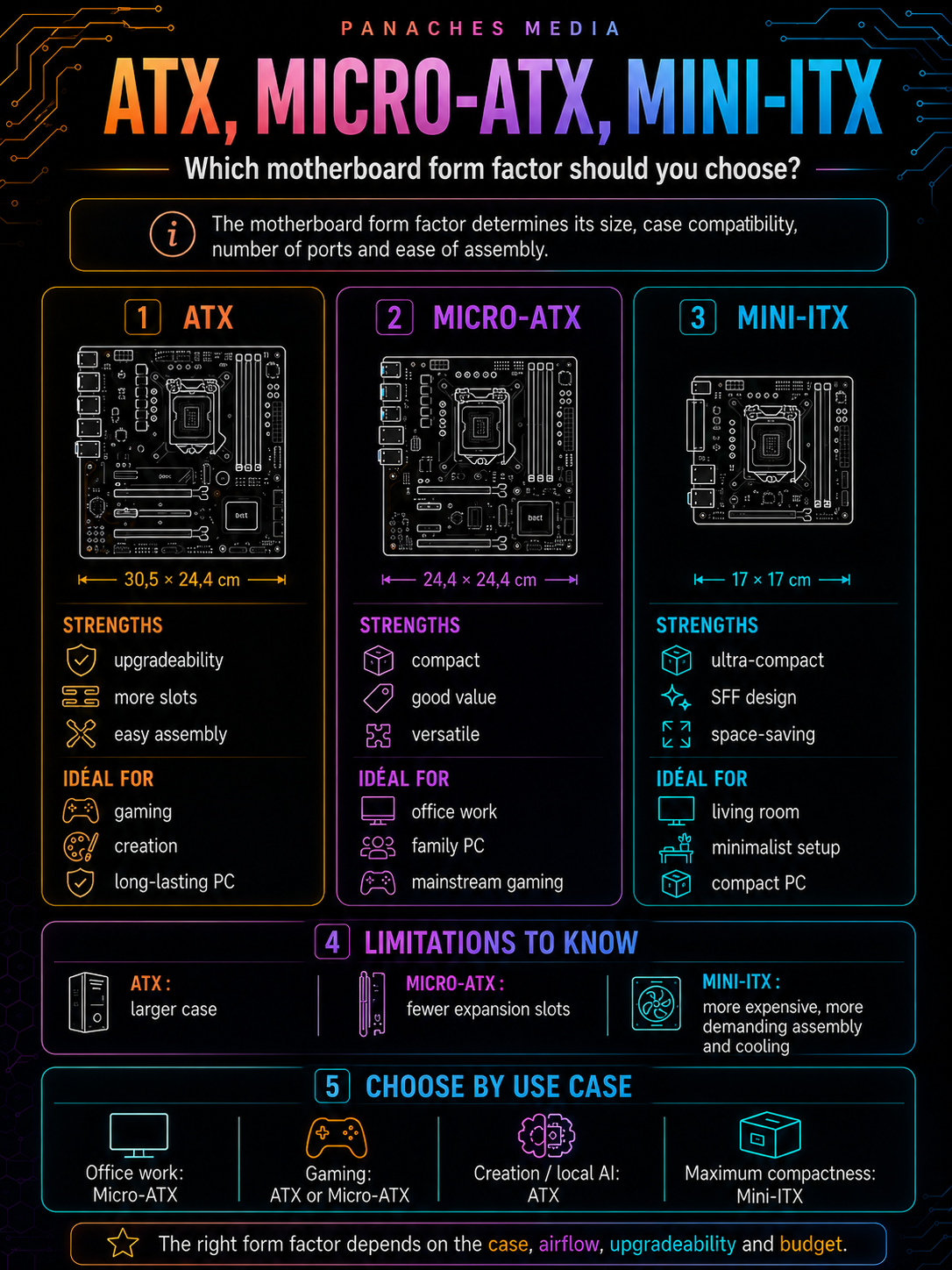
A motherboard’s form factor defines its physical size. It determines which cases it can fit into, how many slots it can offer, how much room remains around components, whether assembly will be easy or tight, and sometimes even how easy the machine will be to cool.
The three most common form factors are:
- ATX;
- Micro-ATX;
- Mini-ITX.
These formats are not just different sizes. They represent different philosophies.
ATX focuses on comfort, upgradeability and classic desktop builds. Micro-ATX focuses on the compromise between price, size and features. Mini-ITX focuses on compactness, but with more constraints.
The right question is therefore not:
“Which form factor is best?”
But rather:
“Which form factor matches my case, my use case, my budget and my comfort level when building?”
Why form factor matters
A motherboard’s form factor affects several concrete elements.
It can change:
- the size of the required case;
- the number of RAM slots;
- the number of PCIe slots;
- the number of M.2 ports;
- the space available for cooling;
- the ease of assembly;
- cable management;
- airflow;
- motherboard cost;
- build upgradeability;
- the type of PC you can build.
A motherboard that is too large will not fit into your case. A smaller board may work, but lack connectors or make future upgrades more difficult.
Form factor is therefore a very practical choice. It does not directly make the processor faster, but it influences building, maintenance and the lifespan of the PC.
A good form factor is the one that leaves enough room for the components you need today, with a little margin for tomorrow.
ATX: the standard desktop PC format
ATX is the most common form factor for classic desktop PCs.
Its usual dimensions are 30.5 x 24.4 cm.
It is found in many mid-tower and full-tower cases. It offers space, good readability, generally richer connectivity and more upgrade possibilities.
An ATX motherboard often provides:
- 4 RAM slots;
- several M.2 ports;
- several PCIe slots;
- more fan headers;
- more internal connectors;
- better component layout;
- more complete rear connectivity;
- more space around the processor;
- more comfortable installation.
For many users, ATX is the easiest form factor to recommend.
It is well suited to gaming PCs, creative machines, versatile configurations, development PCs and machines that are meant to last.
The advantages of ATX
The first advantage of ATX is space.
On a larger board, components have more room. Slots are easier to access. Ports are often more numerous. Assembly is generally more pleasant.
This is especially useful if you install:
- a large graphics card;
- several SSDs;
- a lot of RAM;
- several fans;
- a capture card;
- a sound card;
- a network card;
- a large cooling system.
ATX also makes future upgrades easier.
If you want to add a second SSD, a PCIe card or more fans, an ATX board is more likely to offer the required connectors.
This format is also more comfortable for beginners. Components are less cramped, cables are easier to organize, and assembly mistakes are often easier to correct.
The limits of ATX
ATX does not only have advantages.
Its main drawback is case size.
An ATX board requires a compatible case, generally larger than a compact Micro-ATX or Mini-ITX case. This means a larger, heavier PC that may be less discreet on a desk.
ATX can also be more expensive depending on the range, although this is not always the case. Some mid-range ATX boards are very affordable, but well-equipped models can quickly rise in price.
Another point: not everyone actually uses the benefits of ATX.
If you use a single SSD, one graphics card, two RAM sticks and a few USB ports, a Micro-ATX board could be enough. In that case, ATX mostly offers comfort and headroom, not necessarily a requirement.
Who is ATX for?
ATX is recommended if you want:
- a classic desktop PC;
- a comfortable gaming PC;
- a creative machine;
- an upgradeable configuration;
- several M.2 ports;
- several PCIe slots;
- easier assembly;
- good cable management;
- a mid-tower or full-tower case;
- headroom for the next few years.
It is the most versatile form factor.
If you are not trying to build a compact machine, ATX is often the safest choice.
Micro-ATX: the smart compromise
Micro-ATX, often abbreviated mATX, is more compact than ATX.
Its usual dimensions are 24.4 x 24.4 cm.
It keeps many important features while allowing smaller and often less expensive PCs.
A Micro-ATX board often provides:
- 2 or 4 RAM slots depending on the model;
- one or more M.2 ports;
- one or more PCIe slots;
- enough connectivity for many uses;
- often attractive pricing;
- good compatibility with compact cases.
Micro-ATX is often the most underestimated form factor.
Many users buy ATX out of habit, even though a good Micro-ATX board would have been perfectly enough.
The advantages of Micro-ATX
The first advantage of Micro-ATX is balance.
It allows you to reduce PC size without entering the extreme constraints of Mini-ITX.
With a good Micro-ATX case, you can build a machine that is:
- more compact than an ATX PC;
- less expensive;
- fairly easy to assemble;
- upgradeable enough for most uses;
- capable of accepting a good graphics card;
- suitable for reasonable gaming;
- suitable for office work;
- suitable for a family PC;
- suitable for a versatile machine.
Micro-ATX often offers excellent value for money.
Because the boards are smaller and sometimes less loaded with unnecessary connectors, they can cost less than an equivalent ATX board while keeping the essentials.
It is a very interesting form factor for balanced builds.
The limits of Micro-ATX
Micro-ATX comes with a few compromises.
It generally offers fewer PCIe slots than an ATX board. If you want to install several expansion cards, this can become limiting.
The number of M.2 ports may also be lower depending on the model. Some Micro-ATX boards are very well equipped, while others remain fairly simple.
Space between components can be tighter. With a large graphics card, some ports or connectors may become harder to access.
Case choice matters a lot. A good Micro-ATX case can offer good airflow and pleasant assembly. A poor compact case can make the configuration hot, noisy or difficult to build.
Micro-ATX is therefore an excellent compromise, but you still need to check the exact motherboard and case specifications.
Who is Micro-ATX for?
Micro-ATX is recommended if you want:
- a more compact PC;
- good value for money;
- an office configuration;
- a family PC;
- a reasonable gaming PC;
- a versatile machine;
- a less bulky case;
- a motherboard that is equipped enough without costing too much.
It is probably the best choice for many simple or balanced builds.
It is well suited to users who want a clean, modern and practical PC without necessarily needing many expansion slots.
Mini-ITX: compact and demanding
Mini-ITX is the smallest of the three common form factors.
Its usual dimensions are 17 x 17 cm.
It is designed for very compact PCs, often called SFF, for Small Form Factor. These machines can be discreet, elegant and easy to place in a living room, on a desk or in a small space.
Mini-ITX makes it possible to build PCs that are impressive in density: a lot of power in a small volume.
But this compactness comes with constraints.
A Mini-ITX board generally provides:
- 2 RAM slots;
- a single main PCIe slot;
- one or two M.2 ports depending on the model;
- fewer internal connectors;
- sometimes more limited rear connectivity;
- less space around the socket;
- more delicate assembly;
- often a higher price.
Mini-ITX is attractive, but it is not the easiest form factor.
The advantages of Mini-ITX
The first advantage of Mini-ITX is obvious: size.
It allows you to build very compact machines, sometimes much smaller than a classic ATX PC.
This is interesting if you want:
- a discreet PC;
- a living room machine;
- a minimalist setup;
- a transportable PC;
- a designer case;
- a powerful but compact configuration;
- more free space on the desk.
Mini-ITX can also be very aesthetic. Well-designed compact builds often have real charm: low volume, controlled cabling, dense design and carefully chosen components.
For enthusiasts, it is a very stimulating form factor.
It forces you to think of the machine as a precise puzzle: every component must have its place.
The limits of Mini-ITX
Mini-ITX is also the most restrictive form factor.
Assembly is more delicate. Space is limited. Cables are harder to organize. Large graphics cards do not fit in every case. Cooling requires more attention.
The main limits are:
- only 2 RAM slots in most cases;
- a single PCIe slot;
- fewer M.2 ports;
- fewer fan headers;
- more delicate case choice;
- GPU compatibility must be checked very carefully;
- power supply often depends on the case;
- airflow is harder to manage;
- higher temperatures if the build is poorly planned;
- sometimes higher price than an equivalent Micro-ATX or ATX board.
Mini-ITX therefore requires careful preparation.
It is not impossible for a first build, but it is less forgiving.
Who is Mini-ITX for?
Mini-ITX is recommended if you truly want a compact machine.
It suits users looking for:
- an SFF PC;
- a minimalist setup;
- a living room machine;
- a compact but powerful PC;
- a precise aesthetic project;
- a transportable configuration;
- a very small case.
On the other hand, it is less suitable if you want:
- many expansions;
- several PCIe cards;
- a lot of internal storage;
- very simple assembly;
- an economical configuration;
- a lot of thermal headroom;
- easy upgrades.
Mini-ITX is an excellent form factor when compactness is a priority. Otherwise, Micro-ATX or ATX are often more rational.
Form factor comparison table
| Form factor | Usual dimensions | Strengths | Limits | Ideal use |
|---|---|---|---|---|
| ATX | 30.5 x 24.4 cm | Upgradeability, connectivity, easy assembly | Larger case | Gaming, creation, durable PC |
| Micro-ATX | 24.4 x 24.4 cm | Good price, compact, enough for many uses | Fewer expansion slots | Family PC, reasonable gaming, budget |
| Mini-ITX | 17 x 17 cm | Very compact, aesthetic, SFF | Expensive, tight, harder assembly | Compact PC, living room, minimalist setup |
This table gives a quick reading, but it does not replace checking each model.
Two ATX boards can be very different. Two Micro-ATX boards too. And two Mini-ITX cases can have completely different constraints.
Case compatibility
The motherboard form factor must always be checked against the case.
A case usually lists compatible form factors:
- ATX;
- Micro-ATX;
- Mini-ITX;
- sometimes E-ATX;
- sometimes proprietary formats.
An ATX case often accepts ATX, Micro-ATX and Mini-ITX. A Micro-ATX case often accepts Micro-ATX and Mini-ITX. A Mini-ITX case generally accepts only Mini-ITX.
But you should always check the case specification sheet.
Compatibility does not depend only on the motherboard. You also need to look at:
- maximum graphics card length;
- maximum CPU cooler height;
- liquid cooling compatibility;
- power supply type;
- number of SSD bays;
- airflow;
- cable routing;
- front-panel connectors;
- space around the motherboard.
A motherboard that is compatible on paper can become painful to build in a case that is too tight.
Airflow and cooling
Form factor also affects cooling.
A larger case often offers more room for fans, radiators, cables and airflow.
This is not automatic: a poorly designed large case can be bad, and a well-designed small case can be excellent. But in general, the smaller the volume, the more careful you need to be.
ATX often offers the best thermal comfort because the case is larger and components are less cramped.
Micro-ATX can cool very well if the case is well designed.
Mini-ITX requires more precision: CPU cooler choice, GPU size, power supply, fans, cables and component positioning.
For a quiet machine, form factor can therefore matter.
A small powerful machine can be very fast, but also hotter or noisier if cooling is not under control.
Upgradeability: how much margin should you keep?
Upgradeability depends heavily on form factor.
An ATX board generally leaves more headroom:
- more RAM slots;
- more M.2 ports;
- more PCIe slots;
- more internal connectors;
- easier component additions.
A Micro-ATX board keeps a good part of this margin, but with some limits.
A Mini-ITX board forces you to make the right choices from the start. With only two RAM slots and a single PCIe slot, upgrades are more limited.
So you should ask yourself:
- will I add an SSD later?
- will I move to 64 GB of RAM?
- will I use a capture card?
- will I install a network card?
- will I change the graphics card?
- will I keep this machine for a long time?
If you want a very upgradeable machine, ATX is more comfortable. If you want a good balance, Micro-ATX is very interesting. If you want a very compact PC, Mini-ITX means accepting less margin.
The real cost of form factor
Form factor also affects budget.
You might think that smaller means cheaper. That is not always true.
Micro-ATX is often very competitive. It can save money on the motherboard and case.
ATX offers a wide range of prices, from reasonable to very high-end.
Mini-ITX, however, is often more expensive for equivalent features. Miniaturization, component density and design constraints can raise the price.
A Mini-ITX PC can also cost more because of the case, specific power supply, adapted cooling or compatibility constraints.
You should therefore compare the complete cost:
motherboard + case + power supply + cooling.
A compact form factor can be attractive, but become less economical once the full configuration is taken into account.
Which form factor for office work?
For an office PC, form factor mainly depends on available space and budget.
An office PC generally does not need many PCIe slots or a huge case. It mostly needs to be reliable, quiet, simple and pleasant to use.
Micro-ATX is often an excellent choice for this use case. It allows you to build a compact, affordable and sufficiently equipped machine.
Mini-ITX can be interesting if you want a very small and discreet PC, but it may sometimes cost more.
ATX also works very well, but it can be oversized for a simple machine.
For office work, the right choice is often:
Micro-ATX for the best balance, Mini-ITX if compactness is the priority.
Which form factor for gaming?
For gaming, all three form factors can work, but not with the same constraints.
ATX is the most comfortable choice. It offers room for the graphics card, cooling, SSDs and cables. It is the simplest form factor for a classic or high-end gaming configuration.
Micro-ATX is very interesting for a reasonable gaming PC. It can reduce size and sometimes cost, without sacrificing performance if the board and case are well chosen.
Mini-ITX can create a very attractive compact gaming PC. But you must carefully check graphics card length, cooling, power supply and airflow.
For gaming, the simple rule is:
ATX for comfort, Micro-ATX for compromise, Mini-ITX for deliberate compactness.
You should not sacrifice the graphics card or cooling simply to get a smaller form factor.
Which form factor for content creation?
For content creation, ATX is often the most comfortable choice.
Creators may need:
- a lot of RAM;
- several SSDs;
- a powerful graphics card;
- a capture card;
- an audio interface;
- many USB ports;
- fast networking;
- stable cooling.
In this context, the space and connectivity of ATX are valuable.
Micro-ATX can absolutely work for a reasonable creative machine, especially if you do not need many expansion cards.
Mini-ITX is possible, but more delicate. It can work for a mobile creator or compact setup, but it requires careful planning around RAM, storage, ports and heat.
For heavy creation, ATX often remains the safest choice.
Which form factor for development?
For development, the form factor depends on the type of work.
A web, application or CMS developer can work very well on a Micro-ATX or Mini-ITX machine if RAM and SSD are sufficient.
But for heavier uses — compilation, Docker, VMs, local AI, databases, tests, 3D tools — upgradeability needs to be considered.
ATX becomes interesting if you want:
- several SSDs;
- a lot of RAM;
- a powerful graphics card;
- a network card;
- a capture or specialized card;
- more comfortable cooling;
- a durable machine.
Micro-ATX remains an excellent compromise for many developers.
Mini-ITX can be very pleasant for a minimalist setup, but it requires planning RAM and storage from the start.
Which form factor for local AI?
For local AI, form factor must be chosen carefully.
AI use cases can require:
- a large graphics card;
- a lot of VRAM;
- a lot of system RAM;
- several SSDs;
- good cooling;
- a strong power supply.
ATX is often the most practical option for an ambitious AI machine because it leaves more room for the GPU, cooling and storage.
Micro-ATX can work for a reasonable AI configuration, provided there is enough space for the graphics card.
Mini-ITX is possible, but much more restrictive. A large graphics card in a small case can create temperature, noise and compatibility issues.
For heavy local AI, think first about GPU, VRAM and cooling. The form factor must allow these components to work properly.
Mistakes to avoid
The first mistake is choosing a motherboard without checking the case.
The second mistake is buying an ATX board for a case that only accepts Micro-ATX or Mini-ITX.
The third mistake is choosing Mini-ITX only for style, without anticipating heat, cables and expansion limits.
The fourth mistake is believing Micro-ATX necessarily means low-end. Some Micro-ATX boards are very decent, even excellent for their price.
The fifth mistake is paying for a high-end ATX board without using its ports or slots.
The sixth mistake is forgetting graphics card length.
The seventh mistake is not checking internal connectors, especially front USB-C, fan headers and M.2 ports.
The eighth mistake is underestimating cooling in small cases.
Form factor in a modern workspace
Modern uses often mix browsing, documents, files, PDFs, notes, creation, development, communication, multimedia and sometimes local AI.
In this context, motherboard form factor influences the type of machine you build: an upgradeable tower, a balanced compact PC or a small minimalist machine.
A unified workspace like Panaches illustrates this logic well. When several modules coexist in the same environment — browser, documents, notes, files, PDFs, creation or specialized tools — comfort depends on the whole machine. The motherboard form factor is not directly visible in the software, but it influences upgradeability, storage, cooling and PC stability.
A good form factor is therefore not just a question of size. It is a question of coherence.
Key takeaways
A motherboard’s form factor determines its size, case compatibility, number of ports, expansion possibilities and ease of assembly.
ATX is the most comfortable and upgradeable format. It is very well suited to gaming PCs, creation, development, local AI and durable machines.
Micro-ATX is the best compromise for many users. It makes it possible to build a more compact and often less expensive PC while keeping the essentials.
Mini-ITX is the compactness format. It allows very small and elegant PCs, but requires more attention to cooling, case choice, cabling and component compatibility.
The best form factor is not universal.
It depends on the case, budget, use case, need for upgrades and desired comfort level during assembly.
For a first PC or versatile machine, ATX and Micro-ATX are the simplest choices. For a deliberately compact machine, Mini-ITX can be excellent, provided the whole configuration is carefully planned.