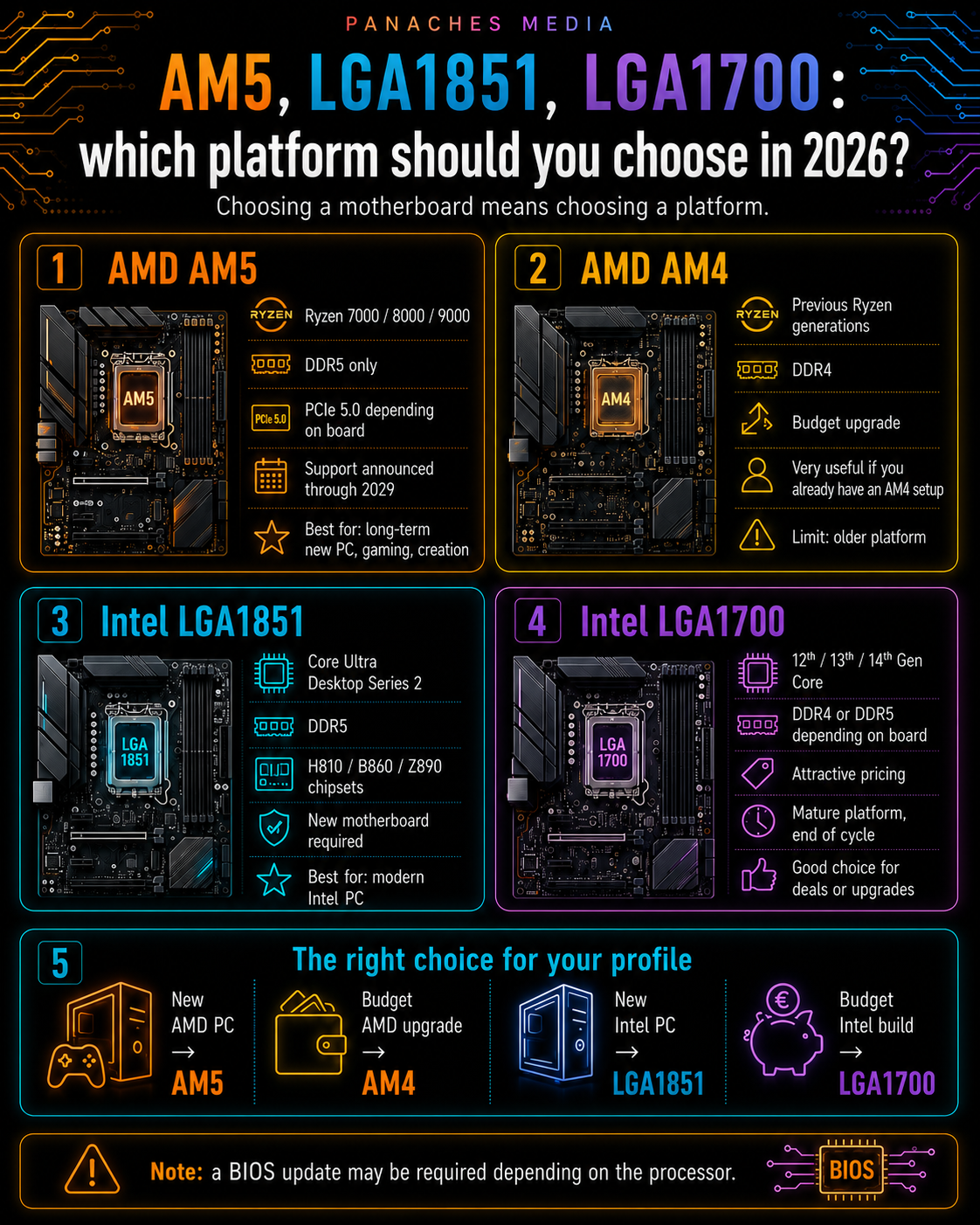
Choosing a motherboard means choosing a platform
When you choose a motherboard, you are not only choosing a board with ports, memory slots and a processor socket.
You are choosing a platform.
This platform determines the compatible processor, the type of RAM, the available chipsets, the upgrade possibilities, the total cost of the configuration and sometimes even the lifespan of the machine.
In 2026, the main consumer PC platforms to know are:
- AMD AM5;
- AMD AM4;
- Intel LGA1851;
- Intel LGA1700.
They do not target exactly the same uses. Some are modern and upgradeable. Others are more economical. Some require DDR5. Others still allow DDR4. Some are designed for the latest processors, while others are better suited to extending an existing configuration.
So the right question is not only:
“Which motherboard should I buy?”
But rather:
“Which platform matches my processor, my budget and the lifespan I expect from my PC?”
Why the platform matters as much as the motherboard
A platform brings together several connected elements:
- a socket;
- a processor family;
- one or more chipsets;
- a compatible memory type;
- PCIe standards;
- upgrade possibilities;
- BIOS constraints;
- a total CPU + motherboard + RAM cost.
Two motherboards may look similar on paper while belonging to very different platforms. One may allow you to upgrade the processor in a few years. The other may be cheaper today, but more limited tomorrow.
This is especially important when building a new machine.
A PC is not only an immediate purchase. It is also a base that can sometimes be improved: adding RAM, replacing a processor, installing a faster SSD, changing the graphics card or keeping the same case for several years.
The motherboard defines part of these possibilities.
AMD AM5: the main platform for recent Ryzen processors
The AM5 platform is currently AMD’s modern base for recent Ryzen processors.
It covers AMD Ryzen 7000, Ryzen 8000 and Ryzen 9000 processors. AMD states that AM5 motherboards with Ryzen 600 and 800 Series chipsets are compatible with AM5 Ryzen 7000, 8000 and 9000 processors, although a BIOS update may be required on some older boards.
AM5 requires DDR5. This means an old DDR4 memory module cannot be reused on an AM5 motherboard.
This constraint can increase the cost of an upgrade if you are coming from an older configuration. But it also allows you to build a more modern machine, with recent memory and better consistency for the years ahead.
Depending on chipset and motherboard model, AM5 can also provide modern features such as:
- DDR5;
- AMD EXPO memory profiles;
- PCIe 5.0 for NVMe SSDs on some boards;
- PCIe 5.0 for GPUs on some high-end chipsets;
- USB4 on some ranges;
- many M.2 ports;
- strong upgrade potential.
The major strength of AM5 in 2026 is its lifespan. AMD has announced support for the AM5 platform through 2029, making it an interesting choice for users who want to keep their motherboard for a long time.
When should you choose AM5?
AM5 is the most logical choice if you are building a new AMD PC in 2026.
It is relevant for:
- a modern gaming PC;
- a balanced Ryzen 5 / Ryzen 7 machine;
- a Ryzen X3D gaming-oriented PC;
- a creation + gaming configuration;
- a machine you want to upgrade later;
- a DDR5-based PC;
- long-term use over several years.
AM5 is especially interesting if you are starting from scratch. In that case, choosing a modern platform directly avoids rebuilding on an already older base.
For gamers, AM5 gives access to recent Ryzen X3D processors, which are very interesting in many gaming configurations. For creators, AM5 makes it possible to target strong Ryzen 7 or Ryzen 9 chips, with a platform rich in storage, memory and connectivity depending on the chosen motherboard.
AM5 is not always the cheapest choice. But it is often the most coherent choice for a new and upgradeable AMD machine.
AM5 chipsets to know
On AM5, several chipsets coexist. They do not all provide the same possibilities.
The most important ones to understand are:
- A620;
- B840;
- B850;
- X870;
- X870E;
- as well as older B650, B650E, X670 and X670E chipsets still present on the market.
Entry-level chipsets such as A620 or B840 target simple or economical configurations. They can be enough for an office PC, a family PC or a modest Ryzen configuration.
B650 and B850 often represent the best balance for many users. They can suit gaming, versatile or reasonably creative PCs, with enough features without necessarily paying for the high end.
X670, X670E, X870 and X870E target more ambitious machines: more connectivity, more fast ports, better expansion options, more PCIe 5.0 depending on the case, USB4 on some ranges, and generally better-equipped motherboards.
However, there is one trap to avoid: a high-end chipset is not automatically useful for everyone. A Ryzen 5 or Ryzen 7 in a simple machine does not necessarily need a very expensive X870E motherboard.
The right choice depends on the processor, the number of SSDs, the desired connectivity, the budget and the real use case.
AMD AM4: the older platform that can still be useful
The AM4 platform is AMD’s former major platform, associated in particular with Ryzen 1000 to Ryzen 5000 processors.
In 2026, it is no longer the platform to prioritize for a new high-end configuration. It uses DDR4, does not target the latest Ryzen processors and offers fewer upgrade prospects than AM5.
But that does not mean it is useless.
AM4 remains interesting in several cases:
- upgrading an older AMD PC;
- very tight budget;
- reusing DDR4 RAM;
- economical office or family PC;
- modest gaming configuration;
- secondary machine;
- repair or extension of an existing configuration.
If you already have a decent AM4 motherboard, it may be worth extending the machine with a better compatible processor, more RAM or a faster SSD.
This is often cheaper than changing the entire platform.
However, for a new machine intended to last a long time, AM5 is generally more coherent.
When should you avoid AM4?
AM4 becomes less relevant if you are buying everything new to build a durable main machine.
The reason is simple: if you need to buy a motherboard, processor and RAM, you should think about the total cost. An AM4 platform may be cheaper, but it is also less upgradeable.
AM4 can be a good economical choice, but it is no longer the most modern choice.
So you need to distinguish between two situations.
If you are upgrading an existing machine, AM4 can be very smart.
If you are building a new main PC, AM5 often deserves priority.
Intel LGA1851: the platform for recent Core Ultra desktop processors
On Intel’s side, the recent platform to know is LGA1851.
It concerns Intel Core Ultra Desktop Series 2 processors. Intel specifies that these processors are designed for the LGA1851 socket and that this socket is not backward compatible with LGA1700. You therefore need a motherboard specifically designed for LGA1851.
This means a user with an Intel LGA1700 motherboard cannot install a recent Core Ultra desktop processor on it.
LGA1851 comes with Intel 800 Series chipsets, including:
- H810;
- B860;
- Z890.
Intel presents the 800 Series chipsets as designed for Intel Core Ultra Desktop Series 2 processors, with feature levels adapted to different user profiles, from mainstream to enthusiast.
This platform targets recent Intel machines, with DDR5, modern connectivity, CPU-side PCIe 5.0 depending on configuration, and integrated AI options depending on the processor.
When should you choose LGA1851?
LGA1851 should be considered if you want to build a new Intel machine around recent Core Ultra desktop processors.
It is relevant for:
- a modern Intel configuration;
- a recent versatile PC;
- a productivity-oriented machine;
- a Core Ultra 5, 7 or 9 configuration;
- a DDR5-based PC;
- a use case where Intel 800 Series chipsets provide the desired features;
- a new purchase with no intention of reusing an older motherboard.
Intel lists recent Core Ultra Desktop Series 2 processors in its Core Ultra 5, 7 and 9 ranges, with models launched between late 2024, 2025 and 2026 depending on the reference.
Choosing LGA1851 can make sense if you want a modern Intel platform and accept starting with a new motherboard.
However, you need to factor in the total cost: processor, LGA1851 motherboard, DDR5, cooling and possibly power supply depending on the configuration.
Intel 800 Series chipsets: H810, B860, Z890
Intel 800 Series chipsets do not all target the same audience.
H810 corresponds to the entry level. It is aimed more at simple, office or economical configurations. It offers fewer lanes, fewer options and less headroom for advanced configurations.
B860 is the mid-range chipset. It can suit many modern Intel PCs: advanced office use, family PC, reasonable gaming, light productivity or versatile machine. Intel indicates that B860 supports memory overclocking, unlike H810.
Z890 is the high-end consumer chipset. It targets more ambitious configurations, unlocked processors, overclocking, high-end gaming machines, creation, streaming or advanced use. Intel indicates that Z890 provides more I/O lanes, more PCIe options and both processor and memory overclocking.
The simple rule:
- H810: simple and economical;
- B860: modern balance;
- Z890: high-end, overclocking and richer connectivity.
Intel LGA1700: still relevant, but near the end of its cycle
The LGA1700 platform concerns 12th, 13th and 14th generation Intel Core desktop processors.
Intel confirms that 14th Gen Core Desktop processors use LGA1700 and require Intel 600 or 700 Series motherboards, sometimes with a BIOS update when moving from a previous generation.
LGA1700 is therefore still very present in 2026, especially in existing configurations, promotions and more economical PCs.
It remains interesting because it offers a lot of choice:
- B660, B760, Z690, Z790 motherboards;
- 12th, 13th and 14th Gen Core processors;
- DDR4 or DDR5 depending on the motherboard;
- sometimes attractive prices;
- wide availability in second-hand or clearance markets.
Intel states that 12th, 13th and 14th Gen Core Desktop processors can support DDR4 and DDR5 depending on the models and motherboards, which makes LGA1700 flexible for economical configurations.
When should you choose LGA1700?
LGA1700 can be a good choice if you are looking for an efficient Intel configuration at a contained price.
It is relevant in several cases:
- you already have an LGA1700 motherboard;
- you want to reuse DDR4;
- you find a good price on CPU + motherboard;
- you are building a budget gaming or office PC;
- you do not necessarily need the latest platform;
- you want a proven Intel configuration;
- you are buying during a promotion.
LGA1700 can be very rational for an office PC, reasonable gaming PC or versatile machine, especially if the total cost is significantly lower than a more recent platform.
But you need to accept one limitation: it is no longer Intel’s most modern platform. If you are buying new high-end hardware and want a durable base, LGA1851 is more logical.
When should you avoid LGA1700?
LGA1700 becomes less interesting if you want to build a new high-end Intel machine with a real upgrade perspective.
It is a mature platform, but close to the end of its cycle. It remains powerful, but it no longer represents Intel’s newest direction on desktop.
You therefore need to pay close attention to price.
If an LGA1700 configuration is significantly cheaper, it can be interesting.
If it costs almost the same as a modern LGA1851 or AM5 platform, its interest decreases.
The right question is:
“Does the money saved justify choosing an older platform?”
If yes, LGA1700 can be a good purchase. If not, it is better to look at AM5 or LGA1851.
DDR4 or DDR5: a choice that changes the budget
The platform choice often determines the memory.
In 2026, DDR5 dominates recent platforms:
- AM5 uses DDR5;
- LGA1851 uses DDR5;
- AM4 uses DDR4;
- LGA1700 can use DDR4 or DDR5 depending on the motherboard.
DDR4 remains interesting for reducing costs. If you already own 32 GB of DDR4, an AM4 or LGA1700 platform can extend a machine with a limited budget.
DDR5 is more coherent for a modern new machine. It accompanies recent platforms and improves the potential lifespan of the configuration.
However, memory should not be the only criterion. You need to look at the global cost:
processor + motherboard + RAM.
A DDR4 platform can be cheaper but less upgradeable. A DDR5 platform can cost more but provide a more durable base.
PCIe 4.0, PCIe 5.0: useful, but not always decisive
Modern platforms often highlight PCIe 5.0.
It is an important evolution, especially for very fast NVMe SSDs and certain high-end configurations. But its importance should not be overestimated for all users.
For many machines, PCIe 4.0 remains more than enough.
A good PCIe 4.0 SSD is already very fast for the system, games, software and most projects. PCIe 5.0 becomes more interesting for heavy transfers, professional creation, workstations or users who want a very recent configuration.
For the graphics card, PCIe 5.0 is not always a decisive criterion. In many cases, CPU/GPU balance, graphics card power, VRAM, power supply and cooling matter more.
So PCIe should be read as a platform element, not as an automatic promise of visible performance.
BIOS: the detail that can block a configuration
BIOS is often forgotten, but essential.
A motherboard can have the right socket and chipset, but require a BIOS update to support a more recent processor.
This is especially true when a new processor is released after the motherboard.
On AM5, AMD states for example that a BIOS update may be required for Ryzen 8000 or 9000 processors on some 600 Series boards.
On LGA1700, Intel indicates that a BIOS update may be required when moving to certain 14th Gen Core processors on Intel 600 or 700 Series boards.
The BIOS Flashback feature is therefore very useful. Depending on the motherboard, it allows you to update the BIOS without a processor installed. It is not mandatory, but it is a real safety net.
Which platform for an office PC?
For an office PC, there is no need to aim for the most expensive platform.
The priorities are:
- compatibility;
- stability;
- reasonable cost;
- NVMe SSD;
- enough RAM;
- sufficient connectivity;
- low noise;
- controlled power consumption.
An AM4 or LGA1700 platform can still be interesting if the price is low and the use case remains simple.
An AM5 platform can be relevant if you are building a new machine that you want to keep for a long time.
LGA1851 can work if you want a recent Intel machine, but it is not essential for simple office use.
For this use case, the best platform is often the one that offers the best cost / stability / lifespan balance.
Which platform for gaming?
For gaming, the platform should be chosen with the processor and graphics card.
AM5 is very interesting for a modern gaming PC, especially if you target a Ryzen X3D or an upgradeable configuration.
LGA1851 can be relevant for a recent Intel configuration, especially if you want a versatile machine mixing gaming, productivity and multitasking.
LGA1700 can remain a rational choice if you find a good price on a 13th or 14th Gen Core processor with a B760 or Z790 motherboard.
AM4 can still help for a budget configuration, but it is no longer the platform to prioritize for a durable new gaming PC.
For gaming, you should especially avoid putting too much budget into the motherboard at the expense of the graphics card. A reasonable chipset and a good graphics card are often better than a luxury motherboard paired with a weak GPU.
Which platform for creation?
For content creation, the platform must provide stability, memory, storage and connectivity.
Needs may include:
- 32 GB, 64 GB or more RAM;
- several M.2 SSDs;
- a multi-core processor;
- good cooling;
- a strong graphics card;
- USB-C, USB4 or Thunderbolt depending on peripherals;
- fast networking;
- stability under long workloads.
AM5 is highly relevant with recent Ryzen 7 or Ryzen 9 processors. B850, X870 or X870E chipsets can cover different levels of need.
LGA1851 is relevant with recent Core Ultra processors and B860 or Z890 boards depending on workload intensity.
LGA1700 can remain interesting if the price is good, especially with 13th or 14th Gen Core i7 or i9 processors, but cooling, motherboard and memory must be checked.
For creation, the choice should not be based only on the socket. You need to look at the number of M.2 ports, VRMs, maximum RAM, connectivity and behavior under long workloads.
Which platform for development?
For development, the priority is often less spectacular than in gaming.
You need a stable and responsive machine with:
- a multi-core CPU;
- plenty of RAM;
- a fast SSD;
- good Linux or Windows compatibility;
- enough ports;
- possibly a graphics card if AI, 3D or computing is involved.
AM5 is an excellent choice for a durable new machine.
LGA1851 is relevant for a modern Intel configuration.
LGA1700 can be very rational if you want to reduce total cost and benefit from DDR4 or good deals.
AM4 can remain useful for a secondary machine, test environment or economical configuration.
For a developer, moving from 16 to 32 GB of RAM can sometimes be more useful than paying for an overly high-end motherboard. The platform choice must therefore remain coherent with the real use case.
Which platform for local AI?
For local AI, the motherboard does not do everything, but it conditions the configuration.
You need to look at:
- processor;
- GPU;
- VRAM;
- system RAM;
- PCIe slots;
- M.2 storage;
- cooling;
- power supply;
- software compatibility;
- possible NPU depending on platform.
AM5 and LGA1851 are the most coherent choices for a modern new machine.
LGA1700 can remain usable if the graphics card and memory follow.
AM4 can work for light tests or an economical machine, but it will be less interesting for an ambitious AI configuration.
For heavy local AI, the GPU and VRAM will often be more important than the motherboard itself. But the platform must allow you to properly install the graphics card, enough RAM and enough storage.
Quick comparison table
| Platform | Memory | Relevant use in 2026 | Strength | Main limitation |
|---|---|---|---|---|
| AMD AM5 | DDR5 | New AMD PC, gaming, creation, durable machine | Upgrade path, recent Ryzen, support through 2029 | DDR5 / platform cost |
| AMD AM4 | DDR4 | Budget upgrade, existing PC, tight budget | Price, DDR4 reuse | Older platform |
| Intel LGA1851 | DDR5 | New Intel PC, recent Core Ultra desktop | Modern Intel platform | New motherboard required |
| Intel LGA1700 | DDR4 or DDR5 depending on board | Budget build, upgrade, deals | DDR4/DDR5 flexibility, availability | End of cycle |
This table is a starting point. The actual price at the time of purchase can strongly change the appeal of a platform.
Mistakes to avoid
The first mistake is choosing a motherboard without choosing the platform.
The second mistake is confusing LGA1700 and LGA1851. The sockets may seem similar in logic, but they are not compatible.
The third mistake is thinking AM4 and AM5 accept the same memory. AM4 uses DDR4, AM5 uses DDR5.
The fourth mistake is paying for a high-end motherboard on an older platform without a real need.
The fifth mistake is neglecting BIOS. Even with the right socket, an update may be required.
The sixth mistake is comparing only the motherboard price without counting CPU + RAM + cooling.
The seventh mistake is choosing the most recent platform when a simple use case could have been covered by a cheaper solution.
The eighth mistake is choosing an economical platform when the goal is to keep the machine for a long time and upgrade the processor later.
The platform in a modern workspace
Modern uses mix browsing, documents, files, PDFs, creation, development, local AI, media management, communication and multitasking.
In this context, the platform is not only a socket question. It conditions the amount of possible RAM, the number of SSDs, processor stability, connectivity, machine lifespan and future upgrades.
A unified workspace like Panaches illustrates this logic well. When several modules coexist in the same environment — browser, documents, notes, PDFs, files, creation or specialized tools — comfort depends on the balance between processor, RAM, SSD, possible GPU and motherboard. Choosing a coherent platform helps build a machine that is more stable and more pleasant to use over time.
The platform is therefore the technical frame in which all components will evolve.
Key takeaways
In 2026, choosing a motherboard means choosing a platform.
AM5 is AMD’s modern platform for recent Ryzen processors. It uses DDR5, offers a strong upgrade path and benefits from extended support through 2029.
AM4 remains useful for tight budgets, economical upgrades and existing machines, but it is no longer the best base for a durable new PC.
LGA1851 is Intel’s recent platform for Core Ultra Desktop Series 2 processors. It requires a new motherboard and targets modern Intel configurations.
LGA1700 remains relevant for 12th, 13th and 14th Gen Core processors, especially thanks to its DDR4/DDR5 flexibility and sometimes attractive pricing, but it should be seen as a mature platform near the end of its cycle.
The right choice therefore depends on budget, target processor, available RAM, real use case and expected lifespan.
A recent platform is not always essential. An older platform is not always bad.
The right purchase is the one that offers the best coherence between the machine you need today and what you want to be able to do with it tomorrow.