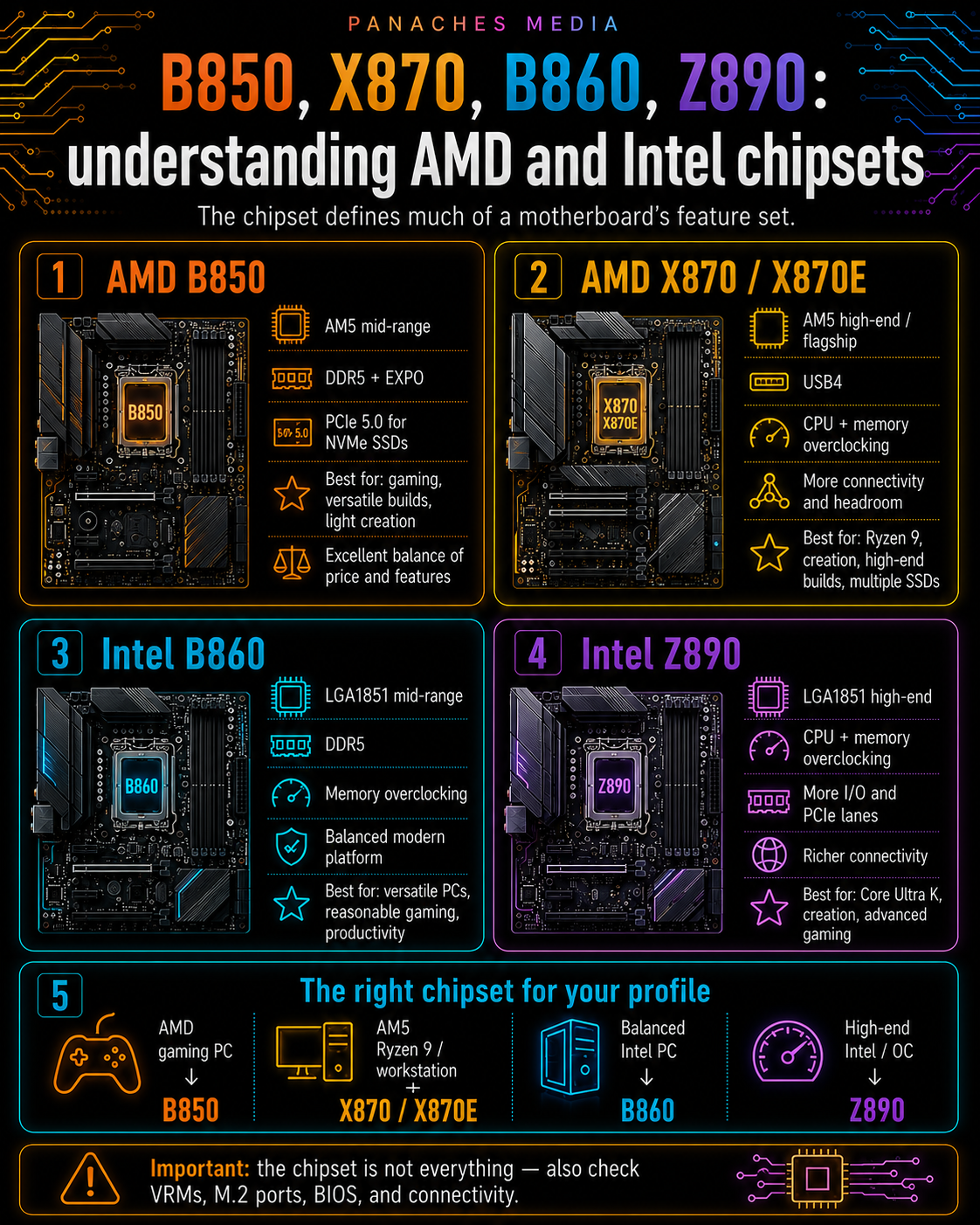
The chipset: the real equipment level of a motherboard
When choosing a motherboard, people often look at the socket first. That makes sense: without the right socket, the processor cannot work.
But once the socket has been validated, another element becomes central: the chipset.
The chipset determines a large part of what the motherboard can do. It influences connectivity, the number of fast ports, PCIe lanes, overclocking options, storage, certain networking features and the overall level of the platform.
Two motherboards can have the same socket, accept the same processor, use the same DDR5 memory, and still offer very different experiences.
Why? Because they do not use the same chipset, do not have the same design, do not have the same VRMs and do not target the same market segment.
In 2026, the main consumer names to know are:
- on AMD: A620, B840, B850, X870, X870E, as well as the older B650, X670 and X670E;
- on Intel: H810, B860, Z890, as well as the older B760 and Z790 platforms for LGA1700.
The chipset does not do everything, but it gives a very useful indication of the motherboard’s range and possibilities.
What the chipset actually influences
The chipset is often misunderstood.
It does not replace the processor. It does not automatically make a machine faster. It does not turn a mid-range graphics card into a high-end model.
But it defines the technical frame of the motherboard.
It can influence:
- the number of USB ports;
- the presence or absence of USB4 depending on the platform;
- the number of M.2 ports;
- available PCIe lanes;
- PCIe 4.0 or PCIe 5.0 for SSDs;
- PCIe 4.0 or PCIe 5.0 for the graphics card depending on the platform;
- processor overclocking options;
- memory overclocking options;
- the number of SATA ports;
- the richness of the rear I/O;
- RAID management depending on chipset;
- networking features depending on the board;
- entry-level, mid-range or high-end positioning.
Put simply:
The socket tells you which processor can work. The chipset tells you what the motherboard can do around that processor.
Do not confuse chipset and motherboard quality
One important point: the chipset is not enough to judge the overall quality of a motherboard.
Two motherboards with the same chipset can be very different.
They can vary in:
- VRM quality;
- power-stage cooling;
- the real number of M.2 ports;
- heatsink quality;
- rear connectivity;
- integrated Wi-Fi or not;
- Ethernet 2.5 GbE or 10 GbE;
- integrated audio;
- the number of fan headers;
- BIOS Flashback support;
- BIOS quality;
- physical component layout;
- price.
The chipset therefore gives the technical category, but not the whole story.
A good B850 board can be more relevant than a poor X870 board for some users. A good B860 board can be a smarter purchase than an overpriced Z890 board if you do not need CPU overclocking. A high-end motherboard can be excellent, but useless if your configuration does not take advantage of it.
The right reflex is to use the chipset as a first filter, then look at the exact motherboard model.
AMD AM5 chipsets in 2026
On the AMD AM5 platform, several chipsets coexist.
AMD includes in particular:
- A620 / A620A;
- B840;
- B850;
- X870;
- X870E;
- as well as older B650, B650E, X670, X670E chipsets.
All of these chipsets are tied to the AM5 platform, and therefore to recent Ryzen processors depending on BIOS compatibility.
The real difference is in the level of features.
The higher you go in the range, the more you generally get:
- more PCIe lanes;
- more fast ports;
- more overclocking options;
- more storage options;
- more connectivity;
- a better base for large processors;
- generally better-equipped motherboards.
But that does not mean everyone should buy X870E.
AMD A620: useful entry-level
The A620 chipset targets simple and economical configurations.
It is aimed at users who want a basic AM5 board, compatible with recent Ryzen processors, without paying for advanced features they will not use.
It is relevant for:
- office work;
- simple family PCs;
- multimedia;
- budget machines;
- small Ryzen 5 builds;
- configurations without overclocking;
- PCs with one or two SSDs.
A620 allows users to enter the AM5 platform at a lower cost. It can be enough for many simple uses.
But you need to accept its limits:
- fewer PCIe lanes;
- less connectivity;
- fewer fast ports;
- sometimes more modest VRMs depending on the model;
- less suitable for a large Ryzen 9;
- not the ideal choice for a very upgradeable configuration.
Entry-level does not mean bad. It simply means limited.
For a simple PC, that is not necessarily a problem. For an ambitious gaming, creation or workstation machine, it is better to look higher.
AMD B840: a more balanced modern entry point
B840 is a newer AM5 chipset designed as a modern entry point into the platform.
Its logic is to provide the essentials of a modern platform without targeting extreme configurations.
B840 can be interesting for:
- modern office PCs;
- family PCs;
- simple Ryzen configurations;
- budget DDR5 machines;
- multimedia use;
- compact or reasonable PCs;
- users who want AM5 without spending too much.
It is not designed for heavy CPU overclocking. It is also not the richest choice for several fast SSDs, a creative workstation or a very high-end configuration.
But for a simple, clean and recent machine, it can make sense.
AMD B850: the modern mid-range choice
B850 is probably one of the most important AMD chipsets to understand in 2026.
It targets the heart of the market: gaming, reasonable creation, versatile PCs and modern configurations without exploding the budget.
It is typically the chipset to consider for:
- modern Ryzen 5;
- Ryzen 7;
- Ryzen 7 X3D;
- balanced gaming PCs;
- light to medium creative PCs;
- durable configurations without moving to the very high end;
- users who want modern features without paying for X870E.
The key point: B850 is a strong compromise.
It generally offers more possibilities than an entry-level chipset, while remaining more reasonable than X870 or X870E.
For many gamers, a good B850 board will be more logical than an expensive X870E board. The money saved can be better used for the graphics card, RAM, SSD or cooling.
AMD X870: reasonable high-end
X870 targets more ambitious AMD configurations.
It is a good choice for:
- high-end Ryzen 7;
- Ryzen 9;
- creative machines;
- high-end gaming PCs;
- users with several SSDs;
- USB4 needs;
- more upgradeable configurations;
- machines intended to last.
X870 should be considered when you want a richer, better-equipped motherboard, with more comfort and connectivity.
But you should not choose it only because it sits “above” B850.
If your PC uses a Ryzen 5, one SSD and a mid-range graphics card, X870 may be underused.
X870 becomes truly relevant when your use case justifies the connectivity, storage, VRMs and advanced features.
AMD X870E: the very high end of AM5
X870E is AMD’s most ambitious mainstream AM5 chipset.
It is aimed mainly at:
- Ryzen 9;
- large gaming configurations;
- heavy creation;
- mainstream workstations;
- several fast SSDs;
- high-end graphics cards;
- overclocking;
- very complete connectivity;
- demanding users.
X870E is not a “necessary” chipset for every AM5 PC. It is a platform of comfort, headroom, expansion and very high equipment level.
For many users, it will be too expensive or unnecessary. But for a very high-end machine built to last, it can be coherent.
The right question is not:
“Is X870E better?”
Yes, in features.
The real question is:
“Does my use case justify the price of an X870E board?”
B650, B650E, X670, X670E: still useful?
The B650, B650E, X670 and X670E chipsets belong to the first AM5 wave.
They are still very present on the market, especially through promotions, clearance sales or already well-tested motherboards.
They can still be interesting if the price is good.
B650 remains a good choice for many reasonable AM5 configurations. B650E brings more PCIe 5.0 depending on the model. X670 and X670E target richer boards, with more connectivity and more headroom.
However, you need to check:
- BIOS version;
- compatibility with recent Ryzen processors;
- number of M.2 ports;
- available PCIe;
- VRMs;
- USB4 or not;
- price compared with newer B850 / X870 boards.
An older good board can be an excellent purchase if the price is right. But an older board that is too expensive quickly loses interest against a newer generation.
Quick table of AMD AM5 chipsets
| AMD chipset | Positioning | Recommended use | Key point |
|---|---|---|---|
| A620 | Entry-level | Office work, simple PC | Budget AM5, limited features |
| B840 | Modern entry | Family PC, simple use, DDR5 | No CPU overclocking, EXPO memory |
| B850 | Mid-range | Gaming, versatile, light creation | Very good balance, PCIe 5.0 NVMe |
| X870 | High-end | Advanced gaming, creation, Ryzen 9 | USB4, richer connectivity |
| X870E | Very high-end | Large PC, workstation, overclocking | PCIe 5.0 GPU + NVMe, maximum headroom |
| B650 / X670 | Previous AM5 generation | Good deals, upgrades | Check BIOS and real price |
This table is a decision aid, not an absolute rule. A specific board can be better or worse depending on its design.
Intel 800 Series chipsets in 2026
On the recent Intel side, the chipsets to know are the Intel 800 Series for Intel Core Ultra Desktop Series 2 processors.
The main consumer chipsets are:
- H810;
- B860;
- Z890.
The principle is fairly simple:
- H810: entry-level;
- B860: mid-range;
- Z890: high-end / enthusiast.
As with AMD, the chipset does not judge the whole board. But it clearly indicates the expected feature level.
Intel H810: simple entry-level
H810 is the simplest Intel 800 Series chipset.
It targets budget, office, family or light configurations.
It can be a choice for:
- office PCs;
- web use;
- simple machines;
- non-extreme Core Ultra processors;
- configurations without overclocking;
- tight budgets.
H810 offers fewer lanes, less connectivity and fewer options than B860 or Z890.
That does not mean it is useless.
For a simple machine, H810 can be enough. But for gaming, creation, heavy multitasking or an upgradeable machine, it is better to look at B860 or Z890.
Intel B860: the balanced choice
B860 is the Intel 800 Series chipset aimed at the mid-range.
It is probably the most rational choice for many modern Intel PCs.
It can suit:
- powerful family PCs;
- reasonable gaming;
- light to medium productivity;
- versatile configurations;
- Core Ultra 5 or Core Ultra 7;
- users who want a modern platform without paying for Z890.
In practice, B860 is the chipset to look at if you want a recent Intel machine that is well equipped, without necessarily aiming for CPU overclocking or a very high-end motherboard.
For many users, a good B860 board will be more logical than an expensive Z890.
Intel Z890: Intel’s high-end mainstream chipset
Z890 is Intel’s high-end mainstream chipset for Core Ultra Desktop Series 2.
It targets more ambitious configurations:
- Core Ultra K;
- high-end gaming;
- creation;
- streaming;
- heavy multitasking;
- overclocking;
- several SSDs;
- richer connectivity;
- enthusiast users.
Z890 is therefore the chipset to target if you want to fully exploit a high-end Intel configuration, especially with an unlocked processor or advanced use.
But as always, you should not buy Z890 by reflex.
If you do not overclock, do not need many fast ports, use a single SSD and a standard graphics card, a good B860 can be smarter.
Q870 and W880: special cases
Intel also offers chipsets such as Q870 or W880 in the 800 Series family.
They do not target exactly the same audience as H810, B860 and Z890.
Q870 is more oriented toward business / fleet management depending on the machines. W880 targets certain workstation or professional uses.
For a general reader who wants to build a gaming, office, creation or development PC, the most important names remain:
- H810;
- B860;
- Z890.
The other chipsets exist, but they will mainly be relevant in branded machines, professional workstations or specific needs.
What about older Intel B760 / Z790 chipsets?
The B760 and Z790 chipsets remain important because they belong to the Intel LGA1700 platform.
They concern 12th, 13th and 14th generation Intel Core processors.
In 2026, they can still be interesting if you find good prices, especially for a budget configuration or an upgrade.
B760 remains a good choice for many reasonable Intel PCs. Z790 targets higher-end LGA1700 configurations, with overclocking on compatible processors and more connectivity depending on the model.
But you need to remember that LGA1700 is a mature platform, near the end of its cycle.
That does not mean it is bad. It means you need to compare the real price against AM5 and LGA1851.
If a B760 or Z790 board is available at an excellent price with a good processor, it can be very interesting. If it costs almost as much as a recent platform, its appeal decreases.
Quick table of Intel chipsets
| Intel chipset | Platform | Positioning | Recommended use |
|---|---|---|---|
| H810 | LGA1851 | Entry-level | Office work, simple PC |
| B860 | LGA1851 | Mid-range | Versatile PC, reasonable gaming, productivity |
| Z890 | LGA1851 | High-end | Overclocking, advanced gaming, creation |
| B760 | LGA1700 | Older mid-range platform | Budget build, upgrade |
| Z790 | LGA1700 | Older high-end platform | 13th/14th Gen Core, good deals, OC depending on CPU |
This table should be read carefully: the quality of the exact motherboard remains essential.
AMD or Intel: chipsets cannot be compared directly
It can be tempting to compare an AMD chipset directly with an Intel chipset.
For example:
- B850 versus B860;
- X870 versus Z890;
- B840 versus H810.
These comparisons can help you get oriented, but they are never perfectly equivalent.
Why? Because AMD and Intel do not organize their platforms in exactly the same way.
The processors are not the same. The sockets are not the same. CPU-side PCIe lanes are not always organized in the same way. Overclocking options do not follow the same rules. Platform lifespans are not identical.
It is therefore better to compare by use case.
For a balanced new AMD PC, you will often look at B850. For a balanced new Intel PC, you will often look at B860. For a large AMD configuration, you will look at X870 or X870E. For a large Intel configuration, you will look at Z890.
But you should always return to the real price of the motherboard and the complete platform.
Which chipset for office work?
For an office PC, there is no need to buy a high-end motherboard.
The needs are simple:
- compatible processor;
- enough RAM;
- an NVMe SSD;
- a few USB ports;
- reliable networking;
- possibly Wi-Fi / Bluetooth;
- low power consumption;
- stability.
On AMD, A620 or B840 can be enough. B850 can be useful if you want more headroom or a more durable machine.
On Intel, H810 can be enough for a simple machine. B860 becomes interesting if you want more connectivity, more comfort and a better base.
For office work, the right chipset is often the one that keeps budget available for RAM, SSD and a good monitor.
Which chipset for gaming?
For gaming, the chipset should be chosen intelligently.
A gamer does not necessarily need the most expensive chipset. They need a good balance between processor, graphics card, RAM, SSD and cooling.
On AMD, B850 will often be the most logical choice for a modern gaming PC. It offers a solid base for Ryzen 5, Ryzen 7 or Ryzen X3D without necessarily paying for the very high end.
X870 or X870E become interesting if you have a large processor, several SSDs, a high-end graphics card or if you want a very complete motherboard.
On Intel, B860 will often be enough for a modern gaming PC. Z890 becomes relevant if you use an unlocked processor, want CPU overclocking or need more connectivity.
The simple rule:
In gaming, do not sacrifice the GPU to buy an overly expensive motherboard.
A good mid-range board is often better than a high-end board that forces you to reduce the graphics card budget.
Which chipset for creation?
For content creation, priorities change.
The processor can work for a long time. Storage can be heavily used. Files can be large. RAM can go up to 32, 64 or 128 GB depending on the workflow. Fast connectivity can become important.
In this context, the chipset needs to provide more headroom.
On AMD:
- B850 can be enough for light to medium creation;
- X870 becomes interesting for more connectivity;
- X870E can be justified for a large machine with several SSDs and a large CPU.
On Intel:
- B860 can be enough for reasonable creation;
- Z890 becomes more logical for high-end Core Ultra, several SSDs, overclocking, streaming or advanced use.
But the chipset is not enough. For creation, you also need to look at:
- VRMs;
- heatsinks;
- number of M.2 ports;
- RAM compatibility;
- USB-C / USB4 / Thunderbolt connectivity depending on needs;
- stability under long workloads;
- networking;
- case cooling.
A creative motherboard must be stable before it is spectacular.
Which chipset for development?
For development, the chipset depends on the workload level.
For web development, CMS work, scripts and light environments, a mid-range board is not always necessary.
For heavier uses — virtual machines, Docker, compilation, local databases, local AI, 3D tools, large IDEs — you need more RAM, storage and stability.
On AMD, B850 is often a good choice for a modern development machine. X870 can be useful if you want more ports, more storage or better connectivity.
On Intel, B860 is often enough. Z890 becomes interesting if you want a more advanced configuration.
For a developer, it is often better to invest in:
- 32 GB or 64 GB of RAM;
- a fast SSD;
- a second SSD;
- good cooling;
- a reliable power supply;
rather than overpaying for a high-end motherboard whose features will not be used.
Which chipset for local AI?
For local AI, the chipset matters, but it should not be overemphasized.
The most critical elements are often:
- GPU;
- VRAM;
- system RAM;
- fast storage;
- cooling;
- power supply;
- software compatibility.
The motherboard must allow these components to be installed properly.
You therefore need to check:
- main PCIe slot;
- space for a large graphics card;
- M.2 ports;
- RAM capacity;
- VRM stability;
- connectivity;
- overall cooling;
- suitable power supply.
On AMD, B850 can be enough for a reasonable local AI machine. X870 or X870E become more interesting for a large configuration with several SSDs, a big CPU and a high-end GPU.
On Intel, B860 can be enough, while Z890 is better suited to more ambitious machines.
The NPU integrated into some processors can be useful for certain AI features, but for heavy local AI, the GPU and VRAM often remain more important than the chipset.
Mistakes to avoid with chipsets
The first mistake is choosing the most expensive chipset without a real need.
The second mistake is thinking the chipset is enough to judge the whole motherboard.
The third mistake is neglecting VRMs with a large processor.
The fourth mistake is buying an entry-level board for a heavy creation machine.
The fifth mistake is paying for high-end while sacrificing RAM, SSD or GPU.
The sixth mistake is confusing old with bad. A good B650, X670 or Z790 can still be interesting if the price is good.
The seventh mistake is confusing recent with essential. X870E or Z890 can be excellent, but useless for a simple PC.
The eighth mistake is not checking the exact motherboard spec sheet. Two boards with the same chipset can be very different.
The chipset in a modern workspace
Modern uses often mix several tasks: browser, documents, PDFs, files, notes, creative tools, development, communication, storage and sometimes local AI.
In this context, the chipset is not directly visible, but it influences overall comfort: number of SSDs, USB ports, networking, upgradeability, stability, memory options and connectivity.
A unified workspace like Panaches illustrates this logic well. When several modules coexist in the same environment — browsing, documents, notes, files, PDFs, creation or specialized tools — smoothness depends on the whole machine. A well-chosen motherboard helps build that coherence, especially when the PC must remain stable with several parallel uses open at the same time.
The chipset is therefore not a marketing detail. It is part of the technical frame that helps the PC stay clean, stable and upgradeable.
Key takeaways
The chipset is one of the most important criteria for choosing a motherboard after the socket.
It does not directly determine all performance, but it strongly influences available features: M.2 ports, PCIe, USB, overclocking, storage, connectivity and product tier.
On AMD AM5, A620 and B840 target simple configurations, B850 represents the best balance for many users, X870 targets the high end, and X870E is aimed at the most ambitious configurations.
On Intel LGA1851, H810 targets entry-level, B860 represents modern balance, and Z890 targets high-end configurations with overclocking and advanced connectivity.
But the chipset is never enough on its own.
You also need to look at the exact motherboard: VRMs, M.2 ports, connectivity, BIOS, networking, form factor, cooling and price.
A good motherboard is not necessarily the one with the most expensive chipset.
It is the one whose chipset, design and price truly match your processor, your use case and your budget.