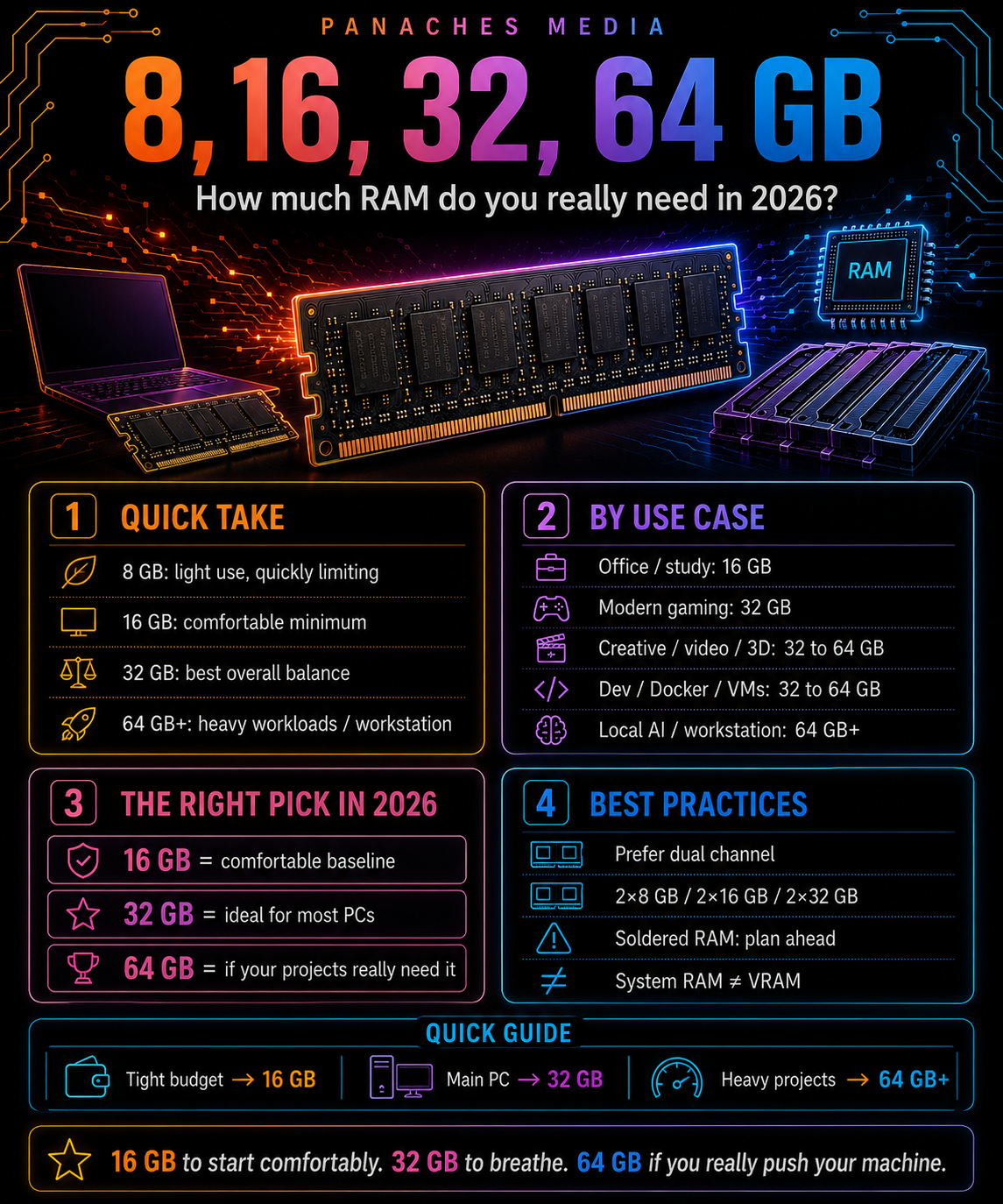
The right amount of RAM depends on your use case
Choosing RAM for a computer seems simple at first.
You see a capacity, a price, sometimes a speed, and you wonder:
“Is 16 GB enough? Do I need 32 GB? Is 64 GB too much?”
The answer rarely depends on a single number.
RAM is used to keep the system, applications, open files, browser tabs, games, creative projects, development environments, virtual machines or certain local AI tools active.
The heavier or more simultaneous your uses are, the more important RAM becomes.
A computer can boot with very little RAM. But booting is not the same as working comfortably.
Microsoft lists 4 GB of RAM as the minimum for Windows 11. That is enough to define basic compatibility, but it does not represent a smooth modern experience with a browser, applications, updates and real multitasking.
So the real question is not:
“What is the minimum amount for the PC to run?”
But rather:
“How much RAM lets me use this PC comfortably today, and still properly in a few years?”
The simple 2026 summary
To get straight to the point, you can use this guide:
| Amount of RAM | Simple reading in 2026 |
|---|---|
| 8 GB | Very light minimum, quickly limiting |
| 16 GB | Comfortable minimum for a modern PC |
| 32 GB | Best balance for most versatile PCs |
| 64 GB | Heavy creation, advanced development, VMs, large projects |
| 128 GB and more | Workstation, heavy local AI, intensive virtualization, specialized professional uses |
This does not mean everyone should buy 64 GB.
It means RAM should be chosen according to real use, not old habits.
For a long time, 8 GB felt sufficient. Then 16 GB became the comfortable standard. In 2026, 16 GB remains usable, but 32 GB is becoming the safer choice for a versatile main machine.
Software is heavier. Browsers keep more tabs open. Games load more data. Creative tools handle larger files. Developers sometimes use Docker, virtual machines, heavy IDEs, local databases and test servers.
RAM is not only about going faster.
It is about preventing the machine from choking.
4 GB: a technical minimum, not a real recommendation
Let’s start with a clear point: 4 GB of RAM is no longer recommendable for a modern main PC.
Yes, some systems can boot with 4 GB. Yes, some very light uses can still work. Yes, old or very limited machines can survive with that amount.
But booting and comfort are not the same thing.
With 4 GB, the system can quickly saturate as soon as you open:
- a modern browser;
- several tabs;
- a document;
- a messaging tool;
- a background application;
- an update;
- an antivirus;
- a cloud service.
The machine then uses storage as backup memory. This is called the page file, virtual memory or swapping.
It allows the system to keep running, but at the cost of a major loss in responsiveness.
In 2026, 4 GB should be seen as a compatibility threshold, not a working base.
For a main PC, you need to look higher.
8 GB: still possible, but very limited
8 GB of RAM is now the minimum for simple use.
It can be enough for:
- light web browsing;
- word processing;
- email;
- video streaming;
- administrative tasks;
- basic school use;
- lightweight Linux;
- secondary computer;
- older machine kept alive.
But the margin is small.
The issue is not that a PC with 8 GB no longer works. The issue is that it reaches its limits quickly.
A browser with many tabs can already take up a significant amount of RAM. Modern websites are rich, animated, full of scripts and sometimes heavy in memory. Web apps like online office suites, design tools, messaging platforms, dashboards or work platforms can also consume far more than expected.
With 8 GB, you often need to close what you are not using.
You can work, but with discipline.
That is acceptable for a simple machine. It is not ideal for a main machine you want to keep for several years.
Who can still use 8 GB?
8 GB can still work if the use is truly modest.
For example:
- simple family computer;
- backup laptop;
- writing machine;
- light browsing;
- email checking;
- videos;
- online classes;
- Linux with a lightweight environment;
- small troubleshooting PC.
But even in these cases, caution is needed.
If the RAM is soldered in a laptop, choosing 8 GB can be risky. The machine may feel enough today, then become frustrating in two or three years.
On a desktop PC or upgradeable laptop, 8 GB can be a temporary starting point. On a non-upgradeable machine, it is much more restrictive.
The simple advice:
8 GB can help. 8 GB is no longer the comfortable choice for a modern main PC.
16 GB: the comfortable minimum
16 GB of RAM is now the comfortable minimum for many users.
This is the amount to target for a modern PC if you want to avoid basic frustrations.
With 16 GB, you can generally run comfortably:
- Windows 11 or a modern Linux distribution;
- a browser with several tabs;
- an office suite;
- a media player;
- communication tools;
- a few background applications;
- games that are not too demanding;
- light photo editing;
- simple development;
- occasional creation.
This is a coherent amount for a serious office PC, a study laptop, a family machine, a remote-work PC or general use.
But you also need to understand its limits.
16 GB can become tight with:
- many tabs;
- recent games;
- Adobe software;
- video editing;
- large photo files;
- virtual machines;
- Docker;
- heavy development;
- large creative projects;
- permanent multitasking.
Adobe, for example, recommends 16 GB of RAM for HD media in Premiere Pro, but 32 GB or more for 4K and higher resolutions. This shows that 16 GB remains useful, but no longer covers all modern creative uses.
Who is 16 GB for?
16 GB suits many classic profiles:
- student;
- remote worker;
- advanced office work;
- comfortable browsing;
- multimedia;
- light gaming;
- light photo editing;
- simple digital drawing;
- light web development;
- family use;
- everyday laptop.
For a user who does not play heavy games, does not edit video, does not run virtual machines and does not use heavy tools in parallel, 16 GB remains reasonable.
But there is an important nuance.
If you are buying a new machine in 2026 and want to keep it for a long time, especially with soldered RAM, 16 GB should be considered the minimum you should not go below, not a luxury.
If the budget allows, 32 GB gives much more comfortable headroom.
32 GB: the best balance for a modern PC
32 GB of RAM is probably the best balance in 2026 for a versatile main machine.
It is not mandatory for everyone. But it is often the most comfortable choice, especially if you want to keep your computer for several years.
With 32 GB, you mainly gain headroom.
You can keep more applications open. Open more tabs. Work with heavier files. Launch a game while keeping tools in the background. Develop more comfortably. Do some creation without constantly watching memory usage.
32 GB is especially relevant for:
- recent gaming;
- heavy multitasking;
- light to medium creation;
- photo editing;
- digital drawing;
- light to medium video editing;
- web or software development;
- light to medium Docker use;
- local databases;
- large browser sessions;
- machines you want to keep for a long time.
Blender lists 8 GB as a minimum and 32 GB as recommended in its hardware requirements. That does not mean every Blender project requires 32 GB, but it confirms that for modern 3D creation, 32 GB is a much more comfortable base.
Why 32 GB is becoming so relevant
The reason is simple: uses now overlap.
Before, users often did one heavy task at a time.
Today, it is common to have:
- browser open;
- 20 or 30 tabs;
- music;
- Discord or messaging;
- word processor;
- design software;
- code editor;
- local server;
- cloud sync;
- game;
- screenshot tool;
- AI tool;
- PDF or documentation;
- several files open.
Each element may seem reasonable on its own. Together, they quickly consume a lot of RAM.
32 GB prevents you from constantly thinking about what to close.
It is less spectacular than a new GPU, but in daily use, the comfort is real.
RAM is a bit like space on a desk: as long as you have enough, you do not think about it. As soon as you run out, everything becomes annoying.
64 GB: for heavy uses
64 GB of RAM becomes interesting when the machine is used for heavy or professional tasks.
At this level, we are talking about more demanding needs:
- advanced 4K video editing;
- After Effects;
- large Photoshop projects;
- large Lightroom libraries;
- 3D creation;
- rendering;
- virtual machines;
- heavy Docker use;
- development with several environments;
- local databases;
- scientific projects;
- large files;
- very heavy multitasking;
- local AI in some workflows.
Adobe also indicates 32 GB or more for 4K and beyond in After Effects, which places 64 GB in a logical zone for creators who want more headroom, especially with complex projects.
64 GB is not necessary for writing, browsing or office work.
But for certain creators, developers or technical users, it is real comfort.
The benefit of 64 GB is not just opening one application. It is being able to work with a large project, several files, previews, caches, background tools and a system that still has room to breathe.
Who is 64 GB for?
64 GB suits more advanced profiles:
- video editor;
- motion designer;
- photographer with large files;
- heavy graphic designer;
- developer using VMs and Docker;
- data analyst;
- virtual machine user;
- 3D creator;
- musician with large sound libraries;
- local AI user;
- personal workstation;
- heavy professional multitasking.
For these profiles, 64 GB is not necessarily excessive.
It helps avoid quick saturation, reduces swapping and keeps the machine smoother under load.
The important point is not to buy 64 GB just “because it looks good”.
If your use never approaches 32 GB, 64 GB will not magically make the PC faster. Unused RAM does not boost performance.
But if your projects regularly saturate 32 GB, then 64 GB can noticeably change comfort.
128 GB and more: workstation territory
128 GB of RAM and more is for specific uses.
This is the world of workstations, heavy production and certain professional workflows.
It can be useful for:
- intensive virtualization;
- several virtual machines in parallel;
- large 3D projects;
- simulation;
- scientific computing;
- heavy databases;
- very high-resolution editing;
- complex compositing;
- large audio projects with massive libraries;
- local AI and heavy pipelines;
- development on large architectures;
- processing very large datasets.
This is not an amount to recommend to the general public.
For many users, 128 GB will remain almost always unused.
But for some professions, it is necessary. A workstation handling huge projects cannot be judged with the same criteria as a family PC.
The right question is:
“Do my software or projects really saturate 64 GB?”
If yes, 128 GB can be justified. If not, it is better to invest elsewhere: CPU, GPU, SSD, display, backup or cooling.
Office work: 16 GB, sometimes 8 GB, ideally 16 or 32 depending on lifespan
For office work, the necessary RAM depends mostly on the expected comfort level.
Very light use can still work with 8 GB:
- emails;
- word processing;
- simple browsing;
- administrative tasks;
- videos;
- a few documents.
But for a modern main PC, 16 GB is much more comfortable.
It lets you use the browser, documents, video calls, messaging apps and cloud services without feeling immediately limited.
For a machine you want to keep for a long time, 32 GB can also make sense, especially if the RAM is soldered or if the user keeps many tabs open.
Simple recommendation:
| Office use | Recommended RAM |
|---|---|
| Very light | 8 GB possible |
| Comfortable office work | 16 GB |
| Durable PC / multitasking / soldered RAM | 32 GB |
For office work, you do not necessarily need to aim very high. But you should no longer go too low.
Web browsing: the real tab trap
The browser has become one of the most memory-hungry everyday applications.
It is no longer just a tool for displaying pages.
It is often a full environment:
- email;
- documents;
- messaging;
- video;
- social networks;
- CMS;
- collaborative tools;
- dashboards;
- online AI;
- cloud storage;
- project management;
- web apps.
Each tab can consume memory. Some extensions too. Some pages stay active in the background.
With 8 GB, you quickly need to close things. With 16 GB, you breathe better. With 32 GB, the browser can become a real workspace without saturating as quickly.
For someone who works heavily in the browser, 32 GB is not absurd. It is often one of the best comfort upgrades.
Gaming: 16 GB can still work, 32 GB is becoming safer
For gaming, the answer depends on the type of games, resolution, background software and expected lifespan.
For a long time, 16 GB was the comfortable gaming standard.
In 2026, 16 GB can still work, but 32 GB is becoming the safer choice for a modern gaming configuration.
Why?
Because recent games can be heavier, but also because gamers often keep other things open:
- Discord;
- browser;
- capture software;
- streaming;
- launcher;
- overlays;
- music;
- monitoring tools;
- sometimes video recording.
System RAM does not replace graphics-card VRAM, but it contributes to overall comfort.
With 16 GB, some recent games can work correctly, but the margin is shrinking. With 32 GB, the system has more room to breathe.
Simple recommendation:
| Gaming profile | Recommended RAM |
|---|---|
| Light / older / e-sport games | 16 GB |
| Comfortable modern gaming | 32 GB |
| Gaming + streaming + creation | 32 to 64 GB |
| Heavy multitasking / large mods | 64 GB depending on games |
For a new gaming PC, 2 × 16 GB is often the most balanced choice.
Graphic creation: 32 GB comfortable, 64 GB depending on projects
For graphic creation, RAM depends heavily on file size.
A small web visual has nothing to do with a very high-resolution poster, a project with many layers, heavy RAW files or several apps open.
For photo editing, digital drawing, graphic design and visual creation:
- 16 GB can be enough for simple projects;
- 32 GB is much more comfortable;
- 64 GB becomes useful for very large files, many layers or professional workflows.
The classic trap is underestimating files.
An image can become heavy with:
- high resolution;
- multiple layers;
- history;
- effects;
- smart objects;
- textures;
- linked files;
- parallel exports.
For a creator, RAM keeps the project fluid while editing.
Simple recommendation:
| Graphic creation | Recommended RAM |
|---|---|
| Drawing / light retouching | 16 GB |
| Regular creation | 32 GB |
| Large files / pro use | 64 GB or more |
Video editing: 32 GB quickly becomes the serious base
Video editing is one of the uses where RAM can climb quickly.
The necessary amount depends on many factors:
- resolution;
- codec;
- project duration;
- number of tracks;
- effects;
- color correction;
- preview;
- cache;
- software used;
- projects open in parallel.
Adobe, for example, recommends 16 GB of RAM for HD media and 32 GB or more for 4K and above in Premiere Pro.
This gives a clear reference:
- simple Full HD editing: 16 GB can be enough;
- 4K editing: 32 GB becomes a real base;
- heavy projects, effects, After Effects, multicam: 64 GB can be much more comfortable.
Simple recommendation:
| Video editing | Recommended RAM |
|---|---|
| Light Full HD | 16 GB |
| Common 4K | 32 GB |
| Heavy 4K / After Effects / multicam | 64 GB |
| 8K / heavy compositing / pro | 64 to 128 GB and more |
RAM does not replace the GPU, CPU or a good SSD, but it prevents the project from choking during work.
3D and rendering: 32 GB recommended, 64 GB and more depending on scenes
3D can consume a lot of memory depending on scene complexity.
The heavy elements include:
- number of objects;
- textures;
- simulations;
- particles;
- geometry;
- subdivision;
- cache;
- rendering;
- engines used;
- resolution;
- open scenes.
Blender lists 8 GB minimum and 32 GB recommended in its requirements.
To learn or create modest scenes, 16 GB can work.
But for real comfort, 32 GB is much more suitable. For heavy scenes, 64 GB or more quickly becomes useful.
Simple recommendation:
| 3D / rendering | Recommended RAM |
|---|---|
| Learning / simple scenes | 16 GB |
| Comfortable 3D creation | 32 GB |
| Heavy scenes / textures / simulations | 64 GB |
| Advanced 3D workstation | 128 GB and more depending on projects |
You also need to distinguish system RAM and VRAM. For GPU rendering, graphics-card VRAM can be decisive. But system RAM remains important for the whole project and other tasks.
Development: 16 GB minimum, 32 GB often ideal
For development, RAM depends heavily on the type of project.
A web developer working on simple sites does not have the same needs as a developer using Docker, virtual machines, local databases, heavy IDEs, mobile simulators or AI tools.
For light use:
- code editor;
- browser;
- terminal;
- simple local server;
16 GB can be enough.
But as soon as you add:
- Docker;
- several containers;
- local database;
- heavy Node environment;
- full IDE;
- VM;
- testing tools;
- browser with documentation;
32 GB becomes much more pleasant.
Docker Desktop, for example, requires 8 GB of system RAM on Windows with WSL 2, but this minimum obviously comes on top of the system, browser, IDE and services the user actually runs.
Simple recommendation:
| Development | Recommended RAM |
|---|---|
| Scripts / light web | 16 GB |
| Comfortable web/app dev | 32 GB |
| Docker, local databases, heavy IDE | 32 to 64 GB |
| Multiple VMs / large projects | 64 GB and more |
For many developers, 32 GB is the real sweet spot.
Virtual machines: count the RAM of each system
Virtual machines completely change the calculation.
Each VM needs its own memory.
If your main system already uses 8 to 12 GB, and you launch a VM with 8 GB, total consumption rises quickly.
Two VMs, three VMs, a test environment, a local server, a database, a browser and an IDE can saturate 32 GB faster than expected.
For virtualization:
- 16 GB allows light testing;
- 32 GB is a serious minimum;
- 64 GB brings much more comfort;
- 128 GB and more becomes useful for advanced labs.
Simple recommendation:
| Virtualization | Recommended RAM |
|---|---|
| Occasional test of a small VM | 16 GB |
| Regular VMs | 32 GB |
| Several VMs / serious lab | 64 GB |
| Advanced / pro / infrastructure lab | 128 GB and more |
Practical rule:
Add up the RAM of the main system + the RAM of the VMs + a safety margin.
Without margin, the machine will swap.
And a VM that swaps is rarely a happy experience.
Local AI: do not confuse RAM and VRAM
For local AI, RAM matters, but you need to distinguish two things:
- system RAM;
- graphics-card VRAM.
For models running on GPU, VRAM is often the most decisive factor. It determines whether a model can be loaded directly onto the graphics card.
But system RAM remains useful for:
- loading certain models;
- preparing data;
- running the interface;
- using the system;
- managing files;
- launching other tools in parallel;
- working with CPU models;
- handling datasets;
- doing RAG or document processing.
For light tests, 16 GB can sometimes be enough.
For a more comfortable local AI machine, 32 GB is preferable.
For heavier workflows with models, documents, embeddings, creative tools, development and several services open, 64 GB can become very useful.
Simple recommendation:
| Local AI | Recommended RAM |
|---|---|
| Light tests / small tools | 16 GB |
| Comfortable local use | 32 GB |
| RAG, datasets, AI dev, multitasking | 64 GB |
| Advanced AI workstation | 128 GB and more depending on projects |
The key thing to remember:
VRAM often limits the model on the GPU side. System RAM supports the whole environment around it.
Music, audio and sound libraries
Audio production can also require a lot of RAM.
A simple project with a few tracks is not a major issue. But things change with:
- large sound libraries;
- virtual instruments;
- orchestral samples;
- many plugins;
- multitrack projects;
- real-time effects;
- several apps open in parallel.
For light audio, 16 GB can be enough.
For more serious music production, 32 GB is more comfortable.
For large orchestral libraries or professional projects, 64 GB or more can be justified.
Simple recommendation:
| Audio / music production | Recommended RAM |
|---|---|
| Simple recording / small projects | 16 GB |
| Regular production | 32 GB |
| Large sound libraries / orchestral | 64 GB or more |
RAM does not replace a good audio interface, a stable CPU or a fast SSD, but it can prevent loading issues and slowdowns in heavy projects.
Studies and laptops: beware of soldered RAM
For a study or work laptop, the RAM question is even more important.
Many modern laptops have soldered memory.
That means it will be impossible to add RAM later.
In that case, buying too little can shorten the comfortable lifespan of the machine.
For a student or general use:
- 8 GB can be enough short term, but it is limited;
- 16 GB is much more reasonable;
- 32 GB is interesting for durability, creation, coding or keeping many tabs open.
On a non-upgradeable laptop, the right choice is often to take a bit more than the immediate need.
Simple recommendation:
| Laptop | Recommended RAM |
|---|---|
| Very light use / tight budget | 8 GB minimum |
| Study / work / general use | 16 GB |
| Dev / creation / durable machine | 32 GB |
| Mobile workstation | 64 GB depending on models |
The trap is saving a little today and getting stuck tomorrow.
Desktop PC: easier to upgrade
On a desktop PC, the situation is often more flexible.
If the motherboard has free slots, you can add or replace memory sticks later.
This can sometimes let you start with 16 GB, then move to 32 GB or 64 GB.
But several points need attention:
- DDR4 or DDR5;
- number of available slots;
- motherboard maximum capacity;
- kit compatibility;
- dual channel;
- stick height;
- XMP or EXPO profiles;
- stability if mixing kits.
For a new desktop PC in 2026, a 2 × 16 GB configuration is often ideal.
It gives 32 GB, usually enables dual channel, and sometimes leaves two slots free depending on the motherboard.
For a workstation, 2 × 32 GB can be more coherent.
The most important thing is to avoid awkward configurations: one stick when two would be better, mixed kits, or too little capacity from the start.
1 stick or 2 sticks?
The amount of RAM is not enough. Configuration matters too.
On many consumer platforms, it is better to use two identical sticks to benefit from dual channel.
Examples:
- 2 × 8 GB rather than 1 × 16 GB;
- 2 × 16 GB rather than 1 × 32 GB;
- 2 × 32 GB rather than 1 × 64 GB.
Dual channel increases the bandwidth available between memory and processor.
It does not double all performance, but it can improve certain uses, especially integrated graphics, some games, some memory-dependent applications and general smoothness.
For a modern PC, the simple choice is:
16 GB = 2 × 8 GB 32 GB = 2 × 16 GB 64 GB = 2 × 32 GB
Then the sticks must be installed in the right slots, often A2 and B2, according to the motherboard manual.
Should you buy more to plan ahead?
Yes, but moderately.
Buying a little more than the immediate need can be smart.
For example:
- choosing 16 GB instead of 8 GB;
- choosing 32 GB instead of 16 GB on a durable machine;
- choosing 64 GB instead of 32 GB for creative or advanced development use.
But buying far more than necessary is not always useful.
If your use consumes 12 GB at most, moving from 32 to 64 GB will change almost nothing.
Unused RAM does not magically accelerate the PC.
It is better to find the right balance:
- enough to avoid saturation;
- enough to last;
- not so much that the budget is missing elsewhere.
Sometimes, it is better to invest in:
- a better SSD;
- a better graphics card;
- a better display;
- external backup;
- quieter cooling;
- a reliable power supply.
RAM is essential, but it is not alone.
How do you know if you lack RAM?
There are fairly clear signs.
You may be short on RAM if:
- the PC slows down with several apps open;
- the browser becomes heavy;
- the disk or SSD works heavily for no obvious reason;
- the system uses the page file a lot;
- applications take time to return to the foreground;
- games stutter when other tools are open;
- creative software becomes unstable;
- virtual machines are very slow;
- the system becomes less responsive after a few hours.
On Windows, Task Manager lets you check memory usage.
On Linux, you can use system tools, free, top, htop or graphical monitors.
But you need to look at the situation during real use.
Do not measure RAM just after startup. Look during your actual working day, with your software open.
That is where the right diagnosis appears.
RAM in a modern workspace
Modern uses are no longer neatly separated.
You can write, browse, read PDFs, organize files, manage media, develop, test AI, listen to music, watch video, open a spreadsheet, chat and keep several tools open at the same time.
In this context, RAM becomes a central comfort component.
A unified workspace like Panaches illustrates this logic well. When several modules coexist in the same environment — browser, documents, notes, PDFs, files, media, creative tools or specialized modules — smoothness depends heavily on the PC’s ability to keep active data without saturating.
With too little RAM, the user ends up closing, waiting, reloading and enduring.
With enough RAM, the computer becomes more discreet. It lets you work.
And that is often what we expect from a good machine: that it stops demanding our attention.
Common mistakes to avoid
The first mistake is choosing 8 GB for a modern main PC while thinking “it will be fine”. Yes, it can work. No, it is no longer comfortable for the long term.
The second mistake is choosing 16 GB on a laptop with soldered RAM if you already know you will do creation, development or heavy multitasking for several years.
The third mistake is believing more RAM always increases performance. Beyond the real need, the gain may be zero.
The fourth mistake is underestimating the browser. Tabs and web apps can consume a lot.
The fifth mistake is confusing system RAM and VRAM. For the GPU, VRAM also matters.
The sixth mistake is choosing a single stick instead of two identical sticks.
The seventh mistake is mixing several different memory kits without checking stability.
The eighth mistake is forgetting that the motherboard imposes DDR4 or DDR5.
The ninth mistake is paying for very fast RAM while staying too low in capacity.
The tenth mistake is not looking at your own real use.
Key takeaways
In 2026, the right amount of RAM depends less on a universal rule than on your real use.
8 GB can still be enough for very light use, but it quickly becomes limiting.
16 GB is the comfortable minimum for a classic modern PC: office work, web, multimedia, remote work, studies and general use.
32 GB is the best balance for a versatile main machine: gaming, light to medium creation, development, heavy multitasking and a PC you want to keep for a long time.
64 GB becomes useful for heavy uses: video editing, advanced creation, 3D, virtual machines, intensive development, large sound libraries or more serious local AI.
128 GB and more mainly concerns workstations, massive virtualization, heavy 3D, large datasets, advanced AI and certain professional workflows.
For many users, the best choice in 2026 is simple:
16 GB if the budget is tight or the use is classic. 32 GB for a comfortable modern machine. 64 GB if you know exactly why you need it.
RAM does not magically make everything faster.
But when it is missing, everything becomes slower.
And in daily use, having enough memory is often what makes the difference between a computer that keeps up… and a computer that gets tiring.