Between the idea and the “New Game” button
When a player launches a game, almost all the work that made it possible has become invisible. The character responds to the controller, doors open at the right moment, music accompanies the scene, menus work, enemies react, text has been translated, and the save system normally returns the player to where they left off.
None of that existed in the first idea.
At the beginning, a game may fit into a few sentences: a character, a mechanic, an atmosphere, perhaps an image or a rough prototype. That intention then has to be transformed into thousands of elements capable of working together. Code, animations, interfaces, levels, dialogue, visual effects, sound, save systems, artificial intelligence, data, internal tools, and gameplay rules eventually form a single object that the player experiences as one continuous whole.
That is what the production pipeline is for.
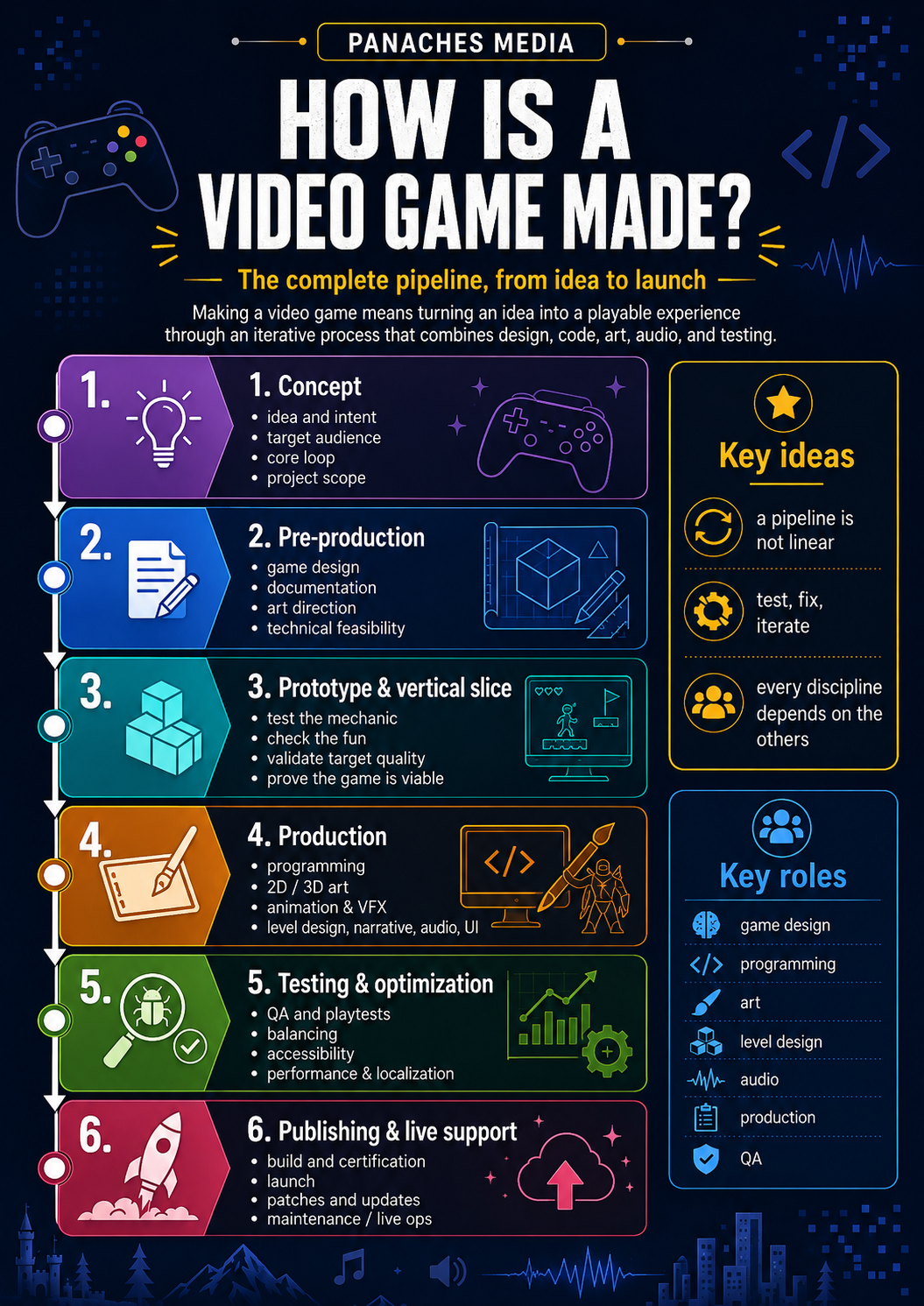
The term can suggest an assembly line where an idea moves neatly from one department to the next until it becomes a finished game. Reality is far more fluid. Teams prototype, test, revisit mechanics, change an animation because it interferes with gameplay, rebuild an area because players keep getting lost, then discover that a feature developed for six months costs too much for what it actually contributes.
Unity describes the general project cycle through four broad phases — pre-production, production, post-production, and operations — but this division mainly helps locate the project in its lifecycle. Within those phases, design, programming, content creation, and testing move forward through repeated iterations. (learn.unity.com)
A pipeline therefore describes less the absolute order of tasks than the way a team gradually turns uncertainty into something playable, testable, and eventually publishable.
1. Concept — deciding what you are actually trying to build
Creating a game does not necessarily begin with a hundred-page document. It can begin with a mechanic, a feeling, a character, a situation, or even a technical constraint.
A platformer might begin with a particularly satisfying movement system. A narrative game might start with the relationship between two characters. A puzzle game may first exist as a rule scribbled into a notebook. In every case, the first challenge is to distinguish an appealing idea from a game that can actually be built.
The concept gradually needs to answer a few simple questions: what does the player do? Why would they want to do it again? What distinguishes this experience from another one? Who is it for? What machines should it run on? And most importantly, what size of project can the team realistically produce with its time, skills, and budget?
This is often where the idea of the core loop appears: the repeated sequence of actions that will structure much of the experience. In a racing game, driving, upgrading, and returning to the track may form one loop. In an RPG, exploring, fighting, collecting resources, and improving a character form another.
A good game idea therefore cannot be reduced to its setting. “An RPG in a cyberpunk city” describes a framework. You still have to discover what the player will actually do for twenty minutes, and then for ten hours.
2. Pre-production — solving the biggest problems before they become expensive
Pre-production is the period in which the project looks for its shape.
Game design clarifies rules, controls, progression systems, interactions, and overall balance. Art direction searches for a visual identity that fits the project. Developers evaluate technical requirements. Production begins estimating resources, dependencies, and the stages that will be needed.
Depending on the team, this information may be collected in a Game Design Document, an internal wiki, a project management tool, or several specialized documents. The exact format matters less than its function: keeping the vision clear enough that several people can build the same game without each carrying a different version of it in their head.
Pre-production is also where the team defines what the project will not do.
That is much less spectacular, but often more useful.
An inventory may be removed. An open city may become a series of separate areas. Ten playable characters may become three. An attractive technology may be abandoned if its technical cost exceeds its real value.
Scope — the boundaries of the project — starts becoming a creative constraint.
3. Prototype — testing the idea before building the game
A mechanic described on paper can sound excellent until someone actually gets their hands on it.
That is precisely what the prototype is for.
It does not try to be beautiful. It tries to answer a question.
Does movement feel good? Does this combat system actually work? Can the camera keep the action readable? Does procedural generation produce interesting levels? Does this dialogue mechanic remain understandable once several variables begin interacting?
Unity specifically recommends starting small and prototyping in order to identify what truly forms the core of the experience and to test different approaches before committing to full production. A quick prototype can even be deliberately disposable: its role is to validate an assumption, not necessarily to become the permanent technical foundation of the game. (learn.unity.com)
This distinction helps avoid a classic mistake: spending weeks producing polished textures, clean animations, and a complete interface only to discover that the central mechanic simply is not very interesting.
The prototype accepts being ugly so that the final game has a better chance of being good.
From prototype to vertical slice
Once the main ideas begin to hold together, some teams produce a vertical slice.
Unlike a rough prototype, it aims to represent a small portion of the game close to final quality. Gameplay, art direction, interfaces, audio, and the main systems should work together. Unity defines a vertical slice as a small playable section demonstrating the project’s major systems, features, and art elements; it can also be used to present the game to a publisher or investors. (learn.unity.com)
A prototype asks:
“Does this idea work?”
A vertical slice asks instead:
“Can we produce this game in this way and at this level of quality?”
The distinction may sound subtle. For a project that will involve dozens of people over several years, it is anything but.
4. Production — when all disciplines begin to meet
Once the direction has been validated well enough, the project truly enters production.
This is generally the longest stage and the one involving the largest number of people. Code expands, levels are built, characters take shape, interfaces appear, temporary movements are replaced by animations, and a few convincing minutes gradually have to become hours of coherent gameplay.
The word “production” hides an essential difficulty, however: everything advances in parallel.
| Area | What is being built |
|---|---|
| Game design | rules, mechanics, progression, economy, balancing |
| Programming | gameplay, tools, AI, physics, saving, networking, technical interfaces |
| Art direction | visual language, colors, shapes, references, overall consistency |
| 2D art / concept art | characters, environments, objects, interfaces, visual exploration |
| 3D | modeling, textures, materials, rigging, animation |
| Level design | playable spaces, pacing, navigation, encounters, objectives |
| Narrative | story, dialogue, quests, staging, environmental storytelling |
| VFX | particles, impacts, magic, explosions, atmosphere |
| Audio | sound effects, ambience, voices, music, audio implementation |
| UI / UX | menus, HUD, navigation, feedback, readability |
| Production | scheduling, coordination, dependencies, priorities, tracking |
This separation is theoretical. In practice, every area depends on the others.
An animator needs to know the character’s actual movement speed. A level designer needs to know how far that character can jump. The sound designer needs the proper events to trigger sounds. The programmer needs to know which animation variations will be used. The environment artist has to respect performance constraints that themselves depend on the target platforms.
A game is therefore not produced by a succession of specialists each working in isolation. It is built through a constant circulation of constraints and information.
5. Programming and systems — building the invisible rules
A large part of development consists of turning game design intentions into systems that can function reliably.
The player presses a button: what happens?
An enemy sees the player: how does it know?
A quest ends: which data needs to change?
An object is picked up: where is its state stored?
The character dies: what should the save system preserve?
Gameplay programming gives life to the interactions directly experienced by the player, but other developers may work on the engine, networking, internal tools, performance, interfaces, build systems, or artificial intelligence.
The larger the project becomes, the more important code architecture becomes. A feature that works perfectly in a small demo can become painful to maintain once it has to interact with fifty other systems.
That is also why prototype code and production code do not always pursue the same objective: the first needs to teach the team quickly, while the second needs to keep working as the project grows.
6. Art direction, 2D, and 3D — giving the world visual coherence
Visual production is not simply about “making good graphics.”
Art direction defines a common language: proportions, shapes, palettes, materials, level of detail, lighting, architecture, costumes, visual effects, and readability all need to feel as though they belong to the same world.
Concept art explores possibilities before production becomes expensive. A character may be drawn in several different forms before the team chooses the one that will actually be modeled. An environment may be tested through a few quick paintings before an entire 3D location is constructed.
For a 3D character, the chain may then include modeling, sculpting, retopology, UVs, textures, materials, rigging, and animation. An environment has different needs: modular architecture, vegetation, props, terrain, materials, lighting, and optimization need to form a reusable whole.
Technology constantly affects these choices. A beautiful cape that clips through the character during every fight is not really finished. A spectacular forest that makes the game drop to fifteen frames per second is not finished either.
Visual creation therefore has to find a balance between artistic intention, gameplay, and technical constraints.
7. Level design — turning systems into situations
A mechanic does not truly exist until a player encounters a situation that allows them to use it.
That is where level design becomes essential.
The level designer organizes spaces, distances, navigation, objectives, encounters, resources, and pacing. A corridor can prepare a surprise. An arena can offer several tactical positions. A cliff can guide the player’s gaze toward the next destination without displaying a huge glowing arrow.
Early levels are often built as a greybox or blockout: simple volumes temporarily stand in for walls, buildings, or obstacles. The goal is to verify proportions and gameplay before investing in artistic polish.
The environment can then be dressed, lit, sounded, and enriched without losing the structure that makes it playable.
This stage shows why a level is not simply scenery. It is an architecture of decisions.
8. Audio, music, and voices — building what the image cannot say alone
A silent game quickly reveals how much of the experience is carried by sound.
A sound confirms that an attack has hit its target. A musical variation signals danger before the player sees it. Ambience gives a location its identity. An interface becomes easier to understand through a few well-placed audio cues.
Audio work therefore begins long before the final recording of sound effects.
Sound designers, composers, audio programmers, and voice actors may all be involved depending on the scale of the project. Sound then has to be integrated into the engine so that it reacts to context: distance, space, combat state, the surface under the player’s feet, weather, or narrative situation.
Music itself can become dynamic. Instead of playing one fixed track, the engine may combine several layers and alter the arrangement according to what is happening on screen.
The player usually does not know how the system works.
They simply hear that “it works.”
That is often the best compliment a well-integrated pipeline can receive.
9. Integration and tools — where the pipeline can save or destroy time
As soon as a team grows, producing the game’s elements is no longer enough. You also need to know how to move them through the project.
Who has the latest version of the character?
How should files be named?
What happens when two people modify the same scene?
How can code and assets automatically be transformed into a playable version?
How do you check that a new file has not broken the project?
Version control, naming conventions, asset management, import tools, automation, and build systems become essential parts of development.
Unreal Engine’s documentation groups these subjects directly within its production pipeline: collaboration and version control, asset management, editor automation, storage, deployment, and build infrastructure all help keep workflows viable as the project and team grow. Epic also emphasizes the value of automated build and testing pipelines for reducing the time between a change and its verification. (dev.epicgames.com)
This work is rarely visible in a trailer.
Yet it can determine whether a team loses ten minutes or two hours every time someone wants to test a change.
Across several years of production, those small frictions become enormous.
10. Testing — discovering the game the team actually made
Developing a game for months creates a fairly predictable problem: the team eventually knows its own project far too well.
They know where to go.
They know the controls.
They understand the rules.
They know that the tiny symbol on the right means holding a button for two seconds.
A new player knows none of that.
Testing exists precisely to confront the game with that reality.
QA looks for bugs, crashes, progression blockers, and unexpected behavior. Playtests focus more on the experience: do players understand the objective? Do they use the mechanic as intended? Is an area too difficult? Does an interface cause mistakes?
Unity distinguishes between tests that confirm whether an experience meets technical requirements, tests that reveal unexpected behavior, and user tests that evaluate what the experience actually produces for its intended audience. (learn.unity.com)
The results can be uncomfortable.
A mechanic the team loves may not work.
A tutorial considered obvious may lose half the players.
A secondary weapon may become far more powerful than expected.
But discovering that problem during a playtest is still preferable to discovering it through ten thousand reviews published on launch day.
11. Accessibility — considering the people who will play from the design stage
Accessibility is not simply a matter of adding a few options to the menus shortly before release.
Text size, contrast, subtitles, control remapping, alternatives to information communicated only through sound or visuals, reduced motor demands, and difficulty settings can directly affect interface and gameplay design.
They are therefore much easier to integrate when considered early enough.
Unity’s accessibility training explicitly places this work in pre-production and recommends maintaining feedback and evaluation cycles throughout development. The Xbox Accessibility Guidelines are likewise intended for designers, developers, and testing teams rather than being treated as a final checklist. (learn.unity.com)
It is not simply another layer added to the pipeline.
It is a way of checking who can actually access the experience being created.
12. Optimization — making the game work in the real world
On the developer’s machine, a scene may run perfectly.
Then come the target console, the minimum-spec PC, the phone that begins to overheat, and the area containing three times as many enemies as the initial test.
Optimization aims to keep the experience within the limits of the hardware.
Rendering has to respect the available budget. Textures consume memory. Animation, physics, AI, and visual effects use processor time. Loading depends on storage and on how data is organized.
Teams therefore use profiling tools to identify the real performance bottlenecks instead of optimizing at random.
That may lead to simplifying geometry, reducing some textures, using levels of detail, limiting calculations, changing streaming systems, or completely reworking a feature.
The objective is not to obtain “the best graphics possible.”
It is to achieve the best experience the target platforms can actually sustain.
13. Localization — when a game has to survive another language
Translating a game is not simply replacing a French sentence with an English or Japanese one.
Length changes.
Writing systems change.
Reading direction may change.
Voices sometimes have to be recorded again.
Images may contain text.
Some cultural references require adaptation.
An interface designed for a six-letter word may suddenly need to display twenty-two.
Localization therefore has to be tested inside the game itself.
Xbox certification requirements include, for example, verification of supported languages, correct display of localized text, and game stability when language settings are changed. (learn.microsoft.com)
The earlier the project anticipates this reality, the less likely it is to discover at the end that its beautiful button physically cannot fit its German translation.
14. Build, certification, and publishing — turning the project into a distributable product
A project running inside the editor is not yet the game the public will download.
A build has to be produced.
The engine then gathers the code and resources needed for a specific platform, prepares the data, optimizes it, and generates the files that can be installed and executed.
Unreal documentation distinguishes operations including compilation, asset preparation, staging, packaging, deployment, and execution. Epic also notes that packaging takes place during production and testing, for final distribution, and later for post-release updates. (dev.epicgames.com)
On consoles, another stage appears: certification.
The platform holder verifies that the game meets its technical and functional requirements. On Xbox, this includes areas such as stability, different game modes, profiles, multiplayer, languages, downloadable content, and various situations related to platform behavior. (learn.microsoft.com)
At the same time, everything surrounding the software has to be prepared: store pages, screenshots, trailers, age ratings, prices, metadata, and communication.
Release is the visible event.
Yet it mostly represents the moment when all the invisible work in the pipeline finally has to function for someone who does not have the editor, the internal tools, or a developer sitting beside them explaining why they need to click here.
15. After release — because a finished game often keeps moving
In the past, placing a game on a cartridge or disc created a fairly clear boundary. Once the product had been manufactured and distributed, fixing an error became difficult and sometimes impossible.
Digital distribution has largely moved that boundary.
Patches, updates, DLC, new seasons, events, balancing changes, additional content, and server maintenance can all extend the pipeline beyond launch.
Unity therefore includes an operations phase after production and post-production, while Unreal explicitly describes post-production as a period in which packaging is also used to distribute patches and new content. (learn.unity.com)
For a relatively self-contained single-player game, this stage may involve only a few patches.
For an MMO or live-service game, it can last for years and continue employing a significant part of the original team.
Release is no longer necessarily the end of the pipeline.
It simply changes its rhythm.
The complete pipeline at a glance
The stages overlap and their order varies from one project to another, but the general movement can be summarized like this:
| Stage | Main question | Desired result |
|---|---|---|
| 1. Concept | What game do we want to create? | vision, promise, audience, constraints |
| 2. Pre-production | How can we realistically produce it? | scope, documentation, planning, direction |
| 3. Game design | What does the player do and under which rules? | mechanics, systems, progression |
| 4. Prototype | Does the idea work once played? | proof of concept |
| 5. Vertical slice | Can we achieve the intended experience and quality? | small representative section |
| 6. Programming | How do we make the rules functional and robust? | systems, tools, gameplay |
| 7. Art direction and assets | What does the game look like? | 2D, 3D, animation, VFX, materials |
| 8. Level design and narrative | Where and how does the experience unfold? | levels, situations, pacing, content |
| 9. Audio | How does the game respond and build atmosphere? | sound effects, voices, music, implementation |
| 10. Testing | What actually happens when someone plays? | bugs, user feedback, balancing |
| 11. Optimization | Does the game run properly on the target hardware? | performance, memory, loading |
| 12. Accessibility and localization | Who can play and in which languages? | options, adaptations, translations |
| 13. Build and publishing | How do we turn the project into a distributable version? | final package, certification, release |
| 14. Maintenance | What needs to be fixed or evolved after launch? | patches, updates, content, services |
This table looks like a straight line because a table has to put its belongings somewhere.
A real production looks more like a network of loops. Testing can send the team back to game design. Optimization can change the art. A localization constraint can reshape the interface. A prototype can kill a feature before production even begins.
That is normal.
Do an indie game and a AAA game really follow the same pipeline?
Not in the same way, but they encounter many of the same problems.
A solo developer may design, program, draw, test, and publish the game alone. In a large studio, those responsibilities may be distributed among hundreds of people and several companies located in different countries.
The main difference lies in scale and specialization.
| Small / independent project | Large production |
|---|---|
| One person may perform several roles | Roles are highly specialized |
| Lightweight and adaptable documentation | Greater documentation and coordination needs |
| Sometimes simple tools | Automated pipelines and dedicated infrastructure |
| Fast decisions | Numerous dependencies between teams |
| Limited amount of content | Massive production of assets and systems |
| Testing with a smaller group | QA teams, labs, outsourcing partners, and test campaigns |
| Sometimes direct publishing | Complex certification, marketing, and distribution |
Yet even the smallest game has to answer the same fundamental questions: is it playable, understandable, technically viable, and complete enough to be shared?
The pipeline changes in size.
The need to iterate remains.
What a pipeline is really trying to protect
Looking at all these stages, it would be easy to conclude that making a video game is mostly about managing a huge number of files, tasks, and meetings.
That would miss why the pipeline exists.
It is not there to make creativity bureaucratic. It exists so that very different forms of creative work can meet without destroying what someone else has just built.
The game designer works on a rule. The developer gives it behavior. The animator gives it movement. The sound designer gives it an audible response. The level designer creates a situation in which that rule becomes interesting. Testing then reveals what nobody expected.
Game production lives inside that circulation.
An isolated 3D model is not yet a character. An isolated line of code is not yet a mechanic. A map filled with rooms is not yet a level.
They become those things when they begin responding to one another.
That may be the best way to understand a video game pipeline: not as a chain mechanically transforming an idea into a product, but as an organization that allows hundreds of creative and technical decisions to eventually produce one coherent experience.
And when the player finally presses “New Game,” all that work can disappear behind something much simpler: the game responds, the world holds together, and play can finally begin.