When AI starts writing code
For a long time, coding meant writing every line yourself.
Finding the right syntax. Reading the documentation. Testing. Failing. Trying again. Understanding why that forgotten semicolon had decided to ruin the morning.
Then AI assistants arrived.
At first, they behaved like intelligent autocomplete tools.
A suggested line. A completed function. A guessed import. A proposed docstring.
Then they became able to generate entire blocks, fix errors, explain code, suggest tests, refactor a function, and sometimes even handle a small task from start to finish.
Today, for many developers, the question is no longer:
Can AI help us code?
The question becomes:
How can we code with AI without losing control over what we are building?
Because AI does not only change the speed of writing.
It changes the gesture of software development itself.
Developers do not necessarily write less: they work differently
Saying that AI “codes for us” is too simple.
Sometimes, yes, it writes a lot.
But that does not mean the developer disappears.
The role moves.
Before, a large part of the visible work consisted of writing the code directly.
With AI, a growing part of the work becomes:
- defining the need;
- framing the request;
- giving the right context;
- limiting the scope;
- reviewing the proposal;
- detecting side effects;
- running tests;
- analyzing errors;
- correcting;
- validating;
- deciding whether the result is acceptable.
The gesture becomes less linear.
We no longer simply do:
think → write → test.
We do something closer to:
frame → generate → review → test → correct → validate.
It is not necessarily easier.
It is different.
And sometimes, it is more demanding than it looks.
Because AI can produce quickly.
But producing quickly is not the same as understanding correctly.
Generated code is not validated code
This is the most important rule.
Generated code is not validated code.
AI can write a clean function. It can fix a visible error. It can suggest a coherent patch. It can produce a test that looks reasonable. It can even explain its work with great confidence.
But that does not prove the code is good.
Generated code can:
- work on a simple example;
- break an edge case;
- alter nearby behavior;
- ignore a business constraint;
- add an unnecessary dependency;
- bypass the real problem;
- produce a solution that is too broad;
- remove a safety check;
- pass existing tests but fail in real use;
- look clean while moving technical debt elsewhere.
This is especially true on existing projects.
In a small isolated script, AI can be spectacular.
In a real application, with history, architecture, modules, data, constraints, interface, tests, packaging, and production, the risk changes completely.
Code is not just text.
It is a living piece inside a system.
And systems do not always enjoy being grafted with a brilliant answer found in thirty seconds.
The real work: giving the right frame
With coding AI, a prompt is not a magic formula.
It is a specification.
The vaguer the request, the more AI improvises.
And an AI improvising in a codebase can quickly become an over-caffeinated intern with access to the “modify all files” button.
A good frame should say:
- what problem was observed;
- where it occurs;
- what must be fixed;
- what must not be touched;
- which files are concerned;
- which tests must pass;
- what expected behavior must be verified;
- what type of report is required;
- what evidence is needed.
The sentence:
Fix this bug.
is far too vague.
A better request looks more like:
Fix only the observed problem in this module. Do not change the behavior of other modules. Do not refactor. Add or adapt targeted tests if necessary. Provide the list of modified files, the identified cause, the correction applied, and the commands run.
Less glamorous.
Much more useful.
AI codes better when we remove the wrong freedoms.
AI loves expanding the scope
One of the great traps of AI assistants is their tendency to “improve” what we did not ask them to improve.
We report a display issue.
It suggests a redesign. We ask for a targeted fix.
It renames functions. We want a bugfix.
It restructures a component. We ask for validation.
It adds an abstraction layer with a very serious name, because apparently the world was missing a ManagerServiceCoordinator.
Sometimes the improvement is relevant.
But often, it increases risk.
In a real project, every change has a cost:
- review cost;
- testing cost;
- comprehension cost;
- maintenance cost;
- possible regression cost;
- mental cost for the developer.
Coding with AI therefore requires a simple discipline:
Fix the precise observed defect, without touching the rest.
Not because improvement is forbidden.
But because a good change must be proportional to the problem.
A clean patch is not the one that changes the most things.
It is the one that solves the problem with the least possible damage.
AI models do not replace architecture
Coding models are progressing fast.
They can read files, suggest modifications, understand errors, write tests, generate components, and create scripts.
But they do not replace architectural vision.
Architecture is not just “where to put the file”.
It is the understanding of responsibilities.
Who decides? Who displays? Who stores? Who validates? Who calls whom? Which part must remain stable? Which part can evolve? Which dependency is acceptable? Which technical debt is dangerous?
AI can help formulate this architecture.
It can document it.
It can suggest a clearer version.
But if the human does not know what must be protected, AI can very quickly produce a seductive and badly placed solution.
The code may work.
Then three weeks later, we discover that one module depends on another module it should never have known about.
And at that point, naturally, everyone suddenly finds their shoes very interesting.
Coding with AI requires more tests, not fewer
Another trap is believing that AI reduces the need for tests.
It is the opposite.
The faster code is generated, the more important tests become.
Why?
Because AI accelerates the production of possibilities.
It can generate ten solutions before we have finished understanding the first one.
Without tests, we judge by feeling.
With tests, we judge by behavior.
Tests do not guarantee everything.
But they force us to formulate an expectation.
They turn an impression into verification.
A good AI workflow should therefore include:
- unit tests;
- targeted tests for the bug;
- verification of expected behavior;
- non-regression checks;
- log reading;
- manual testing if the interface is involved;
- final artifact validation when packaging or production is concerned.
AI can write tests.
But we must check that those tests actually test something.
A generated test can be beautiful, green, and useless.
Green does not always mean “validated”.
Sometimes it only means:
The test confirms exactly what the code already does, including when that behavior is wrong.
A small masterpiece of modern absurdity.
The AI report must become evidence, not a story
When AI finishes a coding task, it loves to explain.
It says what it fixed. It says everything is fine. It says the tests pass. It says the issue is solved.
Very nice.
But in a serious project, a report is not enough.
We need evidence.
A good report should contain:
- modified files;
- identified cause;
- applied correction;
- tests run;
- exact results;
- remaining limits;
- what was not tested;
- possible risks.
Without that, we get a story.
Not a validation.
And a story can be false.
Even when it is beautifully written.
With AI, we must learn to ask for concrete proof:
What command did you run? Which test passed? Which file changed? Which behavior was verified? What remains untested?
This is not gratuitous distrust.
It is project hygiene.
The real gains exist
We should not fall into the opposite extreme.
AI can genuinely help with development.
It can save time on:
- repetitive functions;
- utility scripts;
- basic test generation;
- error reading;
- documentation;
- docstrings;
- simple migrations;
- framed refactorings;
- understanding an old file;
- comparing solutions;
- turning an idea into code structure.
It can also help break mental blocks.
When we are tired, AI can suggest a first path.
When we are lost in a bug, it can reformulate the problem.
When an architecture becomes hard to see, it can help map it.
In these cases, it becomes a real partner.
Not because it knows everything.
But because it makes something appear that we can examine.
And sometimes, having something to criticize is already much better than staring at a wall.
False gains exist too
But some gains are not real gains.
AI can quickly produce a patch that then requires an hour of review.
It can generate a test that passes but protects nothing.
It can fix a symptom instead of the cause.
It can suggest a solution more complex than the problem.
It can create an unnecessary dependency.
It can turn a five-line fix into a six-file modification.
It can make us feel like we are moving forward when we are mostly producing verification work.
The hidden cost of AI code is often there:
not the generation time, but the recovery time.
So we must measure the real gain.
Not only:
AI produced something in thirty seconds.
But:
Did this actually move me closer to a reliable result?
If the answer is no, AI did not accelerate the work.
It moved the work elsewhere.
The developer also becomes an editor
Coding with AI increasingly resembles editing work.
Not only writing.
But choosing.
Cutting. Rejecting. Correcting. Assembling. Reordering. Simplifying. Requesting another version. Keeping one line. Throwing the rest away.
The developer is less only “the person who types code”.
They become the person who directs the production of code.
That position is powerful.
But it requires real standards.
A bad editor accepts everything.
A good editor knows how to say:
No. Too broad. Too risky. Off-topic. Not tested enough. Too abstract. Go back to the real problem.
Coding with AI is not letting go of the keyboard.
Sometimes it is holding the direction more firmly.
The danger for beginners
AI can be wonderful for learning.
It can explain an error, give examples, reformulate a concept, compare two approaches, suggest exercises.
But it can also be dangerous for beginners.
Why?
Because a beginner does not always know how to recognize a bad answer yet.
They can copy code without understanding it. They can accept a fragile architecture. They can believe a green test is enough. They can accumulate solutions they will not know how to maintain. They can appear to progress while losing deeper understanding.
AI should not become a permanent crutch.
To learn coding with it, sometimes we should ask:
- explain why;
- give me a simple version;
- show me the error;
- suggest an exercise;
- compare two solutions;
- point out the risks;
- do not give me the answer directly;
- guide me step by step.
AI can be a teacher.
But we must ask it to teach, not only to solve.
The danger for experienced developers
Experienced developers are not immune.
Their trap is different.
They can detect many errors.
But they may be tempted to go too fast.
They may provide too much context. Accept a plausible fix. Be seduced by a well-named architecture. Forget an edge case. Underestimate the review cost. Multiply prompts until the thread is lost.
AI can feel like a superpower.
And sometimes it is.
But a superpower without protocol often ends as technical debt wearing a cape.
Experienced developers should therefore use AI as a multiplier.
Not as an excuse to loosen the method.
The more powerful the model, the clearer the frame must be.
The more critical the task, the stronger the proof must be.
The closer the code is to production, the less we should take anything on faith.
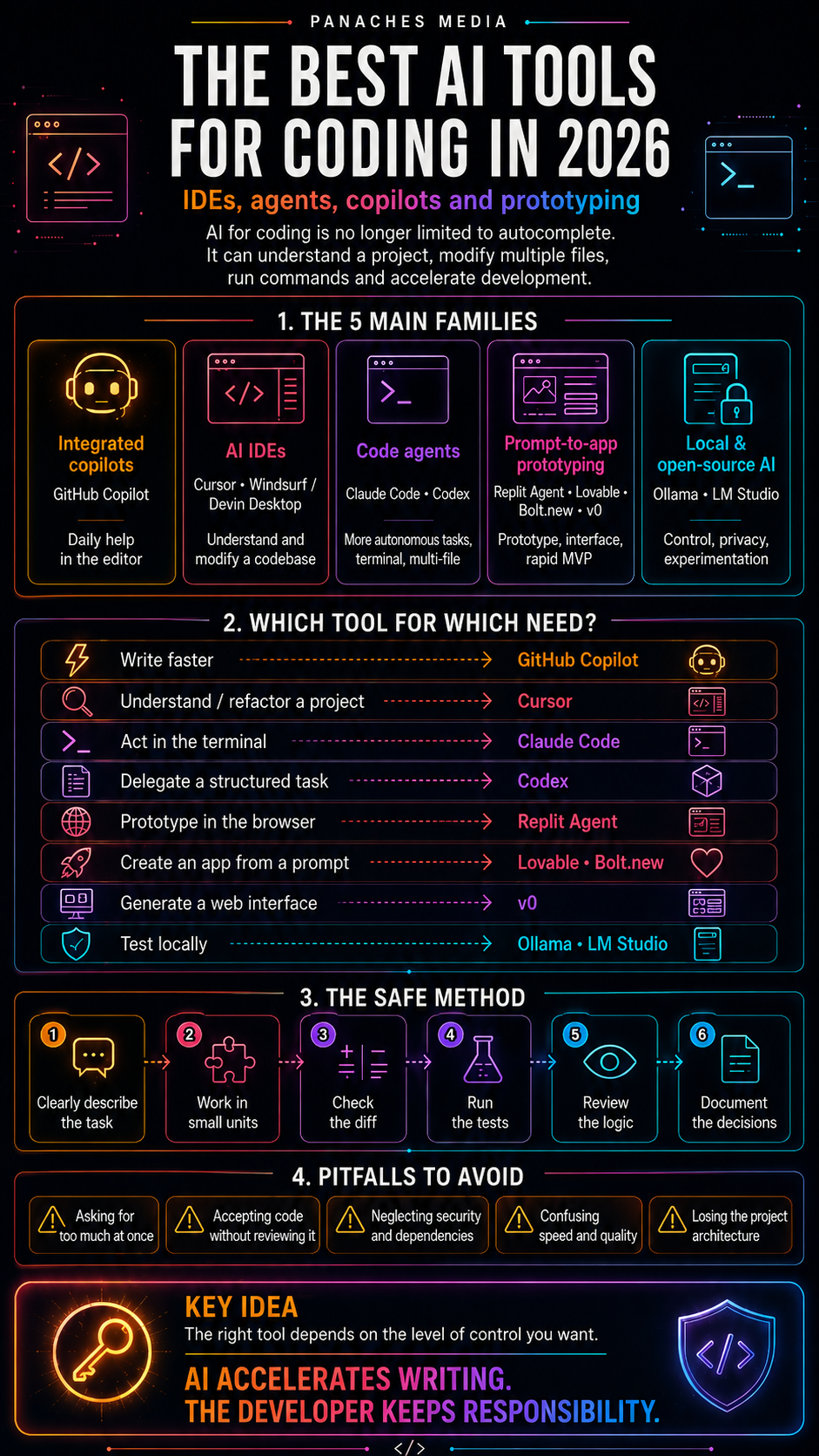
A good workflow for coding with AI
A simple workflow can prevent a lot of damage.
Describe the real problem
Before asking for a fix, write the observed problem.
Not only the error.
The expected behavior. The current behavior. The context. The module involved. The limits.
Reduce the scope
Explicitly say what must not be modified.
This is often as important as saying what must be fixed.
Ask for analysis before the patch
Do not start with:
Fix it.
Start with:
Analyze the probable cause and propose a short plan before modifying anything.
This sometimes prevents impulsive patches.
Fix narrowly
Once the cause is clear, ask for a limited correction.
No refactor.
No global improvement.
No unrelated cleanup.
Test
Run the useful tests.
Not necessarily the whole cathedral for every tiny correction.
But enough to prove that the expected behavior holds.
Review
Look at the modified code.
Even if the tests pass.
Especially if the tests pass too easily.
Validate
For an interface, test visually.
For a build, test the final artifact.
For production, verify in real conditions.
Choosing the right model for coding
Not every model deserves the same use.
A premium model may be justified for:
- complex architecture;
- critical bugs;
- deep refactoring;
- multi-file analysis;
- security;
- performance;
- release validation;
- production blockers.
A lighter model may be enough for:
- comment reformulation;
- docstrings;
- small scripts;
- example generation;
- simple error explanation;
- local cleanup;
- first draft tests.
The right model is not always the most expensive.
It is the one that matches the risk.
Using a costly model for a simple task can drain a budget without improving the result.
Using a weak model for a critical task can cost even more through errors.
So the right question is:
What level of intelligence, context, and validation does this task deserve?
No more.
No less.
What AI should not decide alone
Some decisions must remain human.
For example:
- changing architecture;
- adding a dependency;
- removing existing behavior;
- modifying a license system;
- touching security;
- changing a data format;
- modifying payment logic;
- breaking compatibility;
- validating a release;
- declaring a bug solved.
AI can advise.
But it should not decide alone.
The longer the consequences of a decision, the more explicit it must be.
With AI, the danger is not only error.
It is silent error.
The small modification that slips into a patch, looks reasonable, and becomes a problem three weeks later.
A good developer therefore watches not only what AI writes.
They watch what it assumes.
Keep the pleasure of understanding
In the middle of all this method, we should not forget something simple: coding is also understanding.
There is a particular pleasure in seeing a system light up.
A bug that seemed absurd becomes logical. A blurry architecture becomes readable. A function that was too long finds its shape again. A failing test finally says something. An idea becomes a tool.
AI can accelerate that moment.
But it can also steal it if we delegate too quickly the most interesting part.
The goal is not only to produce code.
The goal is to build a clearer relationship with the system.
A useful AI should not turn us into prompt operators.
It should help us become better readers, better architects, better testers, better creators.
Write less, understand more
Coding with AI does not mean stopping coding.
It means code is not always written in the same way anymore.
Sometimes we write directly. Sometimes we guide. Sometimes we review. Sometimes we refuse. Sometimes we ask for a variation. Sometimes we take everything back by hand. Sometimes we use AI to understand, not to produce.
The developer of tomorrow will not necessarily be the one who types the fastest.
It will be the one who knows how to:
- formulate a problem;
- frame a tool;
- read an answer;
- detect an error;
- test a hypothesis;
- protect an architecture;
- validate a result;
- keep responsibility.
AI can write lines.
But it should not write our understanding of the system for us.
That is where the heart of the craft remains.
Not in every typed character.
But in the ability to know what we are doing, why we are doing it, and what we accept into our code.
In the end, coding well with AI is not writing less in order to think less.
It is writing less in order to understand more.