When we imagine software development, the image comes quickly.
A dark screen. Lines of code. A mechanical keyboard. A half-cold coffee. Someone typing fast with the calm confidence of a person who knows exactly what they are doing.
Beautiful image.
Not entirely false. But deeply incomplete.
Because software development is not just writing code.
Code is the visible part. The spectacular part. The part you can show in a screenshot with pretty syntax highlighting.
But behind every line, there is something else: an intention, a problem, a decision, a constraint, a user, a test, future maintenance, sometimes even an old technical choice coming back three months later with a suspicious smile.
Developing software is not just “making a program work”.
It is turning an idea into a usable system.
And that changes everything.
Before code, there is the need
The first act of software development is not necessarily opening an editor.
It is understanding.
Understanding what we want to build. Why we want to build it. For whom. In what context. With what limits. With what data. With what technical, human, economic or regulatory constraints.
It is less glamorous than a terminal full of commands, but it is often where a project is won or lost.
A bad need rarely produces good software.
You can code a bad idea very cleanly. You can perfectly test a useless feature. You can carefully document a machine nobody asked for.
So software does not begin with syntax.
It begins with a question:
“What problem are we really trying to solve?”
And that question deserves more than a quick answer.
Development is translation
Developing software means translating.
Translating a human intention into machine logic. Translating a vague use case into a clear structure. Translating an idea into an interface. Translating a constraint into architecture. Translating a need into observable behavior.
This translation is never automatic.
Between “I want a simple app” and the actual software, there is a whole world.
“Simple” for whom? Simple to use? Simple to maintain? Simple to code? Simple to sell? Simple to install? Simple to explain?
The word “simple” is wonderful. It looks innocent. Then it becomes a pit.
That is why a developer does not only execute. A developer clarifies.
They turn vague sentences into concrete decisions.
One page or several? User accounts or not? Local data or cloud? Export? Backup? History? Error handling? Accessible interface? Mobile version? Stronger security? An architecture that will still hold when the project grows?
Code comes after.
Or rather: code comes in the middle.
Designing means avoiding random construction
Before writing a lot of code, you often need to design.
Not necessarily with fifty diagrams and a grey-suited steering committee.
But at least with a clear vision:
- what data exists;
- how it flows;
- which modules communicate;
- where files live;
- which actions are possible;
- which errors can happen;
- what must remain simple;
- what must be able to evolve.
Design is the invisible framework of software.
When it is solid, the project breathes. When it is confused, everything becomes more expensive.
Adding a feature takes too long.
Fixing one bug creates two others.
Changing an interface breaks behavior elsewhere.
Nobody knows if a function is still used.
A file called utils_final_2.py starts containing half the universe.
It is not necessarily because developers are bad.
It is often because the project grew without structure.
Like a house where you add a bedroom, then a veranda, then a garage, then a basement, then a medieval tower, without ever checking the foundations.
Charming. But risky.
Coding remains essential, but it is only one step
Of course, code matters.
You need to write functions. Create interfaces. Manipulate data. Call APIs. Manage files. Display results. Handle errors. Optimize when necessary.
Code is where the idea becomes behavior.
But a line of code has no value simply because it exists.
It must do what it promises. It must be understandable. It must be modifiable. It must fit with the rest. It must avoid creating more problems than it solves.
This is often where we see the difference between code that “works” and code that holds.
A disposable script can afford to be quick and dirty. A prototype can accept shortcuts. But software meant to last requires something else.
It requires readability.
And readability, in code, is a form of politeness toward the future.
Especially toward yourself in three weeks, when you reread a function written at midnight with the confidence of a pirate and the memory of a goldfish.
Testing means taking reality seriously
Untested software can work.
That is true.
It can also give the impression of working until the exact moment someone uses it differently than expected.
That is usually when reality enters the room, sits down, crosses its arms and asks: “So?”
Testing is not punishment.
It is a way to verify that software truly does what it claims to do.
There are several levels:
- testing a function;
- testing a module;
- testing an interface;
- testing a user journey;
- testing an installation;
- testing an update;
- testing errors;
- testing edge cases;
- testing what happens when everything does not go well.
Because software is not only judged when everything works.
It is often judged when something fails.
A good error can reassure. A bad error can destroy trust.
So testing is not a technical formality. It is protection.
For the user. For the product. For the team. For the developer who would like to sleep a little.
Deploying is not “put it online and pray”
Another common illusion: believing that development ends when the software works locally.
In reality, a large part of the work begins when it needs to be delivered.
Deploying means moving a project from the workshop into the real world.
And the real world has its little requirements.
Server. Domain name. Database. Environment variables. Access rights. Logs. HTTPS certificates. Static files. Migrations. Backups. Performance. Compatibility. Security. Monitoring. And, of course, that wonderful sentence: “It works on my machine.”
Many things work on your own machine.
The real question is: does it work elsewhere, cleanly, repeatedly, observably, and can it recover if something breaks?
Deploying is not throwing software over a wall.
It is preparing its arrival.
Maintaining means accepting that software lives
Software is never truly finished.
It can be published. It can be stable. It can be usable. It can be sold. It can be good enough to exist.
But it keeps living.
Dependencies change. Systems evolve. Browsers update. Real use reveals unexpected cases. Users ask for something else. Security vulnerabilities appear. Yesterday’s choices show their limits.
Maintenance is not a failure.
It is proof that software exists over time.
A product without maintenance often becomes frozen. A product with too much chaotic maintenance exhausts everyone.
The right balance lives somewhere between the two: fixing what matters, documenting decisions, avoiding scattered micro-corrections, grouping coherent evolutions, keeping a vision.
Maintaining is not only repairing.
It is accompanying.
Documentation is part of the software
Documentation is often treated as an extra.
Something we will do later. One day. When everything is calm. In other words: never.
And yet, documentation is part of the product.
It helps people understand. Install. Use. Contribute. Fix. Return to a project after a pause. Transmit knowledge to someone else. Remember why a decision was made.
There are several kinds of documentation:
- user documentation;
- developer documentation;
- comments in code;
- README files;
- internal procedures;
- changelog;
- release notes;
- installation guides;
- FAQ;
- deployment documentation.
None of them need to be enormous.
But when there is nothing, the project becomes dependent on human memory.
And human memory, let’s be honest, can sometimes forget why it entered a room.
So a full architecture written six months ago… good luck.
Securing means designing with respect
Modern software often manipulates data.
Accounts. Files. Documents. Histories. Preferences. Messages. Private content. Sensitive information.
From that point, security is not a bonus.
It is part of the design.
It is not only about avoiding spectacular attacks. It is also about limiting what is collected, protecting what is stored, explaining what is done, reducing unnecessary access, respecting user rights.
Good software should not ask for more than necessary.
It should be clear in its intentions. Sober with data. Careful with access. Honest about its limits.
Compliance, privacy and security should not be layers added at the end to look serious.
They should influence decisions from the beginning.
Because software does not only show what it can do.
It also shows what it allows itself to do.
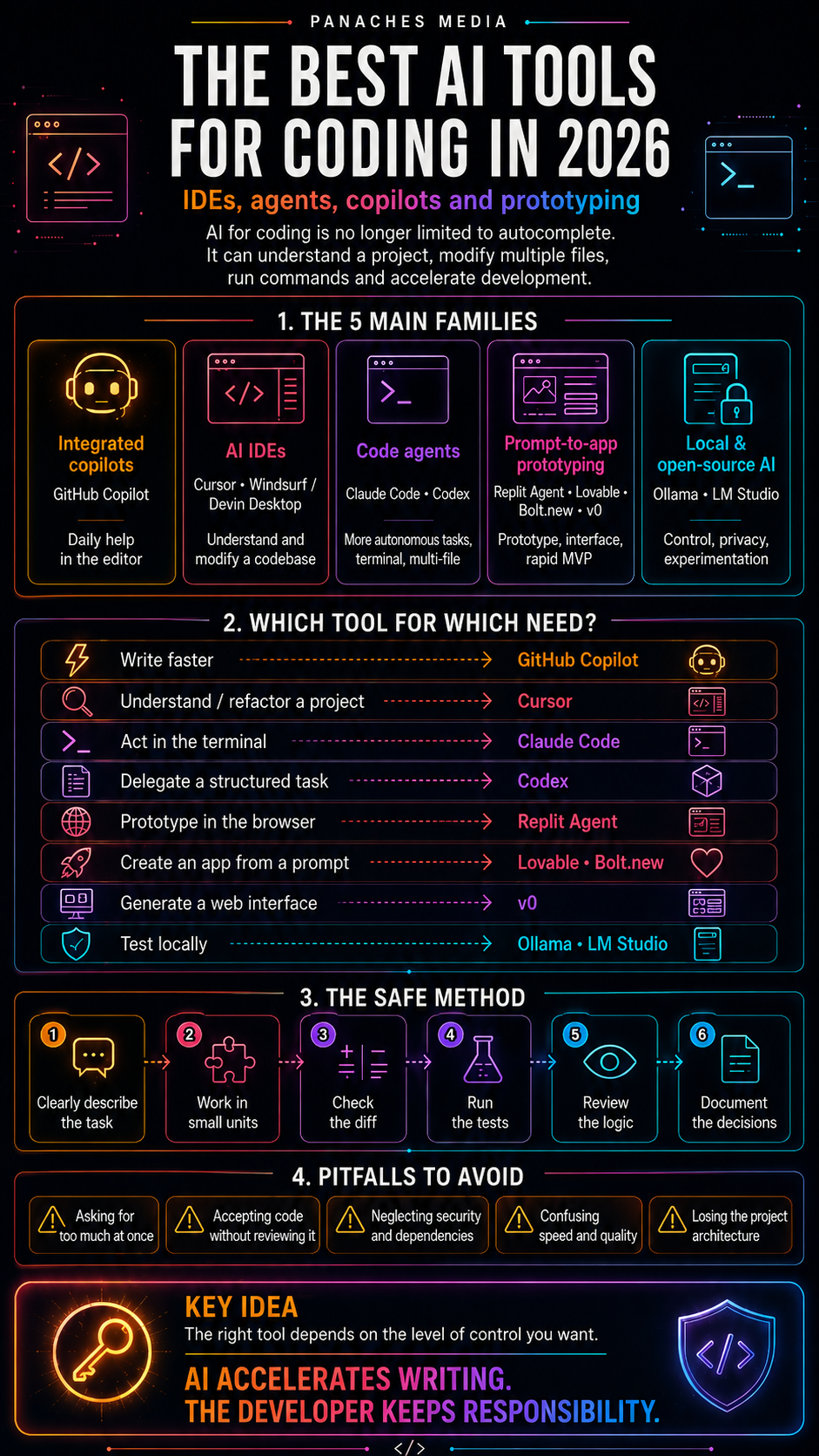
AI accelerates code, but not responsibility
With AI assistants, writing code becomes faster.
You can ask for a function. A test. A fix. An explanation. A translation between languages. A file structure. A piece of documentation. A debugging lead.
It is powerful.
But it does not remove the work of development.
It moves it.
The developer still needs to understand the need. Define the scope. Check modified files. Test. Read errors. Control regressions. Reject off-topic changes. Know when an answer is elegant but false.
AI can write fast.
But it does not guarantee that what it writes is correct, maintainable, secure or suited to the product.
So the human role becomes even more important: framing, checking, choosing, validating.
In short:
AI can produce code. The developer remains responsible for the software.
Less magical. Much healthier.
Organizing your environment becomes a skill
We often talk about languages, frameworks, AI tools and editors.
We talk less about the global environment.
Yet software development requires connecting many things:
- code;
- notes;
- documentation;
- tickets;
- screenshots;
- web research;
- resources;
- prompts;
- files;
- tests;
- logs;
- decisions;
- versions;
- future ideas.
When everything is scattered, work becomes heavier.
You lose time finding things. You forget why a decision was made. You repeat research already done. You explain the context again to every tool. You open fifteen windows to understand a single problem.
This is where a creative workspace like Panaches naturally makes sense: not as a replacement for specialized tools, but as a space to connect web browsing, notes, code, documents, resources, local AI, media and projects.
Modern development does not only need more powerful editors.
It needs better-preserved contexts.
Because a project does not live in a file. It lives in a set of links.
Development also means choosing what not to do
Good development does not mean adding everything.
Quite the opposite.
It often means saying no.
No to a premature feature. No to an overly heavy architecture. No to an unnecessary dependency. No to a dangerous shortcut. No to an optimization without a real problem. No to a full rewrite when a targeted fix is enough.
This is difficult, because code gives a feeling of power.
You can always add an option. A button. A preference. An advanced mode. An API. An automation. A panel. An export. A shortcut. A small “temporary” exception.
Then the software becomes a wardrobe where every drawer opens into another wardrobe.
Development therefore requires restraint.
Not to do less.
To keep a form.
The real craft: connecting
In the end, software development is less about lines than about links.
A link between a need and a solution. A link between an interface and a use case. A link between a database and business logic. A link between an error and its cause. A link between the current version and a future evolution. A link between a user and their control. A link between an idea and its form.
Code is one of the languages of these links.
But it is not the only one.
There are also diagrams. Tests. File names. Error messages. Documentation. Project structure. Interface choices. Procedures. User feedback.
Good software is not only software that works.
It is software whose links hold.
FAQ
Does software development necessarily mean knowing how to code?
Coding is an important part of development, but development also means understanding a need, designing a solution, testing, documenting, deploying, maintaining and securing. Code is central, but it is not alone.
What is the difference between coding and developing?
Coding mostly means writing instructions in a programming language. Developing means turning a problem or an idea into usable, reliable and maintainable software. Development includes code, but also everything around it.
Why are tests so important?
Tests help verify that software does what it promises, including in edge cases. They reduce regressions, improve confidence and make future changes easier.
Can AI replace part of software development?
AI can help write code, generate tests, explain errors or produce documentation. But it does not replace understanding the need, architecture, validation, security or human responsibility.
Why is organization important in software development?
Because a software project contains much more than code: documentation, research, files, tests, prompts, decisions, resources, versions and feedback. Good organization helps preserve context and reduce dispersion.
Conclusion: code is a form, not the whole craft
Software development is not just coding.
It is understanding. Designing. Translating. Testing. Deploying. Maintaining. Documenting. Securing. Organizing. Choosing.
Code remains essential. It is where many things become concrete.
But it is not the whole story.
Useful software rarely comes from a simple accumulation of lines. It comes from a set of decisions that hold together.
A clear need. A suitable architecture. An understandable interface. Reliable tests. Enough documentation. Possible maintenance. Real attention to users.
So yes, learning to code matters.
But learning to develop means learning to build a coherent world around code.
And that is already much more interesting than a dark screen full of green symbols.
Even if, let’s admit it, the dark screen still has a certain style.