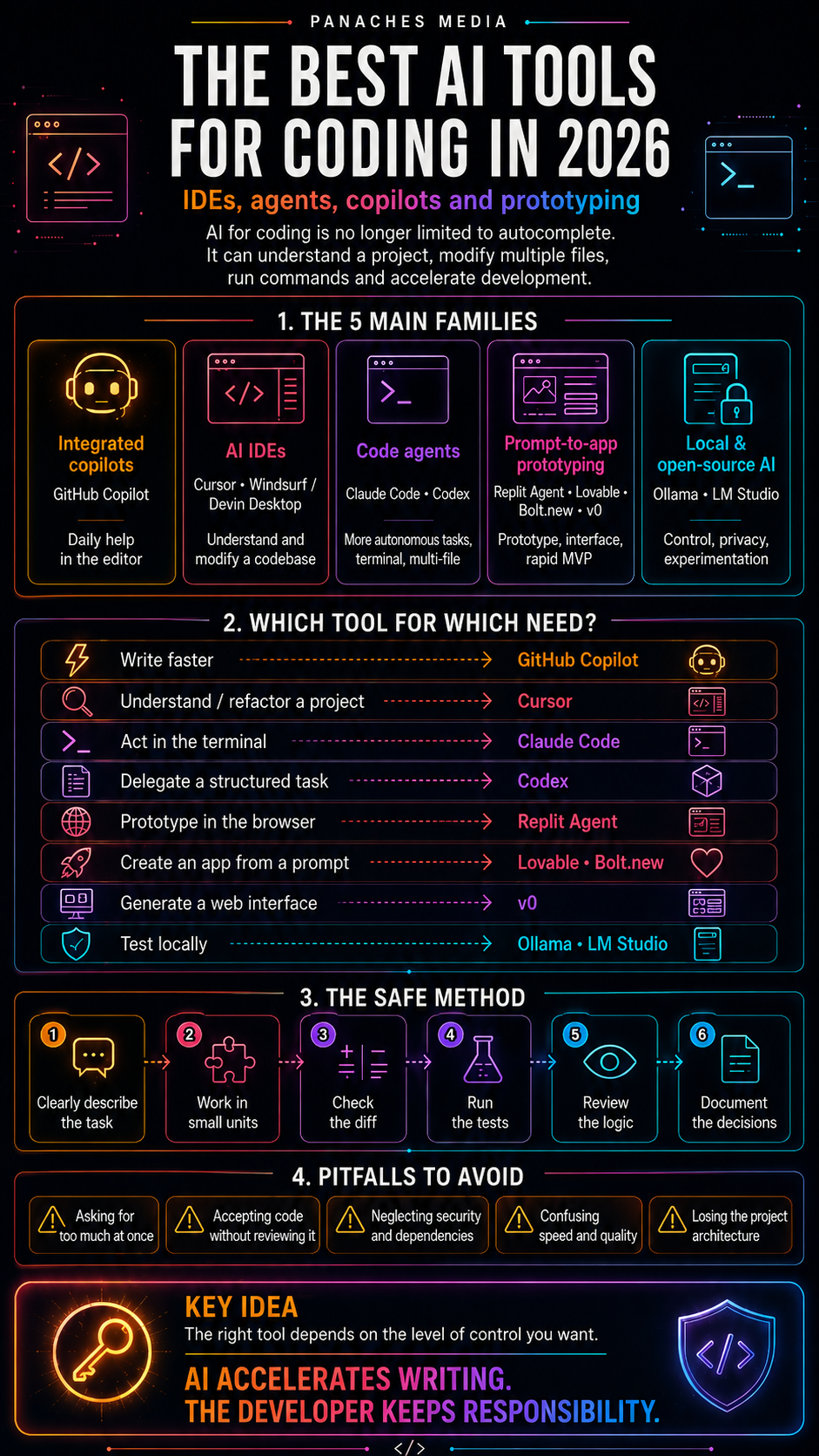
Why coding with AI no longer means only “autocomplete”
For a long time, AI for coding mostly meant autocomplete.
You started writing a function, and the tool suggested the rest.
You began a loop, and it completed a few lines.
You asked for an explanation, and it summarized a piece of code.
That was useful, but still relatively limited.
In 2026, the landscape has changed.
The best AI tools for coding no longer just suggest a line. They can understand a codebase, modify multiple files, explain an architecture, write tests, run commands, fix errors, prepare a pull request, or generate an application from a description.
This evolution changes the question.
We should no longer ask only:
Which tool completes my code best?
We should rather ask:
What kind of AI assistance fits my development workflow?
Because an in-editor copilot, a terminal agent, a full AI IDE, an app generator, or local AI do not serve exactly the same purpose.
They belong to different families.
The main families of AI tools for coding
To make sense of the landscape, AI development tools need to be separated into several families.
The first family is integrated copilots. These are tools like GitHub Copilot, designed to support developers inside their usual editor: completion, explanation, function generation, targeted edits, and sometimes agent mode.
The second family is AI IDEs. Cursor, Windsurf, or Devin Desktop belong to this logic. The development environment itself is designed around AI: project understanding, multi-file edits, agents, terminal, context, rules, workflows.
The third family is code agents. Claude Code, Codex, Devin, or some integrated agents can receive a broader task, plan it, modify the project, run commands, and report on their work.
The fourth family is prompt-to-app prototyping, sometimes called vibe coding. Replit Agent, Lovable, Bolt.new, or v0 make it possible to quickly create an interface, an application, or a prototype from a prompt.
The fifth family is local and open-source AI. Ollama, LM Studio, llama.cpp, Open WebUI, or some local coding models make it possible to experiment with more control, sometimes without sending data to the cloud.
These families can complement each other, but they do not all replace the same things.
A good AI developer does not try to automate everything. They choose the right level of assistance depending on the task.
GitHub Copilot: the default integrated copilot
GitHub Copilot remains an important reference because it is deeply integrated into the GitHub ecosystem, VS Code, and many editors.
Its main strength is how close it stays to the daily workflow.
It can help with:
- completing code;
- explaining a function;
- generating tests;
- suggesting modifications;
- fixing errors;
- assisting inside the editor;
- helping on existing files;
- speeding up small repetitive tasks.
Copilot is especially interesting for developers who want smooth assistance without completely changing environments.
It does not necessarily require rethinking the whole way of working. It adds itself to the existing flow.
That is its strength.
But it is also its limit.
For heavier refactors, complex multi-file fixes, or tasks that require a complete strategy, a more autonomous agent or a more specialized AI IDE may be better suited.
Copilot therefore remains very useful as an integrated assistant, but it is not always the best choice when you want to delegate a whole mission.
Cursor: the AI IDE that has become a reference for many developers
Cursor has established itself as one of the most cited tools in AI-assisted development.
Its strength comes from the fact that it is not just an extension. It is a development environment built around AI, with a logic of dialogue, project context, and code modification.
Cursor is useful for:
- understanding a codebase;
- modifying multiple files;
- requesting a targeted fix;
- generating a feature;
- refactoring part of a project;
- discussing code;
- accelerating everyday tasks;
- working in a workflow close to VS Code.
Its value lies in staying close to familiar development habits while adding a strong AI layer.
For a developer who regularly works on existing projects, Cursor can become a true workstation.
However, one rule must remain clear: Cursor helps modify code, but it must not replace understanding of the project.
When the tool proposes a modification, the developer still has to reread it, test it, compare the diff, and verify side effects.
An AI IDE can write quickly.
But the developer is always the one accountable for the result.
Claude Code: the terminal agent for working inside the project
Claude Code represents another approach: the coding agent inside the terminal.
Its value lies in being very close to the real project. It can read the codebase, reason about the structure, run commands, modify files, explain choices, and support Git workflows.
This is particularly useful for:
- analyzing a codebase;
- fixing a complex bug;
- refactoring a specific area;
- writing or adjusting tests;
- understanding an architecture;
- automating repetitive tasks;
- preparing a series of changes;
- documenting a behavior.
Claude Code is often useful when the need goes beyond simple function generation.
It can become a work partner for longer tasks.
But this power requires discipline.
A terminal agent can run commands, read files, propose changes, and act on the project. That means the scope must be defined clearly:
- which task;
- which files;
- which constraints;
- which tests;
- what it must not touch;
- how it should report its changes.
The more autonomous the agent, the more precise the framework needs to be.
Codex: the code agent designed for delegation
Codex, on the OpenAI side, also fits into this evolution toward more autonomous development agents.
The idea is not only to ask for a piece of code in a conversation. It is about delegating development tasks: understanding a request, working on a project, modifying code, checking, explaining, and helping ship.
Codex is useful for:
- working on several tasks in parallel;
- delegating fixes;
- generating structured changes;
- accelerating repetitive work;
- assisting teams;
- preparing contributions;
- linking conversation, code, and delivery.
This logic becomes very powerful when tasks are well broken down.
A good use of Codex is not:
Build the whole application.
It is rather:
Fix this precise bug, in this scope, with these constraints, then explain the modified files and the tests to run.
Code agents work best with limited, verifiable, and well-contextualized missions.
It is the same difference as between giving a vague idea and writing a proper development ticket.
Windsurf / Devin Desktop: the agentic IDE and agent management
Windsurf has evolved toward a logic connected to Devin Desktop, with an increasingly agentic orientation.
The central idea is to make developer and agent work together in an environment where code, editor, terminal, workflows, and agents are integrated.
This kind of tool targets developers who want to go beyond the simple conversational assistant.
It can help with:
- working on multiple files;
- using an agent inside the IDE;
- handling longer tasks;
- launching or following changes;
- keeping a complete development environment;
- relying on rules, memories, or workflows;
- making human and agent collaborate in the same space.
This positioning is interesting because it shows a strong trend: the IDE is no longer just an editor. It becomes a control center for agents.
But here again, illusions must be avoided.
The more the tool can act, the more necessary it becomes to reread, test, roll back, control permissions, and understand what has been modified.
The developer does not disappear. The role changes.
They spend less time writing every line and more time formulating, framing, checking, and maintaining.
Replit Agent: prototyping and deploying quickly in the browser
Replit Agent responds to a different need: building quickly from the browser.
Its value lies in combining development environment, AI, execution, and deployment.
It is useful for:
- prototyping an idea;
- creating a small application;
- testing a concept;
- learning by seeing the code;
- directly modifying the result;
- quickly sharing a project;
- avoiding heavy local setup.
Replit is especially interesting for advanced beginners, technical creators, students, or freelancers who want to go from idea to prototype without installing a whole development chain.
But prototype and robust product should not be confused.
A tool of this kind can generate something functional very quickly, but architecture, security, dependencies, performance, and maintainability will often need to be reworked if the project becomes serious.
The right use is:
Build quickly to learn, test, or validate an idea.
Not:
Replace an entire software engineering process.
Lovable, Bolt.new, and v0: the prompt-to-app wave
Lovable, Bolt.new, and v0 represent another side of AI development: starting from a prompt to create an interface, an application, or a prototype.
This family is very interesting because it opens software creation to non-developers or semi-technical profiles.
You can describe an application, a page, a dashboard, a form, or an interface, and quickly obtain a first version.
But the tools do not all have the same positioning.
Lovable leans more toward building complete applications through a very accessible workflow. Bolt.new focuses on web development in the browser, with execution and iteration. v0, coming from the Vercel ecosystem, is very strong for generating web interfaces, components, and frontend-oriented applications.
These tools are useful for:
- prototyping an idea;
- creating a landing page;
- generating an interface;
- testing a user experience;
- producing a rapid MVP;
- giving a starting point to a developer;
- exploring a product idea without starting from zero.
But they also require caution.
The result may be visually impressive without being technically solid. An application may work in demo form while hiding problems related to security, data, business logic, or maintenance.
Vibe coding is powerful for getting started.
It should not make validation disappear.
Local AI for developers: control, experimentation, and privacy
Local AI is becoming increasingly important for developers.
With tools such as Ollama, LM Studio, llama.cpp, Open WebUI, or vLLM, it becomes possible to test models on your own machine or on controlled infrastructure.
For coding, local AI can be used to:
- test open-source coding models;
- work on sensitive snippets;
- experiment without relying entirely on an API;
- create internal tools;
- do local prototyping;
- integrate a model into an application;
- evaluate performance based on available hardware.
The benefits are obvious: more control, more privacy, more independence.
But realism is necessary.
A local model does not always match the level of the best cloud models. It requires hardware, memory, configuration time, and sometimes compromises in speed or quality.
Local AI is therefore very interesting for certain uses, but it does not automatically replace the most powerful cloud agents.
The right choice depends on the need:
- privacy;
- cost;
- performance;
- integration;
- autonomy;
- model quality;
- project complexity.
For a developer, the real value is having the choice.
Which tool should you choose depending on the need?
There is no single best AI tool for coding.
There are use cases.
For everyday help inside the editor, GitHub Copilot may be enough.
For a complete AI development environment, Cursor is an excellent reference.
For agentic tasks in the terminal, Claude Code is highly relevant.
For delegating structured development missions, Codex can be very useful.
For an agentic IDE with agent management and more advanced workflows, Windsurf / Devin Desktop is worth watching.
For rapid prototyping in the browser, Replit Agent is interesting.
For creating an application from a prompt, Lovable or Bolt.new can dramatically accelerate the start.
For generating web interfaces, v0 is particularly well suited.
For testing or integrating models locally, Ollama and LM Studio remain simple reference points.
So the right choice depends on the question:
Do I want to complete, understand, modify, delegate, prototype, deploy, or control locally?
Each verb corresponds to a different family of tools.
The safe method for coding with AI
Coding with AI requires a method.
The more powerful the tool, the more its use must be framed.
1. Clearly describe the task
A vague request often produces a vague result.
It is better to specify:
- what the problem is;
- what behavior is expected;
- which files are involved;
- which constraints must be respected;
- what must not be modified;
- how the result should be verified.
A good coding prompt often looks like a good development ticket.
2. Work in small units
AI agents are impressive, but they remain more reliable on limited tasks.
Fix a specific bug.
Write a test.
Refactor a function.
Add a validation.
Create an isolated component.
Document a module.
The larger the task, the greater the risk of side effects.
3. Keep the diff visible
The diff is the place of truth.
No matter how good the AI’s explanation is, the modified files must be checked.
A good workflow requires verifying:
- what was added;
- what was removed;
- what was moved;
- which dependencies changed;
- unexpected files;
- possible effects on the rest of the project.
4. Run the tests
AI can write convincing code that does not work.
That is why tests, linters, type checks, builds, business commands, and, if necessary, manual tests must still be run.
AI should help write the tests, not replace them.
5. Review the logic
Code can pass the tests and still be bad.
It may be too complex, badly placed, fragile, hard to maintain, inconsistent with the architecture, or unsafe from a security perspective.
The developer therefore has to review the logic, not just the result.
6. Document the decisions
When an agent modifies an important part of the project, a trace must be kept.
Why this choice?
What assumption?
What limitation?
What validation command?
What next steps?
AI can help write this note, but the decision must remain clear.
Frequent mistakes with AI coding tools
The first mistake is asking for too much.
“Redo the whole module” is rarely a good request if the context is not perfectly framed.
The second mistake is not verifying dependencies.
An agent may add an unnecessary, outdated, vulnerable, or incompatible library.
The third mistake is accepting code because it looks clean.
Well-formatted code can hide poor logic.
The fourth mistake is neglecting security.
Authentication, permissions, injection, secret exposure, input validation, file access, network calls: AI can make mistakes in all these areas.
The fifth mistake is losing the architecture.
After many small generations, a project can become incoherent: mixed conventions, duplicated files, poorly separated layers, inconsistent styles.
The sixth mistake is confusing speed and quality.
AI can produce quickly, but real development is judged by maintainability.
The right reflex is simple:
AI accelerates writing. The developer keeps responsibility for the architecture.
AI coding tools do not replace the developer
AI tools change the profession, but they do not remove the fundamental skills.
It is still necessary to understand:
- architecture;
- data;
- tests;
- errors;
- performance;
- security;
- user experience;
- maintenance;
- deployment;
- trade-offs.
AI can write code.
But it does not always know the real product context, the team’s priorities, the business constraints, the history of decisions, or hidden risks.
The developer becomes more of a pilot.
They formulate.
They frame.
They delegate.
They reread.
They test.
They integrate.
They decide.
This is an important evolution.
Code is no longer written only line by line. It is also specified, generated, checked, and governed.
Inside Panaches
Panaches already has an interesting logic for this type of workflow.
A development project is not limited to code. It also involves notes, files, documents, screenshots, ideas, tests, scripts, prompts, sometimes PDFs, sometimes mockups, sometimes visual resources.
The problem is often fragmentation.
The code is in one IDE.
The notes are in another application.
The prompts are in a separate document.
The screenshots are in a folder.
The ideas are in a notepad.
The documentation is elsewhere.
The terminal is elsewhere again.
The value of a workspace like Panaches is to bring more of these elements together in one coherent environment.
For a developer or technical creator, this makes it possible to imagine a workflow where you can:
- take notes;
- read documentation;
- open a project;
- use a terminal;
- organize ideas;
- keep references;
- work with local AI;
- prepare content or a report;
- document a technical decision.
AI then becomes an assistance layer inside a broader environment, not just a chatbot next to the code.
Modern development no longer happens only inside the editor.
It also happens in the way the project is organized.
Conclusion: the right AI coding tool depends on the level of control you want
In 2026, AI tools for coding have become powerful, varied, and sometimes impressive.
But they do not all serve the same use case.
GitHub Copilot supports daily work.
Cursor turns the editor into an AI environment.
Claude Code acts inside the terminal.
Codex allows structured task delegation.
Windsurf / Devin Desktop pushes the logic of the agentic IDE.
Replit, Lovable, Bolt.new, and v0 accelerate prototyping.
Ollama and LM Studio open the door to local AI.
The right choice depends less on rankings than on the need.
Do you want to write faster?
Understand a codebase?
Modify multiple files?
Delegate a task?
Create a prototype?
Generate an interface?
Test models locally?
Keep control over sensitive data?
Each answer leads toward a different tool.
The right strategy is not to use every AI coding tool.
The right strategy is to build a workflow where AI accelerates development without making understanding, verification, and responsibility disappear.
FAQ
What is the best AI tool for coding in 2026?
There is no single best tool. GitHub Copilot is very practical for daily assistance, Cursor for a full AI IDE, Claude Code for terminal work, Codex for task delegation, and Replit, Lovable, Bolt.new, or v0 for rapid prototyping.
What is the difference between a copilot and a code agent?
A copilot assists the developer inside the editor: completion, explanation, suggestions. A code agent can receive a broader task, modify multiple files, run commands, and explain the changes.
Does Cursor replace VS Code?
Cursor is built on a workflow close to VS Code and can replace the main editor for some developers. But the choice depends on extensions, habits, performance, and project integration needs.
Do Claude Code and Codex serve the same purpose?
They both belong to the family of code agents, but with different environments and workflows. Claude Code is strongly oriented toward the terminal and the local project, while Codex is more tied to the OpenAI ecosystem and the delegation of development tasks.
Do tools like Lovable, Bolt.new, or v0 replace a developer?
No. They can quickly create prototypes, interfaces, or starter applications, but a serious project still requires validation, architecture, security, testing, and maintenance.
Should you use local AI for coding?
Local AI is useful for privacy, experimentation, integration, and control. But it can require more hardware, more configuration, and more compromises than the best cloud tools.