Is a game engine merely a technical tool?
At first, it often looks like an empty window.
A camera. A scene. A few folders. A button to launch the project.
Then a character is placed inside it.
A light, a collision and a sound are added, along with one simple rule: when the player presses a key, something must happen.
The empty window gradually becomes a world.
The game engine sits at the centre of this transformation. It connects images, code, physics, animations, interfaces, sound and data so that all these elements can react together in real time.
Yet not all engines build the same worlds.
Unreal Engine targets large 3D scenes, visually ambitious games and real-time production. GameMaker favours the speed and clarity of a 2D pipeline. Construct 3 and GDevelop replace part of the code with visual logic. Bevy offers a modern architecture in Rust, but requires users to accept an environment that is still evolving.
The real question is therefore not:
What is the best game engine?
But rather:
Which engine matches the game you can actually finish?
Because the most powerful engine is not always the most useful.
Sometimes it accelerates the project.
Sometimes it turns a small platform game into a personal research programme on shaders, multithreading and the reasons why the character is still falling through the floor.
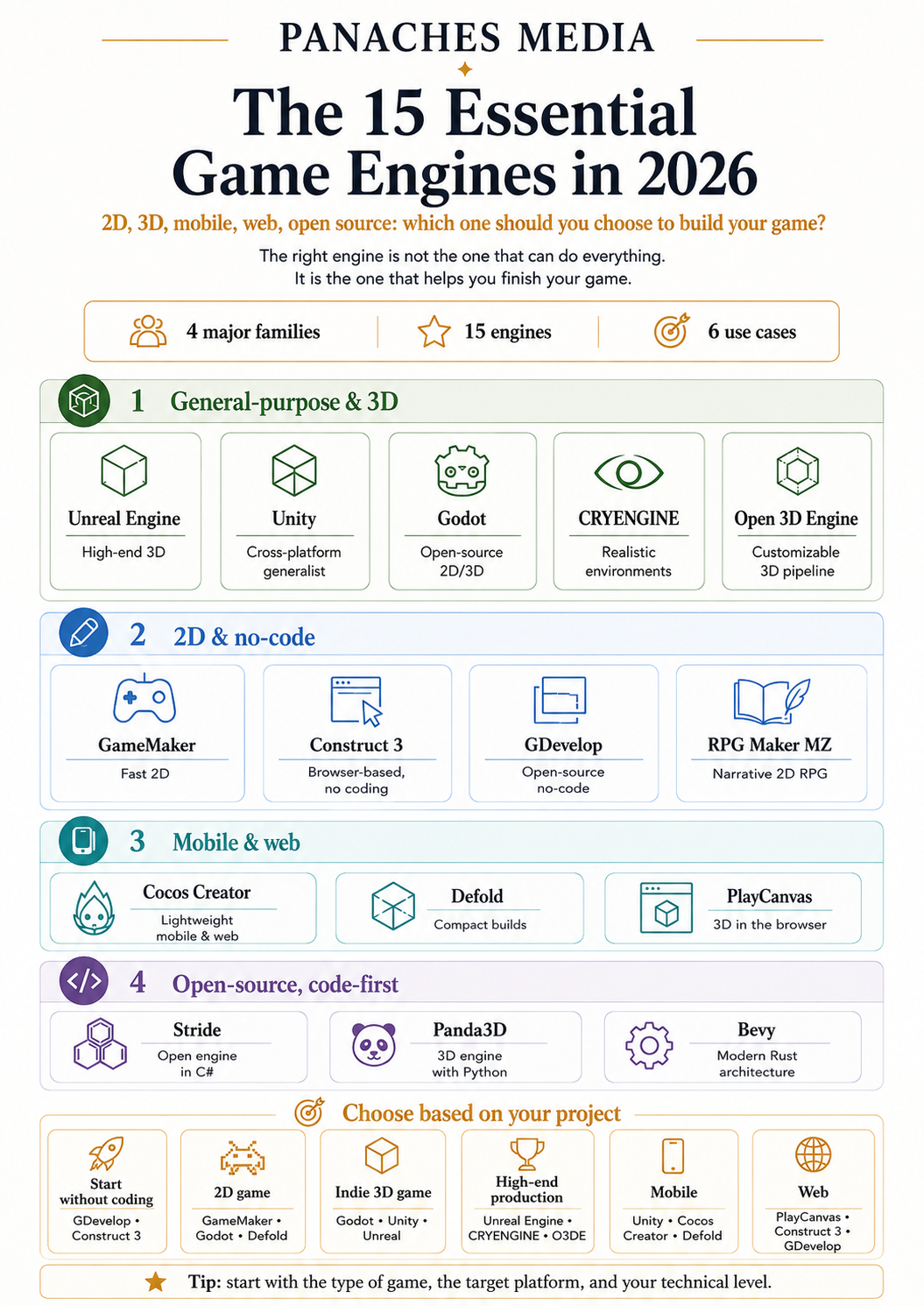
Here are the fifteen essential game engines to know in 2026.
The best game engines at a glance
| Primary need | Recommended engine | Positioning |
|---|---|---|
| Produce a visually ambitious 3D game | Unreal Engine | High-end 3D |
| Deploy across many platforms | Unity | General-purpose |
| Use an open-source engine for 2D and 3D | Godot | Open source |
| Create realistic 3D environments | CRYENGINE | Specialised 3D |
| Build a fully customisable 3D pipeline | Open 3D Engine | Advanced open source |
| Develop a 2D game quickly | GameMaker | Accessible 2D |
| Create a game in the browser without coding | Construct 3 | No-code |
| Design a 2D or 3D game using visual logic | GDevelop | Open-source no-code |
| Create a narrative 2D RPG | RPG Maker MZ | Specialised RPG |
| Produce lightweight mobile and cross-platform games | Cocos Creator | Mobile and web |
| Develop a compact and efficient game | Defold | Lightweight 2D and 3D |
| Create a 3D experience directly for the web | PlayCanvas | Web 3D |
| Work in C# with an open-source engine | Stride | Open-source C# |
| Program a 3D engine with Python | Panda3D | Code-first |
| Explore a modern architecture in Rust | Bevy | Experimental code-first |
This table is not a podium.
An engine does not win because it has more features. It wins when it reduces the distance between the idea, the prototype and the playable version.
The major general-purpose and 3D engines
1. Unreal Engine — The best for visually ambitious 3D games
Unreal Engine has become one of the main standards for real-time 3D creation.
It combines a level editor, the Blueprint visual scripting system, and tools for terrain, physics, animation, cinematics, rendering and character creation.
Technologies such as Nanite, Lumen, Virtual Shadow Maps and World Partition are designed to display detailed, dynamic and large-scale environments. Unreal Engine 5.8, released in June 2026, continues to improve world-building, lighting, animation and virtual-production tools. Epic presents this version as the final major planned milestone for Unreal Engine 5 before work accelerates on Unreal Engine 6.
Unreal Engine is particularly suited to:
- realistic 3D;
- action and adventure games;
- large scenes;
- cinematics;
- virtual-reality experiences;
- virtual production;
- projects using MetaHuman;
- teams targeting consoles and PC.
Its greatest strength
Unreal Engine quickly reveals what a project could become.
Lighting, materials, environments and characters can be viewed directly in a render close to the final result.
This immediacy is powerful. It makes it possible to work on staging without waiting several hours for every image to be calculated.
Its main limitation
This power requires capable hardware, time and a certain amount of discipline.
The editor contains many interconnected systems. A beginner can start with Blueprints without writing C++, but they will still need to understand variables, events, components, references and project organisation.
In terms of licensing, Unreal Engine is free for game developers until a product reaches one million dollars in attributable gross revenue. Beyond this threshold, a 5% royalty applies to the portion of revenue above it, subject to the exemptions provided by Epic.
2. Unity — The best balance between accessibility and cross-platform deployment
Unity occupies a middle ground between accessible engines and advanced production environments.
It can create 2D and 3D games, mobile applications, virtual-reality experiences, simulations and interactive productions. Its main language, C#, offers a relatively readable balance between accessibility and power.
One of its major advantages remains its ecosystem.
Unity has a vast store of assets, plugins, templates, interface systems, controllers and third-party tools. It is therefore possible to begin with an empty scene or with part of the pipeline already constructed.
Unity Personal currently allows publishing to the web, desktop computers, mobile devices and AR/VR platforms. This plan remains free for organisations whose annual revenue and funding do not exceed 200,000 dollars. In 2026, Unity Pro is listed at 2,310 dollars per seat per year, or 210 dollars per month.
Unity is particularly suited to:
- independent production;
- mobile games;
- 2D and 3D projects;
- virtual and augmented reality;
- cross-platform games;
- prototypes;
- teams already working in C#.
Its greatest strength
Unity does not immediately impose a type of game.
The same environment can host a mobile puzzle game, a 2D platformer, a VR experience or a 3D adventure game.
Its abundance of resources also reduces the number of problems that need to be solved alone.
Its main limitation
This flexibility can become a form of fragmentation.
Two Unity projects can use completely different architectures, rendering systems and plugins. Users must therefore choose their pipeline and then ensure that its various parts continue to work together.
The richness of the Asset Store can sometimes save three weeks.
It can also lead to spending two days trying to understand why two save systems both claim to be “simple, modular and production-ready.”
3. Godot — The best open-source engine for 2D and 3D
Godot is a free, open-source engine developed by its community.
It provides a unified interface for creating 2D and 3D games, with an organisation based on scenes and nodes. Every character, camera, interface or gameplay element can be constructed as a combination of reusable components.
Godot has a genuine 2D engine that uses pixel coordinates rather than a 3D scene observed through an orthographic camera. For 3D, it offers modern renderers based on Vulkan, Direct3D 12 and Metal. Version 4.7.1 was the current maintenance release in July 2026.
The GDScript language uses a syntax close to Python. Godot also supports C# on several platforms and allows native extensions to be developed.
Godot is particularly suited to:
- creating 2D games;
- independent projects;
- stylised 3D games;
- prototyping;
- teams that want control over their engine;
- learning game development;
- entirely open-source pipelines.
Its greatest strength
Godot imposes no subscription, sales royalties or separate commercial licence.
The engine is distributed under the MIT licence. Creators retain ownership of their games and can use, modify or redistribute the engine, provided that the required licence notices are retained.
This freedom changes the relationship with the tool.
The engine cannot suddenly become inaccessible because a project exceeds a revenue threshold or a subscription expires.
Its main limitation
Its ecosystem remains smaller than those of Unity or Unreal Engine.
Some professional integrations, console solutions and specialised resources are provided through third parties. Its 3D capabilities are progressing quickly, but large photorealistic projects still find more ready-made tools in Unreal Engine.
Godot is not trying to be the largest engine in the room.
It is trying to be the one whose walls you can open to understand how the room was built.
4. CRYENGINE — The best for realistic 3D environments
CRYENGINE has historically been associated with games that push the representation of natural environments, vegetation, water and dynamic lighting particularly far.
Its Sandbox editor brings together level construction, materials, particles, cinematics, physics, animation and various artificial-intelligence systems.
The engine notably provides physically based rendering, voxel-based global illumination, vegetation tools, volumetric effects and an integrated physics solution.
CRYENGINE is particularly suited to:
- creating realistic environments;
- first-person games;
- immersive experiences;
- vegetation and landscapes;
- projects that need access to the engine’s C++ code;
- developers already familiar with advanced technical pipelines.
Its greatest strength
CRYENGINE has a strong visual identity.
It can still produce dense landscapes, atmospheric lighting and environments that give the impression that someone has carefully simulated every damp leaf in the forest.
Its main limitation
Its ecosystem, community documentation and number of available resources are smaller than those of Unreal Engine or Unity.
Its licence includes a 5% royalty after an exemption covering the first 5,000 dollars of annual gross revenue per project. Games must also be registered with Crytek before release.
CRYENGINE therefore remains a powerful engine, but it is now a more specialised choice than a universal one.
5. Open 3D Engine — The best for building a fully customisable 3D pipeline
Open 3D Engine, usually shortened to O3DE, is an open-source real-time 3D engine derived from the technological foundation of Amazon Lumberyard.
It provides a complete environment for creating games, simulations and interactive applications. Its architecture is organised around modules called Gems, which can add tools, rendering systems, physics, artificial intelligence, networking or project-specific features.
O3DE includes the Atom renderer, Script Canvas visual programming, Lua scripting, a physics system, animation tools, prefabs and asset-processing pipelines. Version 26.05.0 was released in May 2026.
O3DE is particularly suited to:
- creating internal tools;
- simulations;
- industrial applications;
- complex 3D projects;
- technical teams;
- studios that want to modify their engine extensively;
- pipelines without proprietary commercial obligations.
Its greatest strength
O3DE is designed to be taken apart, adapted and rebuilt.
Teams can select the Gems they need, create new ones and directly modify internal systems.
This modularity is valuable when an engine needs to adapt to an unusual project rather than forcing the project to adapt to the engine.
Its main limitation
O3DE is heavy and technically demanding.
It is aimed more at teams capable of managing a C++ pipeline than at creators who want to install an engine in the morning and build their first level in the afternoon.
Its value lies less in immediate simplicity than in long-term independence. The project is open source and presented without fees or commercial obligations connected to its use.
Accessible engines for 2D and no-code creation
6. GameMaker — The best for creating a 2D game quickly
GameMaker is one of the most direct engines for producing a 2D game.
Its editor combines a visual interface, tools for sprites, rooms, objects and sequences, and a dedicated programming language: GML.
It is possible to begin with visual actions and then gradually write code as the project requires more control.
GameMaker is particularly suited to:
- 2D platformers;
- action games;
- top-down RPGs;
- arcade games;
- prototypes;
- independent developers;
- creators who want to learn programming gradually.
Its greatest strength
GameMaker reduces the amount of technical preparation required before producing something playable.
Creating a character, a collision, a room and a first mechanic does not require building an entire architecture.
This speed leaves more room for experimentation.
Its main limitation
The engine remains primarily oriented towards 2D.
It is possible to produce effects or three-dimensional spaces, but this is not its natural territory.
GameMaker is free for non-commercial use. The Professional licence, required to commercialise a game on most platforms other than consoles, is available as a one-time purchase for 99.99 dollars. Console exports require an Enterprise plan.
7. Construct 3 — The best for creating in a browser without programming
Construct 3 runs directly inside a browser.
Its event system makes it possible to build game logic using visual conditions and actions. Users can therefore express a rule such as:
When the player touches the enemy, remove one health point.
This approach does not remove logic.
It makes it visible.
Construct 3 remains primarily associated with 2D, but its editor began introducing increasingly concrete 3D features in 2026, including a 3D editor and an official plugin for three-dimensional models.
Construct 3 is particularly suited to:
- creating 2D games;
- prototypes;
- web games;
- learning logic;
- game jams;
- creators who do not want to begin with a programming language;
- small 3D or hybrid experiences.
Its greatest strength
Iteration is extremely fast.
The project can be modified, launched and shared from the browser without installing a complete compilation pipeline.
This immediacy is ideal for testing a mechanic.
A good prototype does not need to be technically majestic.
It needs to answer one question quickly: is it fun?
Its main limitation
Construct 3 uses a subscription model to provide access to its complete set of capabilities.
The event system also becomes more difficult to organise as the project grows. Simple visual logic can gradually turn into a vast tapestry of conditions, exceptions and sub-events.
The code has not disappeared.
It has simply chosen rectangles.
8. GDevelop — The best open-source no-code engine
GDevelop combines a visual editor, a no-code event system and an open-source engine distributed under the MIT licence.
Initially focused heavily on 2D, it now supports 2D and 3D objects, three-dimensional physics, lights, shadows, characters, cameras and a real-time 3D editor.
Projects can be extended with JavaScript, while predefined behaviours make it possible to add movement, health, pathfinding, dialogue or platforming mechanics quickly. GDevelop also includes multiplayer features and AI assistance designed to explain or generate part of the game’s logic.
GDevelop is particularly suited to:
- learning game design;
- 2D;
- stylised and low-poly 3D;
- mobile and web games;
- prototypes;
- education;
- creators who want to avoid code without depending on a completely closed engine.
Its greatest strength
GDevelop lowers the technical barrier without reducing the project to a toy.
The event system remains accessible, but it can be complemented by JavaScript and community extensions.
The engine itself is open source. Subscriptions mainly cover additional services such as cloud storage, automated exports, AI credits and online features.
Its main limitation
Its initial simplicity can hide the real complexity of a large game.
When systems multiply, events, variables, scenes and objects need to be structured with as much discipline as in a traditionally programmed project.
No-code does not abolish architecture.
It simply waits a few weeks before coming to ask for it.
9. RPG Maker MZ — The best for creating a narrative 2D RPG
RPG Maker MZ specialises in the creation of 2D role-playing games.
It provides a map editor, an event system, combat, characters, items, skills, dialogue and a complete foundation for building an adventure without programming every system from scratch.
Its event editor can trigger dialogue, movement, switches, conditions and scene transitions.
JavaScript plugins can then extend or replace some of these functions.
RPG Maker MZ is particularly suited to:
- creating 2D RPGs;
- narrative games;
- character-focused adventures;
- turn-based combat;
- creators who want to concentrate on writing and world-building;
- small teams.
Its greatest strength
RPG Maker immediately provides the grammar of the genre.
The creator does not need to build an inventory, a dialogue system and combat management before being able to tell a story.
They can begin with a map, an encounter and a decision.
Its main limitation
This structure leaves a visible footprint.
Projects that retain the default interfaces, assets and systems can quickly begin to resemble one another.
Creating a strong identity therefore requires customising the graphics, pacing, plugins, combat and staging.
RPG Maker does not necessarily limit the imagination.
It simply makes the point at which customisation stopped highly visible.
Lightweight engines for mobile and the web
10. Cocos Creator — The best for lightweight mobile and cross-platform games
Cocos Creator is an open-source engine capable of producing 2D and 3D games.
It provides a complete editor, a component-based architecture, an animation system and scripting in TypeScript. Its pipeline is particularly focused on mobile devices, the web, mini-games and experiences that need to retain a lightweight engine.
Cocos Creator 4 is presented as a platform for creating interactive 2D and 3D content, with a cross-platform engine and tools designed for both artists and developers.
Cocos Creator is particularly suited to:
- creating mobile games;
- web games;
- 2D productions;
- lightweight 3D;
- teams using TypeScript;
- projects that need to run on modest devices;
- mini-game markets.
Its greatest strength
Cocos Creator places considerable emphasis on size, performance and cross-platform deployment.
It makes it possible to produce a visually rich game without systematically carrying an engine designed for photorealistic worlds several kilometres wide.
Its main limitation
Its Western community and documentation are less prominent than those of Unity, Unreal Engine or Godot.
The engine is particularly solid within its field, but its ecosystem can feel more difficult to explore for a developer who is completely new to the Cocos universe.
11. Defold — The best for compact and efficient games
Defold is a free, cross-platform engine particularly well known for 2D and lightweight projects.
It combines an editor, runtime, build system, debugger, profiler and a scripting language based on Lua. Its component-based structure makes it possible to organise objects and behaviours in a modular way.
Defold also supports 3D, models, animations, shaders and various modern graphics APIs. However, its engine remains especially appreciated for 2D, mobile and web games that need to start quickly and run on many devices.
Defold is particularly suited to:
- 2D;
- mobile games;
- the web;
- casual games;
- small teams;
- projects sensitive to build size;
- developers who appreciate Lua.
Its greatest strength
Defold removes a great deal of friction.
It requires neither registration nor heavy configuration to begin. Builds, hot reload, the profiler and the main tools are integrated.
The engine is free, with no upfront fees, royalties or runtime fees. Its source code is available under a specific licence derived from Apache 2.0, which notably allows the games and extensions created with it to be commercialised.
Its main limitation
Defold does not have the same volume of plugins, templates and integrations as Unity.
It rewards teams that are prepared to understand its architecture and build certain features themselves.
It is an engine that travels light.
It therefore occasionally asks you to carry your own chair.
12. PlayCanvas — The best for 3D directly inside the browser
PlayCanvas is a JavaScript and TypeScript engine designed for the web.
Its open-source engine supports WebGL 2 and WebGPU, while its online editor makes it possible to build, test and share scenes directly from the browser.
Projects run in HTML5 on modern browsers, without downloading a traditional executable. PlayCanvas is therefore particularly suited to interactive experiences, web games, product configurators and 3D presentations.
PlayCanvas is particularly suited to:
- web 3D;
- games accessible through a URL;
- interactive experiences;
- configurators;
- visualisations;
- JavaScript and TypeScript teams;
- projects that need to start quickly inside a browser.
Its greatest strength
Sharing becomes almost immediate.
A scene can be modified online, tested on several devices and then sent as a link.
This simplicity changes the way a prototype can be presented to a team or client.
Instead of explaining how to install build number 17, you can simply open a page.
Its main limitation
The browser imposes its own constraints.
Memory, file size, mobile performance and the differences between WebGL and WebGPU need to be monitored carefully.
PlayCanvas can display impressive experiences.
But it cannot prevent the user from opening the game in a tab positioned between twenty-seven other tabs and a video meeting.
Programming-oriented open-source engines
13. Stride — The best open-source engine for C# developers
Stride is a free, open-source 2D and 3D engine developed in C#.
It provides an editor called Game Studio, an asset pipeline, a customisable renderer, physics, animation, navigation, particles and tools intended for virtual reality.
Stride 4.3 uses modern versions of C# and .NET, with support for C# 14 and .NET 10. Its engine and editor are distributed under the MIT licence.
Stride is particularly suited to:
- creation in C#;
- developers from the .NET ecosystem;
- 3D games;
- visualisations;
- virtual reality;
- teams looking for an open-source alternative to Unity;
- projects that require a modifiable engine.
Its greatest strength
Stride connects the .NET environment to a genuine visual-creation pipeline.
The project remains a standard C# solution, compatible with Visual Studio, Visual Studio Code or Rider.
Developers can therefore use tools, libraries and habits that are already familiar.
Its main limitation
Its community and ecosystem remain much smaller than Unity’s.
There are fewer tutorials, plugins and answers to highly specific problems.
Stride gives you the keys to the workshop.
Sometimes you need to build the shelf on which to place them.
14. Panda3D — The best for programming a 3D engine with Python
Panda3D is an open-source 3D engine whose core is written in C++, with interfaces primarily intended for Python and C++.
Unlike Unity, Unreal Engine or Godot, Panda3D is not built around a large central visual editor.
Development mainly consists of writing a programme that controls the engine, its scene, models, cameras and systems.
Panda3D provides 3D rendering, animation, profiling tools, physics, a scene graph and various tools for processing or optimising assets. It is distributed under a modified BSD licence, without royalties or commercial costs.
Panda3D is particularly suited to:
- Python programming;
- simulations;
- educational or scientific projects;
- visualisations;
- 3D prototypes;
- developers who prefer a library to an editor;
- custom pipelines.
Its greatest strength
Panda3D offers considerable structural freedom.
Developers do not need to adopt the workflow of an imposed editor. They can build their application like a Python project and automate their pipeline precisely.
Its main limitation
It is not a drag-and-drop creation tool.
The official documentation itself warns that users should already understand programming, APIs and data structures to use it comfortably.
Panda3D is accessible to those who know Python.
That does not make it magically simple.
Python is a welcoming language. A 3D engine remains a fairly long conversation.
15. Bevy — The best for exploring the future of engines in Rust
Bevy is an open-source 2D and 3D engine built in Rust.
Its architecture is based on an ECS — Entity Component System — which separates data, entities and behaviour in order to promote modularity, parallelisation and performance.
Bevy provides 2D and 3D renderers, a scene system, hot reload, audio and a plugin-based architecture. It is distributed under the MIT or Apache 2.0 licences, without fees or a share of sales.
Bevy is particularly suited to:
- learning Rust;
- developers interested in ECS architectures;
- directly coded 2D and 3D games;
- interactive tools;
- technical experimentation;
- projects that value modularity;
- teams prepared to follow an engine under rapid development.
Its greatest strength
Bevy is designed around modern ideas.
Components are Rust structures, systems are functions, and the engine aims to parallelise work efficiently.
It also allows developers to select only the plugins that the project actually needs.
Its main limitation
Bevy is not yet presented by its own developers as a stable choice for every project.
The official documentation warns that important features may be missing and that new versions regularly introduce API changes. It even recommends Godot to creators who currently need a more complete and stable engine.
Bevy is exciting.
But choosing an exciting engine and choosing a reassuring engine are sometimes two very different decisions.
Which game engine should you choose for your project?
You are a beginner who cannot program
Begin with GDevelop or Construct 3.
Their visual logic makes it possible to understand conditions, variables, events and states without immediately having to solve syntax problems.
RPG Maker MZ is a better entry point when the project is clearly a narrative 2D RPG.
The objective of a first game is not to prove that you can build a physics engine.
It is to reach an ending screen.
You want to create a 2D game
The most obvious choices are:
- GameMaker for a fast and specialised workflow;
- Godot for an open-source and extensible solution;
- Construct 3 for working inside the browser;
- GDevelop for an open-source no-code approach;
- Defold for a compact game intended for mobile or the web.
The right choice mainly depends on how much code you want to write and the amount of control you need.
You want to create an independent 3D game
Godot is well suited to stylised projects, small teams and developers who favour open source.
Unity remains relevant when a large ecosystem of assets, plugins and platforms is needed.
Unreal Engine becomes particularly interesting when visual quality, large scenes or cinematic tools occupy a central role.
The engine needs to match the project’s real scale.
A game made of three rooms and one character does not necessarily need a system designed to load a continent.
You are targeting high-end 3D production
Choose Unreal Engine.
CRYENGINE may remain relevant for certain projects focused on realistic environments, while O3DE gives more freedom to technical teams that want to build their own pipeline.
In this kind of production, the engine represents only one part of the equation.
Modelling, animation, source-control, collaboration and deployment tools also need to be considered.
You are creating for mobile
Unity has a very broad ecosystem.
Cocos Creator and Defold provide lighter engines.
GameMaker is suited to 2D projects.
GDevelop makes it possible to prototype and publish quickly without building the entire pipeline manually.
Mobile rarely rewards the engine capable of displaying the largest number of triangles.
It rewards the one that starts quickly, remains readable on a small screen and does not turn the phone into a pocket radiator.
You are creating for the web
Choose:
- PlayCanvas for a 3D experience designed directly for the browser;
- Construct 3 for accessible 2D games that are quick to share;
- GDevelop for visual logic and HTML5 export;
- Defold for lightweight builds;
- Cocos Creator for web games and cross-platform mini-games.
Download size and startup time become just as important here as rendering quality.
You want a completely open-source engine
The strongest choices are:
- Godot for a complete and accessible environment;
- O3DE for advanced 3D and technical pipelines;
- Stride for C# and .NET;
- Panda3D for Python;
- Bevy for Rust;
- GDevelop for no-code creation;
- PlayCanvas Engine for the web.
Open source does not mean that all these engines offer the same level of maturity.
Freedom of code does not replace documentation, stability or community support.
It simply gives you the right to solve a problem yourself when no one else has solved it yet.
How can you choose an engine without making a mistake?
Begin with the game, not the technology
What is the genre?
What kind of camera does it use?
Is the game 2D or 3D?
Does it need to run on mobile, browsers, PC or consoles?
How many people are working on it?
Once these answers have been written down, half of the engines can already be eliminated.
Examine the complete pipeline
The engine needs to accept the assets produced by your drawing, modelling and animation tools.
Check imported formats, material systems, animations, sound, version control and deployment methods.
An engine can be pleasant during prototyping and become painful when fifteen people need to modify the same project.
Evaluate the ecosystem
A large community provides:
- more tutorials;
- more plugins;
- more assets;
- more answers to errors;
- more available developers.
A smaller engine may offer greater freedom, but it often requires a more autonomous team.
Actually read the licence
The word “free” can describe several different realities:
- free without commercial restrictions;
- free below a revenue threshold;
- free with royalties above a threshold;
- free for learning, but paid for commercialisation;
- free engine with paid cloud services;
- open-source engine with console exports supplied by a third party.
A licence is not the most romantic part of development.
It becomes rather captivating, however, when a game begins to make money.
Test the engine with a small project
Create the same scene inside two or three engines:
- a controllable character;
- a collision;
- an interface;
- a level transition;
- a simple save system;
- an export to the target platform.
In a few hours, you will learn more than by watching twenty videos titled “Why This Engine Will Destroy All the Others.”
Three examples of pipelines
Independent 2D game
Concept → prototype → sprites → gameplay → levels → interface → testing → publication
Possible engines:
- GameMaker;
- Godot;
- Construct 3;
- GDevelop;
- Defold.
Stylised 3D game
Concept art → modelling → rigging → integration → gameplay → lighting → optimisation → build
Possible engines:
- Godot;
- Unity;
- Unreal Engine;
- Stride.
Interactive web experience
Mock-up → lightweight assets → interactions → optimisation → mobile testing → web publication
Possible engines:
- PlayCanvas;
- Construct 3;
- GDevelop;
- Cocos Creator;
- Defold.
The right engine is the one that allows the game to move forward
Choosing an engine can sometimes feel like choosing an identity.
Unity or Unreal?
Godot or GameMaker?
No-code or programming?
Open source or a commercial solution?
Discussions quickly become passionate, as though adopting an engine required defending one’s family for several generations.
But the player does not see the engine.
They see the game.
They feel the precision of a jump, the slowness of a menu, the coherence of a world and the way music begins at exactly the right moment.
Unreal Engine provides scale.
Unity provides a vast playground.
Godot provides freedom.
GameMaker provides speed.
Construct 3 and GDevelop provide an entry point.
PlayCanvas provides a URL.
Bevy provides a glimpse of what engines may still become.
But no engine provides the essential decision:
reducing the idea long enough to make it possible to finish.
The best engine is therefore not necessarily the one that can do everything.
It is the one that allows you to continue tomorrow without rebuilding what you created today.
Main sources
- Official Unreal Engine documentation and licence.
- Official Unity plans and pricing in 2026.
- Godot presentation, features and licence.
- CRYENGINE features and licence.
- Open 3D Engine presentation and documentation.
- Official GameMaker licence documentation.
- Construct 3 editor and release notes.
- GDevelop presentation, features and plans.
- Official Cocos Creator presentation.
- Defold presentation, platforms and licence.
- Official PlayCanvas documentation.
- Stride presentation and features.
- Panda3D presentation, documentation and licence.
- Official Bevy presentation and documentation.