Is a character born from a pencil, a mesh or a prompt?
A few years ago, creating a digital character generally meant knowing how to draw, sculpt or manipulate a 3D armature.
Today, the number of entry points has multiplied.
An illustrator can build a character one stroke at a time. A video creator can transform an image into an animated puppet. A developer can assemble an avatar ready to enter a game. A solo creator can generate an initial visual direction with artificial intelligence, then refine it in traditional software.
All these tools promise to “create characters.”
Yet they do not perform the same job.
Some produce an image.
Others build an actual 3D model.
Some add a skeleton, expressions or animation. Others intervene mainly at the beginning of the process, when the character is still only a silhouette, a mood or a slightly vague idea scribbled at the back of a notebook.
The real question is therefore not:
What is the best character creation tool?
But rather:
Which tool matches the way you want to bring your character to life?
Comparing Blender, Midjourney, Live2D Cubism and MetaHuman as though they were competing in the same contest would not make much sense. It would be a little like asking a pencil, a camera and a sculpture studio to settle the matter in a duel.
They can all give birth to a character.
They simply do not start from the same place.
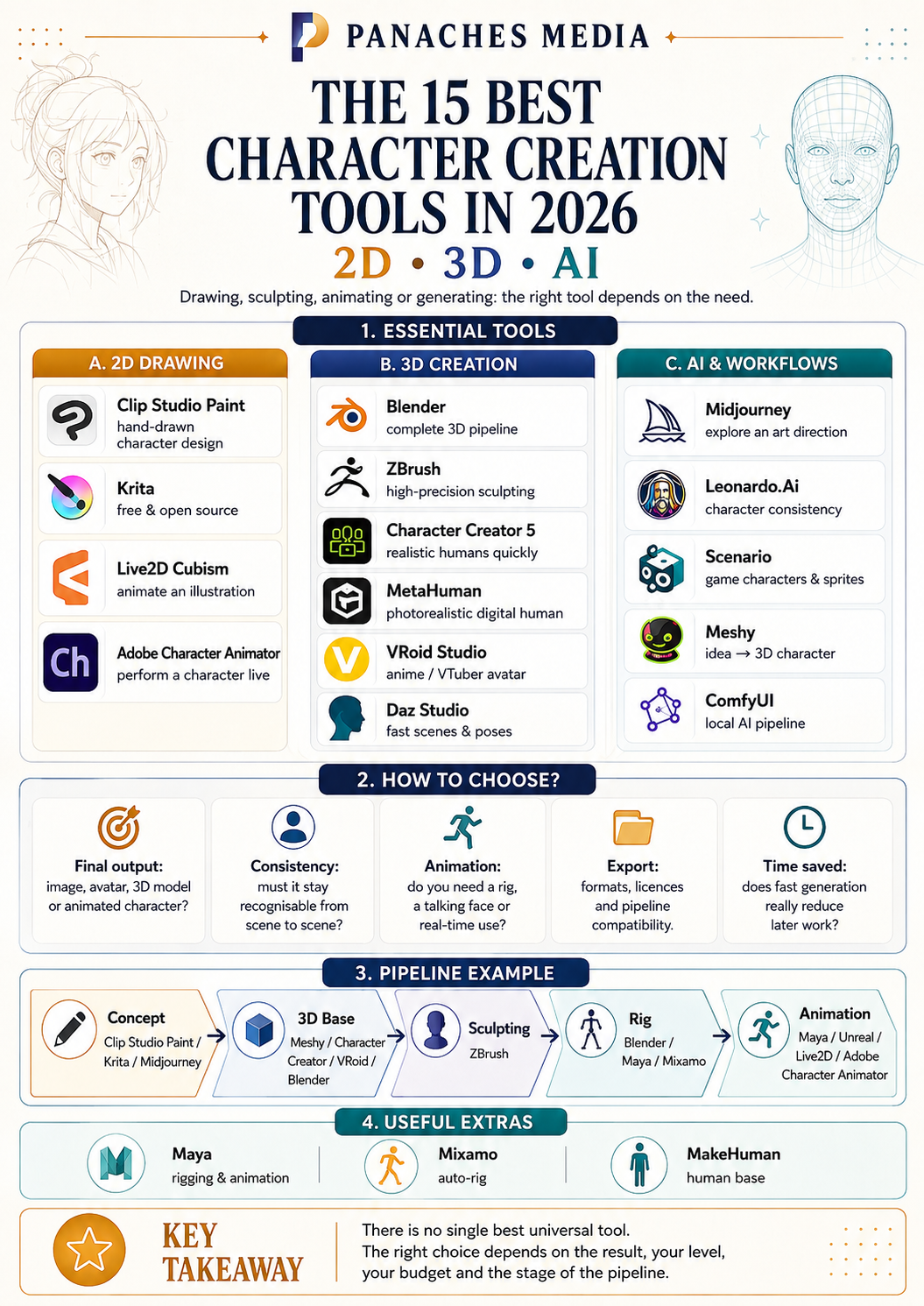
The best character creation tools at a glance
| Primary need | Recommended tool | Type |
|---|---|---|
| Draw a 2D character | Clip Studio Paint | 2D drawing |
| Draw for free | Krita | 2D drawing |
| Animate an illustration | Live2D Cubism | 2D animation |
| Perform a character live | Adobe Character Animator | 2D animation |
| Create an entire 3D character | Blender | Complete 3D creation |
| Sculpt with an extreme level of detail | ZBrush | 3D sculpting |
| Quickly produce realistic humans | Character Creator 5 | 3D generator |
| Create a photorealistic digital human | MetaHuman | 3D generator |
| Design an anime or VTuber avatar | VRoid Studio | 3D generator |
| Quickly assemble characters and scenes | Daz Studio | 3D generator |
| Explore an art direction | Midjourney | AI generation |
| Produce consistent illustrated characters | Leonardo.Ai | AI generation |
| Create game characters and sprites | Scenario | AI generation |
| Turn an idea into a 3D character | Meshy | AI 3D generation |
| Build a local AI pipeline | ComfyUI | AI workflow |
This selection is not a universal podium.
The best tool depends on the expected result, the time available, your technical level, your budget and the stage of the pipeline you want to accelerate.
The software examined in our initial working base already illustrates this diversity: Blender covers almost the entire production pipeline, Meshy accelerates 3D generation, MetaHuman focuses on realistic humans, while VRoid Studio, Daz Studio and MakeHuman address much more specific needs.
The best tools for creating 2D characters
1. Clip Studio Paint — The best for hand-drawn character design
Clip Studio Paint occupies a special place among illustrators, manga artists, comic book creators and webtoon artists.
It is not a generator that builds the character for you.
It is a digital drawing studio designed for those who want to retain control over every line, every shape and every expression.
The software provides customisable brushes, stabilisation tools, vector layers, transformation features and 3D mannequins that can be placed directly in a scene to study a pose or camera angle.
These 3D models do not replace drawing. They act more like scaffolding: a temporary presence on which the artist can construct the image before making the underlying structure disappear.
Clip Studio Paint is particularly suited to:
- silhouette exploration;
- costume research;
- manga and comic book character design;
- expression sheets;
- turnaround sheets;
- concept art;
- finished illustrations.
Its greatest strength
Clip Studio Paint supports almost the entire visual process without imposing a particular aesthetic.
The same software can be used to draw a realistic character, a manga heroine, a grotesque creature or a mascot made from three circles and a slightly unsettling smile.
Its main limitation
You still need to learn how to draw, observe, compose and tell a story.
The software can stabilise a line and make the work easier. It cannot decide why the character is looking down, wearing that coat or hiding their left hand behind their back.
2. Krita — The best free and open-source choice
Krita is one of the best entry points for beginning character design without a subscription.
Free and open source, the software provides a complete digital painting environment with numerous brush engines, layers, masks, perspective assistants and transformation tools. It also includes a workspace dedicated to frame-by-frame 2D animation, with timeline management, onion skinning and video export.
Krita can accompany a character from the first silhouette to the final illustration.
It is equally suited to quick sketches, detailed paintings, colour studies and reference sheets intended for future 3D modelling.
Krita is particularly suited to:
- learning digital drawing;
- character painting;
- concept art;
- silhouette exploration;
- reference sheets;
- short 2D animations;
- workflows based on free and open-source software.
Its greatest strength
Krita offers remarkable freedom for a free application.
It does not try to hide its tools behind an oversimplified experience. It provides a genuine workshop that is accessible enough to begin with and deep enough to use for years.
Its main limitation
Krita remains primarily a drawing and painting application.
It does not include a complete parametric character generation system or advanced rigging tools comparable to Live2D Cubism or Adobe Character Animator.
3. Live2D Cubism — The best for bringing movement to an illustration
Live2D Cubism does not truly transform a drawing into a 3D model.
It does something stranger — and often more interesting.
The software deforms the different parts of an illustration to create a sense of depth, rotation and movement.
The hair sways. The face turns. The eyes follow a direction. The mouth responds to the voice. The clothing reacts subtly to movement.
Yet the character retains their illustrated appearance.
Live2D Cubism makes it possible to model and animate an illustration using deformers, parameters, physics systems and lip-sync features.
Live2D Cubism is particularly suited to:
- creating VTuber avatars;
- visual novels;
- narrative games;
- mobile application characters;
- virtual assistants;
- interactive illustrations;
- animated characters that must retain a 2D style.
Its greatest strength
The visual identity of the original drawing remains visible.
The character does not need to be rebuilt in a different visual language. The lines, flat colours and imperfections of the drawing continue to form part of their personality.
Its main limitation
The work begins long before the animation.
The illustration must be carefully separated into numerous elements: eyes, eyelids, mouth, strands of hair, arms, clothing and different areas of the face.
A beautiful image that has been poorly prepared can quickly become a rigid puppet.
4. Adobe Character Animator — The best for performing a character live
Adobe Character Animator transforms an illustration into a digital puppet controlled by a camera and microphone.
The software analyses movements of the face, eyes and body, then applies them to the character. It can also automatically generate lip synchronisation from the voice.
The user no longer simply animates the character.
They perform it.
A facial expression becomes a raised eyebrow. A smile opens the character’s mouth. A tilt of the head produces an immediate reaction on screen.
Adobe Character Animator is particularly suited to:
- creating talking characters;
- YouTube videos;
- live broadcasts;
- presentations;
- educational formats;
- animated shows;
- comedy content.
Its greatest strength
The transition from a static drawing to a living performance is very fast.
The creator can record an entire scene by directly performing the character rather than constructing each movement frame by frame.
Its main limitation
The quality depends heavily on how the puppet has been prepared.
Ready-made templates make it possible to begin quickly, but they can produce a generic impression. To create a truly personal character, the layers, expressions and behaviours must be prepared carefully.
The best 3D character creation tools
5. Blender — The best versatile 3D tool
Blender is simultaneously a modelling, sculpting, texturing, rigging, animation, simulation and rendering application.
That is precisely what makes it essential.
A character can begin as a rough block, then be sculpted, retopologised, painted, equipped with a skeleton, animated, lit and rendered without leaving the software.
Blender covers the entire 3D production pipeline and also offers 2D drawing and animation tools integrated into its three-dimensional workspace.
Free and open source, it is suitable for independent artists, students, game developers, animators and small studios alike.
Blender is particularly suited to:
- complete 3D character creation;
- stylised characters;
- creatures;
- models intended for video games;
- short films;
- cinematics;
- 3D printing;
- subscription-free pipelines.
Its greatest strength
Blender does not force you to leave the workshop halfway through the job.
Even when specialised tools are added to the pipeline, it can remain the central space in which the different parts of the character are brought together.
Its main limitation
Blender brings the complexity of 3D together in a single application.
It does not make that complexity disappear.
At first, the experience feels a little like entering a cockpit with the perfectly reasonable intention of making a goblin. You need to learn where to place your hands before taking off.
6. ZBrush — The best for digital sculpting
ZBrush is the reference tool for artists who think of their characters as sculptures.
Rather than beginning by manipulating every polygon, the artist pushes, carves, smooths and adds virtual material.
This approach makes it possible to build faces, muscles, folds, armour, creatures and extremely complex surface details.
ZBrush is designed to sculpt and paint models made from millions of polygons, using a brush-based approach that aims to recreate a sensation close to working with clay.
ZBrush is particularly suited to:
- sculpting organic characters;
- creatures;
- models intended for film;
- figurines;
- high-definition models;
- skin details;
- complex clothing and armour;
- 3D-printing projects.
Its greatest strength
ZBrush allows the artist to think in volumes before thinking in polygons.
The artist can focus on silhouette, weight, muscles, wrinkles or materials without immediately having to solve every technical problem associated with the final model.
Its main limitation
ZBrush is often one stage of the pipeline rather than the entire pipeline.
The character will generally move on to Blender, Maya or another application for final retopology, rigging, animation and sometimes rendering.
7. Character Creator 5 — The best for quickly producing 3D humans
Character Creator follows a very different logic from Blender or ZBrush.
You do not necessarily begin with a sphere or a piece of digital clay. You begin with a human base that can be transformed using morphs, materials, clothing, hair and accessories.
Character Creator 5 notably adds a high-definition morph system, new anatomical bases, ActorMIXER and advanced facial tools.
This approach is particularly effective when several credible human characters must be produced without rebuilding the entire anatomy from scratch each time.
Character Creator 5 is particularly suited to:
- creating digital actors;
- producing realistic characters;
- video games;
- animated films;
- cinematics;
- teams that need to create an entire population;
- workflows connected to iClone, Blender, Maya, Unity or Unreal Engine.
Its greatest strength
Character Creator transforms a long, artisanal production process into a parametric workflow.
It makes it possible to begin with a technically usable base, then spend more time developing the character’s identity.
Its main limitation
Its speed relies partly on an ecosystem of additional content, modules and assets.
The more distinctive a character needs to be, the more necessary it becomes to move beyond the default settings, customise the textures and manually refine certain elements.
A face obtained quickly is not automatically a memorable face.
8. MetaHuman — The best for photorealistic digital humans
MetaHuman is designed to produce credible, detailed digital humans suitable for real-time animation.
The creator can begin with a preset, blend different facial bases, then adjust the features, skin, eyes, teeth, hair and body proportions.
MetaHuman Creator is now integrated directly into Unreal Engine. The ecosystem also includes Mesh to MetaHuman and MetaHuman Animator for converting meshes and capturing facial performances.
MetaHuman 5.8 further expands the possibilities for customisation, material editing and the creation of character populations.
MetaHuman is particularly suited to:
- creating photorealistic humans;
- virtual production;
- realistic games;
- immersive experiences;
- digital doubles;
- performance capture;
- projects built in Unreal Engine.
Its greatest strength
MetaHuman makes it possible to quickly reach a level of realism that would normally require several specialists.
The character arrives with a facial structure, materials, hair and a rig suited to animation.
Its main limitation
MetaHuman excels at creating credible human beings.
It is far less natural when the goal is a highly stylised character, a deliberately impossible silhouette or a creature that never intended to respect human anatomy.
9. VRoid Studio — The best for anime avatars
VRoid Studio makes 3D creation feel much more familiar to illustrators.
Customisation is performed using sliders, painted textures and tools that feel closer to drawing than to traditional polygonal modelling.
Hair can be built strand by strand, clothing can be customised and characters can be exported in the VRM format for use in various compatible applications.
The software also includes a clothing system based on the XWear format.
VRoid Studio is particularly suited to:
- creating manga or anime characters;
- VTuber avatars;
- virtual worlds;
- 3D social platforms;
- stylised games;
- a first introduction to 3D character creation.
Its greatest strength
VRoid Studio makes it possible to quickly produce an expressive character without extensive technical training.
Its hair and texture creation tools provide illustrators with a space in which their 2D skills remain useful.
Its main limitation
Its visual language remains strongly associated with anime.
This is an intentional specialisation, not a hidden flaw. The problem only appears when the software is asked to become something it was never designed to be.
10. Daz Studio — The best for quickly assembling characters and scenes
Daz Studio works like a virtual photography studio populated by digital actors.
You choose a character base, then adjust its body shape, face, clothing, hair, pose, lighting and environment.
The software is built around the Genesis character system and an extensive content library, making it possible to construct realistic characters without having to model, sculpt or rig them entirely from scratch.
Daz Studio is particularly suited to:
- narrative illustration;
- covers;
- visual novels;
- anatomical reference;
- scene composition;
- portraits;
- artists who want to produce 3D images without immediately learning the entire modelling process.
Its greatest strength
Daz Studio makes it possible to create a convincing scene quickly.
The creator can concentrate on pose, lighting, camera and storytelling rather than rebuilding every garment or hairstyle.
Its main limitation
The character can quickly become an assembly of predefined or purchased elements.
Creating a genuine identity therefore requires moving beyond the default content and working on morphs, textures, poses and staging.
The best AI-assisted character creation tools
11. Midjourney — The best for exploring an art direction
Midjourney is particularly useful at the beginning of the process, when the character is still only an intuition.
A short description can become a series of silhouettes, costumes, faces, materials or moods.
The creator does not necessarily receive the final answer.
They receive directions.
Midjourney’s reference systems make it possible to use an image to guide the appearance of a character or object in new scenes. Style references can also be combined with these images to maintain a more stable visual direction.
Midjourney is particularly suited to:
- visual research;
- mood boards;
- silhouettes;
- costumes;
- conceptual portraits;
- stylistic variations;
- pre-production;
- quickly exploring a universe.
Its greatest strength
Midjourney creates interesting visual accidents.
It can reveal a material, shape or combination that the creator might not have imagined or articulated alone.
Its main limitation
A beautiful image is not yet a usable character.
It has no clean layers, skeleton, 3D model or genuinely reliable turnaround. Details can also change between images: an earring disappears, a pattern transforms or a face gently drifts towards that of an unknown cousin.
Midjourney opens doors.
It does not necessarily build the house behind them.
12. Leonardo.Ai — The best balance between generation and consistency
Leonardo.Ai aims to combine rapid generation with control tools.
Its Character Reference feature makes it possible to reuse the appearance of a character in new images. It can be combined with style references or custom Elements to further stabilise a visual identity.
Elements use a LoRA-like system that can be trained from images provided by the user in order to reproduce a character or aesthetic across multiple creations.
Leonardo.Ai is particularly suited to:
- creating recurring characters;
- illustrated books;
- comic book concepts;
- pose variations;
- costume changes;
- series of illustrations;
- audiovisual pre-production.
Its greatest strength
Leonardo.Ai brings several control methods together in a relatively accessible interface.
It can support the transition from an initial exploratory generation to a more stable character.
Its main limitation
Consistency remains an objective that must be monitored, not a magical promise.
Small identifying details — jewellery, patterns, hairstyle, proportions or accessories — still need to be checked from one image to the next.
13. Scenario — The best for video game characters and assets
Scenario is particularly valuable for studios and developers that need to produce coherent visual sets.
The platform makes it possible to train custom models capable of reproducing the same character in different poses, expressions and scenes. It also provides tools dedicated to turnarounds, sprites and characters viewed from multiple directions.
The objective is no longer simply to generate a beautiful illustration.
It is to build a family of images that can be used within the same project.
Scenario is particularly suited to:
- designing heroes and supporting characters;
- mobile games;
- 2D RPGs;
- sprites;
- costume variations;
- character collections;
- large-scale asset production;
- teams that already have an established art direction.
Its greatest strength
Scenario thinks in systems rather than isolated images.
A character can be trained, combined with a style, then adapted to different production contexts.
Its main limitation
The tool becomes truly powerful when an art direction already exists.
Without solid references, automation does not resolve indecision.
It merely allows you to hesitate much faster.
14. Meshy — The best for quickly turning an idea into a 3D character
Meshy brings image generation and 3D asset creation closer together.
The user can begin with a description or reference image to generate a three-dimensional character. The model can then be rigged, animated and exported to other applications or game engines.
The platform also provides an automatic rigging system and a library of animations intended for humanoid characters.
Meshy is particularly suited to:
- transforming a 2D concept into a 3D base;
- prototyping;
- independent games;
- supporting characters;
- rapid mock-ups;
- VR and AR projects;
- creators without extensive modelling experience.
Its greatest strength
Meshy compresses several technical stages into a single process.
A sketch or description can become a model that can actually be rotated, exported, rigged and animated.
Its main limitation
A quickly generated model is not automatically ready for demanding production work.
The topology, textures, joints and deformations may require further work in Blender, Maya or ZBrush.
AI can accelerate the birth of the model.
It cannot guarantee that the character will walk without falling apart at the first bend of the elbow.
15. ComfyUI — The best local and customisable AI workshop
ComfyUI is not a generation model.
It is a modular interface that allows users to build their own creation pipelines using nodes connected to one another.
Each operation becomes a visible stage: loading a model, writing a prompt, adding a reference image, controlling a pose, generating, retouching, upscaling or exporting.
A ComfyUI workflow is therefore less like a conventional application and more like an assembly plan.
The tool is open source, can run locally and allows numerous models and operations to be combined within customisable graphs.
Workflows can be saved, shared and reused. ComfyUI also supports systems such as LoRA, ControlNet, inpainting and different generation or editing models.
ComfyUI is particularly suited to:
- local generation;
- building custom characters;
- character LoRAs;
- repeatable workflows;
- pose control;
- automated production;
- integration into an application;
- creators who want to understand and control their pipeline.
Its greatest strength
Almost everything can be replaced, controlled, modified or automated.
The creator can build a workflow suited to their needs rather than constantly adapting those needs to a closed interface.
Its main limitation
Almost everything must also be understood, installed or configured.
ComfyUI is less an application than a workbench.
It can become exactly what you need, provided you are willing to build part of the tool as well.
Complementary tools not to overlook
Some applications regularly appear in selections of character creation tools even though they primarily intervene at a specific stage.
They remain essential.
But their real strength often emerges when they are combined with another tool.
Autodesk Maya
Maya can be used to model characters, but its reputation is primarily built on its rigging, animation, deformation and simulation tools, as well as its integration into professional production pipelines.
It is not necessarily the fastest tool for inventing a character.
It is often the application in which the character learns how to move properly.
Mixamo
Mixamo is not a complete character creation application.
Its main purpose is to automatically add a skeleton to a humanoid model and apply existing animations to it.
It therefore transforms a sometimes lengthy technical stage into a much faster process, but it does not provide modelling or sculpting tools.
MakeHuman
MakeHuman quickly generates a parametric human base that can then be exported to Blender or other applications.
It is useful for obtaining an anatomically coherent starting body, but it is more the first stage of a pipeline than a complete creation environment.
Which character creation tool should you choose for your profile?
You are a complete beginner
Begin with a tool that quickly produces something visible.
VRoid Studio is a good entry point for anime avatars.
Daz Studio makes it easier to assemble realistic characters.
Adobe Character Animator can quickly give an illustration a voice and expressions.
Meshy can transform an idea or image into an initial 3D base.
The first objective is not to master the entire production pipeline.
It is to discover which part of the process makes you want to continue.
You are an illustrator or comic book creator
Choose Clip Studio Paint for an environment specialised in illustration, manga and comics.
Choose Krita for a free and open-source solution.
Live2D Cubism can then add movement to your illustrations without rebuilding them entirely in 3D.
Leonardo.Ai or Midjourney can also be used during the initial research phase, provided they remain instruments of exploration rather than replacements for art direction.
You want to learn 3D creation seriously
Choose Blender.
The learning curve is real, but the skills acquired remain useful across almost every stage: modelling, sculpting, retopology, UVs, textures, rigging, animation and rendering.
ZBrush can then be added to take the sculpting process further.
The most important thing is to master one primary tool before accumulating six interfaces in which you only know where to find the “New Project” button.
You need to produce realistic humans quickly
Choose Character Creator 5 for a flexible, parametric pipeline.
Choose MetaHuman for a very high level of realism and direct integration with Unreal Engine.
Choose Daz Studio when the main objective is to assemble characters, poses and scenes for illustration.
These tools do not eliminate creative work.
They simply shift the effort: less time spent rebuilding anatomy and more time spent differentiating faces, clothing, attitudes and stories.
You are creating a video game
The choice depends on the scale and style of the project.
- Blender can be used to create, correct and optimise models.
- Character Creator accelerates the production of human characters.
- VRoid Studio is suitable for anime avatars.
- Scenario can help create consistent characters, turnarounds and sprites.
- Meshy makes 3D prototyping easier.
- Maya remains particularly powerful for rigging and animation in a professional pipeline.
Above all, you need to check export formats, topology, licences and compatibility with the game engine being used.
A magnificent character that cannot enter the game remains a very attractive person stuck outside the door.
You are primarily looking for ideas
Use Midjourney to explore broadly.
Use Leonardo.Ai to gradually stabilise an identity.
Use Scenario when that identity must then be adapted across a coherent production.
Artificial intelligence can accelerate research.
But generating one hundred faces is useless if none of them tells the right story.
Art direction often begins at the moment you decide to delete ninety-nine of the proposals.
You want to work locally
ComfyUI is the most flexible option for building a pipeline based on open models, LoRAs, reference images and control systems.
It requires more preparation, hardware and technical knowledge than a hosted service.
In exchange, it provides a level of independence, automation and customisation that is difficult to find in a completely closed platform.
How can you recognise a good character creation tool?
A tool that looks impressive in a demonstration is not automatically suited to your project.
Before choosing one, a few questions can help you avoid spending long weeks learning in the wrong direction.
What result must it produce?
An illustration intended for a cover does not have the same constraints as a game character, a VTuber avatar, a figurine or a digital human intended for a film.
Begin with the expected output, not the feature list.
Does the character need to remain consistent?
A single image can tolerate a few inaccuracies.
A comic book, animated series or game requires the face, clothing, proportions and accessories to remain recognisable in every scene.
This question is particularly important when using generative tools.
Will the character need to be animated?
A beautiful model without clean topology, a rig or expressions can become unusable as soon as it needs to walk, speak or pick up an object.
You therefore need to check what the tool actually produces:
- a simple image;
- a static mesh;
- a rigged character;
- a facial avatar;
- a complete model ready for animation.
Can you retrieve your work?
Check the export formats, terms of use and commercial licences.
Your character needs to be able to enter the next tools in your pipeline.
A model trapped inside a platform can become expensive to rebuild when the project evolves.
Does the tool genuinely save you time?
Free software with a learning curve lasting several months can cost more in time than a paid tool that is well suited to the project.
Conversely, an extremely fast generator may produce a model that will need to be almost completely rebuilt.
Generation speed is therefore only one part of the calculation.
The real time saving is measured when the character reaches the end of the pipeline.
The best pipeline often combines several tools
It is tempting to search for a single application capable of doing everything.
In practice, characters move between tools.
A concept can begin in Clip Studio Paint, Krita or Midjourney.
It can become a 3D base in Meshy, Character Creator, VRoid Studio or Blender.
The details can be sculpted in ZBrush.
The rig can be built in Blender, Maya or Mixamo.
The animation can then be completed in Maya, Unreal Engine, Live2D Cubism or Adobe Character Animator.
Efficient pipelines often combine several specialised tools rather than expecting a single application to excel at everything.
That is not a weakness.
It is the normal way digital creation works.
The important thing is to understand the role of each tool and avoid unnecessary transitions.
A good pipeline is not the one with the most software.
It is the one in which the character can move forward without being rebuilt at every stage.
A character is more than an appearance
The tools have become faster.
They can suggest a face, generate an outfit, build a mesh, add a skeleton, reproduce an expression or transform a voice into movement.
Some stages that once required several days can now be sketched out in a few minutes.
But a character does not become memorable because their skin has a highly detailed texture.
They become memorable because their silhouette already tells us something.
Because their clothes look as though they have been worn.
Because their gaze suggests a story that began before the image.
Because we can sense their habits in their posture, their contradictions in their costume and perhaps even their failures in the way they avoid looking at other people.
Clip Studio Paint provides the line.
Blender provides the volume.
Live2D Cubism provides the movement.
Character Creator and MetaHuman provide a presence.
Artificial intelligence provides possibilities.
The creator gives them a reason to exist.
And that is still the part that no button can generate completely.
Main sources
- Official Clip Studio Paint documentation on character art and 3D mannequins.
- Official overview and features of Krita.
- Official Live2D Cubism documentation.
- Official Adobe Character Animator documentation.
- Official Blender overview and manual.
- Official Maxon presentation of ZBrush.
- Official Character Creator 5 manual.
- Official MetaHuman documentation and news.
- Official presentation of VRoid Studio.
- Official presentation of Daz Studio and the Genesis system.
- Official Midjourney documentation on character and style references.
- Leonardo.Ai documentation on Character Reference and Element training.
- Scenario documentation on character models, turnarounds and sprites.
- Official Meshy documentation on 3D character generation, rigging and animation.
- Official ComfyUI documentation and repository.