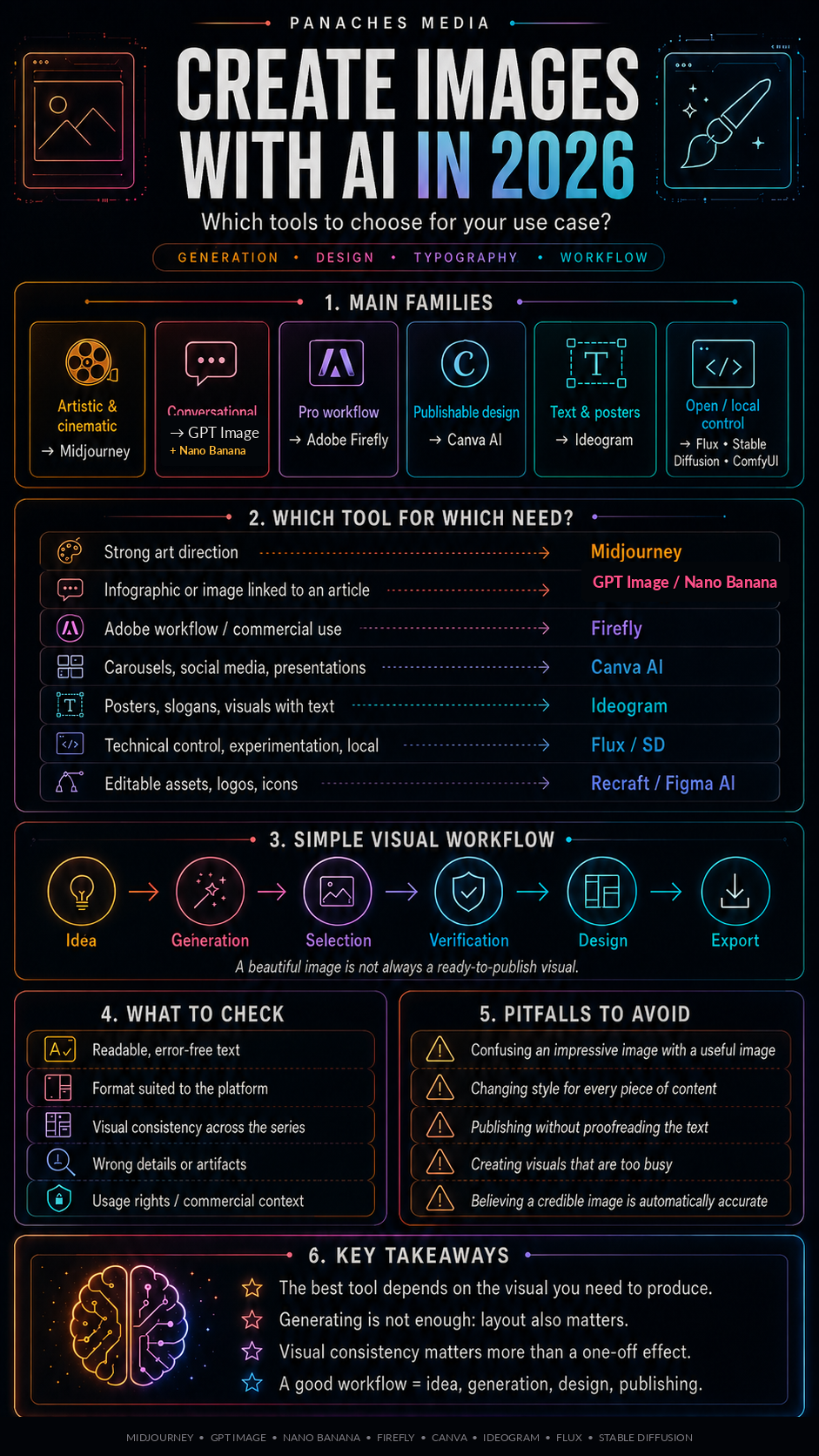
Why AI image tools are not all equal
Creating an image with AI has become extremely simple.
You write a sentence.
You choose a style.
You generate.
You try again.
You adjust.
And sometimes, in just a few seconds, you get an image that would previously have required hours of research, sketching, photo compositing, or illustration.
But this simplicity hides an important reality: AI image tools do not all serve the same purpose.
Some are excellent for creating spectacular artistic images.
Others are better suited to marketing visuals.
Others are more practical for integrating text.
Some fit naturally into professional software.
Some offer more technical control.
Some are better suited to social media, infographics, or editorial content.
So you should not simply look for “the best AI image generator.”
You should instead ask:
Which tool fits the image I want to create and the workflow it needs to fit into?
A standalone AI image can be impressive.
But real visual content often requires much more than that: intention, format, readability, brand consistency, usage rights, retouching, export, variants, adaptation to social platforms, and sometimes manual editing.
That is where the choice of tool becomes strategic.
Generating an image is not the same as producing a finished visual
The first distinction to make is simple.
An image generator creates visual raw material.
A design tool turns that material into usable content.
An image can be beautiful without being ready to publish.
It may lack readable text.
It may be in the wrong format.
It may not respect the hierarchy needed for an infographic.
It may be difficult to edit.
It may not fit a brand system.
It may be too spectacular for a sober article.
It may be attractive, but still not useful.
That is why a strong visual workflow often combines several steps:
- image generation;
- selection;
- retouching;
- cropping;
- adding text;
- layout;
- export;
- adaptation for different platforms.
Midjourney, GPT Image,Nano Banana, Firefly, Ideogram, Flux, or Stable Diffusion mainly serve to create visual material. Canva, Adobe Express, Recraft, Figma, or Affinity are more useful for structuring, composing, adapting, or finishing.
So the question is not only:
Which tool generates the most beautiful image?
But also:
Can I easily edit, adapt, and publish this image?
The main families of AI image tools
To see things clearly, we can group tools into several families.
The first family is artistic and cinematic generators. Midjourney is one of the main symbols of this category. These tools are very strong for creating moods, characters, scenes, styles, spectacular visuals, or creative references.
The second family is generators integrated into assistants. GPT Image inside ChatGPT makes it possible to create and edit images conversationally. This is practical for working in iterations, explaining what you want, asking for variations, or correcting a detail.
The third family is professional creative tools. Adobe Firefly fits into the Creative Cloud ecosystem, with strong attention to professional use, editing, and models designed for commercial contexts.
The fourth family is all-in-one design tools. Canva AI is very useful for quickly producing social visuals, infographics, presentations, carousels, thumbnails, or visual documents from templates and editable elements.
The fifth family is tools specialized in typography and text-based visuals. Ideogram is often mentioned for logos, posters, slogans, or compositions where the text must be more readable.
The sixth family is open models and controllable workflows. Flux, Stable Diffusion, ComfyUI, or local tools provide more control, more experimentation, and sometimes more freedom, but they usually require more technical skill.
The seventh family is editable and vector-oriented design tools. Recraft, Figma AI, Adobe Express, or some Canva features help move from generated imagery to assets that are easier to adjust.
These families can complement one another.
The right choice rarely depends on just one criterion.
Midjourney: art direction and visual power
Midjourney remains a major reference for visual quality, art direction, and mood.
Its main strength is aesthetics.
It is a very strong tool for:
- creating cinematic images;
- exploring an art direction;
- generating characters;
- producing atmospheres;
- creating visual concepts;
- working on creative references;
- testing graphic universes;
- getting highly appealing images quickly.
For an artist, writer, content creator, art director, or narrative project, Midjourney can be extremely powerful.
It is especially useful when you want to find a style, explore an atmosphere, or create images that instantly attract attention.
But its strength can also become a limitation.
A Midjourney image can be stunning but difficult to control precisely. It can stylize too strongly. It can produce generic beauty if prompts are not carefully framed. It can be less suitable when you need to respect an exact document, a strict brand system, or an editable composition.
Midjourney is therefore excellent for inspiration, art direction, and high-impact visuals.
But for infographics, supports with a lot of text, or designs that need to be easily modified, it usually needs to be complemented with a layout tool.
GPT Image: conversational image creation and simple iteration
GPT Image, integrated into ChatGPT, serves a different use case.
Its main strength comes from conversation.
You can describe an image, ask for a correction, specify a detail, modify a scene, adapt a format, or turn an idea into a visual without changing environments.
This is very practical for:
- creating article images;
- generating infographics;
- producing variants;
- correcting a visual idea;
- working in several steps;
- turning text into an image;
- adapting an image to an explanation;
- creating content that stays coherent with an article.
For a media outlet, a writer, or a creator who already works with an AI assistant, that is a major advantage.
The image is not separated from the reasoning. It can stay linked to an article, an outline, a synthesis, a script, a carousel idea, or an editorial intention.
The limitation is that results can vary depending on the requests, and text inside the image must always be checked carefully. A generated infographic may be visually beautiful but still contain a typo, an awkward hierarchy, or a wording issue.
GPT Image is therefore very useful for creating quickly and iterating inside an editorial workflow.
But it does not remove the need to review every visual element.
Nano Banana / Gemini Image: mainstream AI image creation inside Google’s ecosystem
Nano Banana, integrated into Gemini, has become one of the most visible AI image tools for mainstream users.
Its value comes from a clear positioning: creating and editing images directly inside the Gemini environment, with a conversational logic close to GPT Image, but carried by Google’s ecosystem.
It can be used to:
- quickly generate an image from a prompt;
- edit an existing image;
- test visual variations;
- create social media visuals;
- prepare article images;
- explore compositions with text;
- turn a simple idea into a usable image;
- work inside an environment already familiar to Gemini users.
Nano Banana is especially interesting for users who want a simple, fast, accessible tool without entering a highly technical workflow.
Where Midjourney remains very strong for spectacular art direction, Nano Banana is closer to everyday use: create, correct, adapt, retry, test.
With Nano Banana Pro, Google has also emphasized more advanced use cases: better text rendering inside images, more precise instruction following, information visualization, more accurate edits, and generation supported by Gemini’s reasoning capabilities.
This makes it relevant for explanatory visuals, editorial images, simple posters, content with text, or visuals linked to an already structured idea.
But the same precautions apply as with other image generators.
An image can look clean without being correct. Text must be proofread. Details must be checked. Faces, objects, logos, numbers, or factual elements can contain errors. And for professional use, format, rights, visual consistency, and integration into the publishing workflow must always be reviewed.
Nano Banana is therefore an important tool to include in the 2026 landscape.
It naturally sits alongside GPT Image for conversational creation, Midjourney for artistic exploration, Ideogram for text-based visuals, and Canva for final layout.
Its best use is not necessarily to replace every other tool.
Its best use is to become a fast, mainstream option for generating, editing, and testing images inside the Gemini ecosystem.
Adobe Firefly: professional workflow and Creative Cloud logic
Adobe Firefly positions itself more clearly within a professional environment.
Its value is not only image generation. Its value lies in integration with the Adobe ecosystem: Photoshop, Illustrator, Express, Premiere, creative workflows, retouching, composition, effects, visual generation, and editing.
Firefly is especially relevant for:
- designers;
- communication professionals;
- marketing teams;
- creatives already working inside Adobe;
- commercial visuals;
- retouching;
- integration into a production chain;
- use cases where commercial safety matters.
Adobe also emphasizes an approach designed for professional and commercial use. This is an important point for companies and teams that want to reduce certain risks related to training data provenance or usage rights.
But Firefly is not necessarily the most spectacular tool for every image.
Its advantage lies more in coherence with a professional creative workflow: generate, edit, adjust, integrate, export.
For a user already inside Creative Cloud, Firefly can feel much more natural than an isolated generator.
Canva AI: producing publishable content quickly
Canva AI is one of the most practical tools for turning visual ideas into publishable assets.
Its strength is not only its ability to generate images. Its strength is in combining generation, templates, layout, text, social formats, presentations, infographics, documents, thumbnails, brand kits, and export inside one space.
Canva is especially useful for:
- creating carousels;
- producing infographics;
- preparing visuals for Instagram, TikTok, Pinterest, or LinkedIn;
- making presentations;
- adapting one piece of content into several formats;
- working quickly without being a designer;
- using a strong template base;
- creating coherent materials for a brand.
For a content creator or a small team, Canva is often more useful than a pure image generator.
Why?
Because the real challenge is not only getting a beautiful image. The challenge is producing a complete visual that is readable, suited to the format, and ready to publish.
Canva responds well to that need.
Its limitation is that visuals can sometimes start to look alike if you rely too heavily on templates. So you still need to personalize, build your own visual identity, and avoid the “generic design” effect.
Ideogram: text, posters, and typography
Ideogram became especially noticeable for images that include text, posters, logos, slogans, or typographic compositions.
This is a very important category, because image generation has long had trouble with letters.
A generator may produce a magnificent background while failing on a simple word. For posters, covers, logos, or campaign visuals, that weakness becomes a blocking issue.
Ideogram is therefore interesting for:
- creating posters;
- exploring logo ideas;
- producing visual titles;
- integrating slogans;
- generating typographic compositions;
- preparing advertising visuals;
- testing branding ideas.
It does not replace a professional logo designer. It does not guarantee a perfect brand identity. But it can accelerate visual exploration when text is part of the image itself.
You still need to verify:
- spelling;
- readability;
- alignment;
- typographic consistency;
- whether the result can be reused or rebuilt inside an editable tool.
Ideogram is therefore useful when image and words need to work together.
Flux, Stable Diffusion, and open-source workflows: control and experimentation
Open or more controllable models such as Flux, Stable Diffusion, and workflows built around ComfyUI occupy a special place.
They mainly appeal to users who want more control.
They can be used to:
- experiment locally;
- create custom workflows;
- control certain parameters;
- work with specialized models;
- use LoRAs or adapted models;
- generate in batch;
- integrate AI imagery into a pipeline;
- work with more independence.
This family is very important for technical artists, developers, independent studios, or users concerned with privacy.
But it requires more learning.
You need to understand models, settings, resolutions, prompts, workflows, sometimes nodes, and often the hardware. Freedom increases, but complexity does too.
The open-source approach is therefore very powerful for those who want to master generation.
It is less suited to someone who simply wants to publish an infographic or a thumbnail quickly.
Recraft, Figma AI, and tools focused on editable design
Another category is becoming increasingly important: tools that bring image generation closer to editable design.
The problem with many AI images is rigidity. You generate a flattened image, then struggle to precisely modify a single element, a text block, an icon, a color, or a layout.
Editable design tools try to solve that problem.
Recraft, Figma AI, Adobe Express, Canva, and other solutions aim to make visuals easier to adapt, repurpose, or integrate into a design system.
That is essential for:
- logos;
- icons;
- brand visuals;
- graphic systems;
- presentations;
- interfaces;
- infographics;
- reusable assets.
The more a visual needs to live inside a real workflow, the more editing matters.
A spectacular but uneditable image can become a problem. A slightly less spectacular visual that remains editable can be much more useful.
That is an important rule for professional creators:
The most impressive result is not always the best working file.
Which tool should you choose depending on the need?
For strong art direction, Midjourney remains an excellent choice.
For conversational creation linked to an article, a script, or an idea, GPT Image inside ChatGPT is very practical.
For a professional Adobe workflow, Firefly makes perfect sense.
For carousels, infographics, and social visuals ready to publish, Canva AI is often the most efficient choice.
For posters, exploratory logos, and integrated typography, Ideogram is very interesting.
For technical or local control, Flux, Stable Diffusion, ComfyUI, multimodal local tools, or other open-source solutions may be the right path.
For editable assets, logos, icons, and visual systems, Recraft, Figma AI, Canva, or Adobe Express deserve attention.
So the right question is not:
Which tool makes the most beautiful image?
But rather:
Do I need inspiration, control, text, editability, fast publishing, or a professional workflow?
Each need leads to a different tool.
A simple method for creating a strong AI image
A strong AI image does not come only from a strong prompt.
It comes from a process.
1. Define the use case
Before generating, you need to know what the image will be used for.
Article image?
Infographic?
Poster?
Thumbnail?
Moodboard?
Concept art?
Carousel?
Advertising visual?
Narrative illustration?
The format, level of detail, and style will depend on that use.
2. Define the message
An image should support an idea.
If it only exists “to look pretty,” it may end up distracting from the real content.
For an article, it should summarize a notion.
For an infographic, it should clarify.
For a carousel, it should guide the reading.
For a cover, it should attract without misleading.
The message must remain the priority.
3. Choose the right tool
You do not choose the same tool for a typographic poster, a cinematic portrait, a diagram, a thumbnail, an icon, or a documentary-style image.
Tool choice should come after defining the use case.
4. Generate several directions
The first image is not always the right one.
You often need to explore several directions:
- framing;
- mood;
- style;
- color;
- realism level;
- composition;
- lighting;
- visual density.
Iteration is part of the work.
5. Check the details
AI images can contain subtle mistakes.
Hands, eyes, text, objects, perspective, symbols, invented logos, inconsistencies, artifacts, fake interfaces, absurd details.
Before publishing, you need to look at the image like an editor, not only like a viewer.
6. Finalize in a design tool
For published content, a design step is often necessary.
Crop.
Add a title.
Correct the hierarchy.
Adapt the format.
Export cleanly.
Create an EN or ES version.
Repurpose it for social media.
That is the stage that transforms a generation into finished content.
Pitfalls to avoid
The first pitfall is confusing an impressive image with a useful image.
An image can be spectacular and still explain nothing.
The second pitfall is publishing without checking the text.
Generators are improving, but typographic errors are still possible. A typo in an infographic or poster immediately creates a sense of carelessness.
The third pitfall is changing visual style with every piece of content.
If each article or carousel uses a different direction, the brand becomes unreadable. You need to build a series identity.
The fourth pitfall is generating visuals that are too busy.
Social media demands readability. A very detailed visual can become unreadable on mobile.
The fifth pitfall is forgetting usage rights.
Each tool has its own terms. You need to check licenses, commercial use rules, restrictions, and rights related to the models or assets used.
The sixth pitfall is assuming AI always understands references.
In precise fields such as architecture, fashion, art history, science, or technology, images can look credible while still being false.
The seventh pitfall is replacing art direction with mere generation.
A creator still needs to choose, frame, reject, correct, harmonize, and give meaning.
AI image generation and visual identity: keeping consistency
For a media brand or company, the challenge is not only to produce images.
The challenge is to produce a recognizable series.
That means defining:
- a palette;
- a mood;
- a typography;
- formats;
- framing rules;
- a level of detail;
- a visual hierarchy;
- a way of using icons;
- rules for characters;
- rules for backgrounds.
Without that, AI can create many images, but very little identity.
For Panaches Media, for example, an infographic series can use a premium dark style, orange, pink, purple, and cyan gradients, readable panels, a strong typography, and discreet branding.
That consistency makes the content immediately recognizable.
It matters more than one spectacular standalone image.
Inside Panaches
Panaches naturally has a place in this kind of visual workflow.
Image creation does not always begin inside a generator.
It often begins with:
- an idea;
- a note;
- an article;
- a reference;
- a moodboard;
- a screenshot;
- a character sheet;
- a research phase;
- an infographic structure;
- a publication format.
The problem is that these elements are often scattered.
References are in a browser.
Prompts are in a document.
Images are in a folder.
Notes are in another application.
Exports are in a design tool.
Carousel ideas are somewhere else.
EN and ES versions are somewhere else again.
A workspace like Panaches can help bring these steps together: writing, organizing, collecting references, working with a moodboard, preparing prompts, analyzing images, structuring an infographic, managing files, and maintaining project consistency.
AI then becomes a creative layer integrated into the process, not just an isolated generator.
For a creative media workflow, that is essential.
AI imagery should not only produce beauty.
It should serve an intention, a piece of content, and an identity.
Conclusion: the right tool depends on the visual you want to produce
In 2026, AI tools for creating images are numerous, powerful, and sometimes extremely impressive.
But they should not be confused.
Midjourney is strong for art direction.
GPT Image is practical for conversational iteration.
Nano Banana / Gemini Image has become a very useful mainstream option.
Firefly fits into a professional Adobe workflow.
Canva AI helps produce publishable content quickly.
Ideogram is interesting for visuals with text.
Flux, Stable Diffusion, and ComfyUI provide more control.
Recraft, Figma AI, and design-oriented tools make editing and adaptation easier.
The right choice depends on the need.
Do you want a spectacular image?
A social visual ready to publish?
A readable infographic?
An exploratory logo?
A poster with text?
A commercial workflow?
Local control?
A coherent visual system?
Each answer leads to a different tool.
The right strategy is not to generate everything everywhere.
The right strategy is to build a visual workflow: idea, generation, selection, verification, design, export, and consistency.
That is when AI becomes truly useful for image creation.
FAQ
What is the best AI tool for creating images in 2026?
There is no single best tool. Midjourney is very strong for aesthetics, GPT Image for conversational iteration, Firefly for Adobe workflows, Canva for publishable content, Ideogram for text-based visuals, and Stable Diffusion or Flux for more control.
What is the difference between Midjourney and Canva AI?
Midjourney is mainly used to generate creative and artistic images. Canva AI is more useful for creating ready-to-publish assets: carousels, infographics, presentations, thumbnails, or social content.
Why use Ideogram?
Ideogram is especially interesting when text is part of the image: posters, slogans, exploratory logos, advertising visuals, or typographic compositions.
Are AI images ready to publish immediately?
Not always. You still need to verify details, text, usage rights, format, and visual consistency. A retouching or design step is often necessary.
Should you use Stable Diffusion or Flux locally?
These tools are interesting if you want more control, experimentation, or privacy. However, they require more technical skill than mainstream consumer tools.
How can you avoid AI visuals that look too generic?
You need to define a clear art direction: palette, framing, mood, typography, level of detail, formats, and series rules. Visual identity comes from consistency, not from generation alone.