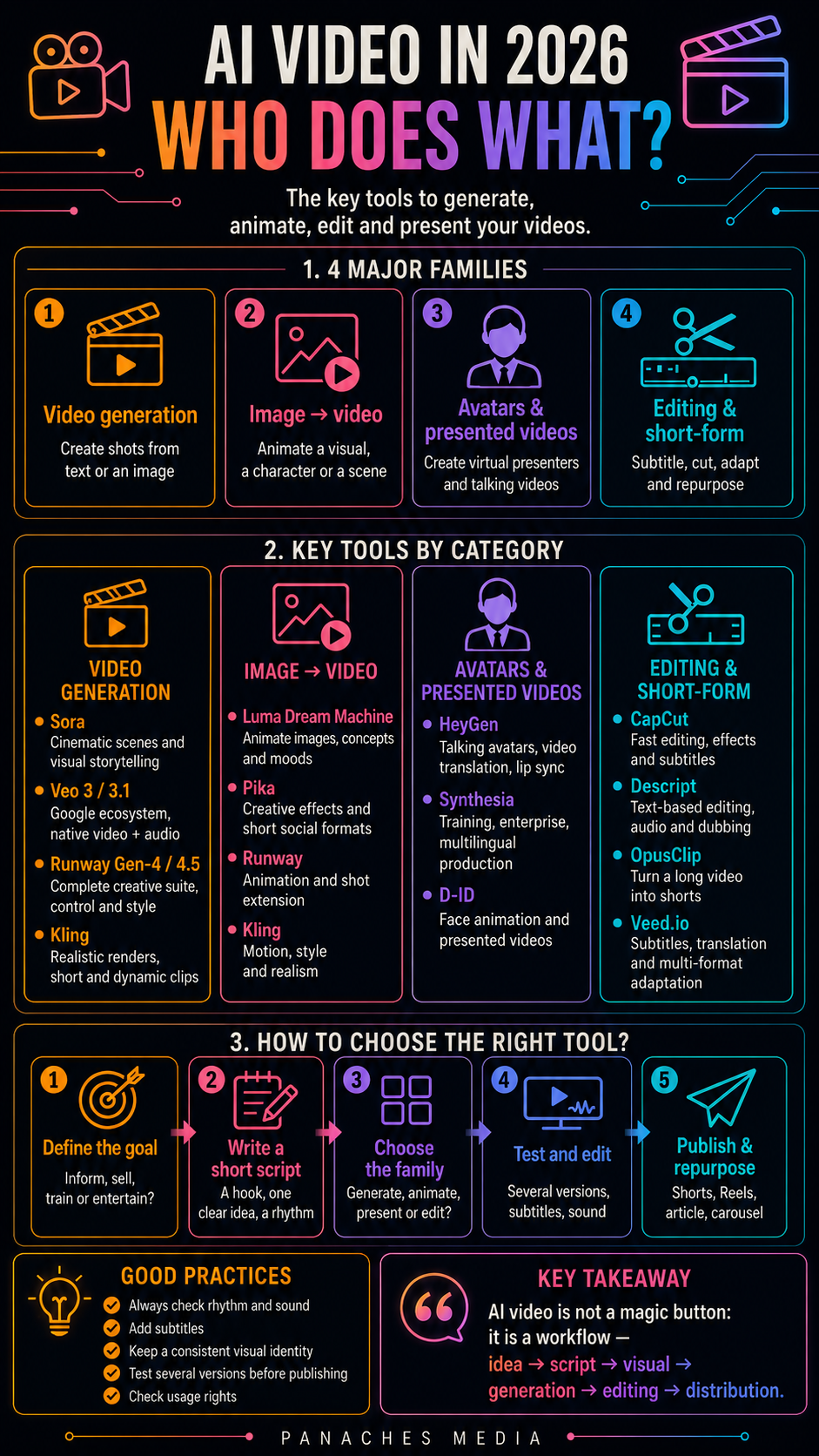
Why AI video is becoming a field of its own
For a long time, AI-assisted video creation mostly felt like a promise.
You imagined writing a sentence, clicking a button, and getting a complete, smooth, coherent video ready to publish.
In 2026, that promise has become much more concrete, but it remains more complex than it seems.
AI video is not limited to “generating a video from a prompt.”
It now covers several very different use cases:
- creating a cinematic shot;
- animating a still image;
- generating a scene from text;
- transforming an existing clip;
- creating a talking avatar;
- dubbing a video into another language;
- producing training videos;
- creating shorts for TikTok, Reels, or YouTube Shorts;
- automatically editing extracts;
- adapting a video to several formats;
- generating a mood, a setting, a movement, or a transition.
That is why we should not simply look for “the best AI video tool.”
We should rather ask:
What kind of video do I need to produce?
An ad, a training avatar, an artistic animation, a short clip, a social video, or a cinematic scene do not require the same tool.
AI video has become a family of tools, not one single technology.
Video generation, AI editing, and avatars: three different worlds
The first distinction is essential.
First, there are video generation tools. They create shots from a prompt, an image, a storyboard, or visual references. Sora, Veo, Runway, Kling, Luma, and Pika belong to this family.
Then there are AI editing and post-production tools. They help cut, subtitle, reformat, clean, translate, adapt, or transform an existing video. Descript, CapCut, Adobe Premiere Pro with AI features, Runway, and Veed.io can belong to this logic depending on the use case.
Finally, there are avatar and talking-head video tools. HeyGen, Synthesia, D-ID, Colossyan, and Elai are mainly used to create virtual presenters, training videos, marketing messages, dubbing, or multilingual videos.
These three families can complement one another, but they do not answer the same need.
A cinematic generation tool does not necessarily replace a good editing tool.
A talking avatar does not replace a generated scene.
A subtitling tool does not replace video art direction.
A shot generator does not replace a real publishing workflow.
To choose properly, you first need to identify the role of the video.
The main families of AI video tools
AI video tools can be grouped into several major families.
The first family is high-end generative video models. Sora, Veo, Runway, and Kling are often mentioned for producing realistic, cinematic, or stylized shots from text, images, or references.
The second family is image-to-video tools. Luma, Pika, Runway, and Kling can animate images, characters, posters, concepts, or existing visuals.
The third family is AI video creation suites. Runway, Adobe, CapCut, Veed, and Descript do not only generate content: they also help edit, retouch, subtitle, transform, or adapt videos.
The fourth family is avatars and presented videos. HeyGen, Synthesia, and D-ID turn a script into a video with a face, voice, lip sync, or translation.
The fifth family is short-form tools. CapCut, OpusClip, Descript, Pika, and some tools built into social platforms help produce short formats adapted to social media.
The sixth family is professional and marketing workflows. Google Vids, Adobe, Runway, Synthesia, HeyGen, and some enterprise platforms target teams, training, internal communication, advertising, or multilingual localization.
Each family has its own value.
The trap is comparing them as if they were the same product.
Sora: the symbolic reference for generative video
Sora remains a central name in the imagination around AI video.
Its value comes from this promise: generating realistic, complex, coherent video sequences from text or visual instructions.
Sora and Sora 2 attracted attention because they represent AI video as a simulation model: motion, physics, scenes, characters, environments, continuity, and synchronized audio depending on the version.
It is an interesting tool to watch for:
- cinematic scenes;
- visual storytelling;
- concept videos;
- realistic shots;
- creative experimentation;
- generation with audio;
- use cases where motion consistency matters.
But Sora should be approached carefully.
Access, versions, APIs, and availability can change quickly. An article or comparison should therefore avoid presenting Sora as a stable and universal tool without checking its current state at the time of use.
Sora is an important reference point, but not necessarily the easiest tool to integrate into a daily workflow.
For a creator who needs to produce social content regularly, Runway, Kling, Luma, Pika, CapCut, HeyGen, or Synthesia may sometimes be more immediately usable depending on the need.
Veo: AI video inside the Google ecosystem
Veo is one of Google’s major video models.
Its main value comes from its progressive integration into the Google ecosystem: Gemini, Flow, Google Vids, Vertex AI, API, and creative or professional uses depending on the plan.
Veo is especially interesting for:
- generating videos from text or images;
- working with native audio depending on the version;
- producing short content;
- using creative controls;
- integrating AI video into Google workflows;
- exploring professional uses through Google Cloud or Workspace;
- connecting video, documents, presentations, and productivity tools.
The advantage of Veo is not only video generation.
It is also its ecosystem.
For users already deeply involved in Google Workspace, Gemini, NotebookLM, or Google Vids, Veo can become a natural building block in a production chain.
Its limits depend on access, pricing, available offers, formats, expected quality, and the level of creative control needed.
Veo is therefore especially interesting for Google-first profiles, teams, creators who want to connect video, documents, and productivity, and developers looking for API or cloud integration.
Runway: the most complete creative video suite
Runway is one of the most important names in creative AI video.
Its value comes from the fact that it is not limited to an isolated generator. Runway works more like a video creation suite: generation, image-to-video, control, editing, retouching, effects, references, styles, and iterations depending on the models and features available.
Runway is useful for:
- creating cinematic shots;
- animating images;
- working with visual references;
- testing an art direction;
- producing short clips;
- modifying or extending videos;
- creating stylized scenes;
- experimenting with motion, camera, atmosphere, and composition.
For a visual creator, Runway is often closer to a production tool than to a simple technology demo.
That is a major strength.
But this richness also requires more method. The more possibilities there are, the more you need to define:
- style;
- duration;
- format;
- movement;
- relationship to sound;
- type of shot;
- consistency between several clips;
- final destination.
Runway is therefore especially suited to creators who want to build a video direction, not just generate an isolated clip.
Kling: visual quality and accessible generation
Kling has become one of the AI video tools often mentioned for the quality of its results and its accessibility.
Its main value lies in video generation from text or image, with a strong orientation toward realistic, cinematic, animated, or stylized scenes depending on the prompts.
Kling is useful for:
- creating short shots;
- animating images;
- producing cinematic visuals;
- testing concepts;
- generating realistic scenes;
- creating social content;
- experimenting with camera movements;
- producing quick variants.
For a content creator, Kling can be interesting because it often makes it possible to obtain usable shots quickly, especially for short formats or animated visuals.
But like all video generators, its limits need to be watched:
- temporal consistency;
- changing details;
- unstable faces;
- hands and objects;
- inconsistent movements;
- text inside the image;
- continuity between several shots;
- usage rights;
- generation cost.
Kling is therefore a powerful tool for exploration and short-shot production, but it needs to be integrated into a real workflow of selection, editing, and verification.
Luma: image-to-video, motion, and visual concepts
Luma is especially interesting for turning ideas or images into videos.
Its value lies in its ability to animate visuals, generate scenes from text or image, and work on short cinematic renders.
Luma can be used to:
- animate an article image;
- turn concept art into a video shot;
- create camera movement;
- produce a visual loop;
- generate a mood;
- test a storyboard;
- bring a poster, character, or setting to life;
- create short videos for social media.
For a creative workflow like Panaches Media, Luma is interesting because it can extend image and design work.
An infographic, article image, moodboard, or generated visual can become a short sequence, an intro shot, an animated background, or a social video element.
Its limit is the same as with many AI video tools: a beautiful generation is not enough. You still need to check motion, readability, continuity, and real use inside the edit.
Luma is therefore strong for adding motion to an existing visual direction.
Pika: short-form creativity and social formats
Pika occupies an interesting place in short and creative AI video.
Its positioning is lighter, faster, more experimental, and oriented toward idea-to-video.
It is useful for:
- creating short clips;
- animating an image;
- producing playful effects;
- testing visual ideas;
- generating social content;
- creating quick variants;
- working on short formats;
- exploring a more playful approach to AI video.
Pika can be very practical when the goal is not to produce a perfect cinematic scene, but to quickly create an engaging, original, or social-friendly video.
For TikTok, Reels, Shorts, or experimental content, it is a tool worth watching.
Its limit is that very creative short formats can quickly become gimmicky if the idea is not clear.
The right use is to start from a simple message, then use the video effect to reinforce that message.
HeyGen: avatars, dubbing, and localization
HeyGen belongs more to the family of avatars and spoken video.
Its main value is not generating a cinematic shot, but transforming a script, a voice, or a video into presented, translated, or localized content.
HeyGen is especially useful for:
- creating a talking avatar;
- producing marketing videos;
- translating a video into several languages;
- synchronizing lip movements;
- creating personalized messages;
- producing training content;
- turning a script into a presented video;
- adapting a video to several markets.
For a brand, sales team, trainer, or creator who wants to speak on camera without filming every video, HeyGen can save a lot of time.
It is also interesting for an AI character like Ambre, as long as the visual identity is stable, the voice is coherent, the script style is natural, and the strategy is clear.
But the cold corporate effect should be avoided.
A talking avatar is not automatically engaging. It needs a good script, natural rhythm, credible voice, clean framing, and relevant use.
HeyGen is therefore powerful for localization, avatars, and presented messages, but it needs real editorial direction.
Synthesia: corporate video, training, and enterprise
Synthesia is one of the major avatar video tools oriented toward enterprise.
Its main value is producing professional videos from text: training, internal communication, onboarding, support, documentation, and multilingual content.
Synthesia is especially useful for:
- creating training videos;
- producing internal modules;
- generating professional avatars;
- turning scripts into videos;
- localizing content;
- standardizing communication;
- creating HR, compliance, or product support;
- producing at scale.
Where HeyGen may appeal to many creators and marketers, Synthesia has a stronger corporate and training image.
That is a strength inside organizations.
But it is not necessarily the best tool for creative, artistic, cinematic, or highly embodied videos.
Synthesia should therefore be chosen when the goal is clarity, training, structured production, and professional distribution.
CapCut, Descript, and OpusClip: producing and recycling short formats
Not all AI video tools generate scenes.
Some are mainly useful for editing, recycling, cutting, subtitling, and adapting content.
CapCut, Descript, OpusClip, Veed, and some tools integrated into social platforms are important because they answer the real need of many creators:
How do I turn an idea or a long video into publishable short content?
These tools can help with:
- automatic cutting;
- generating subtitles;
- reformatting into 9:16;
- removing silences;
- extracting the best moments;
- translating or dubbing;
- cleaning audio;
- adapting for TikTok, Reels, or Shorts;
- producing several variants.
For Panaches Media, this family is very important.
An article can provide a script.
An infographic can become a short video.
A long video can be cut into excerpts.
An Ambre presentation can be adapted into Shorts.
A software tutorial can become several capsules.
AI video is therefore not only generation.
It is also transformation and distribution.
Which tool should you choose depending on the need?
For a generated cinematic scene, Runway, Kling, Veo, Sora, or Luma are worth considering.
For a video from an image, Luma, Runway, Kling, or Pika are often relevant.
For an advanced creative workflow, Runway is one of the strongest reference points.
For a Google ecosystem, Veo, Flow, and Google Vids may feel more natural.
For a talking avatar, HeyGen or Synthesia are the main choices.
For a corporate training video, Synthesia is very well suited.
For multilingual localization, HeyGen can be very interesting.
For short social formats, CapCut, Pika, OpusClip, Descript, or Veed may be more effective than a pure generator.
For a Panaches / Ambre video, the right workflow could combine:
- script writing;
- character generation or stabilization;
- voice;
- avatar or talking-head;
- short-form editing;
- subtitles;
- social media adaptations.
The right choice therefore depends on the question:
Do I want to generate, present, edit, translate, recycle, or publish?
Each verb leads to a different family of tools.
A simple method for creating a useful AI video
A successful AI video does not start with the tool.
It starts with the message.
1. Define the objective
Should the video inform, explain, sell, entertain, present, train, or intrigue?
A video tool will not save a vague objective.
2. Write a short script
Even a very visual video needs structure.
For a short, you often need:
- a hook;
- one main idea;
- two or three points;
- a conclusion;
- a discreet call to action.
The script should be simple, spoken, and rhythmic.
3. Choose the format
The format changes everything.
9:16 for TikTok, Reels, and Shorts.
16:9 for YouTube, a website, or a presentation.
1:1 or 4:5 for some social posts.
Horizontal or vertical depending on the channel.
Generation should be designed from the start for the final platform.
4. Choose the tool family
Avatar? Cinematic generation? Editing? Dubbing? Image animation? Clip extraction?
Do not choose a video generator if your real need is editing.
Do not choose an avatar if your real need is visual atmosphere.
Do not choose a corporate tool if your goal is lively social content.
5. Generate several versions
The first version is rarely the best.
You need to test several movements, rhythms, voices, framings, durations, and styles.
6. Edit and verify
The video must be watched as final content.
You need to check:
- text;
- subtitles;
- rhythm;
- transitions;
- character consistency;
- lip sync;
- visual details;
- audio;
- usage rights;
- message.
7. Repurpose
A good video can become several pieces of content:
- short;
- extract;
- carousel;
- thumbnail;
- text post;
- Pinterest pin;
- enriched article;
- newsletter.
That is where video becomes profitable inside a media workflow.
Pitfalls to avoid
The first pitfall is confusing an impressive video with a useful video.
A shot can be stunning while communicating no idea at all.
The second pitfall is generating before writing.
Without a clear script, the video often becomes a sequence of pretty but empty images.
The third pitfall is neglecting sound.
An average video with good sound can work. A beautiful video with bad sound is hard to watch.
The fourth pitfall is forgetting subtitles.
On social media, many videos are watched without sound or in noisy environments. Subtitles remain essential.
The fifth pitfall is changing style with every video.
As with infographics, a series identity needs to be built.
The sixth pitfall is believing AI always respects physics.
Video models are improving, but movements, objects, hands, faces, transitions, and continuity can still remain inconsistent.
The seventh pitfall is publishing without checking rights.
Images, voices, avatars, music, likenesses, brands, templates, prompts, characters: every element needs to be clear.
The eighth pitfall is making an avatar speak like an administrative press release.
An avatar needs a human, direct, rhythmic, embodied voice.
Otherwise, it immediately feels artificial.
AI video and brand identity
AI video raises a deeper question than image generation.
It is not only about visual style. It is also about:
- voice;
- rhythm;
- face;
- gestures;
- presence;
- music;
- editing;
- way of speaking;
- relationship with the audience.
For Panaches Media, this means Ambre can become a real connecting thread, but only if her identity is stabilized.
You need to define:
- her canonical face;
- her voice;
- her tone;
- how she addresses the audience;
- her setting;
- her editing style;
- format duration;
- the types of topics she presents;
- the limits of her use.
Ambre should not be a different generated image in every video.
She should become a coherent presence.
That is what can create a real difference between Panaches Media and a generic page publishing AI content.
Inside Panaches
Panaches naturally fits into an AI video workflow.
A video does not begin inside a generator. It often begins with an article, a note, an outline, a moodboard, a script idea, or an infographic.
The workflow can look like this:
- write the article;
- extract the important notions;
- create the infographic;
- turn the notions into a short script;
- prepare a voice;
- generate or use an avatar;
- edit the video;
- add subtitles;
- adapt for social media;
- keep files, prompts, scripts, and exports inside the project.
Once again, the problem is fragmentation.
The script is in one document.
The image is in a folder.
The voice is in another tool.
The avatar is somewhere else.
The video export is elsewhere.
Subtitles are somewhere else again.
Social posts are in another application.
A workspace like Panaches can help keep the project together: articles, notes, media, references, scripts, files, visuals, exports, and AI.
AI video then becomes one step in a complete editorial workflow, not a separate toy.
Conclusion: AI video is a workflow, not a magic button
In 2026, AI video tools have become powerful.
Sora, Veo, Runway, Kling, Luma, Pika, HeyGen, Synthesia, CapCut, Descript, and OpusClip cover very different needs.
Some generate scenes.
Some animate images.
Some edit clips.
Some create avatars.
Some translate or dub.
Some recycle long content into short formats.
The right choice depends on the need.
Do you want to create a cinematic shot?
Present an article with an avatar?
Dub a video?
Create a short?
Animate an image?
Produce training content?
Adapt a video for several social networks?
Each answer leads to a different tool.
The right strategy is not to look for one perfect AI video tool.
The right strategy is to build a workflow: idea, script, visual, voice, generation, editing, subtitles, verification, publishing.
That is when AI video becomes truly useful.
FAQ
What is the best AI video tool in 2026?
There is no single best tool. Runway, Veo, Sora, Kling, and Luma are interesting for video generation. HeyGen and Synthesia are better suited to avatars. CapCut, Descript, and OpusClip are useful for editing and short formats.
What is the difference between Runway and HeyGen?
Runway is mainly used to create, modify, or stylize video shots. HeyGen is more focused on creating talking avatars, translating videos, and producing presented content.
Is Veo mainly useful for Google users?
Veo becomes especially interesting if you already work with Gemini, Google Vids, Flow, Google Workspace, or Google Cloud. Its value increases with integration into the Google ecosystem.
Do AI video tools replace editing?
No. They can generate or transform shots, but editing remains essential for rhythm, clarity, subtitles, sound, and platform adaptation.
Can HeyGen or Synthesia be used for a character like Ambre?
Yes, but only if the character identity is stabilized: face, voice, tone, setting, script style, and editorial use. Otherwise, the character may become inconsistent.
What are the main risks of AI video?
The main risks are inconsistent motion, wrong details, usage rights, overly artificial avatars, poorly written scripts, neglected sound, and publishing without verification.
What simple workflow should be used for a short AI video?
A good short workflow can be: idea, script, format, generation or avatar, voice, editing, subtitles, verification, export, publishing.