AMD or Intel: an old question that still matters
When choosing a processor for a PC, one question almost always comes up: should you buy AMD or Intel?
A simple answer would be convenient. It would let us say that one brand is better than the other, once and for all. But that would be misleading.
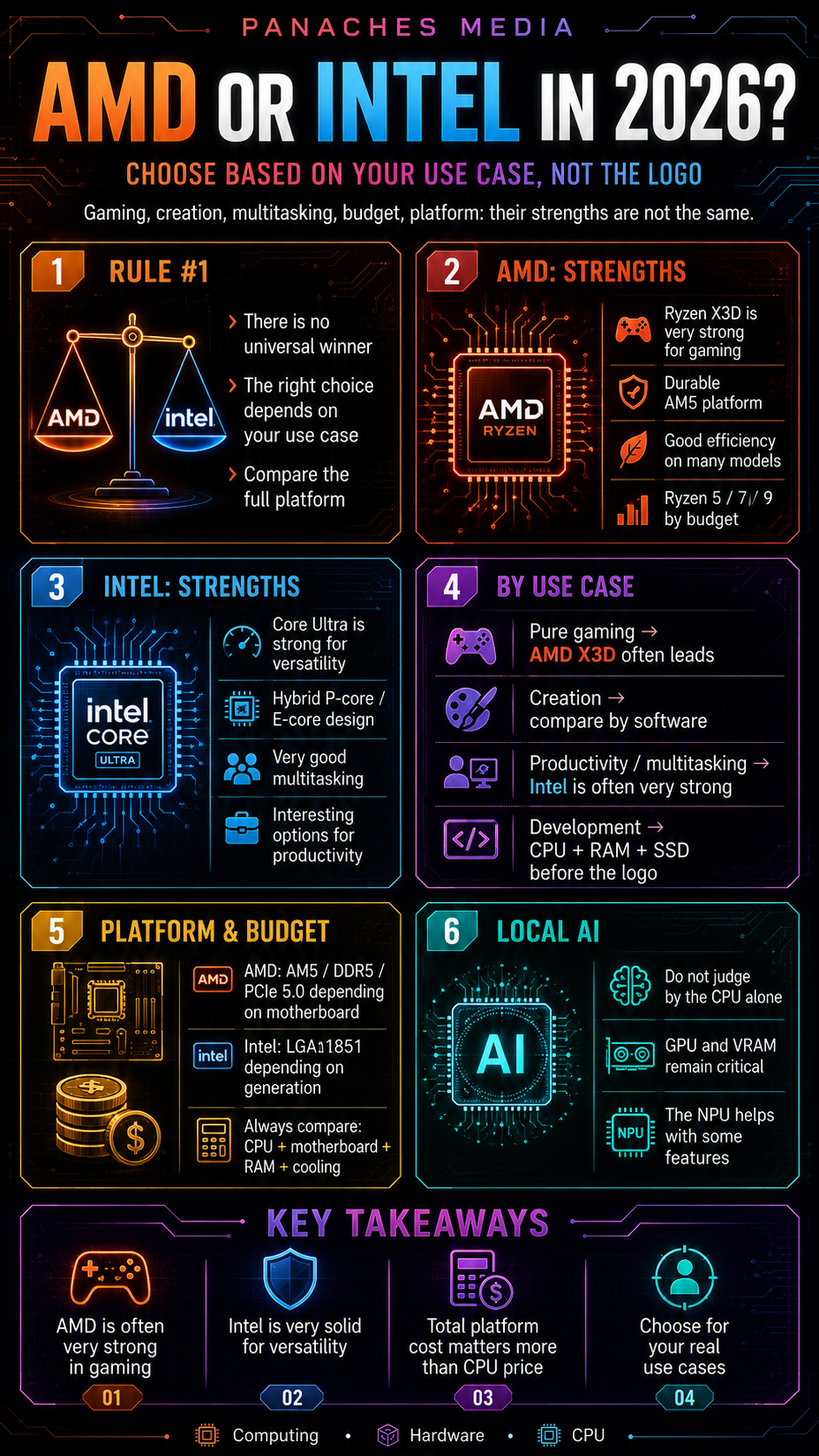
In 2026, AMD and Intel both offer excellent processors. The real difference is not just a logo on a box. It depends on use case, budget, platform, motherboard, memory, power consumption, cooling and the software being used.
AMD can be very strong for gaming, especially with its Ryzen X3D processors. Intel remains very competitive in certain productivity workloads, multitasking and Core Ultra hybrid architectures. But neither brand wins absolutely everywhere.
The right question is therefore not:
“AMD or Intel, which one is best?”
The better question is:
“Which platform best matches my real use case?”
Two different philosophies
AMD and Intel both make x86 processors for PCs. This means they remain compatible with the vast majority of Windows and Linux software, as well as classic PC use cases.
But their technical and commercial approaches are not identical.
AMD focuses heavily on its Ryzen ranges, the AM5 platform, the efficiency of its recent architectures and its X3D models equipped with 3D V-Cache. This technology adds a large amount of cache to certain processors, which can improve performance in latency-sensitive workloads, especially video games.
Intel, on the other hand, pushes its Core and Core Ultra ranges, with a hybrid logic that combines performance cores and efficiency cores. This organization can be interesting for distributing several types of workloads: heavy tasks, background tasks, productivity, multitasking and mixed uses.
To simplify a lot, we could say:
- AMD: very strong in gaming, efficiency, cache and the AM5 platform;
- Intel: very strong in versatility, multitasking, hybrid architecture and productivity depending on the software.
But this summary remains deliberately imperfect. The right choice always depends on the exact model, current pricing and the complete configuration.
AMD in 2026: the strengths of Ryzen
AMD has a very strong position in the desktop processor market thanks to its Ryzen ranges.
The brand has several important arguments:
- efficient processors;
- a durable AM5 platform;
- good DDR5 compatibility;
- very competitive models for gaming;
- interesting Ryzen 5 options in the mid-range;
- solid Ryzen 7 and Ryzen 9 options for advanced uses;
- X3D versions that are particularly strong in many games.
The Ryzen range is easy to understand for many users. A Ryzen 5 often targets efficient mid-range builds. A Ryzen 7 is aimed at demanding users, especially for gaming or versatile use. A Ryzen 9 targets creators, advanced users and high-end machines.
The X3D models occupy a special place. They are not simply “faster” processors in the traditional sense. Their value mainly comes from their additional cache, which can reduce certain memory waits and improve performance stability in games.
That is why AMD is often very well positioned in gaming configurations.
Intel in 2026: the strengths of Core Ultra
Intel obviously remains a major player in PC processors.
Its recent ranges are organized around Intel Core and Intel Core Ultra, with hybrid architectures on many models. This logic combines performance-oriented cores and efficiency-oriented cores.
The idea is to distribute tasks more effectively:
- heavy workloads on performance cores;
- some secondary tasks on efficiency cores;
- multitasking across a more flexible organization;
- productive applications on an architecture able to absorb multiple flows.
Intel keeps several strengths:
- excellent software compatibility;
- strong productivity performance depending on the applications;
- hybrid architectures that are interesting for multitasking;
- ranges widely used by PC manufacturers;
- many references in laptops;
- gradual integration of AI features depending on the platform;
- solid options for versatile machines.
Desktop Core Ultra processors such as Core Ultra 7 or Core Ultra 9 can be very interesting for users who do not only play games, but mix creation, heavy office work, multitasking, development and professional uses.
Gaming: Ryzen X3D often has the advantage
For video games, AMD has a very strong argument: Ryzen X3D.
In many games, core count alone does not explain performance. Frequency matters, of course. Architecture matters too. But cache can play a huge role, especially in reducing memory access and improving frame consistency.
This is where AMD processors with 3D V-Cache become very interesting.
A Ryzen 7 X3D can sometimes deliver better gaming performance than a more expensive processor with more cores, simply because the game benefits more from the cache.
That does not mean all games react the same way. Some titles are more GPU-sensitive, others CPU-sensitive, and others depend on memory or engine optimization. But overall, Ryzen X3D processors have become a reference for gaming configurations.
For a gamer, the most interesting AMD profiles are often:
- Ryzen 5 for a reasonable gaming configuration;
- Ryzen 7 X3D for a machine strongly focused on gaming;
- Ryzen 9 X3D for gaming + creation.
Intel remains competitive, especially with its Core Ultra 7 and Core Ultra 9, but for a pure gaming PC, AMD often has a very visible advantage thanks to cache.
The right reflex is still to compare with the target graphics card. A high-end processor will never compensate for a graphics card that is too weak.
Content creation: look at the software before the brand
For content creation, the answer becomes less simple.
Video editing, 3D rendering, heavy photo editing, animation, streaming, audio, creative development or real-time engines do not all use the processor in the same way.
Some software benefits greatly from a large number of cores. Other software relies mostly on the GPU. Some workflows are sensitive to RAM, SSD speed, codecs or specific hardware accelerations.
In this field, AMD and Intel both have arguments.
AMD offers powerful Ryzen 9 processors, with many cores and threads, as well as X3D models that are interesting for users who want to combine gaming and creation.
Intel offers high-end Core Ultra processors capable of handling multitasking and certain productivity workloads very well, with a hybrid architecture that can be interesting depending on the software.
For creation, you should not choose “AMD” or “Intel” in the abstract. You should look at tests in your real software:
- DaVinci Resolve;
- Premiere Pro;
- After Effects;
- Blender;
- Photoshop;
- Lightroom;
- Unreal Engine;
- Unity;
- audio software;
- streaming tools;
- rendering engines;
- production suites.
A video creator does not necessarily have the same needs as an illustrator, editor, streamer, Unreal developer or 3D artist.
The right creative processor is the one that fits into a complete machine: CPU, GPU, RAM, SSD, monitor, cooling and stability.
Productivity and multitasking: Intel remains very solid
Intel keeps a strong reputation in productive and multitasking use cases, especially thanks to its hybrid architectures.
In advanced daily use, you may have several applications open: a heavy browser, spreadsheet, documents, messaging, video calls, development tools, creative software, cloud sync, light local AI, compression or background export.
In this context, an architecture capable of distributing tasks efficiently can provide a pleasant experience.
Core Ultra processors, depending on the model, can be interesting for:
- multitasking;
- productive applications;
- versatile machines;
- creative configurations;
- background tasks;
- PCs used all day;
- certain professional uses.
This does not mean AMD is bad at productivity. Recent Ryzen processors are very powerful and can be excellent in many workflows. But Intel often remains a very serious option for users who want a versatile machine capable of handling many things at once.
Here again, price matters enormously. An Intel processor that looks attractive at a given price can lose interest if the motherboard is too expensive. A Ryzen can become more attractive if the complete platform is better balanced.
Development: CPU, RAM and SSD before the logo
For development, AMD or Intel can both work very well.
The choice mainly depends on the type of development.
For web development, scripts, CMS work, lightweight projects or classic tools, a modern 6 to 8-core processor is often more than enough, whether it is AMD or Intel.
For heavier projects, you need to look at:
- compilation;
- containers;
- virtual machines;
- local databases;
- Docker environments;
- heavy IDEs;
- automated tests;
- local AI tools;
- intensive multitasking.
In these cases, the number of cores and threads becomes important, but RAM and SSD speed are just as important.
A developer may sometimes gain more by moving from 16 to 32 GB of RAM than by choosing a slightly faster CPU. Similarly, a fast NVMe SSD can transform the responsiveness of heavy projects.
AMD offers very good multi-core processors in the Ryzen 7 and Ryzen 9 ranges. Intel offers interesting Core Ultra processors with many hybrid cores. Both can be good options.
For a developer, the priority is often:
- enough RAM;
- a fast SSD;
- a comfortable multi-core CPU;
- good system compatibility;
- stable cooling;
- possibly a GPU if AI, 3D or computing is involved.
The processor logo comes after that.
Local AI: do not expect everything from the CPU
Local AI adds another layer to the AMD or Intel choice.
For a long time, people mostly talked about CPU and GPU. Now spec sheets also highlight NPUs, TOPS and integrated AI features.
But we need to remain careful.
For light AI features, such as enhanced video calls, noise reduction, certain effects, integrated assistants or a few efficient local tasks, the NPU can be useful.
For heavier models, such as local large language models, image generation, creative AI workflows or massive processing, the GPU often remains much more important. VRAM then becomes a central criterion.
In this context, AMD and Intel should not be compared only by the CPU. You need to look at the whole:
- CPU;
- integrated or dedicated GPU;
- VRAM;
- RAM;
- possible NPU;
- drivers;
- frameworks;
- software compatibility;
- operating system;
- cooling.
An Intel machine with an NPU can be interesting for certain modern features. An AMD machine with a good dedicated GPU can be much more relevant for some heavy AI use cases. A PC without an NPU can remain very capable if the graphics card follows.
The right choice therefore depends on the type of local AI you want to run.
Platform: AM5 versus LGA1851
Choosing AMD or Intel is not only choosing a processor. It is also choosing a platform.
On AMD’s side, the AM5 platform has become central for recent Ryzen processors. It comes with DDR5, PCIe 5.0 depending on the motherboard, and an upgrade path appreciated by many users.
On Intel’s side, recent desktop Core Ultra processors use another platform, with a different socket and chipsets specific to that generation.
This means a processor is never bought alone. You need to check:
- the socket;
- the motherboard;
- the chipset;
- compatible memory;
- M.2 ports;
- PCIe;
- CPU power delivery;
- BIOS updates;
- cooling;
- upgrade possibilities.
A CPU may look interesting on its own, but become less attractive if the compatible motherboard is expensive. Conversely, a slightly more expensive processor can be a better purchase if the platform is more durable.
You should therefore always compare the full cost:
processor + motherboard + RAM + cooling.
Power consumption and cooling: a criterion too often forgotten
The AMD or Intel choice also depends on power consumption and cooling.
A powerful processor can heat up. If it gets too hot, it can reduce its frequencies to stay within a safe range. As a result, real performance becomes lower than what the spec sheet promised.
You therefore need to look at:
- power consumption under load;
- heat output;
- required cooling;
- noise;
- stability during long sessions;
- case size;
- power supply quality;
- real machine usage.
AMD is often appreciated for the efficiency of certain Ryzen processors, especially in gaming or balanced configurations. Intel can offer very strong performance, but some models may require serious cooling depending on workload and settings.
You should not only look at maximum performance. You also need to look at comfort: noise, temperature, stability, consumption and durability.
For a compact desktop PC, an efficient processor can be more pleasant than a more powerful but hotter model. For a workstation, good cooling is essential. For a laptop, chassis design matters as much as the chip.
Budget: CPU price is not enough
Comparing AMD and Intel only by CPU price is a mistake.
The real price of a configuration depends on the total cost:
- processor;
- motherboard;
- RAM;
- cooling;
- possible power supply;
- case;
- graphics card;
- storage.
A well-priced processor can lose interest if the compatible motherboard is too expensive. A newer platform may require DDR5. A hotter CPU may require a better air cooler or liquid cooling. A high-end configuration may require a stronger power supply.
You also need to look at promotions and bundles. Depending on the period, AMD or Intel can become more interesting simply because a CPU + motherboard combo is better positioned.
The best value for money therefore changes regularly.
For a smart purchase, you need to compare:
real price of the full configuration + performance in your use case.
Not just the processor price.
Desktop or laptop: beware of quick comparisons
The AMD versus Intel comparison is not the same on desktop PCs and laptops.
On desktop, you can choose more freely:
- motherboard;
- cooling;
- RAM;
- GPU;
- power supply;
- storage;
- future upgrades.
On laptops, the processor is integrated into a complete machine. Two computers with similar chips can have very different performance depending on cooling, power limits, battery and chassis quality.
A powerful Intel or AMD processor can be constrained in a laptop that is too thin. Conversely, a less spectacular chip on paper can provide a better experience if the machine is well designed.
For a laptop, you therefore need to compare the complete machine, not only the processor.
Look at:
- battery life;
- noise;
- heat;
- display;
- keyboard;
- soldered or upgradeable RAM;
- replaceable SSD;
- dedicated GPU or not;
- ports;
- weight;
- cooling quality.
On laptops, the CPU brand only tells part of the story.
AMD vs Intel comparison table in 2026
| Criterion | Frequent AMD advantage | Frequent Intel advantage | Key takeaway |
|---|---|---|---|
| Pure gaming | Ryzen X3D, large cache | Competitive high-end Core Ultra | AMD is often very strong thanks to 3D V-Cache |
| Creation | Versatile Ryzen 9 / Ryzen X3D | Solid Core Ultra in productivity | Compare software by software |
| Multitasking | Very good on Ryzen 7/9 | Interesting hybrid architecture | Depends on model and price |
| Efficiency | Some Ryzen chips are very efficient | Varies by model | Look at real power consumption |
| Platform | AM5 appreciated for upgrades | Intel platforms widely available | Compare motherboard + RAM |
| Budget | Often very competitive depending on range | Very competitive depending on deals | Prices change quickly |
| Local AI | Mostly depends on the GPU | NPU/AI platforms depending on machines | Do not confuse NPU and GPU |
| Laptop | Very good depending on models | Very present among manufacturers | Compare the complete machine |
This table is not an absolute rule. It mainly helps avoid rushed conclusions.
Which choice for your profile?
For an office PC, AMD and Intel both work very well. Focus on a balanced machine, with enough RAM, a good SSD and a recent processor.
For a versatile family PC, look at Ryzen 5 / Ryzen 7 and Intel Core i5 / Core Ultra 5 or 7 depending on price. The most important thing is the overall balance.
For a gaming PC, AMD Ryzen X3D is often the most obvious choice if the budget allows it. Intel remains a solid alternative, especially in a versatile machine.
For a creation + gaming PC, Ryzen 9 X3D processors are interesting, but high-end Core Ultra processors can also be very relevant depending on the software.
For a development PC, choose above all a multi-core CPU, plenty of RAM and a fast SSD. AMD and Intel can both work.
For a local AI machine, look first at the GPU, VRAM, RAM and software compatibility. The AMD or Intel CPU choice is important, but rarely sufficient on its own.
For a workstation, compare application performance, stability, maximum RAM, cooling and platform. Do not choose only by brand.
Mistakes to avoid
The first mistake is choosing AMD or Intel out of habit. Both brands evolve, and a good decision in 2023 is not necessarily the best in 2026.
The second mistake is believing one brand wins everywhere. AMD can be excellent in gaming, Intel very good in productivity, but everything depends on the models.
The third mistake is ignoring the motherboard. The processor is only one part of the platform.
The fourth mistake is not looking at total cost. CPU, motherboard, RAM and cooling must be compared together.
The fifth mistake is neglecting the graphics card. For gaming, visual creation or local AI, it can matter as much as, or even more than, the CPU.
The sixth mistake is relying only on global benchmarks. Look at tests close to your software and your games.
The seventh mistake is buying too much power for your use case. A huge CPU will not magically make a machine more pleasant if it is limited by RAM, SSD or GPU.
AMD, Intel and modern uses
Modern uses are less and less separated.
You may work, browse, write, play, create, test AI, open PDFs, organize files and use several tools at the same time. In this context, the processor must contribute to a smooth experience, but it is not enough on its own.
A unified workspace like Panaches illustrates this logic well: several modules can coexist in the same environment, with browsing, documents, notes, files, PDFs, creation or specialized tools. In this kind of use, AMD or Intel can both work. What really matters is the coherence of the machine: CPU, RAM, SSD, possible GPU and good software management.
The AMD versus Intel debate therefore becomes less of a brand war and more of a question of balance.
Key takeaways
In 2026, AMD and Intel both offer excellent processors.
AMD is often very strong for gaming, especially thanks to Ryzen X3D and 3D V-Cache. The AM5 platform also remains an important argument for those who want an upgradeable configuration.
Intel remains very solid for multitasking, productivity and versatile machines, with its Core Ultra hybrid architectures and strong presence in many configurations.
But the right choice does not depend only on the brand.
It depends on your use case, your budget, your motherboard, your memory, your graphics card, your cooling and your software.
To choose intelligently, do not only ask:
“AMD or Intel?”
Ask instead:
“Which platform offers the best balance for what I actually do?”
That answer is what allows you to build a durable, smooth PC that is genuinely adapted to your needs.