Why AI has become so hard to follow
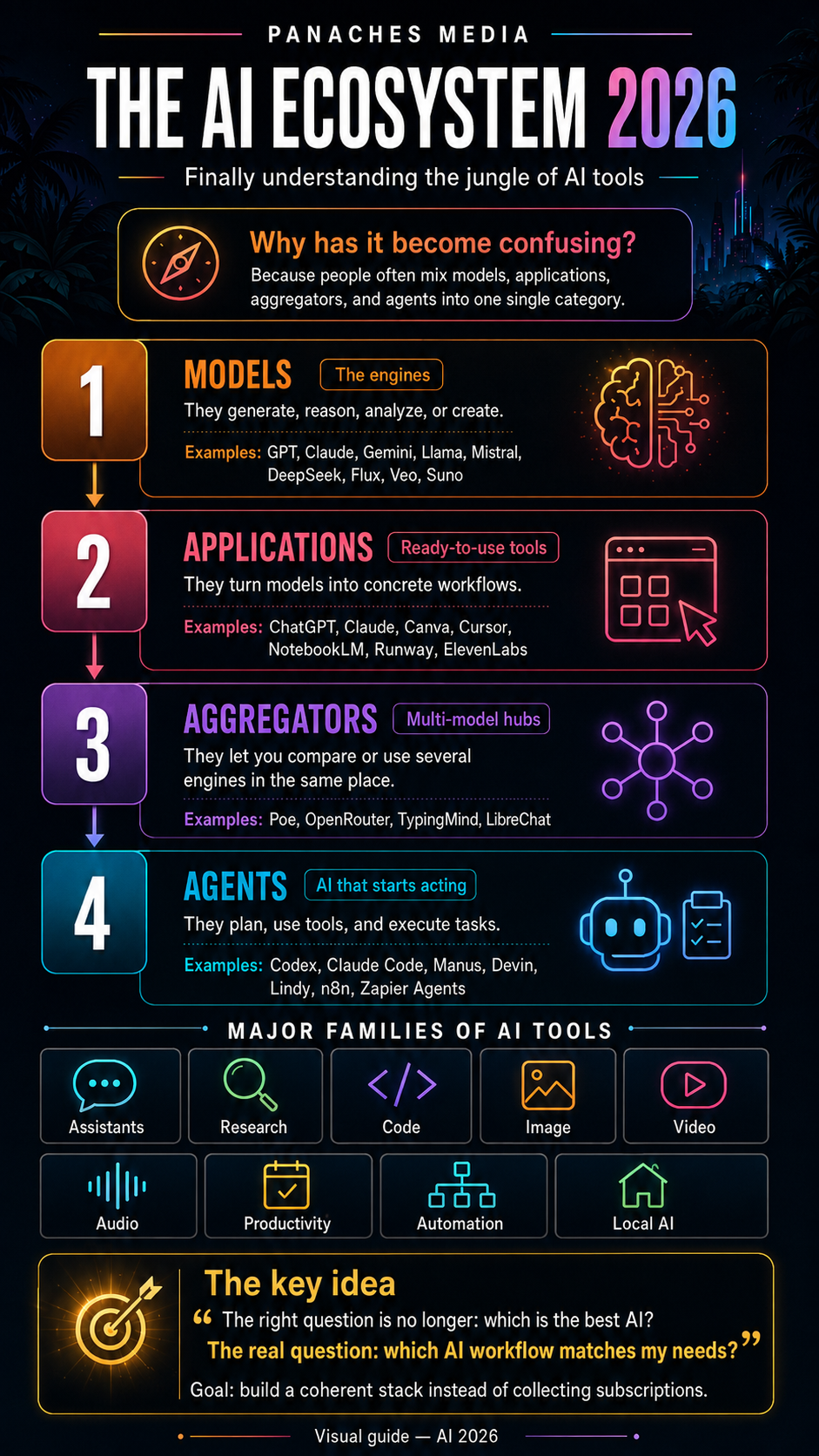
In 2026, artificial intelligence is no longer just a technology topic. It has become an entire ecosystem: chat assistants, image generators, video tools, coding platforms, autonomous agents, local models, applications for documents, research, design, music, and automation.
As a result, it has become very difficult to know what to use.
Should you choose ChatGPT, Claude, Gemini, Perplexity, Midjourney, Runway, Cursor, NotebookLM, Poe, OpenRouter, Ollama, or something even more specialized? The answer depends less on finding “the best AI” and more on understanding the landscape.
Because these tools do not all play the same role.
Some are models. Some are applications. Some are multi-model platforms. Some are even becoming true agents capable of taking action.
To see things clearly, we first need to stop putting everything in the same basket.
An AI model is not an AI application
This is where much of the confusion begins.
An AI model is the engine. It is the core technology capable of generating text, code, images, audio, video, or complex reasoning.
An AI application is the product used by the public or by professionals. It takes one or several models and turns them into a concrete tool: a chat interface, image editor, coding assistant, search engine, presentation generator, transcription tool, and so on.
A simple analogy helps.
The model is the engine. The application is the car. The multi-model aggregator is a garage where you can choose between several engine brands. The agent is closer to a driver capable of receiving an objective and carrying out several actions.
This distinction changes everything.
Comparing GPT, Claude, or Gemini with Canva, Cursor, or NotebookLM does not really make sense. The first are engines for reasoning and generation. The second are products designed for specific use cases.
Foundation models: the engines of the AI ecosystem
Foundation models are the base layer of modern AI.
They can specialize in several areas:
- text and reasoning;
- code;
- image;
- video;
- voice;
- music;
- 3D;
- multimodal analysis.
In text and reasoning, the major model families include GPT, Claude, Gemini, Grok, Mistral, Llama, DeepSeek, Qwen, and Kimi. Some are closed and accessible through proprietary applications or APIs. Others are open source or open-weight, and can sometimes be used locally.
In image generation, major names include Midjourney, GPT Image, Ideogram, Firefly, Flux, and Stable Diffusion. In video, tools and models such as Runway, Kling, Veo, Sora, and Luma are often mentioned. In audio, ElevenLabs, Suno, Udio, and Whisper each serve different needs: voice, music, transcription, dubbing, or editing.
But a model alone is not always easy to use. It often needs an interface, a workflow, and features designed for real-world use.
That is where applications come in.
AI applications: ready-to-use tools
AI applications are the tools people use every day.
ChatGPT, Claude.ai, Gemini, Perplexity, Canva, Cursor, Runway, ElevenLabs, Gamma, Notion AI, and NotebookLM are applications. They may rely on one model, several models, or more complex internal systems.
Their value is not only the power of the model they use. Their real value comes from the complete experience:
- the interface;
- supported files;
- integrated features;
- memory or projects;
- web search;
- export options;
- collaboration;
- available models;
- automations;
- integration into an existing ecosystem.
For example, Canva is not just an image generator. It is a design environment. Cursor is not just a coding chatbot. It is an editor designed to modify files, understand a project, and help build software. NotebookLM is not just a summarization assistant. It is a workspace centered on your own documents.
This is why an application that looks less “powerful” on paper can be more useful in a real workflow.
Multi-model aggregators: a response to fragmentation
Since no model dominates every use case, another category has become strategic: multi-model platforms.
Their role is simple: giving access to several models from a single interface.
Poe, OpenRouter, TypingMind, LibreChat, and some professional platforms make it possible to compare or use different models depending on the task. For users, this can reduce the need to multiply subscriptions. For developers, it allows them to test several providers, route requests, optimize costs, or prepare fallback options.
These platforms answer a 2026 reality: there is no universal perfect AI.
One model may be excellent for writing. Another may be better at coding. Another may be faster. Another may be cheaper. Another may handle a language, format, or context window more effectively.
The aggregator therefore becomes a kind of dashboard. It does not replace specialized applications, but it helps users navigate between engines.
AI agents: when AI starts taking action
The fourth category is the most important one to watch: AI agents.
A chatbot answers a request. A copilot assists during a task. An agent receives an objective, plans several steps, uses tools, checks sources, modifies files, or executes actions.
This difference is major.
For example, an agent can analyze a code project, suggest a fix, modify several files, run tests, and explain what it changed. In a professional context, an agent can monitor emails, prepare a report, organize information, fill in a business tool, or coordinate several actions.
This is why coding, automation, and productivity tools are rapidly moving toward agentic workflows.
Claude Code, Codex, Cursor, Windsurf, Devin, Manus, Lindy, Zapier Agents, CrewAI, AutoGen, LangGraph, and n8n all belong, to different degrees, to this new wave. Some are designed for developers. Others target teams, freelancers, or operational roles.
But the more an AI acts, the more control matters.
A useful agent must be guided, limited, verifiable, and integrated into a clear workflow. Otherwise, it becomes a black box that can move fast, but also make mistakes fast.
The major families of AI tools in 2026
To avoid getting lost, it is better to classify tools by actual use case.
Several major families can be identified.
General-purpose assistants help with writing, thinking, structuring, summarizing, translating, organizing, or solving problems. ChatGPT, Claude, Gemini, Copilot, and Grok belong to this category.
Research and monitoring tools help find information, compare sources, read documents, or synthesize content. Perplexity, NotebookLM, Elicit, Consensus, and Semantic Scholar are useful in this area.
Coding tools help write, fix, refactor, understand, or generate applications. Cursor, Claude Code, Codex, GitHub Copilot, Windsurf, Replit, Lovable, and Bolt.new each answer different needs.
Image and design tools help produce illustrations, visual concepts, posters, carousels, brand assets, or social media content. Midjourney, GPT Image, Firefly, Canva, Ideogram, Recraft, Leonardo, and Stable Diffusion are often cited.
Video and avatar tools are used to generate, edit, animate, or present video content. Runway, Kling, Veo, Sora, Luma, Pika, HeyGen, and Synthesia cover very different needs, from cinematic shots to training videos.
Audio and music tools make it possible to create voices, dubbing, podcasts, music, or transcriptions. ElevenLabs, Suno, Udio, Descript, Murf, and Whisper are important references.
Productivity tools integrate into everyday work: notes, meetings, emails, documents, presentations, and project management. Notion AI, Gamma, Superhuman, Otter, Granola, ClickUp AI, and Slack AI are examples.
Automation tools connect applications together and increasingly integrate agents. Zapier, Make, n8n, Lindy, Flowise, and Dify allow users to create more or less advanced workflows.
Finally, local AI tools respond to a growing need for control, privacy, and independence. Ollama, LM Studio, Jan, Open WebUI, llama.cpp, and vLLM make it possible to run or serve models locally or on controlled infrastructure.
The right question is no longer “which AI is best?”
The real question is rather:
Which combination of tools matches my use case?
A content creator does not need the same stack as a developer. A researcher does not have the same needs as a designer. A marketing team does not work like a freelancer. A company handling sensitive data will not choose the same solutions as a general user.
A minimal AI stack can often start simply:
- one general-purpose assistant;
- one source-based research tool;
- one visual creation tool;
- one tool adapted to your main profession;
- optionally, one automation tool;
- optionally, one local solution for sensitive data.
The goal is not to collect subscriptions. The goal is to build a coherent working environment.
Build a workflow instead of chasing every new tool
The AI market moves fast. Too fast for any list to remain true for long.
A tool can become excellent in a few months. Another can lose its lead. An application can change its pricing, model, data policy, or generation quality. Rankings are useful, but they are not enough.
The most important thing is to understand the families.
If you can distinguish a model, an application, an aggregator, and an agent, you are already better equipped to choose. If you can classify tools according to your real use cases, you avoid spreading yourself too thin. If you build a stable workflow, you gain more than by testing every novelty.
In 2026, maturity does not mean using as much AI as possible. It means knowing which tools to use, why, and when.
Inside Panaches
Panaches fits precisely into this workflow logic.
Instead of multiplying separate spaces, the goal is to bring together creation, writing, reading, code, organization, and AI assistance inside one local environment.
An article can begin in a note, rely on PDFs, move through a moodboard, be structured in a mind map, illustrated with visuals, then prepared for the web or social media. A project can combine documents, media, code, research, and AI without being scattered across fifteen interfaces.
This is where AI becomes truly useful: not as an isolated attraction, but as a working layer integrated into a creative space.
The future of AI will probably not be one single tool. It will be a smoother way to organize, produce, understand, and create.
FAQ
What is the difference between an AI model and an AI application?
An AI model is the technical engine capable of generating or analyzing content. An AI application is the usable product that integrates this engine into an interface designed for a specific use case.
Are ChatGPT, Claude, or Gemini models or applications?
The names often refer both to a model family and to an official application. For example, ChatGPT is the application, while GPT refers to the model family used behind it.
What is a multi-model aggregator?
It is a platform that allows users to access several AI models from a single interface. It can be used to compare responses, choose the best model for a task, or reduce dependence on one provider.
What is an AI agent?
An AI agent is a system capable of carrying out several actions to reach an objective. Unlike a classic chatbot, it can plan, use tools, modify files, or interact with software.
Should I use many AI tools?
No. The most effective approach is often to build a simple stack: one general-purpose assistant, one research tool, one creative tool, one professional tool, and optionally an automation or local AI solution.
Why is local AI becoming important?
Local AI gives users more control over their data, allows them to test open-source models, and makes it possible to work without depending entirely on the cloud. It is especially useful for sensitive, creative, or technical use cases.