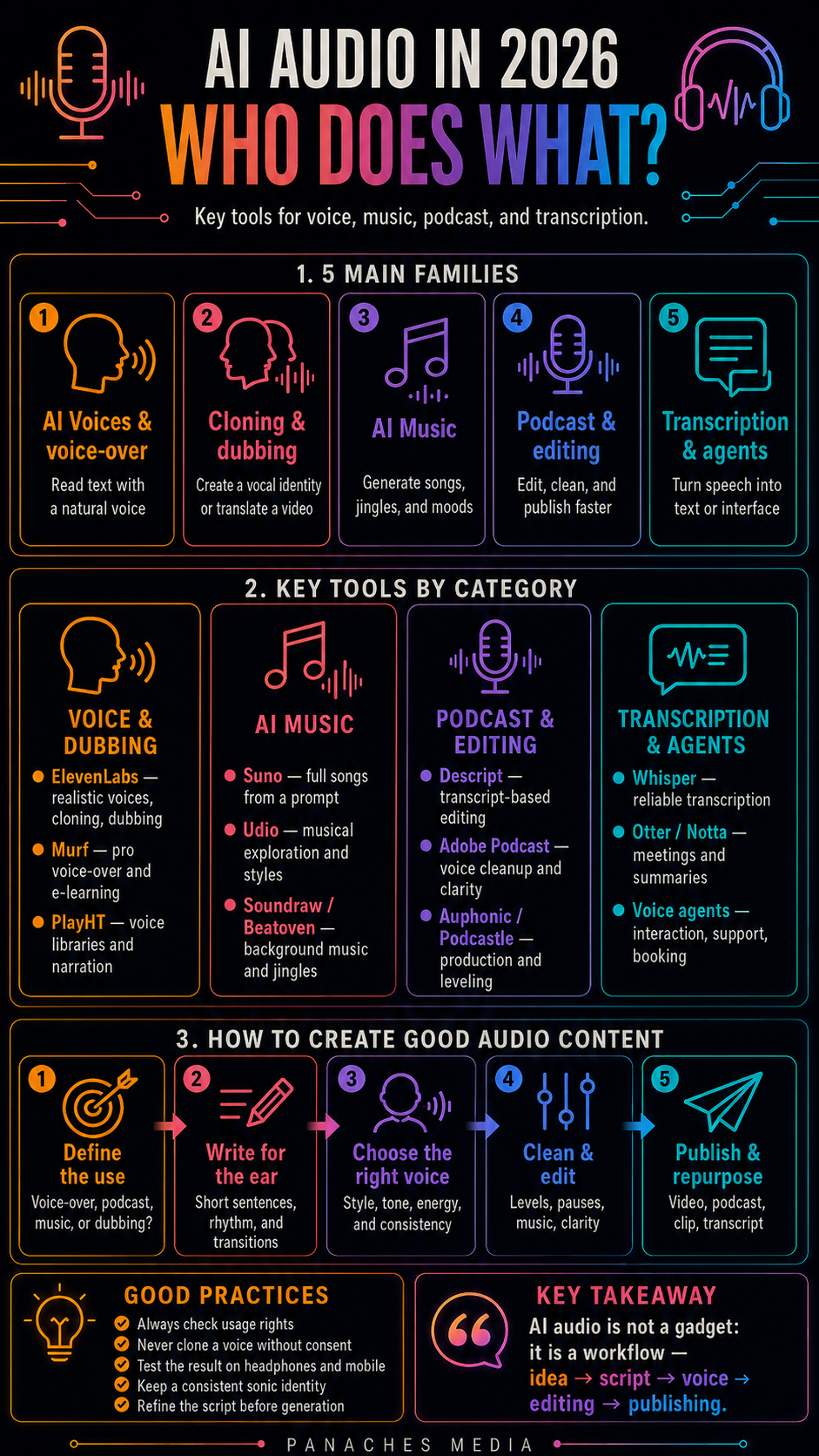
Why AI audio becomes central in 2026
For a long time, AI audio was seen as a secondary tool.
People mostly imagined a slightly robotic synthetic voice, useful for reading text, but rarely natural enough to carry a real creative project.
In 2026, the situation is very different.
AI audio tools can generate realistic voices, clone a voice, dub a video, create a full song, produce a jingle, clean up a recording, transcribe a meeting, edit a podcast like a text document, generate sound effects, or make a voice agent speak.
Audio is no longer just an add-on.
It is becoming a central part of content workflows.
A short video needs a voice.
An avatar needs a sonic identity.
A podcast needs clean editing.
A training video needs clear narration.
A brand needs a recognizable tone.
An article can become an audio script.
An infographic can become a short video with voice-over.
A character like Ambre needs a consistent voice, not only a face.
That is why we should not simply look for “the best AI audio tool.”
We should rather ask:
Do I need a voice, music, editing, dubbing, a podcast, or a voice agent?
Each use case belongs to a different family of tools.
AI audio is not limited to voice
The first mistake is putting all AI audio tools in the same basket.
A voice-over is not a song.
A transcription is not dubbing.
A podcast is not a voice agent.
Audio cleanup is not music creation.
A jingle does not have the same constraints as a character voice.
Several major families can be distinguished.
The first is AI voice and text-to-speech. These tools turn text into spoken voice. ElevenLabs, Murf, PlayHT, Speechify, and WellSaid belong to this logic.
The second is voice cloning and brand voice. Here, the challenge is not only to generate a voice, but to reproduce or design a vocal identity.
The third is dubbing and localization. These tools are used to translate video or audio while keeping a natural result, sometimes with lip sync or emotional adaptation.
The fourth is AI music. Suno, Udio, Soundraw, Beatoven, Mubert, and other tools make it possible to create songs, moods, background music, jingles, or support tracks.
The fifth is podcasting and audio editing. Descript, Adobe Podcast, Auphonic, Podcastle, Riverside, and some editing tools help clean, cut, transcribe, edit, and publish faster.
The sixth is transcription and meeting notes. Whisper, Otter, Notta, Descript, and tools integrated into productivity suites turn speech into usable text.
The seventh is voice agents. Here, voice is no longer only an output: it becomes an interaction interface.
These families can complement each other, but they do not serve the same purpose.
ElevenLabs: the reference for voice, dubbing, and sonic identity
ElevenLabs has become one of the most important names in AI audio.
Its main value comes from voice quality, the range of use cases, and the audio ecosystem built around the platform.
ElevenLabs can be used to:
- generate a voice-over;
- create narration;
- clone a voice with consent;
- produce multilingual dubbing;
- create character voices;
- generate sound effects;
- work on voice agents;
- prepare video, training, marketing, or podcast content.
For a content creator, ElevenLabs becomes very useful as soon as voice becomes central.
A short video can gain impact with a clear voice.
A tutorial can become more pleasant with natural narration.
A character like Ambre can become more recognizable with a stable voice.
An article can be transformed into an audio version.
A French piece of content can be adapted into English or Spanish with a coherent voice.
But this power also requires caution.
Voice cloning should never be used without consent. A voice is an identity. It can be recognized, imitated, misused, or used to deceive. The more realistic AI voices become, the more important ethics, rights, transparency, and security become.
ElevenLabs is therefore a very powerful audio creation tool, but it must be used with real editorial responsibility.
Murf, PlayHT, and voice-over platforms
Alongside ElevenLabs, several platforms focus on voice-over generation and professional use cases.
Murf, PlayHT, Speechify, WellSaid, and LOVO offer voice libraries, settings, languages, styles, and features suited to spoken content creation.
These tools are useful for:
- YouTube videos;
- training;
- e-learning modules;
- ads;
- corporate videos;
- social content;
- presentations;
- narrative podcasts;
- product demo voice-overs.
Their value often lies in simplicity.
You write a script, choose a voice, adjust rhythm, pauses, sometimes emotion or pronunciation, and then export.
For a marketing team, trainer, or creator who wants to produce quickly, that is very practical.
The limitation is that not all voices are equal. Some may still sound too smooth, too advertising-like, or too artificial depending on the context. A technically perfect voice can still lack presence.
The right choice therefore depends on the content type.
For clear training, a clean and stable voice may be enough.
For a recurring character, the voice must be more identifiable.
For an emotional video, the vocal performance needs more subtlety.
For a brand, consistency over time matters.
An AI voice-over should not only read a text.
It should carry an intention.
Suno: creating full songs from a prompt
Suno represents one of the major breakthroughs in AI music.
Its value is allowing non-musicians, or creators who want to prototype quickly, to generate full songs from an idea.
You can describe a style, a mood, a theme, sometimes lyrics or structure, then obtain music with vocals, instrumentation, and production.
Suno is useful for:
- creating a concept song;
- generating a jingle;
- testing a musical mood;
- producing a demo;
- exploring a style;
- creating music for a video;
- imagining a sonic identity;
- prototyping a narrative or advertising idea.
For a content creator, Suno can be extremely practical.
A short video can have a chorus.
A series can have a musical theme.
A campaign can test several sonic directions.
A character can have a musical atmosphere.
A creative project can explore worlds without immediately going through full music production.
But one important distinction must be kept in mind.
Generating a song is not the same as producing a fully mastered musical work.
An AI song can be interesting for exploration, prototyping, social media, or inspiration. But for serious professional use, rights, licensing, quality, mix, artistic coherence, and the role of the human creator must be checked.
Suno is very strong for imagining quickly.
But it should not make musical direction disappear.
Udio: music generation and sonic exploration
Udio also belongs to the family of AI music generators.
Its value lies in quickly creating tracks, musical ideas, moods, or pieces from text instructions.
Udio can be useful for:
- generating tracks;
- exploring styles;
- creating song ideas;
- producing moods;
- testing lyrics;
- searching for a musical direction;
- creating bases for editing or inspiration.
Like Suno, Udio is especially interesting during exploration phases.
A creator can quickly test several directions: more pop, more electronic, more cinematic, more acoustic, darker, lighter, more experimental.
This speed changes the way people work.
Before, finding a musical direction could require many references, sound libraries, or production time. Today, several test tracks can be created in a few minutes.
But caution remains necessary.
Usage terms must be checked, publishing without understanding rights should be avoided, inspiration should not be confused with final production, and the legal and artistic debates around generative music should be taken seriously.
Udio and Suno are powerful tools, but they must be used methodically.
Soundraw, Beatoven, and Mubert: background music and sonic dressing
Not every music need requires a full song.
For many videos, podcasts, training materials, presentations, or social posts, what is needed is mainly background music, a mood, sonic dressing, or an adapted instrumental track.
That is where tools like Soundraw, Beatoven, Mubert, and other generative music platforms can be interesting.
They are useful for:
- creating a background mood;
- producing music for video;
- generating an intro;
- creating a jingle;
- supporting a podcast;
- dressing a training video;
- adapting the duration to an edit;
- choosing a sonic mood.
This category matters because it answers a very practical need: producing clean, coherent, publishable content without spending hours searching for a royalty-free track.
Even so, licenses must always be checked.
Background music may seem minor, but usage rights remain essential, especially for YouTube, TikTok, ads, sponsored podcasts, or commercial content.
The right approach is to choose a platform with clear terms, then keep a record of the licenses used.
Descript: editing audio and video like text
Descript is one of the most interesting tools for podcasts, spoken video, and transcript-based editing.
Its principle is powerful: audio or video can be edited by manipulating the transcribed text.
This changes the workflow.
Instead of looking for a sentence in a timeline, you find it in the transcript.
Instead of cutting only by ear, you remove a passage from the text.
Instead of editing blindly, you work on speech as if it were a document.
Descript is useful for:
- podcasts;
- interviews;
- YouTube videos;
- training;
- shorts;
- spoken content;
- audio cleanup;
- subtitles;
- clip extraction;
- fast editing;
- correcting passages.
For creators who produce a lot of spoken content, Descript can save a huge amount of time.
It is also very useful in an article → script → audio → video workflow.
A text can become narration.
Narration can be edited.
The transcript can become an article.
A podcast can become social clips.
The limitation is that the tool does not replace listening.
Rhythm, breaths, silences, emotion, music, and final editing must always be checked by ear.
Text helps with editing, but sound remains the final judge.
Adobe Podcast and Enhance Speech: cleaning voices quickly
Adobe Podcast, especially with Enhance Speech, answers a very common need: making a voice clearer.
In content creation, people do not always have a studio, a perfect microphone, an acoustically treated room, or a silent environment.
An audio cleanup tool can therefore make a big difference.
It can help:
- reduce background noise;
- improve clarity;
- balance a voice;
- make a recording cleaner;
- prepare a voice for video;
- save audio recorded in poor conditions;
- improve a podcast, interview, or tutorial.
This type of tool is extremely practical, but it does not perform miracles.
A bad recording can be improved, but not always transformed into perfect professional audio. Too much processing can also make a voice artificial, metallic, or compressed.
The right reflex remains:
- record as well as possible from the start;
- clean afterward;
- listen to the result;
- compare before and after;
- avoid over-processing.
Adobe Podcast is very useful for quick improvement, but quality always starts at recording.
Auphonic, Podcastle, and podcast production tools
Alongside Descript and Adobe Podcast, other tools are very useful for audio production.
Auphonic is known for automatic processing: leveling, noise reduction, normalization, and preparation of audio files.
Podcastle, Riverside, and other platforms can help record, edit, transcribe, or produce podcasts and remote interviews.
These tools are useful for:
- balancing levels;
- cleaning voices;
- recording guests;
- transcribing;
- producing episodes;
- exporting in the right formats;
- preparing distribution;
- creating short clips.
Podcasting requires a complete workflow.
Having a good AI voice or a good microphone is not enough. You also need to think about:
- intro;
- structure;
- sound level;
- editing;
- sonic dressing;
- description;
- chapters;
- social clips;
- publishing;
- archiving.
AI can speed up this chain, but it does not replace editorial direction.
A good podcast depends first on a strong topic, clear rhythm, and a voice people want to listen to.
Whisper, Otter, and transcription: turning speech into working material
Transcription is one of the most useful AI audio use cases.
Turning speech into text makes content reusable.
A meeting can become a report.
An interview can become an article.
A podcast can become a newsletter.
A video can become a script.
A dictated idea can become a note.
A tutorial can become documentation.
Whisper, Otter, Descript, Notta, Fireflies, and tools integrated into Zoom, Teams, or Google Meet answer this need.
Transcription is useful for:
- meetings;
- interviews;
- podcasts;
- videos;
- classes;
- training;
- voice notes;
- reports;
- qualitative research;
- project documentation.
But here again, verification matters.
Transcription can make mistakes with names, technical terms, accents, mixed languages, numbers, or ambiguous sentences.
It must therefore be reviewed before publication or any important decision.
Transcription turns audio into usable material, but it does not guarantee perfect accuracy.
Voice agents: when audio becomes an interface
The last major evolution concerns voice agents.
Here, audio is no longer only used to produce content. It becomes an interaction interface.
A voice agent can listen, understand, respond, collect information, guide a user, call an API, book, assist, qualify a request, or support someone.
This family touches:
- customer support;
- sales;
- appointment booking;
- training;
- coaching;
- accessibility;
- personal assistants;
- internal tools;
- interactive experiences.
Voice agents are powerful because they bring AI closer to a natural use: speaking.
But they also raise important questions:
- what can the agent do?
- which actions are allowed?
- what happens if it makes a mistake?
- are conversations recorded?
- does the user know they are speaking to an AI?
- is the data protected?
- how can impersonation be prevented?
- how should sensitive situations be handled?
Audio makes AI feel more human.
That is precisely why it needs stronger safeguards.
Which tool should you choose depending on the need?
For a realistic voice-over, ElevenLabs, Murf, PlayHT, WellSaid, or LOVO are options to compare.
For a character voice or stable vocal identity, ElevenLabs is an important reference, provided consent, style, and consistency are managed properly.
For multilingual dubbing, ElevenLabs, HeyGen, or specialized video tools are interesting.
For a full song, Suno and Udio are the two main names to watch.
For background music or a jingle, Soundraw, Beatoven, or Mubert may be better suited.
For a podcast or spoken video, Descript is very useful thanks to transcript-based editing.
For quick voice cleanup, Adobe Podcast / Enhance Speech can be very practical.
For transcribing a meeting or interview, Whisper, Otter, Descript, or tools integrated into meeting suites are worth considering.
For a voice agent, you need platforms that combine voice, understanding, actions, integrations, and security.
The right choice therefore depends on the question:
Do I want to speak, sing, edit, clean, transcribe, translate, or interact?
Each verb leads to a different family.
A simple method for creating useful AI audio content
Good AI audio content does not start with the tool.
It starts with the intention.
1. Define the use case
Voice-over? Podcast? Jingle? Song? Dubbing? Avatar? Training? Voice agent?
The use case determines the voice, rhythm, duration, style, and constraints.
2. Write for the ear
A text read aloud is not an article.
It needs shorter sentences, a more natural rhythm, breathing space, simple transitions, and a clear hook.
A good audio script should be spoken before it is read.
3. Choose the right voice
The voice must match the content.
Serious? Warm? Energetic? Soft? Premium? Educational? Narrative? Commercial? Embodied?
The wrong voice can make a good text sound artificial.
4. Generate several versions
Several voices, speeds, pauses, emotions, and styles should be tested.
The first generation is not necessarily the right one.
5. Really listen
Audio must be tested by ear.
Not only on speakers. Also with headphones, on a smartphone, at low volume, in a normal environment.
What sounds clean in a studio may be less clear in real use.
6. Clean and edit
Even a good AI voice may need editing.
You may need to adjust:
- silences;
- rhythm;
- breaths;
- music;
- levels;
- transitions;
- background noise;
- voice / music balance.
7. Check rights and consent
This is essential.
Cloned voice, generated music, samples, sound effects, characters, languages, commercial use: every element must be clear.
8. Repurpose
One audio piece can become several forms of content:
- short video;
- podcast;
- social clip;
- dubbed version;
- transcript;
- article;
- newsletter;
- training capsule.
A good audio workflow does not only produce a sound file. It feeds the entire content chain.
Pitfalls to avoid
The first pitfall is choosing a voice that is too perfect.
A very clean voice can feel cold, advertising-like, or artificial. Credibility often comes from micro-variations, rhythm, and intention.
The second pitfall is neglecting the script.
A good voice will not save a flat text.
The third pitfall is publishing AI music without checking rights.
Generative music remains a sensitive field. Licenses, commercial terms, and legal debates must be taken seriously.
The fourth pitfall is cloning a voice without consent.
This is an absolute limit. A voice belongs to a person, an identity, a trust relationship.
The fifth pitfall is over-processing audio.
Too much cleanup can make a voice unrealistic or unpleasant.
The sixth pitfall is forgetting sonic consistency.
If every video or podcast uses a different voice, music, or mood, the brand becomes less recognizable.
The seventh pitfall is using an avatar with a voice that does not match the character.
Image and voice must form a coherent identity.
The eighth pitfall is believing audio is secondary.
In video, bad sound can make people leave faster than average visuals.
AI voice and brand identity
A brand can have a visual identity.
It can also have a sonic identity.
That includes:
- a voice;
- a tone;
- a rhythm;
- music;
- a jingle;
- a way of speaking;
- a mood;
- an energy level;
- an audio signature;
- consistency across formats.
For Panaches Media, this question matters.
If Ambre becomes the face of the media and software, she must also have a recognizable voice.
That voice should be:
- natural;
- coherent;
- warm;
- clear;
- suited to short formats;
- credible in French, English, and Spanish;
- stable from one piece of content to another.
Ambre’s voice should not sound like a generic corporate presentation voice.
It should create a presence.
That presence can connect articles, videos, infographics, tutorials, software demonstrations, and social content.
Inside Panaches
Panaches can naturally integrate an audio workflow into its creative ecosystem.
Audio content is not born in isolation.
It often starts from:
- notes;
- an article;
- a script;
- an infographic;
- a character sheet;
- a video;
- a voice;
- music;
- an export;
- a transcript;
- a translated version.
The problem is always the same: fragmentation.
The script is in one document.
The voice is in one tool.
The music is elsewhere.
Audio editing happens in another app.
Subtitles are in another file.
English and Spanish versions are somewhere else again.
Social exports are in a separate folder.
A workspace like Panaches can help keep project elements together: text, notes, media, files, scripts, prompts, exports, translations, and organization.
AI audio then becomes one step in the editorial workflow.
We can imagine:
- writing an article;
- extracting a short script;
- generating a voice-over;
- preparing an Ambre video;
- transcribing an interview;
- turning audio into an article;
- creating a social capsule;
- archiving sources and exports.
Audio is not separate from content.
It becomes an extension of content.
Conclusion: AI audio needs real direction
In 2026, AI audio tools have become very powerful.
ElevenLabs, Murf, Suno, Udio, Descript, Adobe Podcast, Auphonic, Whisper, Otter, and voice agents cover very different use cases.
Some generate voices.
Some create music.
Some clean recordings.
Some edit podcasts.
Some transcribe.
Some dub.
Some make it possible to speak with AI.
The right choice depends on the need.
Do you want a voice-over?
A song?
A jingle?
A podcast?
Dubbing?
A transcription?
A voice agent?
A sonic identity for a character?
Each answer leads to a different tool.
The right strategy is not to use AI audio as a gadget.
The right strategy is to build a sonic workflow: intention, script, voice, music, editing, cleanup, verification, rights, distribution.
That is when AI audio becomes truly useful.
FAQ
What is the best AI tool for generating a voice?
ElevenLabs is one of the best-known tools for realistic voices, voice cloning, dubbing, and advanced uses. Murf, PlayHT, WellSaid, or LOVO can also be relevant depending on the type of voice-over needed.
What is the best AI tool for creating music?
Suno and Udio are the two major references for generating songs or musical ideas. For background music, Soundraw, Beatoven, or Mubert may sometimes be better suited.
What is the difference between AI voice and AI dubbing?
An AI voice reads or performs a text. AI dubbing adapts audio or video content into another language, sometimes preserving tone, rhythm, or lip sync.
Can a voice be cloned with AI?
Yes, some tools make this possible, but it should only be done with clear consent. Voice cloning without permission raises serious ethical, legal, and security issues.
Which tools should be used for a podcast?
Descript is very useful for transcript-based editing. Adobe Podcast can clean voices. Auphonic can help normalize and improve sound. Riverside, Podcastle, and other tools can help record and produce episodes.
Is AI audio useful for short videos?
Yes. A good voice-over, jingle, background music, or clean subtitling can strongly improve a short video. But the script must stay clear, the rhythm natural, and the sound well balanced.
What role can AI audio play for Ambre?
AI audio can give Ambre a stable, recognizable, multilingual voice. But that voice must be chosen carefully to remain natural, coherent with the character, and suited to Panaches formats.