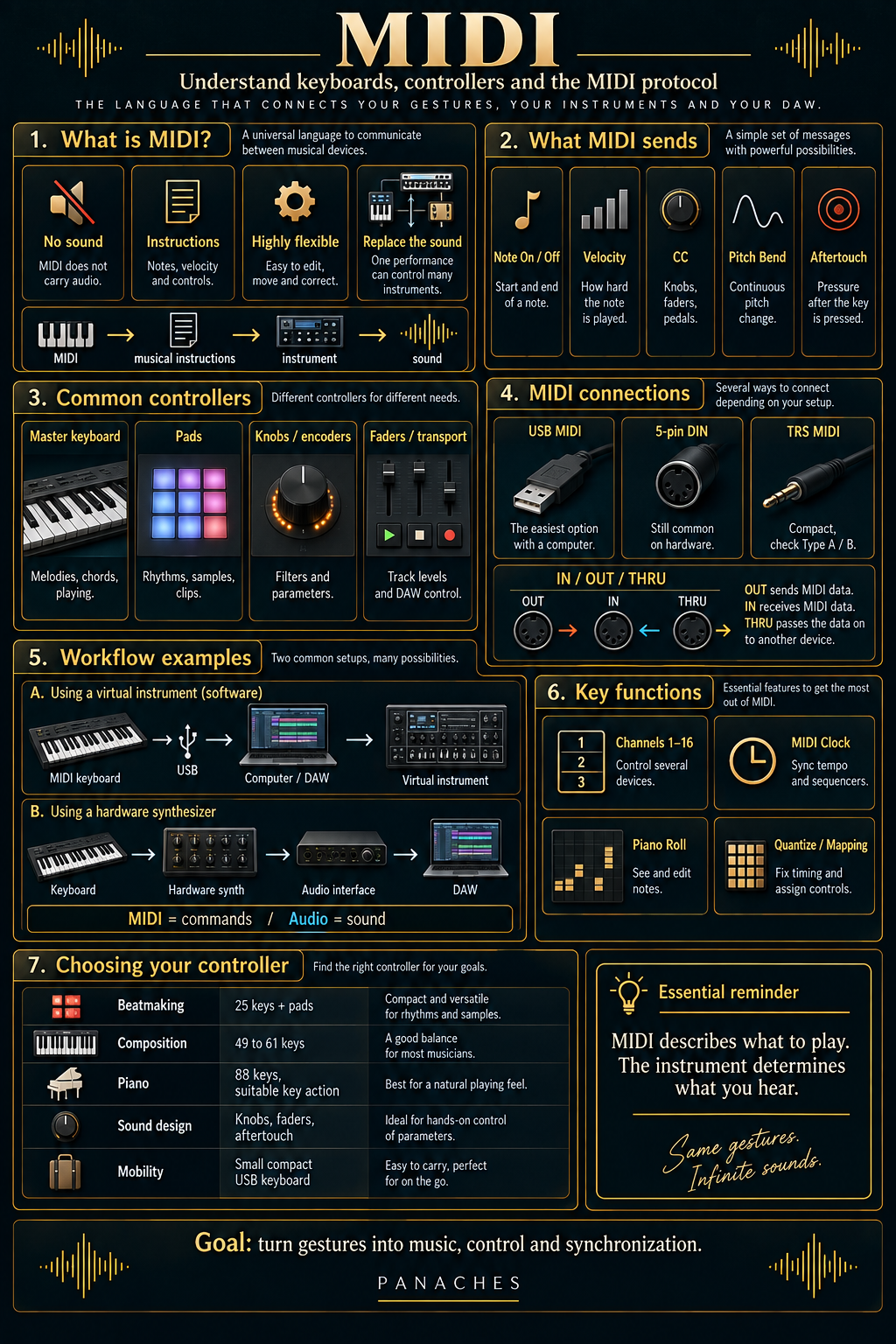
MIDI does not carry sound
MIDI, or Musical Instrument Digital Interface, is a communication protocol designed to allow electronic instruments, computers, software and controllers to exchange musical information.
This is one of the most important distinctions to understand: MIDI is not audio.
When a note is played on a MIDI keyboard, no piano or synthesizer sound is sent to the computer. The controller sends instructions indicating, among other things, which note was played, when it was played and how strongly it was triggered.
MIDI → musical instructions → instrument → sound
The sound is then produced by a virtual instrument in the DAW, a hardware synthesizer, a drum machine or any other device capable of receiving that information.
This separation between performance and sound explains much of MIDI’s power.
Audio and MIDI: two different types of material
An audio track and a MIDI track can represent exactly the same melody, but not in the same way.
| Audio | MIDI |
|---|---|
| Contains sound directly | Contains instructions |
| Usually displays a waveform | Displays notes or events |
| The timbre is already recorded | The sound can be replaced |
| Changing a note may require audio editing | A note can be moved or corrected easily |
| WAV, AIFF or other audio files | MIDI events |
A piano part recorded as audio already contains the sound of the piano.
The same part recorded as MIDI mainly contains the information needed to tell an instrument how to replay that performance.
You can therefore record a melody using a virtual piano, then replace it with a synthesizer, strings or bass without having to play the notes again.
MIDI describes what should be played. The instrument determines what you hear.
What a MIDI performance actually contains
A MIDI performance is not limited to a sequence of notes.
The protocol can transmit different kinds of information used to reproduce a performance or control a device.
| Information | Role |
|---|---|
| Note On / Note Off | Indicates when a note begins or ends |
| Velocity | Usually represents the intensity of the keystroke |
| Control Change | Controls parameters such as modulation, volume or pedals |
| Pitch Bend | Changes pitch progressively |
| Program Change | Requests a program or sound change |
| Aftertouch | Transmits pressure applied after a key has been pressed |
A musician can therefore play a note softly, use a sustain pedal, move a modulation wheel and then perform a pitch bend.
All of these actions can be recorded by the DAW at the same time as the notes.
MIDI then becomes much more than a simple way to enter pitches: it can preserve part of the expression of the performance.
Velocity: playing the right note is not enough
On a velocity-sensitive keyboard, pressing a key softly or strongly generates different values.
The receiving instrument then decides how those values are interpreted.
On a virtual piano, velocity can change the volume but can also trigger different samples. On a synthesizer, it can control filter cutoff, envelope intensity or several parameters at once.
Velocity therefore helps prevent a performance in which every note feels exactly the same.
Good MIDI playing depends as much on note dynamics as on the notes themselves.
Inside the DAW’s Piano Roll, these values can generally be corrected or redrawn after recording.
Aftertouch: adding expression after the note
Some keyboards can also measure the pressure applied to a key after it has already been pressed.
This is called aftertouch.
There are systems where aftertouch is applied globally across the keyboard and others that can track more information on a note-by-note basis.
A synthesizer can use this pressure to introduce vibrato, open a filter or gradually increase an effect.
This function is not essential for every production, but it can become especially useful for pads, leads, strings or expressive virtual instruments.
Master keyboard and synthesizer: do not confuse them
A MIDI master keyboard and a synthesizer can look almost identical while serving very different purposes.
The master keyboard is mainly designed to control something else.
It does not necessarily contain its own sound engine. When you press a key, it sends MIDI to a computer or external instrument.
A synthesizer, on the other hand, has an engine capable of producing sound.
| Master keyboard | Synthesizer |
|---|---|
| Controls software or external equipment | Produces its own sound |
| Usually has no sound engine | Includes a sound engine |
| Often powered through USB | Can operate independently of a computer |
| Designed around MIDI control | Can also send and receive MIDI |
Some synthesizers can also act as MIDI controllers when connected to a DAW.
The distinction therefore depends more on the functions of the device than on its appearance.
MIDI keyboard: choosing the right number of keys
Master keyboards are available in many different sizes.
A small model may fit in front of a laptop, while a full-size keyboard can occupy a large part of the desk.
| Format | Common use |
|---|---|
| 25 keys | Beatmaking, mobility, simple lines |
| 32 to 37 keys | Compact production with more freedom |
| 49 keys | Good compromise for composition |
| 61 keys | More comfortable two-handed playing |
| 88 keys | Piano, composition and extended playing |
The ideal number of keys depends less on the musician’s skill level than on what they actually want to play.
For programming bass lines, a few chords or melodies, a compact keyboard may be enough.
For more complex arrangements or two-handed piano parts, a larger model becomes much more comfortable.
Mini keys, full-size keys and weighted action
The number of keys is not the only factor.
Some compact keyboards use mini keys, which are practical for mobility but feel different from a traditional keyboard.
Larger models usually use full-size keys.
The mechanism can also vary.
A keyboard aimed at electronic production may favour a light and fast response, while an 88-key controller may use a weighted mechanism designed to feel more like a piano.
| Key action | General feel |
|---|---|
| Light / synth action | Fast, practical for synths and production |
| Semi-weighted | Compromise between speed and resistance |
| Weighted / hammer action | Closer to the feel of a piano |
There is no universally superior mechanism.
A pianist and a beatmaker simply do not expect the same thing from a keyboard.
Pads: playing rhythms differently
Many controllers replace or complement the keyboard with pads.
These surfaces are particularly well suited to triggering kicks, snares, hi-hats, samples or clips.
When velocity-sensitive, the pads can also transmit the intensity of each hit.
They are therefore very common in beatmaking and workflows based on samplers or drum racks.
Keyboard = melodic and harmonic logic
Pads = rhythmic logic, samples and triggering
Both approaches can obviously coexist on the same controller.
Knobs, faders and encoders
A MIDI controller can send much more than notes.
Knobs, encoders and faders are used to change different parameters in software or instruments.
A knob can control filter cutoff. A fader can adjust the volume of a track. An encoder can navigate through plugin parameters.
These controls become especially useful when you want to step away from the mouse.
They allow several parameters to be manipulated in a more physical way and sometimes at the same time.
Control Change: the language of controllers
A large part of these controls uses messages called Control Change, often abbreviated as CC.
A CC number corresponds to a function or can be assigned to a parameter.
Some controllers use common assignments, while other controls can be mapped freely inside the DAW.
For example:
Knob → CC → filter cutoff
or:
Fader → CC → track volume
This logic allows the same physical controller to work with very different software.
MIDI mapping: turning physical controls into software controls
MIDI mapping means assigning a physical control on the controller to a function inside the software.
In many DAWs, this can be done very quickly: select a parameter, activate MIDI learn mode, then move the desired knob or fader.
The software then creates the association.
This makes it possible to build an environment suited to your workflow.
One producer may dedicate several knobs to filter, reverb and delay, while another may prefer to control track volumes.
A controller becomes truly useful when it matches the actions you perform most often.
Thirty unused physical controls do not necessarily offer more value than a small controller that is perfectly configured.
Transport controls
Some keyboards and control surfaces also include commands designed specifically for controlling the DAW.
These generally include:
- play;
- stop;
- record;
- project navigation.
They reduce the need to constantly return to the computer keyboard or mouse during a session.
More advanced controllers may also navigate between tracks, select plugins, control the mixer or display information on an integrated screen.
USB MIDI: the simplest connection to a computer
For a modern Home Studio, USB is often the simplest connection.
A single cable can transmit MIDI data between the controller and computer and, on many models, also provide power.
The chain then becomes:
MIDI controller → USB → computer → DAW → virtual instrument
The controller then appears as a MIDI input inside the software.
You generally only need to enable it in the DAW preferences and then select that input on the desired track.
MIDI DIN: connecting hardware directly
Before USB became widespread, MIDI equipment mainly communicated through 5-pin DIN connectors.
This connection is still very common on synthesizers, drum machines, sequencers and other hardware devices.
The most common ports are:
| Port | Function |
|---|---|
| MIDI OUT | Sends MIDI information |
| MIDI IN | Receives MIDI information |
| MIDI THRU | Passes received data on to another device |
A keyboard can therefore control a hardware synthesizer directly without using a computer.
Keyboard MIDI OUT → Synthesizer MIDI IN
The synthesizer then produces the sound, which must be captured separately through its audio output.
MIDI and audio follow different paths
This is a frequent source of confusion with hardware synthesizers.
The MIDI cable tells the synthesizer what to play, but it does not necessarily carry the audio signal.
A typical setup therefore becomes:
MIDI keyboard → synthesizer → audio interface → DAW
The first connection carries MIDI commands.
The second carries the actual sound produced by the synthesizer.
Understanding this separation avoids a large number of cabling problems in a Home Studio.
MIDI over TRS connectors
Some compact devices also use TRS jack connectors to carry MIDI.
This saves space on small controllers, grooveboxes and interfaces.
However, it requires some attention: different wiring schemes have existed, commonly referred to as Type A and Type B.
A simple physical adapter therefore does not always guarantee compatibility.
You need to check which standard the device uses before choosing a TRS-to-DIN adapter.
The 16 MIDI channels
Traditional MIDI can organise messages across 16 channels within a single MIDI port.
These channels can be thought of as separate communication lanes.
A hardware sequencer could, for example, send:
| Channel | Instrument |
|---|---|
| 1 | Main synthesizer |
| 2 | Bass module |
| 3 | Drum machine |
| 4 | Expander or another instrument |
Each device can be configured to listen only to the channel intended for it.
This becomes especially useful when several machines communicate within the same setup.
MIDI Clock: keeping several machines synchronized
MIDI can also be used to synchronize the tempo of several devices.
MIDI Clock sends a timing reference that allows sequencers, synthesizers, effects and drum machines to follow the same tempo.
One device usually acts as the main timing source while the others follow it.
DAW → MIDI Clock → synthesizer + drum machine + sequencer
This synchronization can, for example, keep a hardware arpeggiator perfectly aligned with the DAW project.
Depending on the equipment, other messages can also be used to start, stop or reposition playback.
The Piano Roll: where the data becomes visible
Inside a DAW, MIDI performances are often displayed in the Piano Roll.
Notes appear on a grid.
Vertical position generally represents pitch, horizontal position represents when the note is triggered and the length of the block represents its duration.
Other areas can display velocity, controllers, pitch bends or MIDI automation.
The Piano Roll therefore makes it possible to edit a performance after it has been recorded without directly altering the sound.
A wrong note can be moved. A chord can be lengthened. A velocity that is too high can be reduced.
This flexibility is one of the reasons MIDI is central to digital music production.
Quantization: moving notes back toward the grid
Quantization moves MIDI events closer to a timing grid.
It allows playing that is slightly early or late to be corrected quickly.
However, total quantization can also remove some of the natural movement from a performance.
A drum part aligned perfectly to every grid division can feel much more mechanical than a slightly irregular performance.
Correcting timing does not necessarily mean removing every human variation.
Many DAWs allow partial quantization or let you preserve some of the original timing.
Arpeggiators and creative MIDI tools
MIDI can also transform notes before they reach the instrument.
An arpeggiator can convert a held chord into a rhythmic sequence of individual notes.
Other tools can generate chords, change velocity, transpose notes, create repetitions or constrain notes to a scale.
The chain then becomes:
Keyboard → MIDI processing → virtual instrument → audio
These tools can speed up composition without directly changing the sound of the instrument.
MPE: more expression for each note
MPE, or MIDI Polyphonic Expression, extends expressive control across several notes played at the same time.
In a traditional system, some pitch or expression changes can easily affect several notes together.
MPE allows certain parameters to be controlled more independently for each note.
On a compatible controller, a musician can therefore vary pitch, pressure or other dimensions of expression independently across different notes within the same chord.
This approach is especially well suited to expressive virtual instruments and multidimensional controllers.
MIDI 2.0: evolving a historic standard
The original MIDI standard has lasted for decades because its underlying concept is simple, lightweight and extremely effective.
MIDI 2.0 extends that system with richer communication, greater resolution for certain parameters and new possibilities that allow compatible devices to exchange more information.
This does not mean that all MIDI 1.0 hardware suddenly becomes obsolete.
Compatibility with the enormous installed base of existing MIDI equipment remains a central part of the ecosystem.
For a first Home Studio, understanding the fundamentals — notes, velocity, CC, channels, synchronization and connections — is therefore far more important than choosing a device simply because it says “MIDI 2.0”.
Which controller should you choose for your use?
The best controller mainly depends on the type of gesture you want to make more natural.
| Main need | Controller to prioritise |
|---|---|
| Beatmaking | Pads, encoders, compact format |
| Melodies and chords | Velocity-sensitive keyboard |
| Piano | 61 or 88 keys, suitable key action |
| Mixing | Faders, knobs and transport controls |
| Sound design | Encoders, modulation, aftertouch |
| Live | Pads, accessible controls, flexible mapping |
| Mobility | Small USB keyboard or compact controller |
The number of functions is therefore not the main criterion.
A 25-key controller perfectly suited to a beatmaker can be more effective than a bulky 88-key keyboard that will never be fully used.
A small MIDI setup can already be very complete
You do not need to build a complex network of synthesizers and sequencers to get started.
A very simple setup already offers many possibilities:
USB MIDI keyboard → DAW → virtual instrument
You can then gradually add pads, physical controls or external hardware.
A more advanced hardware system could become:
DAW → MIDI interface → synthesizer + drum machine + synchronized effects
The principles remain exactly the same: send the right instructions to the right device, on the right channel and at the right time.
Mistakes to avoid
| Mistake | Why it causes problems |
|---|---|
| Thinking MIDI carries sound | MIDI commands and audio signals are two different data flows |
| Choosing only by the number of keys | Pads, key action and controls may matter more |
| Ignoring velocity | Performances quickly become artificial |
| Quantizing everything perfectly | The performance can lose its natural movement |
| Accumulating unused controllers | More controls do not automatically mean a better workflow |
| Forgetting MIDI channels | Several devices may receive the wrong commands |
| Confusing MIDI IN and MIDI OUT | The communication direction becomes incorrect |
| Buying a TRS adapter without checking the type | MIDI wiring may be incompatible |
MIDI sometimes appears complicated only because it can connect so many different things.
Its basic principle remains very simple:
One device sends an instruction. Another device receives and interprets it.
MIDI turns gestures into music
The main value of MIDI is not purely technical.
It creates a link between physical gestures and the digital environment.
A key becomes a note. A pad triggers a sample. A knob opens a filter. A fader changes a level. A pedal sustains a chord.
This relationship makes it possible to gradually move away from the mouse and return to a more direct way of playing, programming and manipulating music.
Master keyboards, pads and control surfaces therefore do not necessarily produce the final sound themselves.
They become the physical interfaces used to control the rest of the studio.
MIDI does not make music for you: it turns your gestures into instructions your instruments can understand.
Understanding a few fundamental concepts is enough to unlock a huge range of possibilities: notes, velocity, CC, channels, synchronization and mapping.
Once this logic is understood, MIDI stops feeling like an abstract protocol.
It simply becomes the language that allows the different parts of the Home Studio to play together.