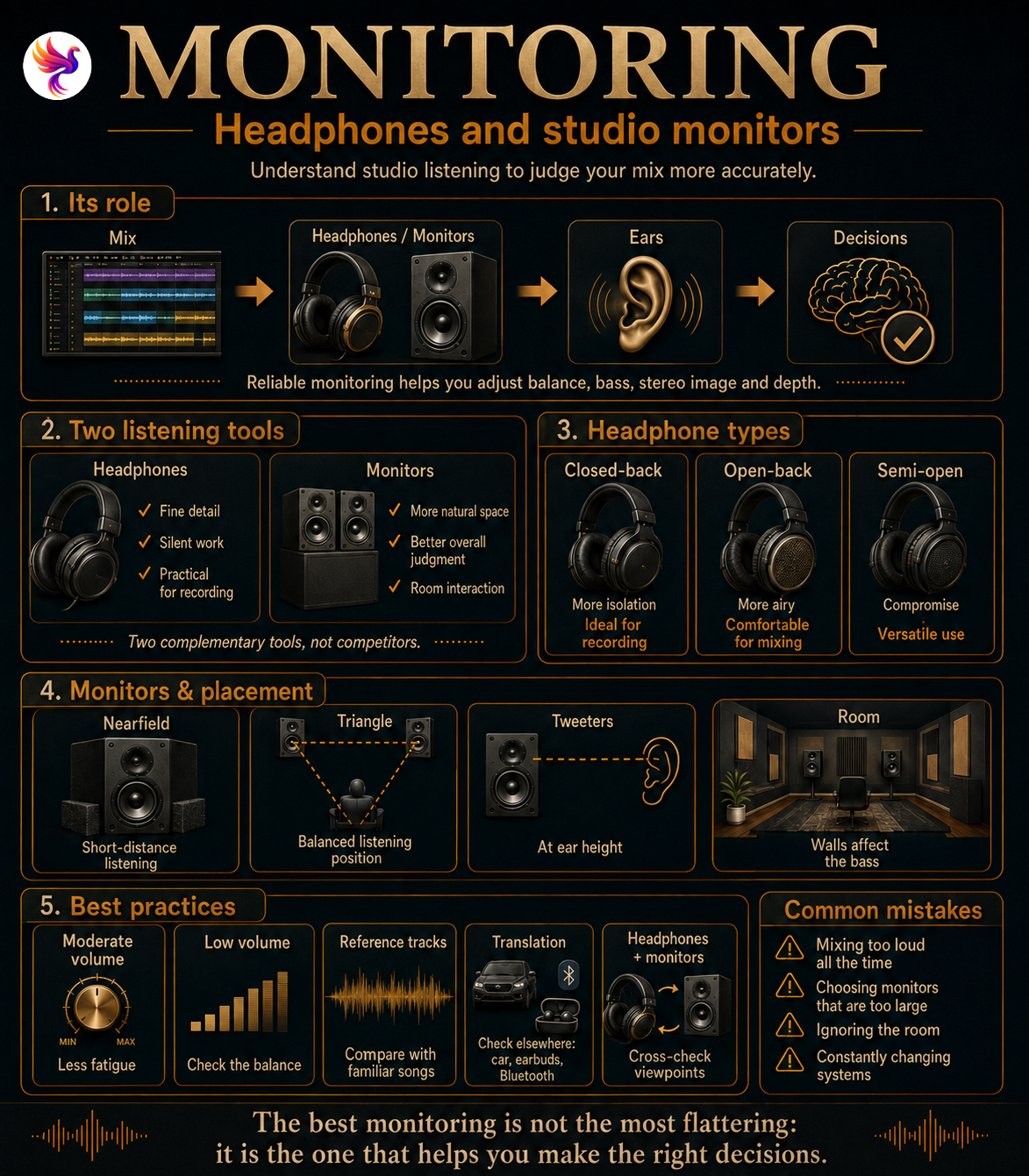
Monitoring: hearing the track as it really is
When producing music, almost every decision depends on listening. Vocal level, bass balance, stereo width, reverb and the relationship between instruments are all adjusted according to what you hear.
That is exactly the role of monitoring: providing a listening environment reliable enough to make those decisions without constantly being misled by the system.
A Hi-Fi system often aims to make music sound enjoyable. Studio headphones and monitors have a different goal: to present the signal consistently enough to reveal problems in the mix.
Monitoring should not make the track sound prettier. It should help you understand what works and what does not.
If a system strongly boosts the low end, you may compensate by reducing bass during mixing. The result may then sound too thin on a more neutral system. Conversely, monitoring with weak bass reproduction may encourage you to add too much.
Building good monitoring therefore has less to do with finding the most spectacular system and more to do with creating a reference you can learn and trust.
Headphones and monitors: two different views of the same mix
Headphones and studio monitors do not deliver sound to the ears in the same way.
With headphones, each ear receives almost exclusively its own channel. With speakers, both ears hear both monitors while the sound interacts with the room before reaching the listener.
| Headphones | Studio monitors |
|---|---|
| Barely affected by the room | Strongly affected by the room |
| Excellent for fine details | More natural for judging space |
| Allow silent work | Give a better sense of the mix moving through air |
| Very practical for recording | Better for judging the mix as a whole |
| Stereo may feel unusually wide | Image closer to conventional listening |
These differences make headphones and monitors complementary tools.
In a Home Studio located in a bedroom or a small untreated room, good headphones can be an excellent first monitoring system. Monitors become more useful once placement and acoustics can be controlled more effectively.
Closed-back, open-back or semi-open headphones?
Not all studio headphones are designed for the same purpose.
Closed-back headphones
Closed-back headphones reduce sound exchange between the inside of the earcups and the surrounding environment.
This is especially useful while recording. A singer can hear the playback without the microphone capturing too much sound leaking from the headphones.
Isolation also makes them easier to use in noisy environments.
The downside is that some closed-back models can feel more confined and may become tiring during long sessions.
Open-back headphones
Open-back headphones allow more air and sound to pass through the earcups.
This design often creates a more natural and spacious listening experience, which is why it is popular for mixing, editing and long working sessions.
However, isolation is minimal. A significant amount of sound escapes, making them poorly suited to recording in front of a microphone.
Semi-open headphones
Semi-open headphones sit between the two approaches. They usually sound more open than fully closed headphones while offering more isolation than fully open models.
| Type | Main strength | Main limitation |
|---|---|---|
| Closed-back | Recording, isolation, mobility | Can sound more enclosed |
| Open-back | Mixing, space, comfort | Very little isolation |
| Semi-open | Versatile compromise | Neither behaviour at the extreme |
The right choice therefore depends on use. Closed-back headphones are often more practical for recording, while open-back models can be especially comfortable for mixing.
Studio headphones do not need to sound spectacular
For casual listening, headphones with powerful bass or bright treble can be very enjoyable.
For mixing, that coloration can become a problem.
If the headphones naturally produce too much bass, you may remove too much from the mix. If they sound very bright, you may make the track unnecessarily dark to compensate.
Perfect neutrality does not really exist. Every pair of headphones has its own sound signature, but that behaviour should remain consistent enough for you to learn how to interpret it.
Headphones you know extremely well can become more useful than theoretically superior headphones whose behaviour you have not learned yet.
This is also why reference tracks matter so much: they help you understand how a familiar system reproduces music that is already professionally balanced.
Impedance: make sure the headphones can be driven properly
Impedance, measured in ohms, appears frequently in studio headphone specifications.
It does not directly represent sound quality.
Instead, it influences the relationship between the headphones and the output driving them. Some high-impedance models may require more voltage to reach a comfortable level, while others can easily be powered by a compact interface or mobile device.
Sensitivity also matters. Two headphones with the same impedance may not require the same amount of power.
The goal is not to choose the highest impedance: it is to choose headphones your audio interface can drive correctly.
Before buying, checking compatibility with the headphone output of your interface is therefore more useful than comparing ohm values alone.
Studio monitors: hearing sound in the room
Studio monitors are used as a reference during production and mixing.
Unlike headphones, they reproduce sound into the room. Both ears therefore receive a combination of both speakers, creating a stereo perception closer to conventional listening conditions.
Most Home Studios use nearfield monitors. They are designed for relatively short listening distances in order to reduce the room’s influence as much as possible.
Most modern Home Studio monitors are also active, meaning their amplifiers are built directly into the speakers.
The signal chain is therefore simple:
Audio interface → active studio monitors
No external amplifier is required.
Woofer size is not a quality ranking
Studio monitors are often described by woofer size: 5 inches, 7 inches, 8 inches or more.
A larger woofer can generally reproduce lower frequencies, but that does not mean an 8-inch monitor is automatically better than a 5-inch model.
In a small room, deeper bass reproduction can actually make acoustic problems more obvious and harder to manage.
| Small room | Larger room |
|---|---|
| Compact monitors often easier to use | Larger monitors may be practical |
| Short listening distance | More distance available |
| Bass strongly affected by walls | More potential for extended low end |
Monitor size should therefore be chosen according to room size, listening distance and the amount of bass extension actually required.
Speaker placement can completely change the result
Good monitors in a poor position can be less reliable than more modest monitors that are properly installed.
A useful starting point is an approximately equilateral triangle between the two monitors and the listening position.
Tweeters should generally be at ear height or angled toward the ears. The monitors should also be placed as symmetrically as possible around the listening position.
This symmetry matters greatly for stereo imaging.
Distance from the walls also has a major influence. Moving monitors by a few dozen centimetres can significantly change the bass response.
Before replacing your monitors, it is often more useful to check their placement.
Dedicated stands or isolation solutions can also reduce vibration transferred into the desk or furniture.
The room is part of the monitoring system
With speakers, you never hear only the monitors.
You hear:
Monitors + room
The direct sound reaches your ears, but part of it also reflects from walls, ceiling, floor, desk and furniture.
These reflections can strengthen some frequencies and weaken others.
Low frequencies are particularly difficult in small rooms. One frequency can be very strong at the listening position and much weaker only a short distance away.
This explains why monitors that are extremely accurate on paper can become much less reliable once placed in a poor environment.
Sound isolation and acoustic treatment are different problems
These two ideas are often confused.
| Sound isolation | Acoustic treatment |
|---|---|
| Reduces sound transmission between spaces | Improves sound behaviour inside the room |
| May require major construction work | Uses panels, absorbers, bass traps or diffusers |
| Limits noise entering or leaving | Controls reflections and resonances |
Adding a few acoustic panels does not therefore make a room soundproof.
Their main purpose is to control reflections and improve listening accuracy inside the room.
Start with placement before buying acoustic treatment
There is no need to immediately cover the walls with panels.
The first step is finding a sensible position for the desk, monitors and listener.
Left-right symmetry matters, as does distance from the walls. When possible, the listening position should not be directly inside a corner.
Once the basic setup is optimised, acoustic treatment can be used to address identified problems rather than simply filling the room with random studio-looking products.
This approach is generally more effective and much less expensive.
Listening level changes perception
Mixing very loudly often feels impressive.
But at high volume, the ears tire more quickly and our perception of frequency balance changes. Bass and treble can feel more prominent, while some imbalances are masked by the overall energy.
A large part of mixing therefore benefits from a moderate listening level.
It is also very useful to occasionally turn the volume down.
When the mix becomes very quiet, the main elements should remain understandable. If the vocal immediately disappears or one instrument dominates everything else, the balance may need attention.
Louder listening still has its place for occasional checks, but it should not be the permanent working level.
A good monitoring system should allow you to work for long periods without constantly needing more volume.
Why check the mix at low volume?
Very quiet listening acts almost like a natural filter.
Small details gradually disappear while dominant elements remain audible.
It can quickly reveal:
- whether the vocal remains present;
- whether the main rhythm still has enough impact;
- whether one instrument occupies too much space.
This is especially useful after several hours of work, when your ears have become accustomed to the mix and your perspective starts to fade.
Reference tracks: learning your monitoring system
One of the best ways to learn headphones or monitors is to regularly listen to professional tracks you know well.
These reference tracks allow you to compare your own mix with a finished production through exactly the same system.
You can then examine overall balance, bass level, vocal presence, stereo width and depth.
The goal is not to copy the reference.
A reference track mainly helps you understand how your own monitoring system translates a production whose final balance you already know.
A few references that match the style you are working on are generally more useful than dozens of completely different tracks.
Headphones and monitors reveal different problems
Headphones often make it easier to hear small details: clicks, breaths, unwanted noise, subtle distortion or reverb tails.
Monitors usually provide a better impression of overall balance, depth and the relationship between instruments in space.
| To check… | Particularly useful tool |
|---|---|
| Clicks, noise, fine details | Headphones |
| Playback leakage during recording | Closed-back headphones |
| Overall stereo image | Monitors |
| Depth and space | Monitors |
| Night-time work | Headphones |
| Real room influence | Monitors |
Moving between the two therefore reveals different aspects of the same mix.
A subwoofer is not mandatory
A subwoofer extends the main monitors into very low frequencies.
It can be useful for productions where sub-bass is important, such as electronic music, hip-hop or audiovisual work.
But proper integration takes work.
The level needs to be adjusted, the crossover must work correctly with the main monitors and placement must suit the room.
In a small untreated room, adding more deep bass can make acoustic problems even harder to understand.
It is better to know monitors with limited extreme bass perfectly than to work with a poorly integrated subwoofer.
Do you need several pairs of monitors?
Some large studios use several monitoring systems.
In a Home Studio, this is generally unnecessary at first.
A good pair of monitors, familiar headphones and occasional checks on everyday playback devices already provide several useful perspectives.
A car, consumer earbuds or a small speaker can be useful for occasional checks.
The goal is not to mix on every device.
It is to make sure the track still works when it leaves the studio.
Translation: the real test of the mix
When a mix maintains its essential balance across different playback systems, we say that it translates well.
That does not mean it should sound exactly the same everywhere.
Headphones, cars, phones, Bluetooth speakers and Hi-Fi systems inevitably behave differently.
What matters is that the important decisions remain valid: the vocal should remain audible, the bass should not become uncontrollable and the track should retain its overall balance.
Good monitoring therefore exists primarily to help create decisions that remain coherent elsewhere.
Which system should you start with?
There is no need to immediately buy both headphones and monitors.
| Situation | Relevant starting point |
|---|---|
| Limited budget | Good studio headphones |
| Vocal recording | Closed-back headphones |
| Mixing mainly on headphones | Open-back or semi-open headphones |
| Quiet, properly arranged room | Studio monitors |
| Versatile production | Headphones + monitors |
| Night-time work | Headphones |
In an untreated bedroom, good headphones may provide a more reliable reference than monitors used under poor conditions.
Monitors become truly useful once their placement and the room can begin to be controlled.
A few common references
These models are not a ranking or a mandatory shopping list. They simply provide examples of references commonly found in studios.
| Category | Examples |
|---|---|
| Closed-back headphones | Audio-Technica ATH-M50x, beyerdynamic DT 770 Pro |
| Open-back headphones | beyerdynamic DT 990 Pro |
| Semi-open headphones | AKG K240 MKII |
| Nearfield monitoring | Active monitors suited to the size of the room |
Comfort is especially important with headphones. A highly regarded model can become difficult to use during long sessions if it does not suit the user’s head and ears.
With monitors, the room makes comparisons even more complicated. An excellent monitor will not behave exactly the same way in two different studios.
Mistakes to avoid
| Mistake | Why it causes problems |
|---|---|
| Always mixing very loudly | Listening fatigue and less reliable perception |
| Choosing monitors that are too large for the room | Bass becomes harder to control |
| Placing monitors randomly | Position strongly affects their response |
| Ignoring acoustics | The room can hide or exaggerate problems |
| Choosing only for bass or loudness | Monitoring should inform, not impress |
| Constantly changing systems | It becomes difficult to learn a stable reference |
| Never using reference tracks | You lose a reliable point of comparison |
These mistakes often have the same cause: trying to improve equipment before understanding what the current system is actually telling you.
The best monitoring system is the one you truly know
No headphones or monitors can reproduce sound with absolute perfection in every situation.
Headphones have their own signature. Monitors interact with the room. Even an excellent studio is still a particular listening environment.
The goal is therefore not to chase an unreachable theoretical neutrality, but to create a stable and sufficiently accurate reference for making good decisions.
Over time, you learn what your headphones emphasise, what your monitors reveal accurately and which frequencies the room makes more difficult to judge.
Reference tracks help maintain that connection with productions whose balance is already known.
Hearing your mix properly does not mean owning the most expensive system: it means understanding exactly what your system reveals — and what it hides.
Headphones, monitors, placement and acoustics ultimately form a single system.
That reference system is what allows the sound you hear in the Home Studio to become a mix that can work elsewhere.