At what point does an image truly begin to live?
When a character blinks?
When a silhouette crosses the screen?
When a background seems to breathe, an object falls with the right weight or a simple pencil stroke suddenly appears to think?
Animation has long been described as the art of creating the illusion of movement.
The definition remains accurate.
But the paths leading to it have multiplied.
An animator can draw every frame by hand. They can build an articulated 2D puppet, manipulate a 3D character, record a performance, simulate physical motion or ask an artificial intelligence system to transform a still image into a video sequence.
All these tools produce movement.
Yet they do not provide the same level of control, require the same skills or lead to the same result.
A video generated in a few seconds is not the equivalent of an animation constructed frame by frame. A real-time engine does not necessarily replace rigging software. A motion design application is not always suited to a character’s acting performance.
The real question is therefore not:
What is the best animation software?
But rather:
What kind of movement do you want to create, and how much control do you need over it?
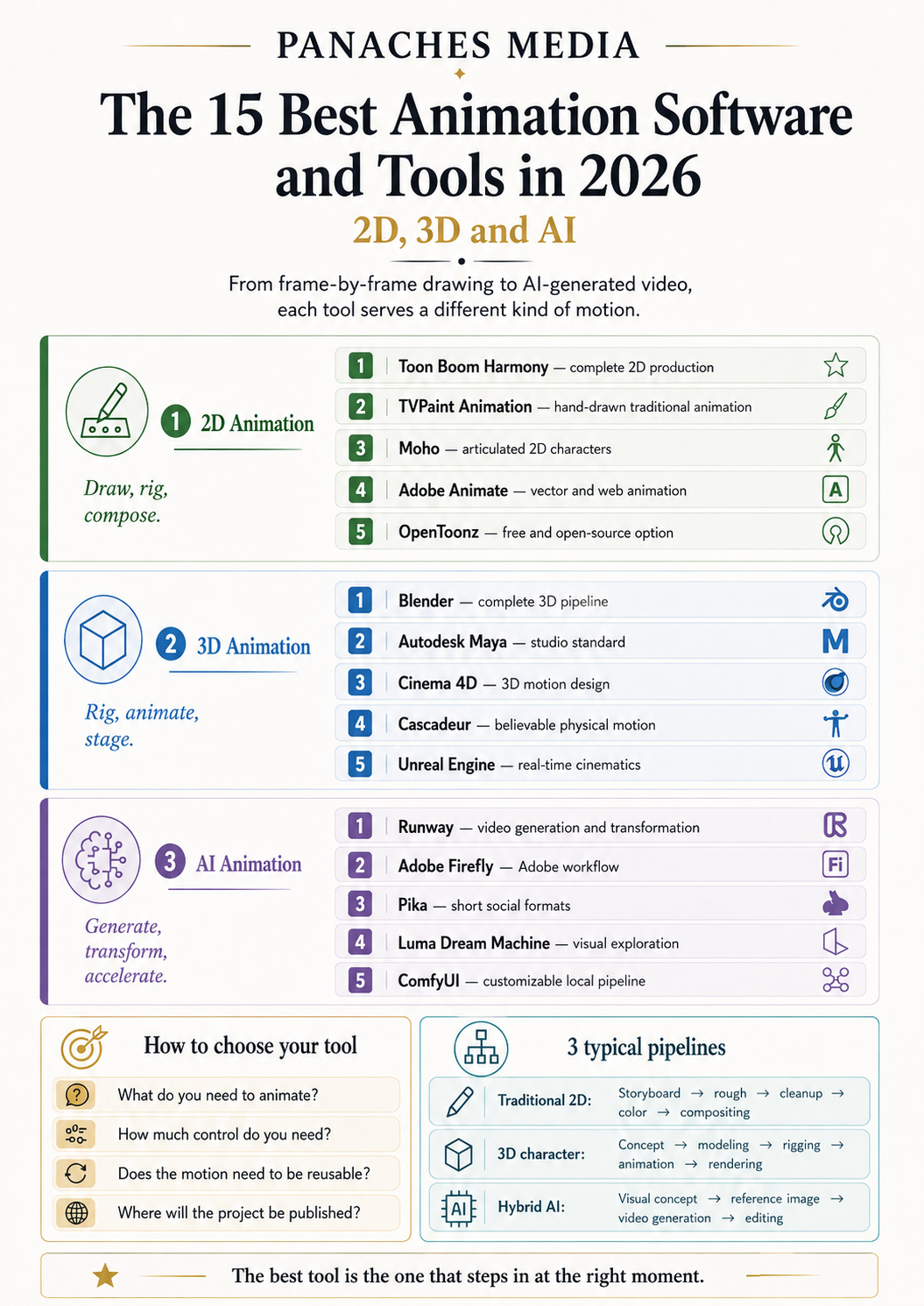
Here are fifteen essential tools to know in 2026, divided between 2D animation, 3D animation and AI-assisted animation.
The best animation software at a glance
| Primary need | Recommended tool | Category |
|---|---|---|
| Produce a complete 2D animated series | Toon Boom Harmony | 2D animation |
| Draw traditional animation | TVPaint Animation | 2D animation |
| Animate articulated 2D characters | Moho | 2D animation |
| Create vector and web animations | Adobe Animate | 2D animation |
| Animate in 2D for free | OpenToonz | 2D animation |
| Learn the entire 3D pipeline | Blender | 3D animation |
| Work within a studio pipeline | Autodesk Maya | 3D animation |
| Produce 3D motion design | Cinema 4D | 3D animation |
| Create physically convincing character movement | Cascadeur | 3D animation |
| Produce real-time cinematics | Unreal Engine | Real-time animation |
| Generate and transform video shots | Runway | AI animation |
| Integrate video generation into an Adobe workflow | Adobe Firefly | AI animation |
| Quickly create social animations | Pika | AI animation |
| Explore visual and cinematic sequences | Luma Dream Machine | AI animation |
| Build a local AI video pipeline | ComfyUI | AI workflow |
This selection is not an absolute ranking.
Toon Boom Harmony is not playing the same game as Runway. Blender does not address the same needs as TVPaint. Cascadeur can perfect a character’s jump, but it will not draw the background around them.
The best tool is the one that enters the process at the right moment.
The best 2D animation software
1. Toon Boom Harmony — The best for complete 2D production
Toon Boom Harmony is one of the most comprehensive environments for producing professional 2D animation.
The software brings drawing, painting, traditional animation, articulated characters, effects, compositing and scene management together in a single environment. It can be used for entirely hand-drawn productions, cut-out animation or hybrid projects combining several techniques.
Harmony therefore does more than simply make a character move.
It organises an actual production pipeline.
A drawing becomes an asset. The asset enters a scene. The scene joins a sequence. Each element can be corrected without necessarily rebuilding everything that follows.
Toon Boom Harmony is particularly suited to:
- producing animated series;
- 2D feature films and short films;
- cut-out animation;
- rigged characters;
- structured studios and teams;
- productions combining drawing and compositing.
Its greatest strength
Harmony can support a project from the first drawings to the final composited image.
This continuity becomes invaluable when a production contains hundreds of shots, several characters and an entire team that would rather avoid searching for the correct version of an arm inside twelve folders named “final_really_final.”
Its main limitation
Its depth comes with a learning curve and a price suited to serious use.
For a short animation or a first experiment, Harmony can feel like renting an entire film studio to make a ball bounce.
2. TVPaint Animation — The best for hand-drawn traditional animation
TVPaint Animation is designed for animators who want to rediscover the freedom of frame-by-frame drawing inside a digital environment.
Its bitmap engine makes it possible to work with brushes, textures and lines close to traditional painting or drawing. TVPaint Animation 12 covers the process from storyboarding to compositing and also introduces bitmap puppet and rigging features alongside its historical frame-by-frame foundation.
The tool does not try to smooth the gesture until it becomes a perfectly constructed vector shape.
It preserves the material quality of the line.
Vibrations, irregularities and small variations between frames can remain visible. They can even become part of the movement.
TVPaint is particularly suited to:
- traditional animation;
- independent and auteur short films;
- productions with a hand-drawn or painted aesthetic;
- rough animation;
- movement studies;
- animators attached to the feeling of paper.
Its greatest strength
TVPaint feels like drawing directly inside time.
Every image can be revised, distorted, cleaned or repainted without leaving the language of drawing.
Its main limitation
Frame-by-frame animation remains demanding.
The software can accelerate the process, simplify corrections and organise shots. It does not draw the in-between frames for you.
Twelve imperfect but living images still require twelve decisions.
3. Moho — The best for articulated 2D characters
Moho specialises in 2D animation built around rigs, bones and deformations.
Users can draw directly inside the software or import vector illustrations and layered Photoshop files. Characters are then equipped with an armature that makes it possible to animate limbs, faces, clothing and certain deformations without redrawing every frame.
Its Smart Bones, inverse kinematics, deformation meshes and constraint systems make it possible to create highly flexible characters.
Moho therefore sits somewhere between a puppet and a drawing.
The character has a reusable structure, but that structure can be deformed to avoid the overly mechanical appearance of articulated animation.
Moho is particularly suited to:
- 2D character animation;
- series produced by small teams;
- explainer videos;
- YouTube content;
- independent projects;
- animators who want to avoid redrawing every frame.
Its greatest strength
A good rig can be reused across many shots.
The time invested in preparing it then becomes a production shortcut.
Its main limitation
The quality depends heavily on the initial rig.
A poorly designed joint remains a poorly designed joint, even when moved with perfectly smooth interpolation.
The risk is producing a character that moves cleanly but looks as though it were assembled with split pins.
4. Adobe Animate — The best for vector animation and the web
Adobe Animate descends directly from the history of Flash, but its role has expanded.
It can create frame-by-frame animation, motion tweens, shape transformations, vector characters and interactive content. Projects can be published as video, GIFs, SVG sequences, HTML5 Canvas content or other formats intended for the web.
Animate remains particularly effective when graphic elements need to stay lightweight, sharp and easy to resize.
An icon can become a character. A button can react to the pointer. An illustration can become a banner, an interface or a short explanatory sequence.
Adobe Animate is particularly suited to:
- vector animation;
- educational content;
- web banners and experiences;
- explainer videos;
- animated interfaces;
- small games and interactive content;
- creators already working within Creative Cloud.
Its greatest strength
Adobe Animate connects animation and interactivity with ease.
Movement does not have to remain trapped inside a linear video.
Its main limitation
It is less suited to complex hand-drawn productions or long cinematic pipelines than TVPaint or Toon Boom Harmony.
It excels in a specific territory: the place where vector drawing, the timeline and the web meet.
5. OpenToonz — The best free and open-source choice for 2D
OpenToonz is a free and open-source solution for producing 2D animation.
The project is based on Toonz, software historically used and adapted in professional production environments. OpenToonz retains tools dedicated to scanning, cleanup, colouring, effects and scene organisation. Some of its tools were developed or adapted through experience gained on Studio Ghibli productions.
OpenToonz can work with raster or vector drawings and makes it possible to build a complete production pipeline without a subscription.
OpenToonz is particularly suited to:
- learning 2D animation;
- independent productions;
- cleanup and colouring;
- workflows based on scanned drawings;
- schools and associations;
- artists who favour free and open-source software.
Its greatest strength
It provides a genuine production environment without imposing an entry cost.
You can therefore discover the logic of timelines, levels, exposure sheets and compositing without first having to choose between paying for the software and buying food for the month.
Its main limitation
Its interface and logic require a period of adjustment.
Free does not always mean simple. OpenToonz contains many tools, but they are not necessarily presented with the gentle guidance of an application designed for a first afternoon.
The best 3D animation software
6. Blender — The best free tool for learning the entire pipeline
Blender covers almost the entire 3D creation pipeline: modelling, rigging, animation, simulation, rendering, compositing, video editing and integrated 2D tools.
Its animation system includes keyframes, curves, the Dope Sheet, non-linear animation, armatures, constraints and numerous rigging tools. Blender remains free and open source while being used for animation, games, series, advertising and films.
It is one of the few applications in which a character can be created, equipped with a skeleton, animated, lit and rendered without leaving the same project.
Blender is particularly suited to:
- learning the complete 3D process;
- character animation;
- short films;
- independent productions;
- video games;
- motion design;
- subscription-free pipelines.
Its greatest strength
Blender makes it possible to understand how the different stages affect one another.
A modelling mistake becomes visible during rigging. A weakness in the rig appears during animation. An overly heavy animation slows down the render.
Everything is brought together in the same workshop.
Its main limitation
That workshop contains an enormous number of drawers.
The sheer quantity of features can disorient beginners, particularly when they simply want to animate a cube and suddenly discover fluid simulations, Geometry Nodes and an entire menu dedicated to world properties.
7. Autodesk Maya — The best for professional pipelines
Autodesk Maya remains one of the leading standards for 3D animation in film, television and video games.
It brings together tools for modelling, layout, rigging, animation, effects and rendering. Its animation editors, character systems and ability to be extended with scripts and internal tools explain its lasting position within major studio pipelines.
Maya is not used only because it contains a large number of buttons.
It is used because entire teams have built their methods around it.
A rig can be passed to animators. Animations can move into lighting. Scripts can inspect, rename, export and repair hundreds of elements.
Maya is particularly suited to:
- professional character animation;
- 3D films and series;
- visual effects;
- AAA game productions;
- students aiming for studio employment;
- custom technical pipelines.
Its greatest strength
Maya offers extremely deep control over movement, rigs and animation data.
It is designed to integrate into a broader production environment.
Its main limitation
The cost, complexity and learning investment are significant.
For an independent creator who wants to produce a short stylised animation, Maya can be extraordinarily powerful — and extraordinarily disproportionate.
8. Cinema 4D — The best for 3D motion design
Cinema 4D is particularly associated with motion design, advertising, broadcast graphics and animated graphics.
Its MoGraph system simplifies the duplication, distribution and procedural animation of shapes and objects. Cinema 4D also supports character animation, simulations, rendering and exchange with tools such as Adobe After Effects and Unreal Engine.
It is highly effective when logos, typography, objects, patterns or repeated structures need to come alive.
Where manual animation would require moving fifty elements, MoGraph can transform repetition into a system.
Cinema 4D is particularly suited to:
- motion graphics;
- advertising;
- title sequences;
- brand design;
- product animations;
- artists working with After Effects;
- procedural compositions.
Its greatest strength
Cinema 4D makes 3D motion design relatively accessible.
Its tools produce clean results quickly without requiring every movement to be constructed element by element.
Its main limitation
It is less naturally oriented towards complex character animation than Maya or Blender.
A character can certainly be animated inside it.
But its natural kingdom remains one of dividing shapes, exploding letters and products rotating beneath lighting that is probably far more elegant than the lighting in your living room.
9. Cascadeur — The best for physically convincing character animation
Cascadeur is specialised software for keyframe-based 3D character animation.
It uses AI-assisted tools and physical systems to help animators build natural poses, manage balance, adjust trajectories and reinforce the credibility of movement. It can create new animations or clean and modify imported animation.
Cascadeur is particularly useful for jumps, falls, fights, running and movements in which the character’s body weight needs to remain readable.
The AI does not replace the animator.
It acts more like a second pair of eyes with an unusually intense obsession with gravity.
Cascadeur is particularly suited to:
- character animation;
- video games;
- action scenes;
- movement created without motion capture;
- correcting mocap data;
- animators who want to learn body mechanics.
Its greatest strength
Its physics tools reveal elements that are difficult to judge with the naked eye: centre of mass, trajectory, balance, impulse and inertia.
Its main limitation
Cascadeur is specialised.
It is not intended to replace Blender, Maya or Unreal Engine for modelling, shading, environments and complete rendering.
Movement is generally created or corrected inside Cascadeur and then exported to the rest of the pipeline.
10. Unreal Engine — The best for real-time animation and cinematics
Unreal Engine is primarily known as a game engine.
But it has also become an environment for animation, virtual production and real-time cinematic creation.
Control Rig makes it possible to create rigs and animate characters directly inside the engine. Sequencer organises shots, cameras, animations and events like an editing and staging timeline.
One of its major changes in perspective is simple:
You no longer need to wait for hours to see the final render.
Lighting, effects, environments and characters can be observed in motion almost immediately.
Unreal Engine is particularly suited to:
- creating cinematics;
- video games;
- virtual production;
- real-time animated films;
- interactive experiences;
- projects using MetaHuman;
- large scenes and environments.
Its greatest strength
The animation is visible directly within its final context.
The character can be observed inside the environment, with the lighting, camera and effects that will actually be used.
Its main limitation
Unreal Engine requires capable hardware and an understanding of several systems at once.
Animating a character inside it often also means managing assets, materials, lights, Blueprints and rendering settings.
Real time is fast.
Learning everything that makes real time possible is slightly less so.
The best AI-assisted animation tools
11. Runway — The best versatile AI environment for video
Runway brings together several models and tools designed to generate, transform and edit images and videos.
The platform can create sequences from text or images, modify existing videos and work on the consistency of characters, objects and environments across several shots. Its models and tools evolve regularly within the same production interface.
Runway is particularly useful when you are already thinking in shots:
a character enters a room, the camera moves forward, the light changes and an element of the environment transforms.
The tool does not necessarily construct traditional animation with a rig and a curve for every joint.
It generates the visual result of the movement.
Runway is particularly suited to:
- previsualisation;
- music videos;
- short narrative formats;
- generative visual effects;
- image-to-video creation;
- staging experiments;
- video creators who want to centralise several AI tools.
Its greatest strength
Runway brings generation, transformation and experimental editing closer together.
It allows creators to iterate rapidly on a visual idea without exporting every test to a new platform.
Its main limitation
The level of control remains different from that of traditional animation software.
You can guide the movement, provide references and repeat the generation.
You cannot always precisely correct the angle of an elbow in frame 37 without changing the rest of the shot.
12. Adobe Firefly — The best for a video workflow integrated with Adobe
Adobe Firefly can generate sequences from text or images, add camera movement and continue the work inside the Adobe ecosystem.
Its image-to-video tool can transform an illustration, photograph or 3D render into a short animated sequence. Firefly also provides an editor for rearranging, extending or regenerating certain parts of a project.
Its main value is therefore not generation alone.
It is the continuity with Photoshop, After Effects, Premiere Pro and the other Creative Cloud tools.
Adobe Firefly is particularly suited to:
- animating still images;
- cutaway shots;
- product videos;
- advertising;
- social content;
- creators already subscribed to Adobe;
- workflows combining generation and traditional editing.
Its greatest strength
Firefly can become one stage among others rather than an isolated platform.
An image prepared in Photoshop can be animated, edited in Premiere, enhanced in After Effects and then integrated into a broader production.
Its main limitation
Like other generators, Firefly mainly produces finished sequences.
It does not replace a rig, an exposure sheet or a genuine editable 3D scene.
13. Pika — The best for rapid animations and social formats
Pika is a video-generation platform focused on fast, visual and easily shareable creations.
It combines text-based generation, image-to-video transformation, modification of existing sequences and effects designed to produce immediately spectacular results.
Pika is particularly effective when a creator wants to animate an illustration, transform an object, add an impossible effect or create a short sequence for social media.
Pika is particularly suited to:
- image-to-video creation;
- vertical formats;
- social content;
- rapid visual effects;
- stylised transformations;
- creators without technical animation experience.
Its greatest strength
The entry point is immediate.
An image and an intention can be enough to produce a first result.
Its main limitation
Simplicity encourages experimentation, but not always precision.
The most impressive results are often very short. Building a long and coherent narrative still requires producing, selecting, connecting and sometimes repairing many shots.
14. Luma Dream Machine — The best for cinematic visual exploration
Luma Dream Machine is an image and video generation environment designed to rapidly transform an intention into a visual sequence.
The platform emphasises ideation, rapid iteration and the creation of movement or atmosphere from simple descriptions.
Dream Machine is particularly interesting when the desired movement concerns less a precise joint than a general sensation:
a camera passing through a landscape, a silhouette appearing in the mist, fabric floating or a scene that seems to have emerged from a dream.
Luma Dream Machine is particularly suited to:
- cinematic research;
- shot concepts;
- environments;
- camera movement;
- atmospheric videos;
- animated mood boards;
- pre-production.
Its greatest strength
Luma makes it possible to explore the rhythm and atmosphere of a scene quickly.
An image that worked as an illustration can suddenly reveal what it becomes when time begins to pass through it.
Its main limitation
The tool remains generation-based.
The result must be evaluated as a produced shot, not as a scene in which every component is fully accessible and editable.
15. ComfyUI — The best for building a local AI video pipeline
ComfyUI is an open-source node-based interface for running and combining generative models.
A workflow can contain stages for loading an image, conditioning, pose control, video generation, upscaling, interpolation and export. Graphs can be saved, shared, automated and adapted to different video models.
Unlike a platform that hides everything behind a prompt field, ComfyUI exposes the process.
Every operation becomes a block.
Every connection shows how information moves through the system.
ComfyUI is particularly suited to:
- local video generation;
- custom pipelines;
- open-source models;
- pose and reference control;
- automated production;
- developers;
- creators who want to keep their files and models locally.
Its greatest strength
ComfyUI provides extremely flexible control.
A model can be replaced. A stage can be added. A generation can be divided into several passes. A workflow can be transformed into an internal tool.
Its main limitation
This freedom requires an understanding of the pipeline.
Models need to be installed, video memory managed, nodes connected and incompatibilities resolved. Sometimes you also discover that a workflow found online depends on an extension hosted in a repository abandoned eight months ago.
ComfyUI is a workshop.
It provides the machines.
It does not always organise the cables.
Useful tools that are not quite complete animation applications
Some applications regularly appear in animation rankings even though they mainly intervene at one particular stage.
They remain valuable, but their actual role needs to be understood.
Mixamo
Mixamo automates the rigging of humanoid characters and makes it possible to apply movements from a motion-capture library.
It therefore accelerates entry into 3D animation, but it does not allow users to freely construct a complete animation with the same level of control as Blender, Maya or Cascadeur.
Daz Studio
Daz Studio can create, dress and pose realistic characters.
It includes animation features, but the application is primarily effective for character creation and scene construction. Complex movement is often completed inside another application.
Meshy
Meshy generates 3D assets from text or images and can automate certain rigging or animation stages.
It is particularly useful before animation: it can quickly produce a base to import into Blender, Maya, Unreal Engine or another environment.
Spline
Spline is highly effective for creating 3D scenes and interactions intended for the web.
It is suitable for product animation, interfaces and interactive experiences, but it is not designed as an advanced character animation environment.
Tinkercad
Tinkercad is an excellent introduction to 3D modelling and printing.
However, it provides neither character rigging nor a genuine advanced animation system.
Ranking it among the best animation software would be a little like recommending an excellent box of building bricks for learning choreography.
Which animation software should you choose for your profile?
You are beginning with 2D animation
OpenToonz makes it possible to discover a complete environment for free.
Moho Debut offers a more direct approach to articulated characters.
Adobe Animate is relevant when you come from vector drawing, the web or Adobe tools.
The right first project is not a feature film.
It is a bouncing ball, a face changing expression or a character crossing a room without looking as though they are being carried along by an invisible conveyor belt.
You enjoy drawing every movement
Choose TVPaint Animation.
Its bitmap, frame-by-frame approach allows the line to breathe.
Toon Boom Harmony may also be suitable, particularly if your production will later need to include rigging, effects and a more structured pipeline.
You want to produce a 2D series
Choose Toon Boom Harmony for a complete pipeline suited to teams.
Choose Moho when the production relies mainly on rigged characters and a small team needs to produce many shots quickly.
You want to learn the entire 3D process
Choose Blender.
You will need to learn several disciplines, but you will not be forced to change tools as soon as your project grows beyond the starting exercise.
Begin with animation.
The detailed sculpture of a twelve-winged dragon can reasonably wait until the following week.
You want to work in a major studio
Learning Autodesk Maya remains relevant for understanding professional film, television and video game pipelines.
The important skill will not only be moving a character.
You will also need to work with a rig built by someone else, respect naming conventions and avoid breaking a scene shared by forty people.
A less romantic form of art, perhaps, but one greatly appreciated by teams.
You are a motion designer
Choose Cinema 4D.
Its procedural approach and integration with After Effects are particularly well suited to title sequences, advertising, typography and product animations.
You want to animate characters with greater physical realism
Choose Cascadeur.
It is an excellent intermediate stage between rough animation, motion capture and a more convincing result.
It can also serve as an educational tool for understanding why a pose feels solid — or why your hero looks as though they are falling before they have even jumped.
You create games or cinematics
Choose Unreal Engine to bring animation, environments, cameras and real-time rendering together.
Blender, Maya, Cascadeur or Mixamo can produce the movement beforehand, before it is integrated into the engine.
You want to create AI shots quickly
Choose:
- Runway for a versatile environment;
- Adobe Firefly to remain within Creative Cloud;
- Pika for rapid effects and formats;
- Luma Dream Machine for visual and atmospheric exploration;
- ComfyUI to work locally and customise the pipeline.
These tools do not necessarily replace traditional animation.
They create a new family of shots situated somewhere between generation, staging, visual effects and editing.
How can you identify the right animation tool?
What do you actually need to animate?
A drawn character?
A 2D puppet?
A 3D actor?
A logo?
A camera?
A complete scene?
An image that you simply want to set in motion?
The word “animation” covers all these situations, but no software handles them all with equal efficiency.
How much control do you need?
An AI generator can create a spectacular shot in a few minutes.
But if the client then asks you to move only the hand by three centimetres without changing the face, environment or lighting, the miracle can become a long series of new generations.
The more a project requires precise corrections, the more important timelines, rigs and animation curves become.
Does the movement need to be reused?
A walk animation can be applied to several 3D characters.
A 2D rig can be used across an entire series.
A generated video is often a more fixed result.
This difference has a profound effect on the profitability of a pipeline.
Where will the project be distributed?
A film, game, web application, advertisement and interactive experience do not share the same constraints.
You need to check:
- export formats;
- resolutions;
- frame rates;
- transparency;
- engine compatibility;
- commercial licences;
- editing possibilities after export.
What is the real cost?
The price of the software is only one part of the expense.
You also need to consider hardware, plugins, assets, generation credits, storage and, above all, learning time.
A free tool that requires six months of training can be excellent.
It simply is not free in the same way as a button tested during a lunch break.
Three examples of animation pipelines
Traditional 2D pipeline
Storyboard → layout → rough animation → in-betweens → cleanup → colour → compositing → editing
Possible tools:
- Storyboard Pro or traditional drawing for preparation;
- TVPaint or OpenToonz for frame-by-frame animation;
- Toon Boom Harmony for production and compositing;
- Premiere Pro or DaVinci Resolve for final editing.
3D character pipeline
Concept → modelling → rigging → animation → simulation → lighting → rendering → compositing
Possible tools:
- Blender or Maya for the main pipeline;
- Mixamo for an initial auto-rig;
- Cascadeur for working on movement;
- Unreal Engine for staging and real-time rendering.
Hybrid AI pipeline
Visual concept → reference image → video generation → selection → correction → editing → sound
Possible tools:
- Photoshop, Krita or Midjourney for the initial image;
- Runway, Firefly, Pika or Luma for movement;
- ComfyUI for a local and controlled workflow;
- After Effects or DaVinci Resolve for correcting and assembling the shots.
In this final pipeline, human work does not disappear.
It moves elsewhere.
The animator no longer necessarily creates every image. They select references, direct the movement, reject inconsistencies, connect shots and sometimes discreetly rebuild everything the model decided to improvise.
Animation remains the art of choosing the right movement
The software has changed.
Images can now be drawn, articulated, simulated or generated.
A character can receive a skeleton automatically. An AI model can invent the in-between frames. A real-time engine can instantly display a scene that would once have required hours of rendering.
But movement does not become right simply because it is smooth.
It becomes right when it reveals something.
A hesitation before opening a door.
A shift of weight before a jump.
A glance arriving a fraction of a second after the voice.
A hand remaining still while the rest of the body wants to run away.
Toon Boom Harmony structures the production.
TVPaint preserves the drawing.
Blender and Maya construct movement in space.
Cascadeur gives it weight.
Unreal Engine places it inside a world.
Artificial intelligence accelerates the emergence of possibilities.
But the animator remains the person who chooses which possibility deserves to remain on screen.
Because animating does not simply mean making something move.
It means deciding why it moves now.
And why, one second later, it needs to stop.
Main sources
- Official Toon Boom Harmony documentation.
- Official presentation of TVPaint Animation 12.
- Official Moho documentation.
- Official Adobe Animate documentation.
- Official OpenToonz website.
- Official Blender presentation and manual.
- Official Autodesk Maya presentation.
- Official Cinema 4D presentation.
- Official Cascadeur documentation.
- Official documentation for Unreal Engine animation tools.
- Documentation and presentation of Runway video models.
- Presentation of the Adobe Firefly video generator.
- Official presentation of Pika.
- Official presentation of Luma Dream Machine.
- Official ComfyUI documentation and video workflows.