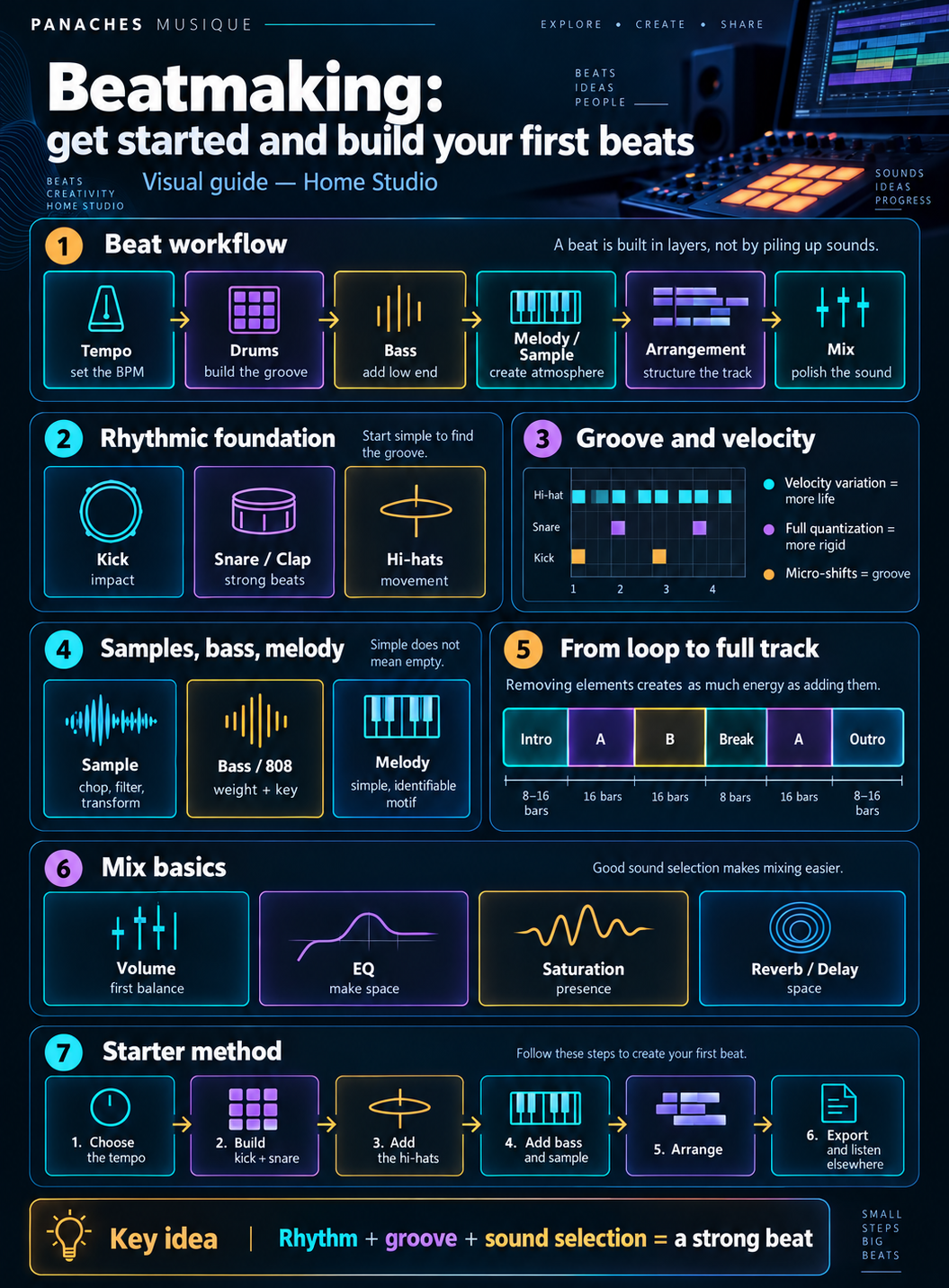
Beatmaking: building music around rhythm
Beatmaking means building a musical production around rhythm, but it is not limited to programming drums.
A beat can contain drums, bass, samples, chords, melody, textures, effects and a complete structure designed to make the track evolve.
In some styles, the instrumental mainly serves as a foundation for vocals. In others, it becomes the finished composition on its own.
The process can be summarized very simply:
Rhythm → harmony → bass → melody → arrangement → mix
This order is not mandatory. Some beatmakers begin with a sample, others with drums or a chord progression.
What matters most is understanding the role of each element and how they fit together.
A beat is not an accumulation of sounds
When starting out, it is tempting to constantly add more elements.
A second melody seems like it could improve the first. Then another hi-hat, an extra percussion sound, an effect and yet another texture.
The result quickly becomes crowded.
An effective beat can rely on very few elements if each one has a clear function.
| Element | Main function |
|---|---|
| Kick | Provide impact and support the rhythm |
| Snare / Clap | Mark the strong beats |
| Hi-hats | Create movement and subdivision |
| Bass | Support the low end and harmony |
| Chords / Sample | Define the harmonic color |
| Melody | Create an identifiable motif |
| Textures / FX | Add space and transitions |
The goal is not to fill every frequency at all times.
A good beat also leaves room for silence.
The DAW becomes the beatmaker’s workshop
Modern beatmaking can be done entirely inside a DAW.
The software allows you to program drums, manipulate samples, record MIDI, load virtual instruments, arrange the track and perform the mix.
A starting setup can be extremely simple:
Computer → DAW → headphones or monitors
A MIDI keyboard or pads can later make programming more physical, but they are not essential when starting out.
Many beats can be created using only the Piano Roll, a mouse and the built-in tools of the software.
Hardware can sometimes speed up the gesture. It does not replace an understanding of rhythm.
Start with the tempo
The tempo, expressed in BPM, defines the overall speed of the project.
It immediately changes the feel of the track.
The same drum pattern can feel relaxed at one tempo and much more energetic at another.
There is no mandatory BPM for a musical style. Habits change depending on the era, genre and the way the rhythm is perceived.
The most useful approach is therefore to choose a tempo that matches the intended movement, then adjust it if the beat feels too slow or too rushed.
BPM gives speed. Groove gives feel.
These two ideas are related, but they are not the same thing.
Understanding the rhythmic grid
Inside a DAW, time is usually represented as a grid.
A 4/4 bar contains four beats, each of which can be divided into smaller values.
This grid provides a reference for placing kicks, snares, hi-hats and other events.
A sixteenth-note subdivision, for example, makes it possible to place several events inside a single beat.
Understanding this structure is useful, but the grid should not be treated as an absolute rule.
Notes can deliberately be placed slightly before or after certain grid positions to create movement.
Kick and snare build the skeleton
For beginners, it is often easier to first build a structure using kick and snare.
In many 4/4 rhythms, the snare or clap marks regular positions while the kick provides more variation.
A very simple pattern can already work:
Kick → Snare → Kick → Snare
But personality appears when you move some kicks, add silence or create syncopation.
It is therefore better to begin with only a few elements and find an enjoyable rhythm before adding details.
If the kick and snare do not work on their own, adding ten percussion sounds will usually not solve the problem.
Hi-hats create movement
Hi-hats often serve a different purpose.
They create a sense of subdivision and help define the movement of the beat.
A regular pattern can provide a stable foundation.
Velocity changes, gaps, rolls and subdivision changes can then break the monotony.
| Treatment | Possible effect |
|---|---|
| Regular pattern | Stability |
| Gaps | Breathing space |
| Variable velocity | More natural playing |
| Rolls | Rhythmic accent |
| Slight timing shifts | Groove |
| Subdivision changes | Energy variation |
A common mistake is trying to make hi-hats complex too early.
A simple pattern that works well with the kick and snare is often far more effective.
Velocity brings drums to life
When every hit has exactly the same intensity, the rhythm can quickly feel rigid.
MIDI velocity makes it possible to vary that intensity.
A hi-hat sequence can alternate between stronger and softer hits.
Ghost notes on a snare can use a much lower velocity than the main accent.
This variation is not only about imitating a real drummer.
It also creates hierarchy between events.
Every hit can be present without having the same importance.
Quantization and groove: do not align everything automatically
Quantization automatically moves events onto the grid.
It is extremely useful for correcting inaccurate MIDI performances.
But when everything is perfectly aligned, the beat can lose part of its movement.
A slightly shifted kick, a snare placed just a little late or less rigid hi-hats can create a very different feel.
Swing partially automates this idea by shifting certain subdivisions.
| Approach | General result |
|---|---|
| Strict quantization | Very precise rhythm |
| Partial quantization | Correction with more natural feel |
| Swing | Regular offset of certain subdivisions |
| Manual placement | Precise control of groove |
The best option depends on the style and intention.
Groove comes from the relationship between elements
Groove does not depend on a single instrument.
It appears in the relationship between kick, snare, hi-hats, bass and sometimes even the melodic elements.
A bass line that plays exactly with the kick creates a different feeling from one that answers between two kick hits.
Likewise, a highly syncopated melody can change the perception of a rhythm that is otherwise very simple.
Groove can therefore be understood as the way events respond to one another in time.
Simply adding a swing setting does not automatically make a beat interesting.
Choose the right sounds before mixing too much
Sound selection is extremely important in beatmaking.
A kick that is too long can conflict with the bass. A very bright snare can become aggressive. A sample that is already very dense can leave little room for other instruments.
Choosing complementary elements makes mixing much easier later.
Good sound selection reduces the need for correction.
Before adding several EQs and compressors, it is often useful to ask whether the original sound actually fits the intended role.
Changing the kick can sometimes solve in seconds what a long processing chain failed to fix.
Layering: stack with a purpose
Layering means combining several sounds to create a new one.
Two snares can be layered: one provides body, the other provides attack.
A kick can also be reinforced with a complementary layer.
But stacking several similar sounds does not automatically make them more powerful.
The layers can mask one another or create phase problems.
Useful layering generally answers a specific question:
What does the second layer add that the first one does not have?
If the answer is unclear, the layer may not be necessary.
Sampling: transforming an existing sound
Sampling means using an existing recording as musical material.
It can be a loop, chord, percussion sound, voice, texture or even a few milliseconds of audio.
The sample can then be transformed through:
- chopping;
- transposition;
- reversing;
- time stretching;
- filtering;
- rearranging.
A sample therefore does not have to be used exactly as it is.
The beatmaker can cut it into fragments, change their order and build a new phrase.
Chopping a sample to create a new structure
Chopping means cutting a sample into several sections.
Each fragment can then be assigned to a pad or MIDI note.
Imagine a phrase containing four parts:
A — B — C — D
After chopping, it could become:
C — A — A — D — B
The sound material still comes from the original source, but the musical structure changes.
This approach sits at the heart of many sampling workflows.
It also makes it possible to create variations very quickly from limited material.
Time stretching and pitch shifting
Two operations are especially important when working with samples.
Time stretching changes the duration of a recording without necessarily changing its pitch.
Pitch shifting changes its pitch.
These tools make it possible to adapt a sample to the tempo and key of the project.
A loop recorded at a different BPM can be synchronized to the track.
A phrase that sounds too high can be transposed downward to create a completely different character.
Modern algorithms make these transformations very easy, although extreme changes can introduce artifacts.
Those artifacts can sometimes become an aesthetic choice of their own.
Using samples also means understanding rights
Sampling is a musical technique, but using existing recordings can also raise copyright questions.
A sample taken from a protected work does not automatically become free to use simply because it has been chopped or modified.
Depending on the project, the appropriate permissions may be required.
Licensed sample libraries or sounds you create yourself make this issue much simpler.
When learning, it is therefore useful to distinguish between production practice and commercial release of a track using protected material.
Bass gives weight to the beat
Once the drums are in place, the bass often becomes one of the most important elements.
It can follow the kick, play around it or create a more independent line.
In many modern productions, the bass is also responsible for much of the physical feel of the track.
But more low end does not necessarily mean more power.
A kick and bass occupying exactly the same area can mask each other.
It therefore becomes important to define their relationship during composition.
Kick and bass should work together before you even think about mixing.
808: somewhere between percussion and bass
The 808 occupies a special place in many contemporary styles.
It can function both as a rhythmic impact and as a bass line.
Because it has an identifiable pitch, tuning matters.
An 808 played on different notes should remain consistent with the key of the track.
It can also be shaped with glide, saturation or different envelopes.
A very low sound can be difficult to hear on small speakers. Light saturation can add upper harmonics and make the bass easier to perceive.
The melody does not need to be complex
Once the rhythm is in place, you can add a chord progression, melody, sample or harmonic texture.
A common mistake is trying to write something very sophisticated immediately.
A loop of only a few notes can be enough if its rhythm and tone are interesting.
Simple does not mean empty. Simple means every note has a reason to be there.
Repetition is also an important part of beatmaking.
The challenge is to keep a recognizable identity while introducing enough variation to avoid monotony.
Chords, melody and counter-melody
A production can contain several melodic layers.
Chords provide the harmonic foundation.
The main melody creates an identifiable motif.
A counter-melody can answer the main motif or fill certain spaces.
But all three layers are not mandatory.
| Element | Function |
|---|---|
| Chords | Establish the harmony |
| Melody | Create a memorable motif |
| Counter-melody | Respond or complement |
| Texture | Add atmosphere |
When every element plays constantly, the beat can become very crowded.
Arrangement is what determines when each element should appear.
Key and scale help the elements work together
Understanding a few basic ideas about key and scale can make beatmaking much easier.
A bass, 808 and melody using incompatible notes can create a sense of conflict even if each sound works well on its own.
There is no need to master all of music theory immediately.
Being able to identify a key, build a simple scale and recognize a few chords already opens many possibilities.
Scale functions available in some DAWs and controllers can also help, but over time they should support rather than replace the development of your ear.
From loop to full track
Creating a four- or eight-bar loop is often relatively easy.
Turning that loop into a complete track is a different stage.
That is the role of arrangement.
Instead of letting every instrument play constantly, you organize when elements appear and disappear.
A very simple structure could be:
Intro → Section A → Section B → Break → Section A → Outro
The names change depending on genre and project.
The core idea remains the same: make the energy evolve over time.
Removing elements is also arrangement
Arrangement does not necessarily require constantly adding new sounds.
Temporarily removing the kick can create a transition.
Dropping the bass for two bars can prepare its return.
Reducing the hi-hats can create a calmer section.
A beat built with only five tracks can feel highly dynamic simply because those five tracks do not always play together.
Arrangement is as much about deciding what disappears as deciding what appears.
Transitions connect the different sections
When two sections change too abruptly, a transition can help prepare the listener.
Several techniques are common:
| Technique | Function |
|---|---|
| Drum fill | Announce a new section |
| Reverse | Create a pull toward the change |
| Riser | Increase energy |
| Impact | Mark the arrival |
| Short silence | Create contrast |
| Filter automation | Transform the sound gradually |
An effective transition can be very subtle.
There is no need to use a huge riser every four bars.
Variations keep repetition from becoming mechanical
A beat often relies on a repeating loop.
That repetition creates identity.
But small variations help maintain attention.
You can change one kick, remove a snare, alter a hi-hat roll, move a bass note or change the end of a melody.
These variations do not need to be spectacular.
A few differences at the end of every fourth or eighth bar can be enough to make the beat feel like it continues to evolve.
Mix while creating without losing the beat
It is normal to make a few adjustments while producing.
Levels need to remain coherent and some sounds may need immediate correction.
But spending twenty minutes EQing a snare before the pattern is even finished can break the creative flow.
A simple way to think about it is to separate two levels:
Production: make the ideas work
Mixing: improve their balance
These stages can overlap, but they should not stop the beat from moving forward.
Volume is the first mixing tool
Before EQ, compression or saturation, track levels determine a large part of the balance.
If the melody is far too loud, no complicated plugin is needed to identify the problem.
Simply lowering its fader may be enough.
A first balance can therefore be built using only:
- volume;
- panning;
- mute / solo.
Once these relationships are correct, additional processing becomes much easier to decide.
EQ is mainly about making space
Equalization changes the frequency balance of a sound.
In a beat, its role is not necessarily to make every track more impressive when heard alone.
It is mainly used to help the elements coexist.
A melody may contain a lot of unnecessary low end even though the bass and kick already occupy that area.
A small reduction can create space.
On the other hand, automatically cutting all low frequencies from every track can quickly make a mix feel too thin.
EQ should respond to an audible problem, not an automatic rule.
Kick and bass: organize the low end
The low frequencies are often one of the most difficult areas in beatmaking.
Kick and bass can complement each other or mask each other.
Several strategies are possible.
The kick can dominate the lowest area while the bass sits slightly higher.
The opposite can also work.
You can also use sidechain processing to temporarily reduce the bass level when the kick hits.
This creates space for a few milliseconds.
But sidechain does not replace good sound selection and arrangement.
Saturation can help sounds cut through the mix
Saturation adds harmonics to a signal.
On a very sub-heavy bass, it can make the sound easier to hear on small speakers.
On a snare, it can add character.
On a sample, it can completely change the texture.
Like many effects, it becomes excessive very quickly.
A small amount can add presence without clearly sounding distorted.
The goal is therefore not always to make the sound obviously saturated.
Reverb and delay create space
Reverb and delay help create a sense of depth.
A completely dry sound often feels very close.
Reverb can place it in a larger space.
Delay can create rhythmic repetitions and sometimes become a real part of the composition.
But too much reverb across several tracks can make the beat blurry.
Sends make it possible to use one effect across several instruments while controlling how much each track sends to it.
Automation makes parameters evolve
A beat does not need to keep exactly the same settings from beginning to end.
Automation can gradually change a parameter over time.
A filter can open during the intro.
Reverb can become more present just before a transition.
The volume of a texture can slowly increase.
A melody delay can appear only on the final note of a phrase.
This evolution adds movement without requiring new tracks.
Keep some headroom
When every track is very loud, the overall level quickly reaches the digital limit.
The master can start clipping before the mix is even finished.
It is generally better to keep some level margin, or headroom, during production.
That does not mean one exact number must always be followed.
It simply means avoiding a project in which everything is constantly pushed to maximum level.
A mix does not need to be extremely loud while being built in order to feel powerful.
Final loudness belongs to a later stage.
Use a reference track
A reference track provides a useful point of comparison.
It can help you judge the overall balance, drum presence, bass level, arrangement density or the amount of space left for vocals.
The goal is not to copy the track exactly.
A reference mainly helps prevent you from losing all perspective after spending several hours on the same loop.
It is important to compare at a reasonably similar listening level so the louder track does not automatically seem better.
Listen outside the DAW
A beat finished in the studio should work on other systems too.
Home Studio headphones and monitors, earbuds, a car or a small speaker do not reproduce bass and stereo in the same way.
The track does not need to sound identical everywhere.
But the essential elements should remain coherent.
The melody should stay readable. The kick should not disappear completely. The bass should not become uncontrollable.
This ability is often called mix translation.
Build your first beat step by step
For a first project, there is no need to use fifty tracks.
A simple method helps keep the focus on what matters.
| Step | Goal |
|---|---|
| 1. Choose the tempo | Define the overall energy |
| 2. Create kick + snare | Build the skeleton |
| 3. Add hi-hats | Create movement |
| 4. Add bass | Add weight and support the harmony |
| 5. Add chords or a sample | Establish the color of the track |
| 6. Create a simple melody | Give the beat an identity |
| 7. Arrange | Turn the loop into a track |
| 8. Mix the levels | Clarify the balance |
| 9. Add a few automations | Make the production evolve |
| 10. Export and listen elsewhere | Check translation |
This method is not a rule.
It mainly helps avoid getting stuck on one detail for too long.
Finishing beats matters more than endlessly perfecting a loop
At the beginning, every new project reveals new difficulties.
It is easy to spend hours working on four bars without ever reaching a finished track.
To improve, it is often much more useful to complete several imperfect productions.
Each beat gives you practice with programming, arrangement, sound selection and mixing.
A finished beat teaches you more about workflow than a perfect loop that never becomes a track.
Speed is not the goal.
The goal is to regularly experience every stage of production.
Mistakes to avoid
| Mistake | Why it causes problems |
|---|---|
| Adding too many sounds | Elements mask one another and the beat loses clarity |
| Making the drums complex too early | The basic groove is never properly established |
| Quantizing everything perfectly | The rhythm can become rigid |
| Ignoring velocity | Patterns lose dynamics |
| Choosing sounds only in solo | They may work badly together |
| Layering without a clear purpose | The mix becomes denser without becoming more effective |
| Getting stuck on a loop | Arrangement is never really learned |
| Mixing before the idea is complete | Technique gradually replaces creation |
| Pushing every level too high | The master loses headroom |
| Collecting samples and plugins endlessly | Choosing becomes harder than creating |
These are not absolute prohibitions.
They simply point to places where the workflow can become unnecessarily complicated.
The beat comes before the tools
Beatmaking can involve a computer, sampler, pads, MIDI keyboard, synthesizers, plugins or an entire collection of machines.
But none of these tools automatically creates rhythm, groove or arrangement.
An effective beat can come from a few samples and four tracks.
An extremely expensive setup can still produce a lifeless loop if the relationships between the elements do not work.
Learning therefore gradually becomes the ability to hear what is actually missing.
Sometimes the beat needs another percussion sound.
Sometimes it simply needs silence.
The best beat is not the one with the most elements: it is the one in which every element reinforces the movement of the track.
Over time, programming becomes faster, sound choices become more precise and arrangement starts to feel more natural.
Beatmaking then stops being a sequence of blocks placed on a grid.
It becomes a way of organizing rhythm, sound and space to build a musical identity.