
Presentation
Runway is a creative artificial intelligence platform specialized in media generation and transformation. It can create videos and images, modify existing footage, generate audio and combine several tools within the same cloud environment.
The creator-focused part of the platform, Runway Creative, brings together models developed by Runway and several models from other laboratories. Users can therefore choose a model directly or let certain tools select the one best suited to the requested task.
Video remains at the heart of the platform. Gen-4.5 is currently Runway's main video model for generation from text or images, while Aleph 2.0 specializes in modifying existing footage.
Runway is no longer limited, however, to a succession of generators. Agent, Apps, Workflows, Studio, references and professional integrations now make it possible to build a process ranging from the initial idea to an edited sequence or reusable pipeline.
Features
Video generation with Gen-4.5
Gen-4.5 can create a video from a text prompt or an image accompanied by instructions.
In Text-to-Video, the prompt can describe the subject, setting, movement, lighting, staging and camera behavior.
In Image-to-Video, the image already defines much of the composition, allowing the prompt to focus more on movement of the subject, environment or camera.
Gen-4.5 supports clips from 2 to 10 seconds, generated in 720p with several horizontal, vertical or square aspect ratios depending on the mode used.
The model currently costs 12 credits per second of generated video.
Gen-4 and Turbo models
Runway also retains earlier or optimized models when cost and speed matter more than maximum quality.
Gen-4 Turbo notably makes it possible to iterate faster and at lower cost from an image.
These models are useful for exploring a direction, testing several movements or producing variants before spending more credits on a final generation.
Model choice therefore becomes part of the creative workflow rather than simply a question of using the newest option.
References and visual consistency
References make it possible to reuse characters, objects, environments or styles across different generations.
Gen-4 Image can use several references in order to combine characteristics from different images.
A character saved as a reference can, for example, be placed in another environment or given different clothing while retaining part of their visual identity.
References can also be annotated or supplemented with sketches in order to guide composition and the position of certain elements more precisely.
This approach makes it easier to build coherent series of shots, even though perfect continuity between generations remains difficult to guarantee.
Video editing with Aleph 2.0
Aleph 2.0, used in Edit Studio, can modify an existing video from simple instructions.
Users can ask it to change a setting, replace a character or product, modify lighting, add an effect or remove an element.
The system attempts to apply the requested transformation while preserving the other characteristics of the sequence.
Edit Studio can work on isolated shots or sequences containing several shots up to around 30 seconds depending on the workflow.
This approach turns Runway into a generative editing tool as much as a generator of new videos.
Act-Two and character animation
Act-Two makes it possible to animate a character from a performance video.
The user provides a video in which a person performs the scene, together with an image or video representing the final character.
Runway then transfers movement, expressions and speech to the reference character.
With a still image, the system can also reproduce certain body and hand movements and add environmental motion to avoid a completely static result.
This feature can be used to create stylized characters, dialogue scenes or sequences in which a human performance remains the basis of the animation.
Image generation
Runway also integrates several image-generation and editing models.
Gen-4 Image notably makes it possible to create images from prompts and references, with particular emphasis on character and environment consistency.
The platform also hosts models from other providers, allowing several approaches to be compared without leaving the same workspace.
Variation, retouching, element replacement and style-change features can then extend the initial generations.
These images can naturally serve as references or starting images for video generation.
Partner models
Runway has become a platform that brings together both its own models and models from other laboratories.
Depending on plans and availability, the environment may offer models such as Seedance, Kling, Nano Banana, Gemini or other image, video and audio systems.
This approach makes it possible to choose a different engine depending on the task without rebuilding the entire workflow in another application.
Available models evolve quickly, however, and their credit costs, resolutions and features are not uniform.
Runway Agent
Runway Agent is a conversational creative assistant capable of working from a brief rather than a single isolated generation.
It can analyze an idea or existing assets, propose a direction, create several shots, generate images and audio and then assemble a video.
Agent can also choose between different models depending on the desired result.
An integrated timeline makes it possible to rearrange or trim the generated elements before finalization.
This approach is particularly suited to campaigns, product videos, social content and projects requiring several coherent assets.
Workflows
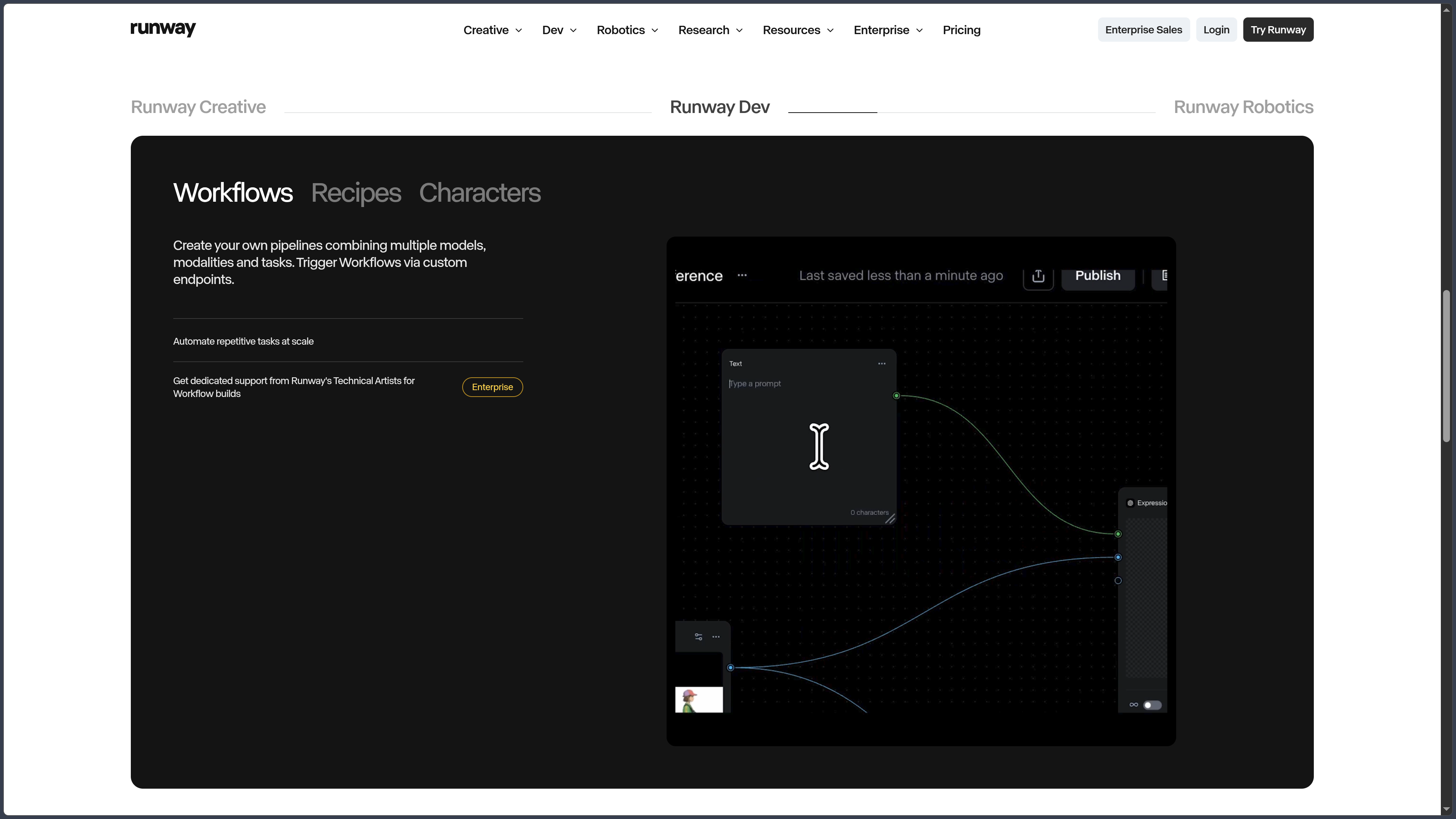
Workflows provide a node-based interface for building custom generation pipelines.
Each node can represent an input, a model or an operation applied to media.
It becomes possible, for example, to generate an image, automatically use it as the input for a video model and then pass the result to another stage.
Workflows also make it possible to create branches, automate repetitive operations and save pipelines as reusable templates.
This approach provides greater control for users who want to produce many variants without manually repeating the same operations.
Apps
Apps group specialized workflows around a specific need.
They can, for example, change a setting, alter the time of day in a scene, relight a video, remove an element, add dialogue or transform a product.
Runway has gradually replaced several former standalone Magic Tools with this new organization.
The goal is to provide simplified access to complex operations without requiring users to know which model or technical pipeline is running in the background.
Studio and assembly
Runway also includes a Studio designed to organize video production.
Clips can be trimmed, assembled and rearranged before export.
This layer makes it possible to go beyond a succession of independent generations and build a short sequence directly inside Runway.
It remains simpler than a dedicated video-editing application, however: Premiere Pro, DaVinci Resolve and Final Cut Pro still provide greater control over long-form production, mixing, effects and finishing.
Audio, voice and music
Runway also provides audio-generation tools.
The platform can produce Text to Speech, effects, voices and different kinds of audio content depending on the available models.
Higher plans notably allow the use of custom voices.
Runway also hosts models specialized in music or sound generation, making it possible to integrate narration, dialogue or ambience within the same environment as images and video.
The credit system is shared across these generations, but costs vary significantly depending on the model used.
Integrations, MCP and API
Runway can integrate with other production environments.
Plugins notably make it possible to use selected Runway workflows from Adobe Premiere Pro and After Effects.
Runway MCP connects the platform to agents compatible with Model Context Protocol so they can generate media from their own working environment.
Runway also provides an API platform for developers who want to integrate different models into applications or automated pipelines.
Since September 2026, Runway has brought billing for its Web application and developer platform closer together, although exact capabilities still depend on the product and model used.
Use cases
Create a video shot from a prompt
A creator can describe a scene, camera movement and action in Gen-4.5 and generate several interpretations.
The best results can then be extended, edited or used as references for additional shots.
Transform an existing video
Recorded or generated footage can be sent to Edit Studio.
Aleph 2.0 can then modify the setting, lighting, costume, an object or part of the scene without necessarily recreating the entire shot.
Create an animated character
A character image can be paired with a filmed performance using Act-Two.
Expressions, speech and movements are transferred in order to create animation guided by an actual human performance.
Produce a campaign or series of content
Runway Agent can start from a brief, generate several assets and adapt the results to different formats or platforms.
References and Brand Kits help maintain greater consistency across variations.
Automate a creative pipeline
A Workflow can connect several models and operations into a reusable chain.
A team can therefore automate the creation of product variants, storyboards, advertisements or social content without manually reproducing every step.
Conclusion
Runway has evolved from an AI video generator into a much broader multimedia creative platform.
Gen-4.5 remains at the center of Runway's native video generation, while Aleph 2.0 provides a complementary approach focused on transforming existing footage.
References, Act-Two, image generation and audio tools then make it possible to build characters, environments and performances within the same ecosystem.
Agent simplifies complex projects by working from an overall objective, while Workflows provides, by contrast, more technical and repeatable control over each stage.
The growing integration of third-party models also turns Runway into an access point for several model families rather than a closed environment built only around its own technologies.
The platform does not completely replace traditional video-editing or post-production software, however. Generations remain probabilistic, and professional finishing often requires taking the results into specialized tools.
For generating videos, transforming existing shots, creating characters and automating AI-assisted multimedia workflows, Runway is now one of the most complete creative environments in the field.
Points to consider
-
The Free plan provides 125 credits once, rather than a new quota every month.
-
Gen-4.5 requires a Standard plan or higher. It currently costs 12 credits per second and generates clips from 2 to 10 seconds in 720p.
-
Standard and Pro credits do not roll over to the following month. Max allows up to one month of unused credits to roll over, while additional purchased credits do not expire.
-
The Unlimited plan is no longer available to new subscribers. Max has replaced it since May 2026, and existing Unlimited subscriptions must switch to Max on November 30, 2026.
-
Partner models do not all use the same conditions. Cost, resolution, duration, geographic availability and features can vary depending on the provider.
-
The mobile application is available on iPhone and Android. The iOS application currently does not support iPad, and several advanced features remain limited to the Web version.
-
Not all Apps are available in the mobile application. Some workflows require the browser or desktop experience.
-
Runway does not claim ownership of content generated by users and does not impose a general restriction on commercial use, subject to compliance with its terms and the rights attached to the elements used.
-
Users must hold the necessary rights to imported images, videos, voices, trademarks and other references. The technical ability to transform content does not constitute legal authorization to use it.
-
The current terms state that Inputs and Outputs may be used by Runway to train and improve its models and services, subject to applicable account settings.
-
Results should be reviewed before publication. Generative systems can produce visual, temporal, textual or audio inconsistencies.
-
Runway is not a complete replacement for Premiere Pro, DaVinci Resolve or After Effects. Its editing tools are primarily designed to work quickly with media generated or transformed by AI.