
Presentation
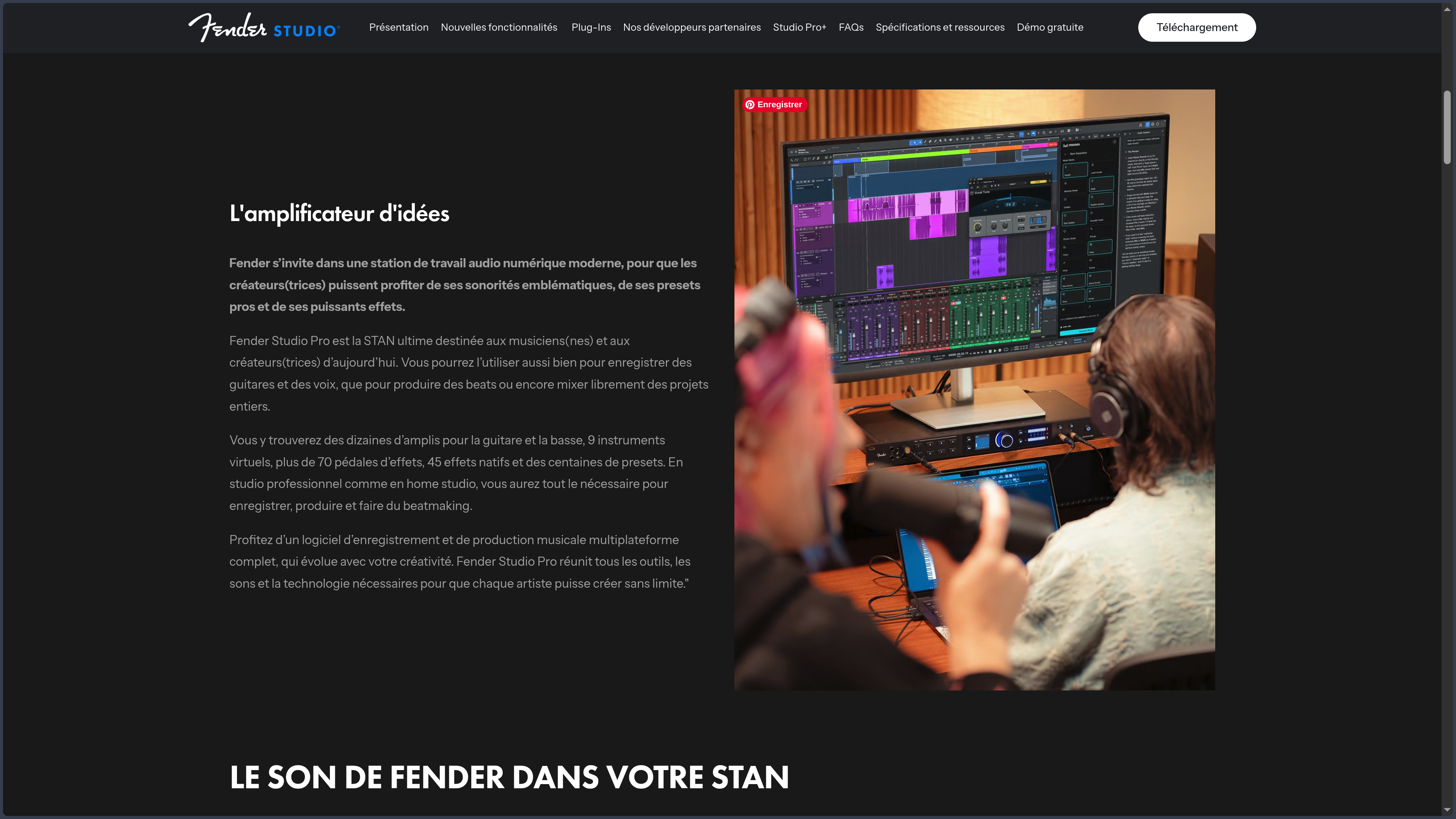
Fender Studio Pro is a digital audio workstation, or DAW, designed for recording, composition, editing, mixing, mastering and performance. Despite its new name, the software does not start from scratch: it is the direct continuation of Studio One Pro, developed for years by PreSonus before Fender brought part of its music creation tools together under the Fender Studio brand in 2026.
This lineage is essential to understanding the product. Fender Studio Pro retains the philosophy that already distinguished Studio One: a relatively direct environment built heavily around drag and drop, where instruments, effects, audio files, routing and arrangement elements can be manipulated without multiplying intermediate windows. It is less about imposing a particular method of composition than shortening the distance between an action and its result.
The software also covers several stages that sometimes remain separated in other environments. A track can be composed and recorded, sent to a dedicated mastering page, and then integrated into an environment for preparing live performances. This continuity between creation, finalization and performance is one of its most interesting aspects: Fender Studio Pro does not necessarily stop when the mix is finished.
The move under the Fender banner now adds another dimension. The Fender Mustang Guitar and Rumble Bass plug-ins directly integrate amps, cabinets, pedals and presets for guitarists and bassists. This orientation does not turn Fender Studio Pro into software intended only for guitar players. Virtual instruments, samplers, MIDI functions, vocal tools, stem separation, audio editing and mixing remain at the center of a DAW designed for much broader productions.
Version 8.1 also expands integrations with services such as Moises Studio and Splice, adds Vocal Tune, develops audio-to-MIDI conversion further and introduces Studio Assistant to provide technical help directly inside the software. The point is less to accumulate spectacular functions than to connect more of the different stages of work around the current project.
Fender Studio Pro runs on Windows and macOS. It should not be confused with Fender Studio, the free application available on more platforms and designed for quick recording, playing with Jam Tracks and capturing ideas. The two products can communicate, but they address different levels of production.
Features
Composing and arranging without unnecessary detours
Drag and drop remains one of the most visible principles of Fender Studio Pro. Instruments, effects, samples and other elements can be brought directly into the project, while many creation and routing operations are performed where they become necessary.
The Channel and Arrangement Overviews provide a condensed representation of the session to make navigation easier in projects containing many tracks or extended arrangements. This overview does not replace detailed editing, but it helps prevent a large production from becoming a long horizontal or vertical scroll that is difficult to navigate.
Harmonic work can rely on the Chord Assistant, which suggests relationships between chords and helps explore different directions without writing the progression in place of the musician. Sound Variations are more useful for complex arrangements, particularly when a virtual instrument contains several articulations or behaviors that need to be triggered within the same part.
Fender Studio Pro 8.1 also adds greater control over pitch directly on the timeline through Pitch Curves applied to audio events. The boundary between arrangement, correction and transformation therefore becomes more flexible: certain changes can be made directly on the musical material without interrupting the construction of the track.
Recording and then working precisely with audio
Fender Studio Pro handles multitrack recording of vocals, guitars, basses, hardware synthesizers and other sources connected to an audio interface. The software supports ASIO or WASAPI drivers on Windows and Core Audio on macOS, with buffer settings and monitoring options suitable for low-latency work.
Once audio has been recorded, the project can continue to evolve without systematically relying on external tools. Timing editing, transposition, dynamics processing and correction functions are integrated into the same environment.
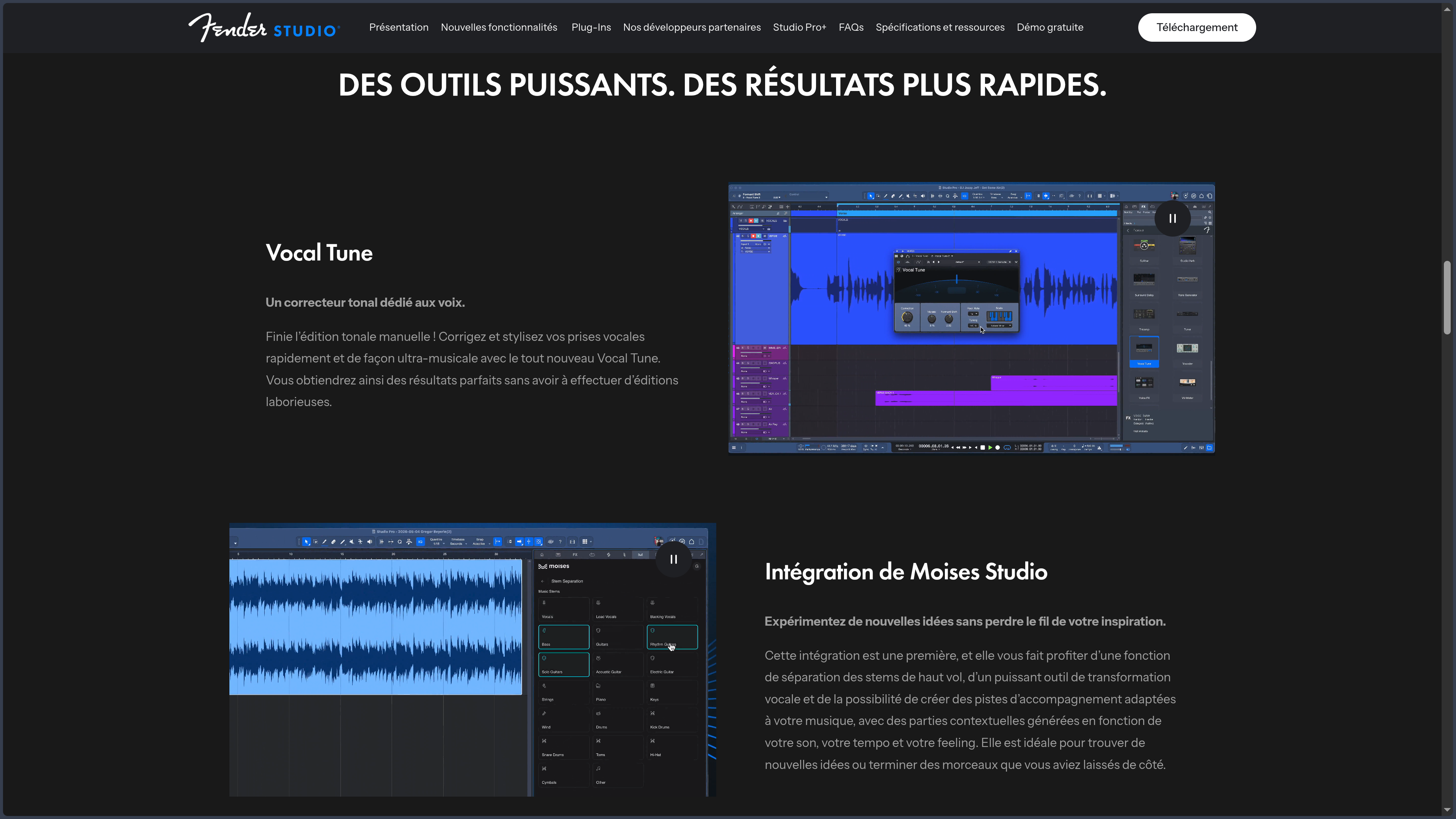
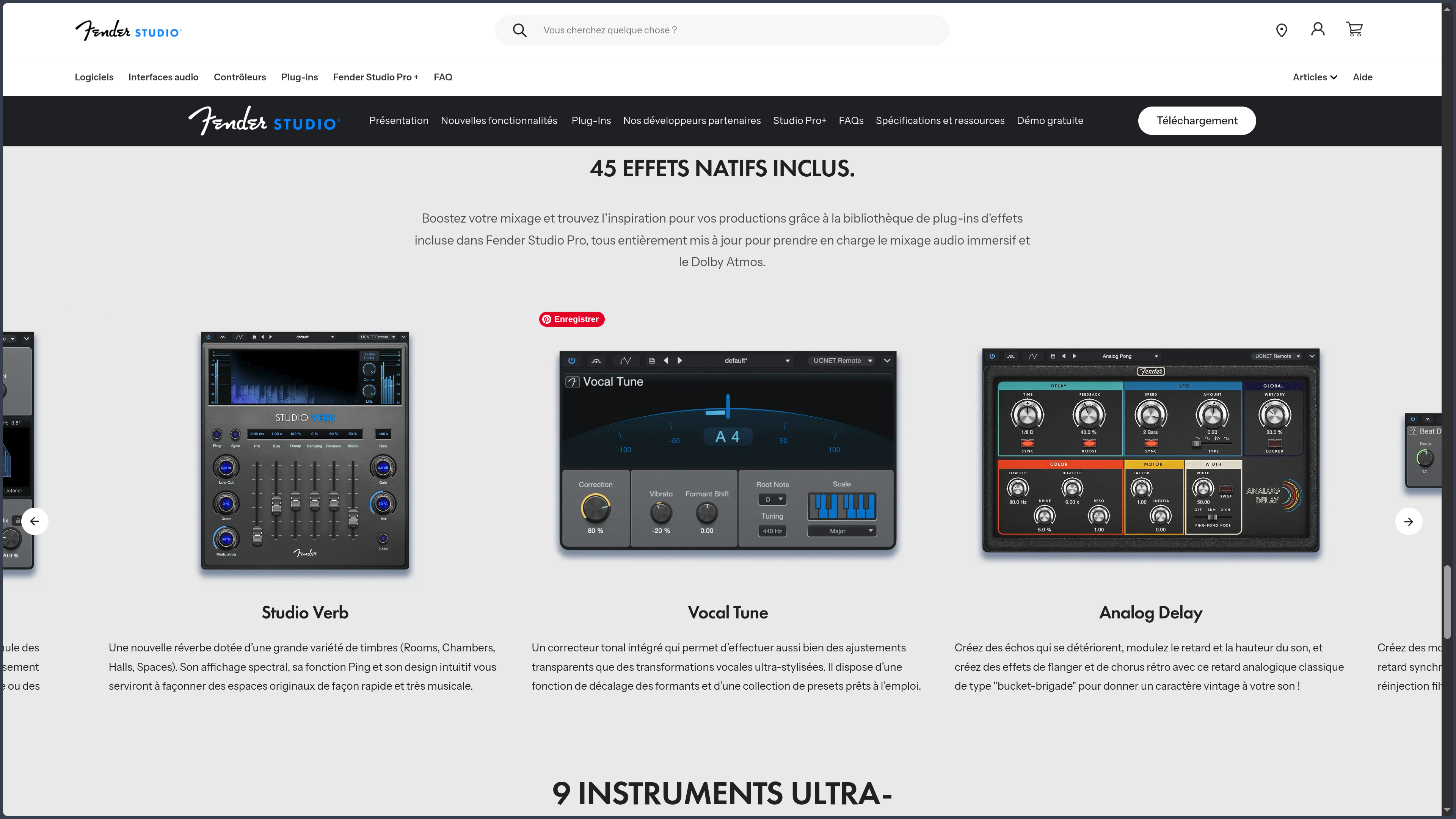
Vocal Tune, introduced with version 8.1, notably makes it possible to work on vocal pitch and formants. The goal can be relatively transparent correction or, on the contrary, a clearly audible transformation. This integration is useful because it places vocal processing directly inside the main workflow rather than reserving it for a specialized application.
The software can also separate an audio file into stems in order to isolate different elements of a mix, then convert certain audio content into editable MIDI notes. A recorded idea, sample or existing part can therefore become compositional material rather than remain a fixed file.
Making guitar and bass first-class parts of the workflow
The name change becomes much more concrete with the Fender Mustang Guitar and Fender Rumble Bass plug-ins. They integrate models of amps, cabinets, pedals and numerous presets directly into the DAW.
Fender advertises 39 guitar amps, 39 bass amps and 73 effect pedals within this collection. The value is not merely numerical. A guitar can be recorded clean and then receive its amplification and effects inside the project, leaving the sound open to change after the take without requiring the performance to be recorded again.
This integration makes Fender Studio Pro particularly coherent for musicians who work with both real instruments and computer-produced elements. Guitar, bass, virtual drums, synthesizers and vocals can share the same project without the real-instrument side being treated as a separate workflow.
The software remains compatible with audio interfaces other than Fender or PreSonus models. The company ecosystem can provide additional integration, but owning Fender hardware is not required to record and produce with Studio Pro.
Transforming sounds instead of only recording them
Fender Studio Pro includes more than 45 native effects and nine virtual instruments, covering both fundamental mixing treatments and sound design and synthesis.
The Sample One and Impact samplers can build instruments or kits from existing sounds, while audio-to-note conversion tools make it easier to move between recorded material and MIDI programming. A loop or played phrase can therefore become the starting point for a new part instead of remaining tied to its original recording.
Native stem separation follows the same logic. It can be used to recover certain elements from a reference track, prepare a remix, isolate a vocal or study a production in greater detail. The Moises Studio integration goes further by adding functions capable of isolating or transforming elements and generating accompaniments suited to the musical context.
Splice is also integrated into the workflow for finding and using samples while taking the project’s tempo, groove or key into account. These services do not replace the fundamental functions of the DAW, but they reduce unnecessary switching when the creative process depends on external resources.
Mixing and then moving into actual mastering
Fender Studio Pro provides a complete mixing environment with tracks, effects, sends, buses, automation and various processing tools. A project can be organized as a relatively simple session or develop into much more elaborate routing according to its needs.
One of its historical distinctions lies in its continuity with a dedicated mastering page. Several completed tracks can be brought together there to work on their overall consistency, levels and preparation for distribution. The logic changes at this point: the goal is no longer simply to improve an isolated track, but to consider several pieces as a coherent whole.
This separation between production and mastering remains close enough that a change to the song does not require rebuilding the entire finalization process from scratch. For an album, EP or group of tracks intended for release together, this relationship can considerably simplify version management.
The software also supports Dolby Atmos workflows and, with version 8.1, offers personalized headphone monitoring intended for immersive work. These capabilities go far beyond the needs of a conventional stereo project, but they allow the same environment to support productions aimed at more complex formats.
Preparing the track for the stage
The Show Page turns completed productions into elements of a performance setup. Songs, backing tracks and other resources can be brought together in a setlist to prepare a concert without rebuilding each track as an independent project.
The software can therefore move from being a studio tool to becoming a control center for the stage. A musician can organize several songs, preserve the necessary instruments or processing and build the order of a set within an environment dedicated to this use.
Video support in the Show Page expands this role further for performances combining music and visual elements. It is not a full video editing application, but rather a function intended to synchronize visuals with the musical performance.
This continuity between arrangement, mastering and live performance distinguishes Fender Studio Pro from DAWs whose workflow essentially ends when the track is exported.
Connecting the computer to Fender Studio
Fender Studio Pro can synchronize projects with the Fender Studio application. An idea captured quickly on another device can therefore continue its life inside the more complete DAW once the project requires more tracks, editing or mixing.
Existing tracks then become the starting point of the arrangement rather than simply a reference that must be imported and manually rebuilt.
This connection gives meaning to the coexistence of the two applications. Fender Studio remains a lightweight tool for recording, practicing or preserving an idea; Fender Studio Pro takes over once that idea needs to become a full production.
The system is still young under its new Fender identity. The ecosystem is gradually bringing software, audio interfaces, controllers and services together around the same account and projects, but its PreSonus lineage remains clearly visible in the architecture and documentation.
Use Cases
Recording a song around guitar or bass
A musician can plug a guitar into an audio interface, record a clean take and then choose an amp and effects in Mustang Guitar. Bass can follow the same logic with Rumble Bass, while virtual drums, a synthesizer and vocals gradually complete the arrangement.
Because the amp sound is not permanently printed into the recording, its settings can continue to evolve with the song. A guitar that feels too dark once the bass has been added can be reworked without recording the performance again.
The workflow therefore stays centered on the music rather than separating instrumental recording from computer-based production.
Turning a demo into a complete production
An idea can begin with a few chords, a vocal and a simple rhythm. Chord Assistant can help explore the progression, virtual instruments enrich the arrangement and samplers build rhythmic or textural elements.
A recorded vocal can then be edited with Vocal Tune, while an audio passage can be converted into MIDI or separated into stems to open new production possibilities. The project develops progressively without requiring a different application at every new stage.
This continuity is particularly suitable for singer-songwriters and producers who prefer to remain in the same environment from the first demo through to the final mix.
Continuing an idea captured away from the studio
A guitar, vocal or small demo can be recorded quickly in Fender Studio when a full production computer is not available. The project can then be synchronized with Fender Studio Pro to continue the work in a much more developed environment.
The existing tracks then become the starting point for the arrangement instead of simply serving as a reference that would need to be imported and rebuilt manually.
This bridge does not replace a complete mobile setup for complex productions, but it answers a very practical situation: preserving an idea when the studio is out of reach, then continuing exactly that work later.
Preparing an EP and then the live set
Several tracks can be produced separately before being brought together in the mastering page. Levels, overall balance and consistency between the tracks can then be worked on at the scale of the complete project.
Once the tracks are finalized, some of them can move into the Show Page to prepare a performance with backing tracks, virtual instruments and video elements. The same environment then accompanies a work from composition through publication and stage presentation.
It is in this kind of journey that Fender Studio Pro’s architecture reveals its difference most clearly: the stages remain distinct, but they are not isolated from one another.
Conclusion
Fender Studio Pro is both a new product and software with a long history. Its name change should not obscure the essential point: it is the continuation of Studio One Pro, with a mature workflow that has had years to develop. Fender now adds its own instrumental culture, amplification models and a broader ecosystem connecting software, hardware and services.
This combination produces something more interesting than simply a DAW wearing a guitar brand’s colors. Fender Studio Pro remains capable of working with MIDI, virtual instruments, samples, vocals, immersive mixing or fully electronic productions. The Fender functions are most valuable when they reduce the distance between the musician playing an instrument and the producer working on the track afterward.
Its other major strength lies in its breadth without excessive fragmentation. Composition and mixing remain central, but mastering has its own environment and performance has the Show Page. For creators who want to carry a project far beyond the recording stage, this continuity can reduce the number of tools and transfers required.
Version 8.1 nevertheless adds many services, assistance functions and connected features to software that was already dense. Moises, Splice, Studio Assistant, stem separation, vocal tools and other integrations can accelerate certain workflows, but they are not in themselves the reason to choose Fender Studio Pro. Its main appeal remains the balance between a traditional DAW deep enough for serious productions and an interface that tries to make those capabilities accessible without turning every operation into a procedure.
For a producer primarily attached to Ableton Live’s clip-based workflow, FL Studio’s pattern system or Pro Tools’ highly codified studio editing, other environments will retain a more specific identity. Fender Studio Pro becomes particularly convincing for those who want a coherent general-purpose tool capable of moving naturally from recording and composition to mastering and live performance, with a now very pronounced focus on guitarists and bassists.
Points to Consider
-
Fender Studio and Fender Studio Pro are two different products: Fender Studio is a lighter free application for recording, practicing and capturing ideas, while Fender Studio Pro is the professional DAW derived from Studio One Pro. Compatibility between the two does not mean they offer the same functions or support the same platforms.
-
Studio One Pro became Fender Studio Pro: the 2026 name change continues the PreSonus software rather than replacing it with a new application. Studio One Pro 7 license holders may qualify for upgrade conditions depending on their license and support period.
-
A perpetual license does not mean free updates for life: purchasing Fender Studio Pro provides permanent access to the acquired version and includes one year of new features. Continuing to receive developments after that period may require an extension or upgrade.
-
Pro+ follows a different model from the standalone perpetual license: Fender offers annual and monthly plans combining the software with additional content and services. The permanent right to use a version of the software should therefore be distinguished from ongoing access to Pro+ benefits.
-
Prices can vary with promotions: Fender lists a reference price for the perpetual license but regularly offers discounts or specific upgrade conditions. The amount actually paid may therefore differ from the catalog price.
-
Some newer functions rely on connected services: Moises Studio, Splice and other integrations significantly expand the workflow but also add a layer of external services around the DAW. The core recording, composition and mixing functions remain usable independently of these integrations.
-
A Fender account is required for installation and activation: Fender Studio Pro is registered and managed through My Fender. An offline activation procedure also exists for computers without a permanent Internet connection.
-
Windows and macOS only for Studio Pro: unlike the free Fender Studio application, which is also available on mobile devices and Linux, Fender Studio Pro is officially intended for Windows and macOS computers.
-
The breadth of the software requires real learning: drag-and-drop operation makes many tasks immediate, but mastering, Show Page, routing, automation, Dolby Atmos and advanced editing tools create a much larger environment than the relatively approachable interface initially suggests.