
Overview
An image needs to be generated.
A model has to be loaded.
A prompt written.
A resolution chosen.
A LoRA added.
A reference image used.
The pose controlled.
The face corrected.
The result passed through a second model.
Upscaled.
Then turned into video.
In many tools, these operations appear as buttons, tabs, and options whose relationships remain hidden.
In ComfyUI, everything is laid out on the table.
Literally.
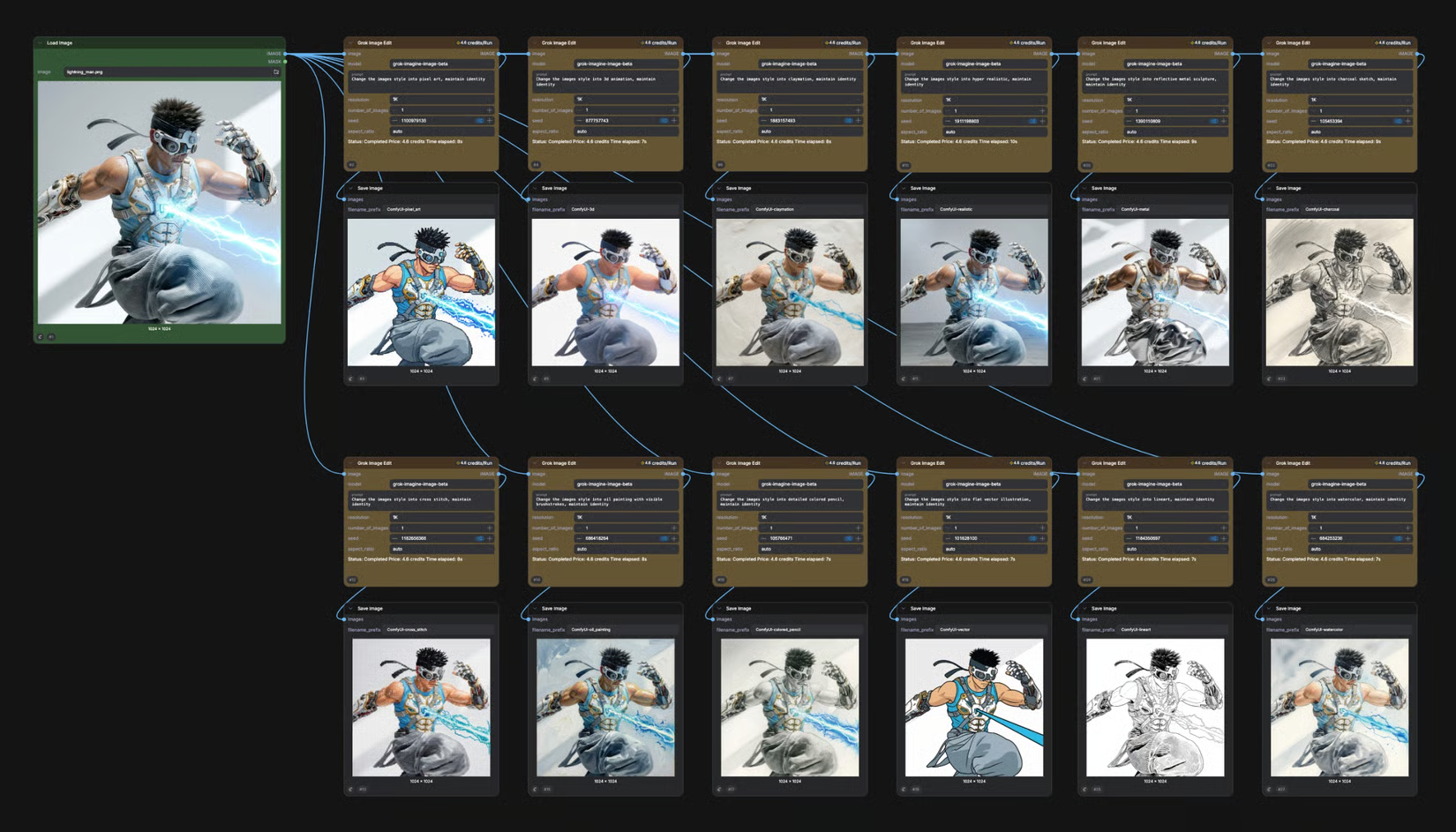
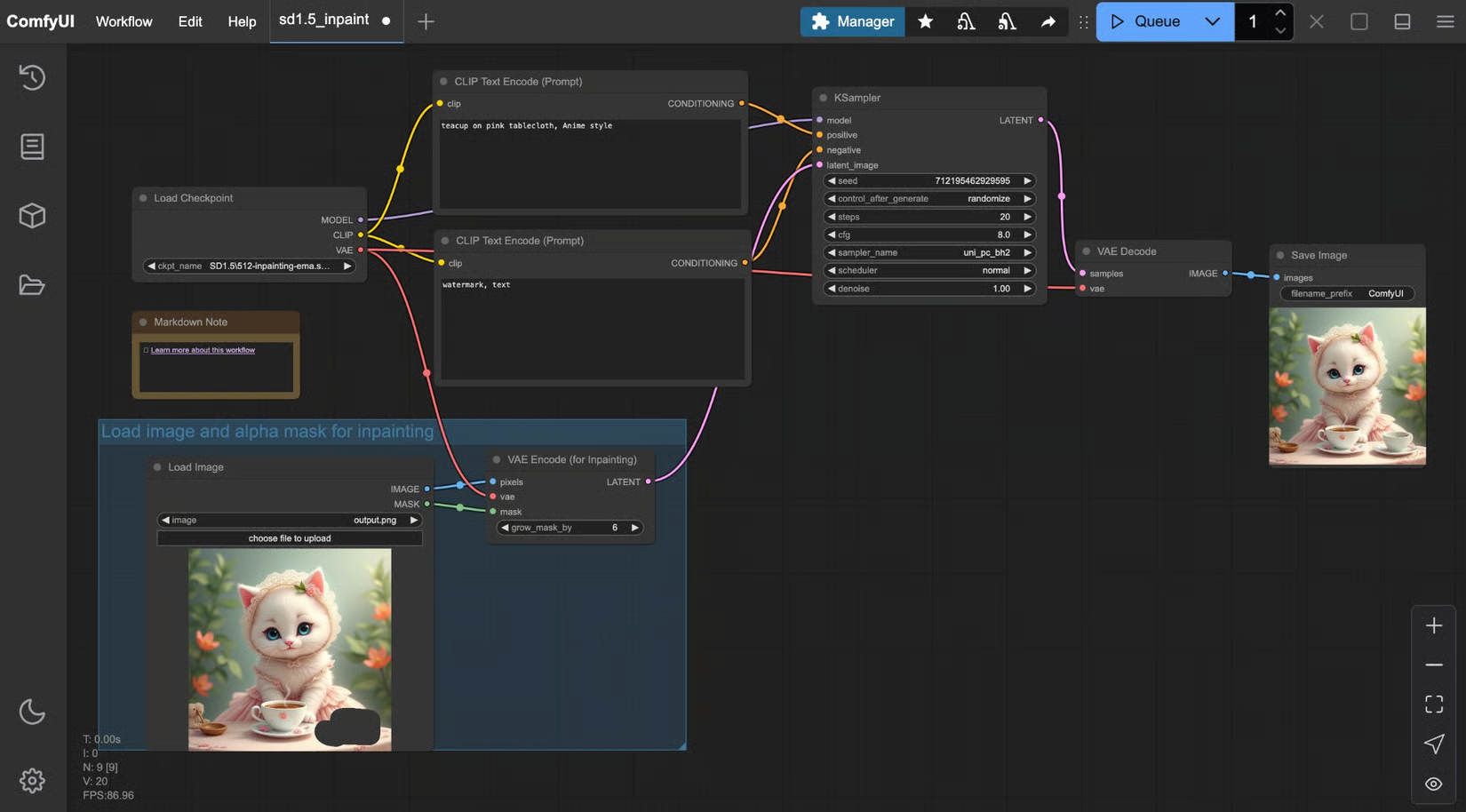
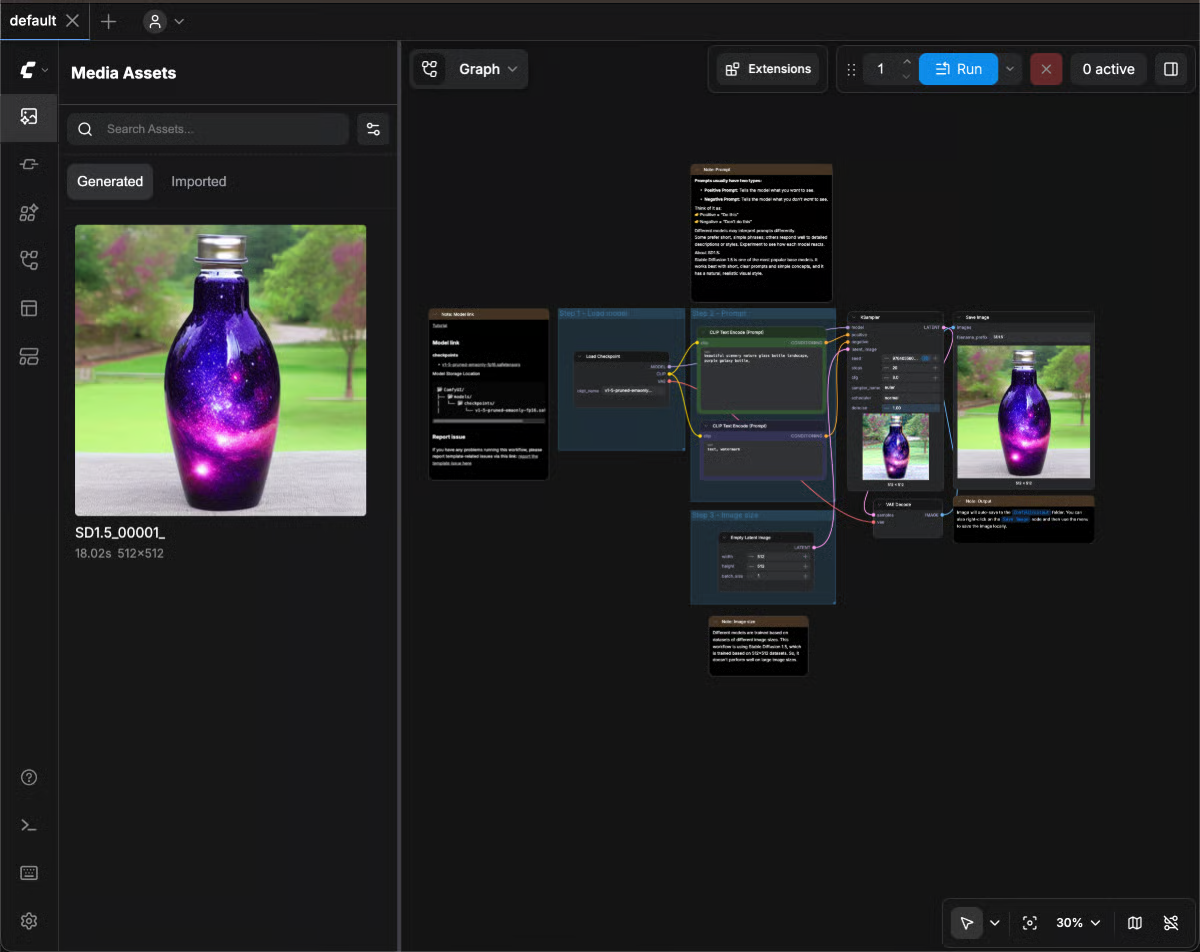
ComfyUI turns the generation pipeline into a visual graph: every model, parameter, transformation, and output becomes a node that can be connected to the others.
The model stops being a black box surrounded by a Generate button.
You can see what goes in.
You can see what comes out.
And, above all, you decide what happens in between.
This logic explains both ComfyUI’s power and its slightly intimidating appearance.
A first workflow may contain seven blocks.
An advanced video project may display several dozen, connected by enough cables to make it look as though a network engineer decided to retrain in generative art.
But behind this visual complexity lies a remarkably simple idea:
ComfyUI does not merely give you a generator. It lets you build the generator you need.
Much more than a Stable Diffusion interface
ComfyUI was born within the diffusion-model ecosystem and remains strongly associated with Stable Diffusion.
That definition is no longer enough.
The engine can now orchestrate workflows around numerous model families designed for:
- image generation;
- image editing;
- video;
- audio;
- 3D;
- segmentation;
- upscaling;
- multimodal models;
- certain language models;
- intermediate processing;
- AI services accessible through APIs.
Models change quickly.
The architecture remains.
A workflow using SDXL can give way to Flux, Qwen Image, or another family.
A video pipeline can use Wan, LTX, or HunyuanVideo.
One node can generate an image locally while another calls a remote proprietary model.
This ability to replace individual building blocks without rebuilding the entire logic is probably one of ComfyUI’s most important strengths.
The model is one piece.
The workflow is the method.
A programming interface without really programming
ComfyUI belongs to the family of visual programming tools.
Each node performs an operation.
A connection passes data.
A simple workflow might look like this:
model → prompt → latent → sampler → decoding → image
But there is no reason to stop there.
An image can be sent to a ControlNet.
Another can become a reference.
A mask can isolate an area.
An upscale can be followed by a new diffusion pass.
The result can then enter a video model.
The video can be interpolated, enhanced, or paired with an audio track.
This logic gradually changes the user.
At first, they search for the right prompt.
Then they begin searching for the right process.
That is an important shift.
The prompt describes an intention.
The workflow describes how the machine will attempt to achieve it.
Local, Cloud, and Partner Nodes: three ways to use Comfy
The Comfy ecosystem now contains several layers that need to be distinguished.
| Mode | Principle |
|---|---|
| ComfyUI Local | Run workflows for free on your own hardware |
| Comfy Desktop | Install and manage one or more local instances more easily |
| Partner Nodes | Call proprietary or hosted models from a ComfyUI workflow |
| Comfy Cloud | Run ComfyUI on GPUs managed by Comfy |
| Comfy API | Turn workflows into processes that applications can call |
| Comfy MCP | Allow certain AI agents to interact with workflows |
This distinction avoids an increasingly common confusion.
ComfyUI itself remains free.
A workflow made entirely from locally installed models can run without a subscription and without consuming credits.
However, when a node calls a paid remote service or the workflow is executed in Comfy Cloud, credits may be consumed.
The same canvas can therefore represent two almost opposite philosophies:
a fully local workshop controlled by its owner;
or a common interface connecting local resources with cloud services.
A recipe that can travel
A ComfyUI workflow can be saved as a JSON file.
Generated PNG images can also embed metadata related to the workflow.
This small detail explains part of ComfyUI’s culture.
An image is no longer merely an image.
It can preserve a trace of how it was produced.
When the required models and nodes are available, the workflow can be reopened, studied, modified, and executed again.
Creation therefore becomes more reproducible.
Instead of writing:
“I think I used this model, a CFG around 5, maybe that LoRA, and probably another sampler.”
you can sometimes simply reopen the recipe.
For a tool based on probabilistic systems, preserving the memory of the process is already a small victory over chaos.
Features
Building workflows with nodes
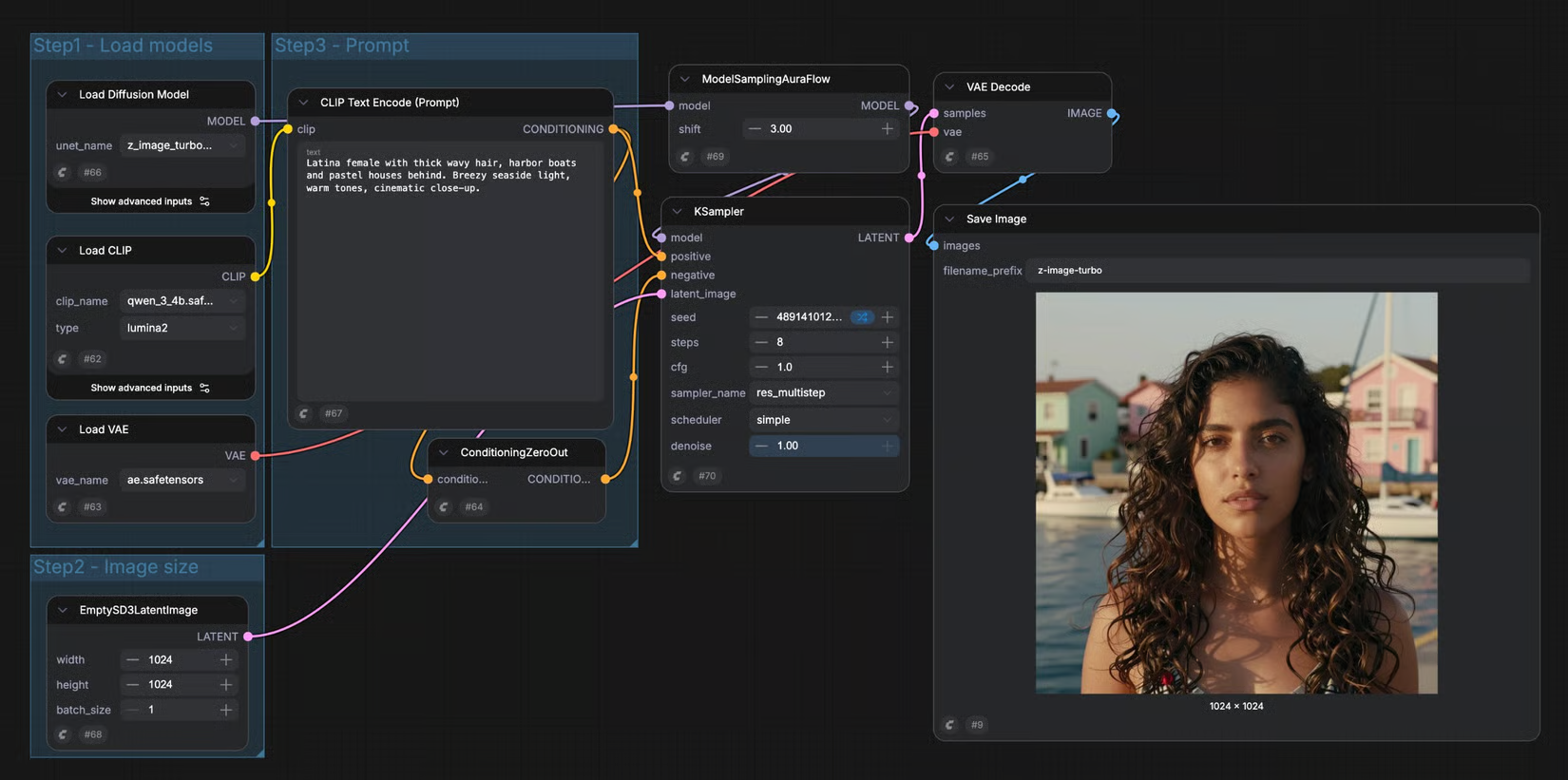
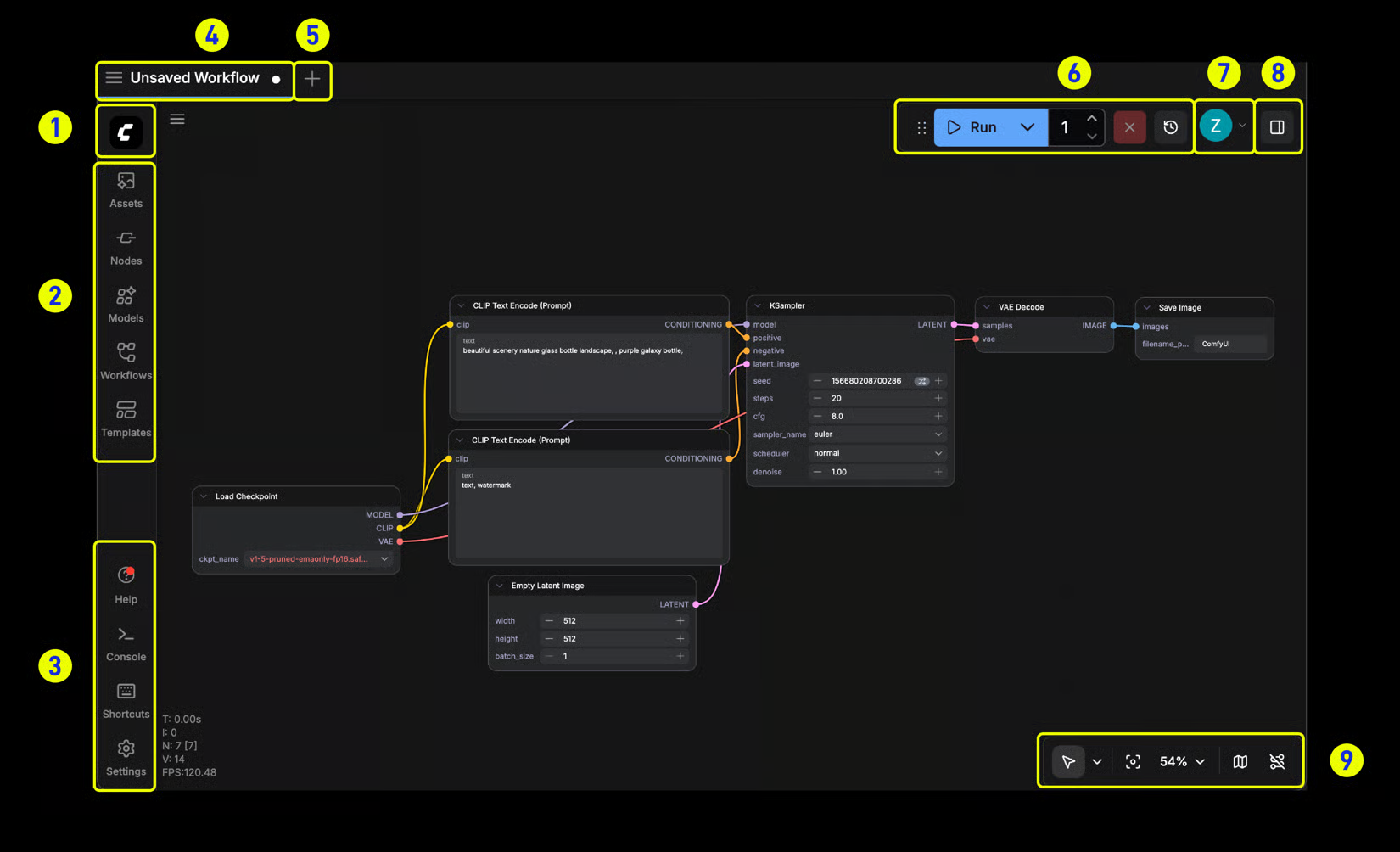
The canvas is the heart of ComfyUI.
Each operation is represented by a node with inputs, outputs, and various parameters.
Connections show how data flows.
In a conventional image workflow, you might encounter elements such as:
- model loading;
- text encoder;
- positive prompt;
- negative prompt;
- latent generation;
- sampler;
- scheduler;
- VAE;
- image saving.
A more complex workflow can add references, masks, ControlNet, LoRA, upscale, detection, segmentation, compositing, and other transformations.
The point is not simply to make an existing pipeline visible.
It is to make it editable.
A node can be replaced.
A branch can be added.
One output can feed several processing steps.
Two methods can be compared inside the same graph.
You no longer move between fifteen panels to understand what the software is doing.
The opposite problem appears: everything is visible.
Absolutely everything.
Transparency can sometimes have a very strong spaghetti-cable flavor.
Controlling inference in depth
Simpler generative interfaces often hide part of the technical configuration.
ComfyUI exposes it.
Depending on the models being used, the workflow can control parameters such as:
- seed;
- number of steps;
- sampler;
- scheduler;
- CFG;
- resolution;
- conditioning;
- denoise;
- VAE;
- encoders;
- model precision;
- processing order;
- successive passes.
This level of granularity becomes useful when someone is trying to understand why two generations behave differently.
The model is only one part of the equation.
The sampler changes the way noise is removed.
The number of steps changes the computation.
Denoise determines how far an original image may be transformed.
The seed can make it possible to compare several settings from a similar base.
ComfyUI therefore makes visible something that simpler interfaces often prefer to hide:
generation is a process, not a button.
Combining checkpoints, LoRA, and other components
Modern models are not always limited to a single file.
A workflow may use several components:
- checkpoint or diffusion model;
- VAE;
- text encoder;
- CLIP Vision;
- LoRA;
- ControlNet;
- upscale model;
- detection models;
- segmentation models;
- specialized audio or video models.
ComfyUI allows these combinations to be built explicitly.
Several LoRA can be applied.
Different models can intervene at multiple points in the same pipeline.
A first stage can generate the composition.
A second corrects details.
A third enlarges the image.
A fourth transforms the result.
This modularity explains why ComfyUI follows the extremely rapid evolution of generative AI relatively well.
When a new method appears, it can often become another building block instead of requiring an entirely new application.
Working with many model families
The compatible catalog evolves almost constantly.
ComfyUI currently supports workflows around many image and video families, including SDXL, Stable Diffusion 3.5, Flux, Qwen Image, Wan, LTX Video, HunyuanVideo, and many others.
Models can also be used for:
- image editing;
- inpainting;
- outpainting;
- depth;
- pose;
- segmentation;
- interpolation;
- audio generation;
- 3D;
- upscaling.
The list quickly becomes absurd to maintain inside a tool profile.
And that is precisely the point.
ComfyUI’s value does not come from a fixed list of compatible models.
It comes from an architecture designed to integrate the next ones.
The best engine of 2026 may not exist in the same form two years from now.
A workflow environment has a better chance of surviving that rotation than an interface built around one model.
Using Workflow Templates
Starting from an empty canvas is not always a great experience.
ComfyUI now provides a Workflow Templates browser.
These workflow templates offer ready-made configurations for different model families and use cases.
When loading an official template, ComfyUI can check whether the required files are present and report missing models.
On Desktop, certain downloads can be handled directly.
This approach considerably lowers the first step.
Instead of asking a beginner to immediately understand why a text encoder must connect to a sampler that itself receives a latent produced somewhere else, the template shows a working construction.
They can then modify one part.
Then another.
Then gradually understand why everything collapses when they disconnect the purple cable they thought was decorative.
Preserving the workflow inside images
The Save Image node can store generated images as PNG files containing workflow metadata.
An image produced with ComfyUI can therefore preserve the settings involved in its creation.
This becomes useful for:
- archiving experiments;
- recovering an old workflow;
- transmitting a method;
- analyzing a generation;
- reproducing an image with different parameters;
- sharing a pipeline.
This way of treating the image as a carrier of its own process is elegant.
It brings the final output closer to the source file.
A JPEG exported from painting software does not usually contain the layers of the original document.
With ComfyUI, a PNG can sometimes remind you how the kitchen was organized when the dish came out.
Extending ComfyUI with Custom Nodes
The custom nodes system is one of the main reasons the ComfyUI ecosystem has exploded.
Developers can create their own nodes to add new functions.
They can integrate:
- new models;
- preprocessors;
- image-processing tools;
- video tools;
- loaders;
- control systems;
- interfaces;
- automations;
- external services;
- utility functions.
This turns ComfyUI into an extensible platform.
A feature that does not exist in the core software may already be available inside a community package.
That speed is extraordinary.
It comes at a price.
Every extension also introduces code, dependencies, and another version that may decide it no longer wants to cooperate with the rest of the installation on Tuesday morning.
Installing and maintaining extensions with ComfyUI Manager
ComfyUI Manager simplifies custom-node management.
In current versions, it can notably:
- search for extensions;
- install them;
- update them;
- disable them;
- identify missing nodes;
- manage certain models;
- create snapshots;
- restore certain states of the installation.
When an imported workflow contains missing nodes, Manager can help find the corresponding packages.
This function is essential in an ecosystem where workflows circulate between users.
Without it, receiving an advanced graph could quickly become a detective game:
“Which GitHub repository did UltimateImageLoaderAdvanced come from again?”
Manager does not eliminate every dependency issue.
It simply turns part of the archaeology into package management.
Centralizing extensions with the Comfy Registry
The Comfy Registry is a public catalog of custom nodes.
Developers can publish, version, and deprecate their packages there.
The Registry also uses versioning to better identify components used inside workflows.
This addresses an important problem.
A workflow works today.
A custom node receives an update tomorrow.
Its API changes.
The workflow stops working.
By recording versions more precisely, ComfyUI is trying to make pipelines more reproducible.
The Registry also participates in checking certain packages and feeds the Manager.
This does not automatically turn every community plugin into perfectly safe software.
But the ecosystem is beginning to develop mechanisms closer to a real dependency manager than the traditional:
“Download this ZIP I found in a Discord comment and put it in custom_nodes.”
Progress sometimes takes very practical forms.
Simplifying graphs with Subgraphs
Large workflows quickly become difficult to read.
Subgraphs allow several nodes to be grouped into one reusable block.
A group dedicated to upscaling can become a subgraph.
A mask-processing chain can become another.
A complex system can therefore be divided into modules.
Subgraphs can also be nested and transformed into reusable components.
This brings ComfyUI closer to modular programming.
Instead of copying twenty nodes into every project, you build a visual function.
It receives certain inputs.
It performs its work.
It returns outputs.
The canvas can breathe again.
At least until someone opens the subgraph and discovers the forty-seven nodes that had been carefully hidden inside.
Running only part of a workflow
Partial Execution makes it possible to launch only the part of the graph needed for a selected output.
This becomes valuable in heavy workflows.
A pipeline may generate an image, upscale it, and then produce several variations.
If you only want to test one branch, recalculating everything is not always necessary.
This logic reduces:
- computation time;
- GPU usage;
- unnecessary generations;
- costs in certain cloud environments;
- waiting during experimentation.
ComfyUI also has execution logic capable of reusing certain results when part of the graph has not changed.
Users therefore end up learning a new discipline:
change only what is necessary to avoid asking the graphics card to repeat two minutes of computation because one word changed in the last branch.
Turning a complex graph into an interface with App Mode
One of ComfyUI’s historical criticisms is obvious.
Workflows can become incomprehensible to someone who did not build them.
App Mode tries to solve this problem.
The workflow creator can select which parameters should be exposed to the final user:
- prompt;
- input image;
- model choice;
- strength;
- resolution;
- other useful controls.
The rest of the graph remains hidden behind a simplified interface.
The workflow then becomes almost a small application.
This changes a lot when it comes to sharing.
A technical artist can build a complex pipeline.
An illustrator can then use it without understanding every connection.
A team can distribute a method rather than an electrical diagram.
App Mode keeps all the complexity under the hood without forcing every passenger to learn mechanics.
Installing more easily with Comfy Desktop
Traditional ComfyUI installation involves dealing with Python, PyTorch, GPU drivers, model folders, and dependencies.
Comfy Desktop aims to simplify this part.
The modern launcher can manage several ComfyUI instances.
Each instance has its own:
- versions;
- custom nodes;
- settings;
- Python environment.
This isolation becomes useful for advanced users.
One instance can remain stable for an important project.
Another can be used to test the latest features.
A third can host that custom node found at one in the morning whose installation begins with a reassuring sentence such as:
“This may break some dependencies.”
Desktop officially supports prebuilt installations on Windows and Apple Silicon macOS. The ComfyUI core can also run on Linux with an appropriate installation.
Running workflows in Comfy Cloud
Comfy Cloud offers the same workflow logic without requiring a local GPU.
The environment is accessible from the browser.
Models and many popular custom nodes are preinstalled.
Comfy states that its Cloud infrastructure uses RTX 6000 Pro Blackwell GPUs with 96 GB of VRAM.
This opens workflows that are difficult to run on a personal machine.
Heavy video models can become accessible from a laptop.
The cloud also offers a library of hundreds of models already available.
Operation remains credit-based.
Creating or modifying the graph costs nothing.
Credits are used when the GPU executes the workflow or when a paid Partner Node is called.
The cloud therefore transforms the hardware problem:
you stop asking whether you have enough VRAM.
You start watching the credit counter.
Problems change.
They never disappear completely. That is probably a fundamental law of computing.
Importing certain personal models into the Cloud
Higher Comfy Cloud tiers allow certain models and LoRA to be imported from platforms such as Hugging Face or CivitAI.
This makes it possible to bring the cloud environment closer to a customized local setup.
The possibility remains more constrained than a local installation, however.
Cloud favors safer formats such as Safetensors and a managed infrastructure.
The user does not have the same arbitrary access to Python or the underlying system.
This difference summarizes the two philosophies rather well.
Local: maximum freedom, personal maintenance.
Cloud: controlled environment, delegated maintenance.
Calling proprietary models with Partner Nodes
Partner Nodes make it possible to insert external services directly into a workflow.
A node can call a proprietary model hosted by a partner without requiring the user to build the complete API integration manually.
The official ecosystem includes providers in several fields:
- image;
- video;
- text;
- audio;
- 3D;
- upscale.
Models from providers such as OpenAI, Google, ByteDance, Kling, Runway, Luma, Black Forest Labs, Ideogram, Recraft, MiniMax, Tripo, or Meshy may appear as Partner Nodes depending on the current catalog.
This gives ComfyUI an interesting position.
The workflow can combine:
local open-source model → local processing → remote proprietary model → local post-processing
without leaving the canvas.
The word “local” therefore deserves a small asterisk.
A ComfyUI workflow can be entirely local.
But a ComfyUI workflow can also enthusiastically call the Internet as soon as the right nodes are connected.
Turning workflows into an API
ComfyUI can operate as a backend.
Its local API allows workflows to be submitted, inputs provided, execution tracked, and results retrieved.
Comfy Cloud also offers an API for hosted workflows.
This makes it possible to integrate ComfyUI into:
- an application;
- a website;
- an internal tool;
- an automated pipeline;
- batch processing;
- a generation service;
- creative software.
The visual workflow then becomes the equivalent of a program.
The interface is used to build and test it.
The application then calls it without necessarily showing the graph to the final user.
This combination is particularly useful for developers who do not want to recode an entire visually validated model chain in Python every time the pipeline changes.
Connecting agents through MCP
Comfy is also developing tools around the Model Context Protocol — MCP.
The goal is to allow certain AI assistants or agents to launch and manipulate workflows through natural language.
An agent can potentially:
- search for models;
- search for nodes;
- select a workflow;
- generate an image;
- generate a video;
- produce audio;
- launch 3D generation.
Comfy Cloud MCP is still evolving, and certain functions may remain in beta or be gradually rolled out.
But the direction is interesting.
The workflow is no longer used only by a human clicking Run.
It becomes a capability another software system can call.
ComfyUI then begins to resemble a kind of graphics engine for creative agents.
Developing your own nodes
ComfyUI is written primarily in Python and has an architecture designed for extension.
A developer can create a custom node to integrate:
- a model;
- an API;
- an algorithm;
- an interface;
- a transformation;
- an internal studio tool.
This extensibility turns ComfyUI into infrastructure.
A studio does not have to wait for a particular function to be added officially.
It can develop its own component and place it directly into the team’s workflows.
The boundary between user and developer then becomes very thin.
You begin by moving nodes.
Then editing a JSON file.
Then a small Python script.
Then, at some point that is rather difficult to date precisely, you own a GitHub repository and three people are asking why version 1.4 of the internal node is breaking their Friday workflow.
Welcome to software development.
Use cases
Building a character-creation pipeline
An artist regularly needs to generate the same type of character.
They want to control:
- the model;
- several LoRA;
- pose;
- face;
- depth;
- resolution;
- final upscale.
In a conventional interface, several options would have to be reconfigured for every generation.
In ComfyUI, the workflow is built once.
Parameters that change regularly can be placed in easily accessible areas or exposed through App Mode.
Everything else becomes the production method.
The artist no longer reinvents the pipeline for every image.
They modify the inputs.
This distinction becomes particularly valuable when several hundred images need to follow the same rules.
Building a character-design sheet
A workflow can receive a starting image or identity.
Several branches then produce different views.
One branch works on the portrait.
Another on the full silhouette.
Another on the pose.
Another enlarges specific details.
Control systems can help guide pose, composition, or references.
The outputs can be saved separately and then assembled in another tool.
ComfyUI does not automatically become character-design software.
It allows you to build a specialized machine for a particular stage of character design.
That distinction is fundamental.
The general-purpose tool becomes the material from which you build your own tool.
Creating an image-to-video pipeline
An image is generated with a specialized model.
It then goes through a correction stage.
The face is restored or refined.
An upscaled version is created.
That image is sent into an image-to-video model.
Intermediate frames can then be interpolated or enhanced.
The entire pipeline can live inside the same graph.
A workflow might, for example, follow this logic:
prompt → image → reference → correction → upscale → video → interpolation → export
The main advantage is not merely the number of tools.
It is their connection.
The approved image automatically becomes the input for the video.
No temp_final_good_version_3 folder is theoretically necessary.
Theoretically.
We are still talking about human beings working with files.
Automating multiple image variations
A studio needs to produce twenty variations of one visual.
Same composition.
Same character.
Different colors, prompts, or seeds.
ComfyUI can automate these variations using branches, batches, or variable parameters.
Results can be generated in series.
This approach becomes useful for:
- advertising;
- concept art;
- style testing;
- character variations;
- visual research;
- game assets;
- social media.
Generation stops being a sequence of manual clicks.
It becomes a process.
Building an upscale and restoration pipeline
An old or generated image needs to be improved.
A workflow can combine several stages:
- image loading;
- detection or segmentation;
- restoration;
- upscale;
- light diffusion pass;
- face correction;
- export.
Each step remains visible.
The creator can compare different branches.
One preserves more of the original image.
Another reconstructs more detail.
This visibility prevents upscale from being reduced to a mysterious “Enhance” slider.
You can see exactly where the image begins to improve.
And where the model may begin inventing a new pair of earrings that absolutely did not exist in the original photograph.
Working entirely locally
An illustrator has a sufficiently powerful machine and wants to keep files on their own computer.
They install models locally and build workflows that do not require any Partner Node.
Images, prompts, and models then remain inside the local environment.
ComfyUI can even operate without an account for these open-source local uses.
This becomes important for:
- confidential projects;
- prototypes;
- internal data;
- unpublished work;
- users who do not want systematic dependence on the cloud.
It does not eliminate every security question.
Custom nodes are code executed locally.
Installing a dubious plugin on a private machine remains a rather creative way of transforming a privacy advantage into a cybersecurity problem.
Using a proprietary model inside a local pipeline
A creator prefers working locally but occasionally wants to use a model that cannot run on their machine.
They build most of the workflow with local models.
One branch then uses a Partner Node.
The result returns to the workflow and receives local post-processing.
This hybrid architecture allows each stage to be placed where it makes the most sense.
The question is no longer:
“local or cloud?”
It becomes:
“which parts actually need the cloud?”
That is a much more interesting approach.
It allows paid resources to be reserved for stages that genuinely add something.
Quickly testing a new model
A new image model appears.
The files are released.
ComfyUI adds or receives the required nodes.
A template circulates through the community.
A user can quickly compare the new model with the current pipeline.
Same reference.
Same resolution.
Similar processing.
Two branches.
Two results.
This experimental culture explains why ComfyUI has become one of the places where new models are tested very quickly.
There is no need to rebuild an entire application around every release.
It is often enough to integrate a new building block into the graph.
Sharing a workflow with a team
A technical artist builds a complex generation pipeline.
Other team members do not need to know the details of the sampler, ControlNet, or intermediate models.
The workflow can be prepared with App Mode.
A few parameters are exposed:
- prompt;
- reference;
- style;
- resolution.
The user clicks Run.
The pipeline remains identical for everyone.
This approach can improve reproducibility.
The technical artist controls the method.
The artists control the creative inputs.
ComfyUI then begins to look less like a personal tool and more like studio infrastructure.
Turning a workflow into a software feature
A team is developing a character-creation tool.
It already has a ComfyUI workflow capable of producing the desired images.
Instead of asking the final user to open ComfyUI, the application can send data to the backend through the API.
The product interface displays:
“Generate character”
Behind that button, a fifty-node graph performs the actual work.
This separation has considerable value.
People designing the pipeline can continue modifying it visually.
Developers do not need to reimplement every model change inside the product interface.
ComfyUI becomes less an application here than a graphics engine hidden behind another application.
Using Cloud GPU for video
A user has a graphics card that is fine for images but insufficient for certain video models.
They prepare the workflow and execute it in Comfy Cloud.
The remote infrastructure provides more VRAM.
The same node logic remains available.
This avoids:
- immediately buying another graphics card;
- installing several dozen gigabytes;
- certain CUDA or PyTorch complications;
- downloading every model locally.
In exchange, computation becomes billable.
The problem “my graphics card does not have enough VRAM” is replaced by:
“how much is this experiment going to consume?”
Economic physics has its own conservation law.
Building a reproducible production workflow
A team produces several hundred assets.
The images need to pass through the same stages.
The workflow can be versioned and preserved with the required models and custom nodes.
Subgraphs isolate certain functions.
Snapshots help recover a previous environment.
Outputs can be generated in batches or triggered through the API.
ComfyUI then becomes a way of formalizing a method.
What was previously:
“Julie knows how to get this result”
can gradually become:
“here is the workflow used to get this result.”
This shift from personal knowledge to a shareable procedure is one of the reasons node-based tools become so interesting in production.
PANACHES review
The first time you open ComfyUI, it is fairly easy to think:
“Why should I connect seven boxes to do what another tool does with one button?”
The question is perfectly legitimate.
Then the workflow grows.
A reference needs to be added.
Another model is introduced.
A mask needs to be preserved.
Two versions need to be compared.
A video needs to start from the final image.
And suddenly, the seven boxes begin to make sense.
ComfyUI is powerful precisely because it refuses to pretend that every creative workflow can fit behind the same button.
A tool that exposes the mechanics
Mainstream software generally tries to hide complexity.
That is often an excellent decision.
Nobody wants to manually choose a compression algorithm every time they send a photograph to a friend.
ComfyUI takes the opposite direction.
It exposes the mechanics.
The creator sees the models.
The encoders.
The conditioning.
The transformations.
The outputs.
This transparency becomes educational.
After some time, certain generative-AI concepts stop being abstract words.
You understand a VAE better because you have to connect it.
You understand that a LoRA is not a complete model because it acts on something else.
You understand that image-to-image follows a different logic from pure generation because the workflow is not constructed the same way.
ComfyUI can therefore teach a lot about generative AI simply because it refuses to hide its pipes.
The workflow matters more than the prompt
Popular culture around generative AI has focused enormously on prompting.
Finding the right words.
The right adjectives.
The magical phrasing.
ComfyUI quickly reveals the limits of that vision.
The prompt is only one input among many.
The result also depends on the model, references, sampler, conditioning, controls, LoRA, denoise, and the entire chain built around them.
That is probably one of the tool’s most interesting lessons.
Quality does not always come from a better prompt. Sometimes it comes from a better pipeline.
This idea brings generative AI closer to other creative professions.
A photographer does not summarize their work as the sentence spoken to the model.
A 3D artist does not summarize a render as the name of the shader.
A filmmaker does not summarize a film as its screenplay.
The process matters.
ComfyUI finally gives the process an interface.
Freedom that can become its own prison
Modularity is wonderful.
Until it is not.
A workflow can grow without any real discipline.
A correction is added.
Then another.
A custom node saves three nodes.
One dependency installs four more.
A branch is kept “just in case.”
Three months later, the canvas looks like the subway map of a city designed by someone who hated straight lines.
ComfyUI does not force good architecture.
It allows good architecture.
That is different.
Groups, subgraphs, naming conventions, and working methods become essential.
As in code, bad organization works perfectly well.
Until the day it needs to be modified.
The custom-node ecosystem is both its superpower and its chaos
Open source allows the community to move extremely quickly.
A new model is released.
A few days later, several implementations appear.
A very specific need exists.
Someone has probably built a node for it.
That energy is difficult to reproduce in a closed product.
But the other side is equally real.
Extensions can be abandoned.
Dependencies conflict.
A downloaded workflow can use eight different packs.
An update can break a component.
And, above all, a custom node is code.
It needs to be treated as such.
Not as an innocent Instagram filter simply because its rectangle has a pretty color.
The Registry, Manager, and verification mechanisms are gradually improving the situation.
They do not replace judgment.
Comfy Desktop fixes one of the historical weaknesses
For a long time, recommending ComfyUI to a non-technical person required a slightly worrying sentence:
“So, first you need to install Python...”
Then came CUDA, PyTorch, Git, and a few folders whose names seemed designed to discourage any artistic vocation.
Comfy Desktop significantly improves that entry point.
The environment becomes easier to install and maintain.
The ability to manage several instances is particularly clever.
It recognizes a reality of ComfyUI:
advanced users want both a stable environment and somewhere to happily break things.
Keeping the two separate is often an excellent idea.
App Mode may be more important than it looks
The complete graph is ideal for the person building the workflow.
It is often disastrous for the person who simply needs to use it.
App Mode creates a separation between those two roles.
This idea can profoundly change professional ComfyUI use.
A specialist prepares the engine.
An artist uses the simplified application.
A studio can standardize a process without forcing everyone to become a diffusion specialist.
ComfyUI then stops being only an expert tool.
It becomes a tool with which an expert can build the interface intended for everyone else.
That is a major distinction.
Cloud does not replace local: it adds a second route
The launch of Comfy Cloud might seem contradictory to ComfyUI’s local and open-source identity.
In reality, the two approaches can coexist very well.
Local offers:
- maximum control;
- no per-generation cost;
- offline operation;
- free installation of custom nodes;
- control of the environment.
Cloud offers:
- powerful hardware;
- no GPU setup;
- preinstalled models;
- access from multiple devices;
- managed infrastructure;
- remote execution.
The choice therefore does not need to become ideological.
Someone with a large workstation may prefer local.
Someone else may use Cloud only for heavy video workflows.
A team can standardize certain production tasks in Cloud while keeping experimental tools local.
This coexistence is probably more interesting than the old opposition:
“local versus cloud.”
A good pipeline can use both.
Partner Nodes intelligently blur the open-source / proprietary boundary
Integrating proprietary models inside ComfyUI might also seem strange.
But it answers a real problem.
Creators no longer work with a single model family.
They move from one engine to another according to the need.
Partner Nodes preserve the workflow architecture even when certain building blocks become remote services.
That is pragmatic.
It prevents the open-source-versus-proprietary debate from turning into religion.
A local model may be excellent for one stage.
A commercial model better for another.
The creator decides where they want to pay and where they want to keep control.
The canvas remains the same.
How does it compare with the alternatives?
AUTOMATIC1111 Stable Diffusion Web UI remains a historical reference. Its panel-based interface is much more immediate for generating images and manipulating classic Stable Diffusion features. ComfyUI becomes considerably more interesting when several stages need to be connected, automated, or reused.
Stable Diffusion WebUI Forge keeps the familiar WebUI logic while improving various technical aspects and support for newer models. It can be simpler for someone who mainly wants to generate and edit images without building graphs.
InvokeAI offers a more structured experience focused on visual creation, with a canvas and tools requiring less technical knowledge. ComfyUI generally offers more architectural freedom and a larger node ecosystem.
SwarmUI aims to provide a more accessible interface around generation engines and can notably use ComfyUI as a backend. It perfectly illustrates an interesting possibility: use Comfy’s power without necessarily exposing its graph to everyone.
Krea belongs more to the world of creative multi-model cloud platforms. Its experience is more immediate, visual, and integrated. ComfyUI retains the advantage of local control, open source, and explicit pipeline construction.
ComfyUI should therefore not be chosen because it has the greatest number of nodes.
It should be chosen when the generation method itself deserves to be built.
For producing an occasional image, its level of control may be unnecessary.
For constructing a repeatable chain, combining several models, experimenting, automating, or integrating generation into an application, that complexity begins to become its main advantage.
Inside a PANACHES workflow, ComfyUI can sit almost anywhere in the visual chain: concept art, characters, environments, variations, retouching, upscale, animation, video, audio, and automation. It does not necessarily replace existing creative software. It can become the layer that prepares or transforms assets before sending them elsewhere.
ComfyUI does not only ask what you want to generate. It asks how you want to generate it. And when that second question becomes important, very few tools offer as much freedom.
Points to consider
-
Local ComfyUI is genuinely free and open source: the core project is distributed under GPL-3.0 and can be run on your own hardware without a Comfy Cloud subscription.
-
The GPL-3.0 license applies to ComfyUI, not automatically to the models: a checkpoint, LoRA, ControlNet, custom node, or other resource may have its own license. Usage and redistribution rights therefore need to be checked separately for every component.
-
Commercial rights depend heavily on the local workflow: using ComfyUI does not guarantee that a model downloaded from Hugging Face, CivitAI, or elsewhere allows commercial use. Each model’s license remains applicable.
-
Comfy states that models offered directly in Comfy Cloud are permitted for commercial use: this guarantee concerns the Cloud catalog provided by Comfy and should not be generalized to any imported or locally used model.
-
Partner Nodes are not local models: they call external services through APIs. Prompts, images, models, or parameters required by the request may therefore be transmitted to the relevant provider.
-
The terms of Partner Node providers still matter: Comfy acts as an intermediary for calls, but the practices and conditions of the third-party provider may also apply.
-
Local use can be completely offline, but only if the workflow truly is: Partner Nodes, automatic downloads, external APIs, and certain extensions require a network connection.
-
Custom nodes are executable code: a malicious plugin can compromise the machine. Official documentation recommends using extensions from trusted developers and avoiding obscure or unverified packages.
-
The Registry improves security without making it absolute: registered nodes may receive checks and trust indicators, but this does not remove the need to verify the origin and purpose of an extension.
-
Dependencies can conflict: custom nodes sometimes install their own Python libraries. Two extensions may require incompatible versions of the same package.
-
Updates can break a workflow: ComfyUI, custom nodes, and models evolve quickly. A configuration working perfectly today may require adaptation after an update.
-
Manager snapshots are valuable but are not a universal backup: they help restore certain configurations, but the documentation notes that support may be incomplete for some nodes not managed through Git.
-
A shared workflow is not automatically self-contained: the JSON describes the graph structure, but the recipient still needs the required models, custom nodes, and dependencies.
-
An image containing a workflow does not contain the models themselves: metadata can recover the recipe, not compress several dozen gigabytes of checkpoints inside a PNG. Physics still retains a few rights.
-
Very complex workflows become difficult to maintain: groups, naming, colors, subgraphs, and internal documentation become essential when several dozen nodes begin interacting.
-
ComfyUI has a genuine learning curve: understanding models, latents, samplers, schedulers, VAEs, conditioning, seeds, and other concepts takes time. Templates and App Mode improve the entry point but do not remove the underlying complexity.
-
Local hardware remains decisive: certain image models are relatively accessible, while video or 3D models may require enormous amounts of VRAM and RAM.
-
Hardware support varies by platform: manual installation supports NVIDIA, AMD, Intel, and Apple Silicon as well as several specialized accelerators, but maturity, performance, and ease of installation are not identical.
-
AMD on Windows remains more specific than NVIDIA: some generations of AMD GPUs have experimental support or depend on particular configurations. An officially detected card does not guarantee that every custom node will work as it does on CUDA.
-
The CPU can technically run ComfyUI: that does not mean launching a large diffusion model or video generation on CPU is an excellent way to spend an afternoon.
-
Comfy Desktop simplifies installation but does not cover every environment equally: prebuilt packages mainly target Windows and Apple Silicon macOS. Linux remains fully usable through an appropriate installation but requires more manual work.
-
Desktop can lag slightly behind the newest features: stable builds do not necessarily receive the latest changes available in manual or nightly versions immediately.
-
ComfyUI evolves very quickly: some guides, community workflows, or video tutorials may already be outdated only a few months after publication.
-
Comfy Cloud is a paid service separate from the local software: at the time of this verification, Standard costs $20/month, Creator $35/month, and Pro $100/month, with discounts for annual billing.
-
Cloud credits are consumed during GPU execution: building and editing the workflow does not consume GPU time. Credits start being used when the workflow is actually executed.
-
Partner Nodes use the same credit balance: calls to proprietary models are billed according to the model and its parameters, even when ComfyUI itself is running locally.
-
Not all monthly Cloud credits roll over: credits included with the subscription are renewed each billing cycle. Additional credits purchased separately have their own rules and can be retained for a defined period.
-
Cloud workflows have execution limits: Standard and Creator currently have a maximum duration of 30 minutes per workflow, while Pro can reach one hour.
-
Cloud does not provide the same freedom for custom nodes: Comfy Cloud maintains a selection of compatible nodes. Users cannot simply upload any personal Python repository into the environment as they could locally.
-
The Cloud catalog nevertheless remains very broad: Comfy announces hundreds of preinstalled models and supports many of the most widely used custom nodes, but a highly specialized local workflow may still depend on missing components.
-
Importing personal models into Comfy Cloud is reserved for certain plans: Creator, Pro, and certain higher tiers can import models or LoRA from Hugging Face or CivitAI according to supported formats and conditions.
-
Cloud import is not equivalent to filesystem access: models must go through the mechanisms provided by Comfy, and only certain formats are accepted.
-
Sharing a Cloud workflow may include associated assets: a shared link may expose images, masks, or other media referenced by the workflow. A link containing private data should therefore not be made public under the assumption that it displays only nodes.
-
Comfy’s current terms state that Cloud Inputs and Outputs remain the customer’s property: Comfy also specifies that it does not use those Inputs or Outputs to train generative or diffusion models.
-
Comfy may nevertheless use certain metadata: the terms allow limited use of information such as workflow structures, node configurations, or prompt classifications to improve the products and their operation.
-
Cloud data is retained to operate and improve the service: prompts, workflows, outputs, and other content may be stored as long as necessary according to retention policies. Deletion can be requested, subject to legal obligations, backups, and other applicable exceptions.
-
Comfy Cloud does not automatically replace an internal privacy policy: a company handling sensitive assets still needs to verify storage, compliance, and any relevant Enterprise requirements.
-
Comfy does not currently provide an official Docker image: community images exist, but the documentation states that they are neither official nor supported by the Comfy team.
-
App Mode simplifies usage, not the pipeline: hiding nodes from the final user does not make the workflow easier to maintain for the person who built it.
-
The API can easily turn a workflow into a backend, which also increases responsibilities: authentication, network exposure, GPU resources, queues, and user management then become conventional application concerns.
-
MCP and agentic features are still evolving: some integrations may remain in beta, change quickly, or require a Cloud subscription and specific access.
ComfyUI can turn a prompt into an image, the image into video, the video into another branch, and the whole thing into a reusable API. It can also turn a quiet Sunday into an investigation into a Python dependency broken by a custom node installed six months earlier. The freedom is real. So is the responsibility to build something maintainable.