
Presentation
Adobe Substance 3D Painter is a painting and texturing application for 3D models. It makes it possible to apply colors, materials, surface details, wear, dirt and other visual properties directly onto a mesh while previewing the result in real time.
Painter mainly works with PBR workflows, in which several types of information describe the appearance of a surface: color, roughness, metallic properties, normals, height and other channels used by the shader.
Its workflow shares certain principles with 2D creative applications through a layer stack, masks and brushes, but these tools are applied directly to the surface of a three-dimensional object.
Painter is used in video games, VFX, animation, product design and more broadly in pipelines where models need detailed textures before being sent to a game engine or rendering application.
The current Substance 3D Painter 12 branch notably develops projection tools, layer management and project preparation. Stable version 12.1.5 also brings several fixes to texturing workflows.
Features
Paint directly on a 3D model
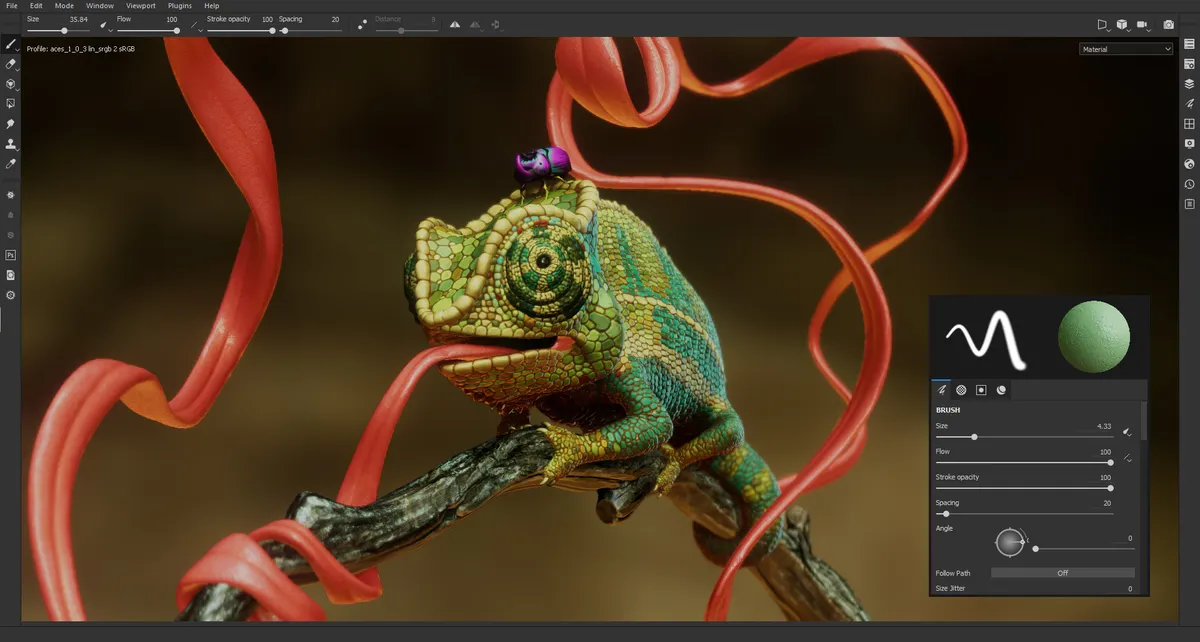
Painter makes it possible to paint directly in the 3D viewport while immediately seeing the result on the model.
Brushes can affect several material channels at the same time. A single brush stroke can therefore modify color, roughness, height or other surface properties.
The application also provides projection, fill and symmetry tools, along with different stroke systems for adapting painting to the shape of the model.
This approach avoids having to work only on a 2D texture that can be difficult to mentally relate to the final geometry.
Layers and non-destructive workflow
Substance 3D Painter is based on a layer stack that makes it possible to separate materials, painting, effects and corrections.
Layers can receive masks, filters and generators in order to precisely control the areas they affect.
This workflow allows a material or color to be modified without repainting the entire texture. Project resolution can also change while preserving a large part of the parametric work.
Painter 12 also adds layer flattening features, useful when a project becomes complex or when a result needs to be temporarily exported to another application.
Smart Materials and Smart Masks
Smart Materials combine multiple layers and effects in order to quickly create complex surfaces such as painted metal, leather, wood or worn materials.
Smart Masks adapt their effects to the geometry of the model.
This adaptation notably relies on information generated during baking: curvature, normals, ambient occlusion and other maps can indicate where dust, wear or surface variations should be placed automatically.
A material can therefore produce different results depending on the shape of the object it is applied to while preserving the same overall logic.
Mesh map baking
Painter includes a dedicated baking mode, meaning the transfer of certain mesh information into textures.
These maps are then used by generators, materials and masks to understand the structure of the model.
Baking can notably use normals, curvature, occlusion and other geometric information required by many PBR workflows.
This step is particularly important when a detailed model needs to transfer some of its information to an optimized version intended for real-time rendering.
UVs, UDIMs and large assets
Textures are generally linked to a UV layout that defines how the surface of the model corresponds to a 2D image.
Painter can work with existing UVs and also provides automatic generation features when the mesh has not been prepared beforehand.
For complex models, the application supports UV Tiles, commonly known as UDIMs, which make it possible to distribute the texture of the same asset across several tiles.
This method is widely used for characters, creatures and production assets requiring more resolution than a single texture can provide.
Projection and Warp to Geometry
Projection tools make it possible to apply an image, pattern or detail onto the surface of a model.
Substance 3D Painter 12 introduces Warp to Geometry, which helps a projection or decal conform to complex shapes, irregular surfaces or geometry containing openings.
This feature is useful for applying logos, lettering, technical patterns or details that need to follow the actual curvature of an object.
It complements more traditional projection methods when the geometry makes manual placement difficult.
Materials and real-time rendering
Painter allows materials to be previewed directly in a 3D viewport with lighting, shadows and surface properties.
Materials can represent different behaviors such as metal, paint, translucency, anisotropy or certain coated surfaces.
This preview makes it possible to judge the result during texturing instead of waiting for export to the final application.
However, it remains important to check the rendering in the destination engine or renderer, because lighting and shaders may interpret textures differently.
Export to game engines and 3D applications
Once texturing is complete, Painter exports the different channels as bitmap textures.
Output templates control file names, formats, bit depth and the way several channels are packed together.
Painter provides several presets for common 3D workflows and also allows custom export configurations to be created.
This flexibility makes integration into game, VFX or rendering pipelines easier without having to manually reorganize every texture after export.
Substance 3D Assets and the Adobe ecosystem
Painter is part of the Adobe Substance 3D Collection, alongside Designer, Sampler, Stager and Modeler.
The Substance 3D Assets library also provides thousands of materials, models and other resources that can be used in projects.
Designer can be used to build more complex procedural materials, while Sampler can notably create materials from images. Painter is then used to apply and customize these resources directly on models.
This complementarity is one of the main strengths of the Substance ecosystem.
Scripts and professional pipelines
Substance 3D Painter supports Python for automating certain operations and integrating the application into production pipelines.
The software also supports standards used in VFX environments, including UV Tiles and Alembic, as well as camera import.
These features make it easier to use Painter in productions where textures need to move between several applications and teams.
For an individual user, they are not essential, but they become important when a pipeline needs to process many assets consistently.
Use cases
Texture a video game character
An artist can import a character prepared in a modeling application, bake its maps and then progressively build skin, clothing, equipment and wear.
The final textures can then be exported according to the format expected by the game engine.
Create realistic materials
Smart Materials, masks and baked maps make it possible to build surfaces that react to the geometry of the model.
Painted metal can, for example, reveal more wear along edges while dust and dirt accumulate in certain cavities.
Paint a stylized asset
Painter is not limited to photorealism.
Brushes, masks and layers can be used to create hand-painted textures, flat graphic colors or color variations adapted to a stylized art direction.
Prepare a VFX asset with UDIMs
A complex character or object can use several UDIM tiles in order to preserve a high level of detail across its entire surface.
Painter can work across these different tiles while maintaining a coherent view of the complete model.
Prepare textures for a 3D product
For product visualization, Painter can be used to build metal, plastic, fabric or other surfaces before sending the object to a staging and rendering application.
Material variations can remain organized in layers to make corrections and alternate versions easier to manage.
Conclusion
Adobe Substance 3D Painter is a specialized tool for painting and texturing 3D models.
Its main strength comes from the combination of direct painting on the model, PBR workflows, non-destructive layers, masks and information generated through baking.
Smart Materials and Smart Masks automate part of the surface work while preserving the ability to manually refine every detail.
Support for UDIMs, customizable exports, Python and production standards also allows it to integrate into pipelines ranging from video games to VFX.
Painter 12 further develops this workflow with Warp to Geometry, layer flattening and several improvements related to projection, rendering and project configuration.
The application does not, however, replace a 3D modeler. It generally comes after mesh creation and preparation, even though certain features can automate UVs or simplify project setup.
For painting 3D models, creating detailed PBR materials and preparing textures for games, rendering or VFX, Substance 3D Painter remains a particularly comprehensive environment.
Points to consider
-
Substance 3D Painter is primarily a texturing application, not a modeling tool. The model is generally created in Blender, Maya, 3ds Max, ZBrush or another application before being imported.
-
Painter 12.1.5 is the current stable version as of October 2, 2026. This update was released on September 15, 2026.
-
Hardware requirements are demanding. On Windows, Adobe lists 16 GB of RAM and 8 GB of VRAM as the minimum, with 32 GB of RAM and 16 GB of VRAM recommended.
-
UDIM projects and high-resolution textures consume large amounts of memory. Adobe notably recommends 32 GB of RAM, a GPU with at least 8 GB of VRAM and an SSD for comfortable UV Tile workflows.
-
The macOS version currently requires at least an Apple M1 Mac with 16 GB of RAM according to Adobe's published configuration.
-
Linux is supported in specific contexts. Adobe references RHEL 8/9 for Enterprise environments and Ubuntu 22.04 for the Steam distribution.
-
Automatic UVs can accelerate project preparation, but a manually prepared unwrap is often preferable when seam placement, texel density or texture organization need to be tightly controlled.
-
The viewport render does not guarantee an exact match with the final application. Shaders, lighting and parameters in the game engine or renderer should be checked after export.
-
Adobe's consumer plan bundles Painter within the Substance 3D Collection. As of October 2, 2026, it is listed at €57.47 including VAT per month and also includes the other Substance 3D applications and 100 GB of cloud storage.
-
The Education plan is restricted to personal, non-commercial use. It should not be used as a free professional license.