Overview
Three.js is a JavaScript library dedicated to 3D in the browser. Its purpose is to make Web graphics APIs more accessible by providing abstractions for creating scenes, cameras, lights, objects, materials, animations and interactions without having to deal directly with all the complexity of WebGL or WebGPU.
A Three.js scene generally relies on three fundamental elements: a Scene, a Camera and a renderer. From this foundation, the developer adds geometry, imported models, textures, lights, effects or interfaces, then animates and updates the scene with JavaScript.
Three.js should not be confused with a complete game engine such as Godot, Unity or Unreal Engine. By default, it does not provide a gameplay system, a full level editor, an imposed entity architecture, a general-purpose physics engine or a console publishing pipeline. It is primarily a Web 3D rendering and tooling library, giving developers much more freedom over the architecture of their application.
This approach makes Three.js particularly suitable for product configurators, scientific visualizations, interactive portfolios, creative Web experiences, educational applications, mini-games, 3D interfaces or AR/VR experiences accessible from a browser.
The project is entirely open source under the MIT license. Its code can be used, modified and integrated into personal or commercial projects without royalties.
At the time of this verification, the latest published version is 0.186.0, corresponding to revision r186. Three.js evolves regularly and its API can change between revisions, making the migration guide important when updating older projects.
Features
Scenes, cameras and object graph
Three.js structures scenes as object hierarchies.
A Scene can contain meshes, lights, cameras, groups and other objects derived from Object3D. Each element can have a position, rotation, scale and parent-child relationship.
This organization makes it possible, for example, to group several vehicle components, attach a camera to a character or move an entire set of objects through a single group.
The main cameras notably include PerspectiveCamera, suited to conventional 3D scenes, and OrthographicCamera, useful for certain interfaces, technical visualizations or games using an orthographic projection.
Three.js also provides raycasting, frustum culling, layers and various tools that simplify selection, visibility and scene interaction.
WebGLRenderer and the next-generation WebGPURenderer
Three.js was historically built around WebGLRenderer, which remains a widely used renderer compatible with a very large number of browsers and devices.
The project now also develops WebGPURenderer, presented as its next-generation renderer.
WebGPU provides more modern access to the GPU and opens the door to more advanced graphics and compute techniques. Three.js has nevertheless designed WebGPURenderer as a universal renderer: when a browser or device does not support WebGPU, it can automatically use a WebGL 2 fallback backend.
This makes it possible to start taking advantage of WebGPU without necessarily restricting the application to the newest hardware.
The current main Three.js builds include both WebGL and WebGPU. Other approaches, such as CSS3D or SVG renderers, remain available as addons for more specific uses.
PBR materials, lights, shadows and environments
Three.js provides many materials ranging from simple unlit rendering to physically based materials.
MeshStandardMaterial and MeshPhysicalMaterial notably support PBR workflows with metallic properties, roughness, transmission, clear coat, iridescence, dispersion and different types of textures.
Several light sources are available: directional, point, spot, ambient and hemisphere.
The renderer also supports shadows, environment maps, HDR, tone mapping and different color spaces required for coherent rendering.
These features make it possible to display anything from a lightweight stylized scene to a realistic product using textures and an HDR environment.
WebGPU, TSL and node-based materials
The development of WebGPURenderer also comes with TSL — Three.js Shading Language.
TSL makes it possible to build materials and graphics calculations as JavaScript nodes instead of writing the entire shader directly in a low-level language.
This architecture can be used both to create custom materials and to take advantage of certain GPU computations or post-processing effects.
It also makes it possible to share more logic between the WebGPU and WebGL 2 backends supported by WebGPURenderer.
For developers who want to go beyond standard materials without maintaining several versions of shaders, TSL represents an important evolution of Three.js.
Post-processing and RenderPipeline
Three.js allows effects to be added after the main render: bloom, depth of field, anti-aliasing, color grading, ambient occlusion, reflections or stylized effects.
With WebGPURenderer, the modern post-processing stack is based on RenderPipeline and the node system.
The pipeline can combine several effects to reduce certain rendering passes and natively supports Multiple Render Targets — MRT, useful for more advanced techniques.
The older WebGL ecosystem also provides post-processing solutions based notably on various passes and EffectComposer.
The choice therefore depends partly on the renderer used and the generation of the project.
Importing glTF, FBX, OBJ, STL and many other formats
One of Three.js’s strengths is its large collection of loaders.
The current documentation notably provides loaders for:
- glTF and GLB;
- FBX;
- OBJ and MTL;
- Collada;
- STL;
- PLY;
- 3MF;
- USD;
- Rhino 3DM;
- LDraw;
- VOX;
- BVH;
- SVG;
- HDR and EXR;
- various compressed texture formats.
For modern real-time 3D scenes, glTF 2.0 is generally the preferred format.
GLTFLoader supports many glTF extensions, including advanced materials, Draco, Meshopt, KTX2/Basis textures, GPU instancing and several modern texture formats.
This support makes it possible to export a model from Blender or another DCC application and preserve its hierarchy, materials and animations in Three.js.
Draco, Meshopt and KTX2 for lighter Web scenes
Asset weight is a major issue for 3D in the browser.
Three.js provides several tools for reducing the amount of transferred data.
Draco can heavily compress mesh geometry. DRACOLoader then uses a JavaScript or WebAssembly decoder depending on browser capabilities.
Meshopt provides another compression and optimization method that can be integrated into glTF files.
For textures, KTX2/Basis Universal allows compressed textures to be distributed and then transcoded into a format suited to the user’s GPU.
These techniques are especially important for scenes intended for the Web: a model that runs perfectly on a local computer can become unusable if it requires several hundred megabytes to load every time.
Model animation and morphing systems
Three.js includes an animation system capable of playing and blending multiple clips.
AnimationMixer can drive skeletal animations, transformations, morph targets and various animatable properties.
A character imported from a glTF file can therefore include several clips — walk, run, attack, idle — which can then be activated or blended depending on the state of the application.
Morph targets can also be used for facial expressions, progressive transformations or geometry variations.
Three.js provides the building blocks required for rendering and controlling these animations, but gameplay logic or the state machine still has to be built by the developer or with an additional library.
Controls, interactions and raycasting
The addons provide different camera and navigation systems.
OrbitControls, for example, lets users rotate a camera around an object using a mouse, touch or trackpad. Other controls are suited to first-person views, free movement or more specific interactions.
Raycasting makes it possible to determine which object is under the pointer or along the direction of a ray.
This feature is the basis of many interactions: selecting a product, clicking a mechanical component, targeting an object, showing a tooltip or triggering an action in a scene.
Three.js therefore provides the fundamental tools while leaving the developer responsible for building the interface and rules suited to the project.
WebXR for virtual and augmented reality
Three.js supports WebXR, the Web API intended for virtual and augmented reality experiences.
WebXRManager, used by the renderers, manages XR activation, cameras, controllers and the different elements required for an immersive session.
The official examples notably cover VR, AR, controllers, hand tracking and different interaction modes.
A compatible experience can therefore run directly from a browser supporting WebXR, including on some standalone headsets.
Available capabilities nevertheless depend heavily on the browser, device and APIs exposed by the platform.
Installation with npm, ES modules or CDN
Three.js can be integrated in several ways.
For a modern project, the documentation generally recommends installing it through npm and using a build tool such as Vite:
npm install --save three
Addons are then imported separately from three/addons/.
CDN integration remains possible, notably with ES modules and an import map.
This modularity allows developers to use only the components they need instead of treating Three.js as a monolithic application.
The library can also be hosted directly with the project without depending on a remote service at runtime.
A broad collection of addons and official examples
Three.js deliberately keeps its core relatively general-purpose.
Many additional features are provided as addons: camera controls, loaders, exporters, post-processing, geometry utilities, WebXR tools, CSS3D, curves, effects, helpers and other components.
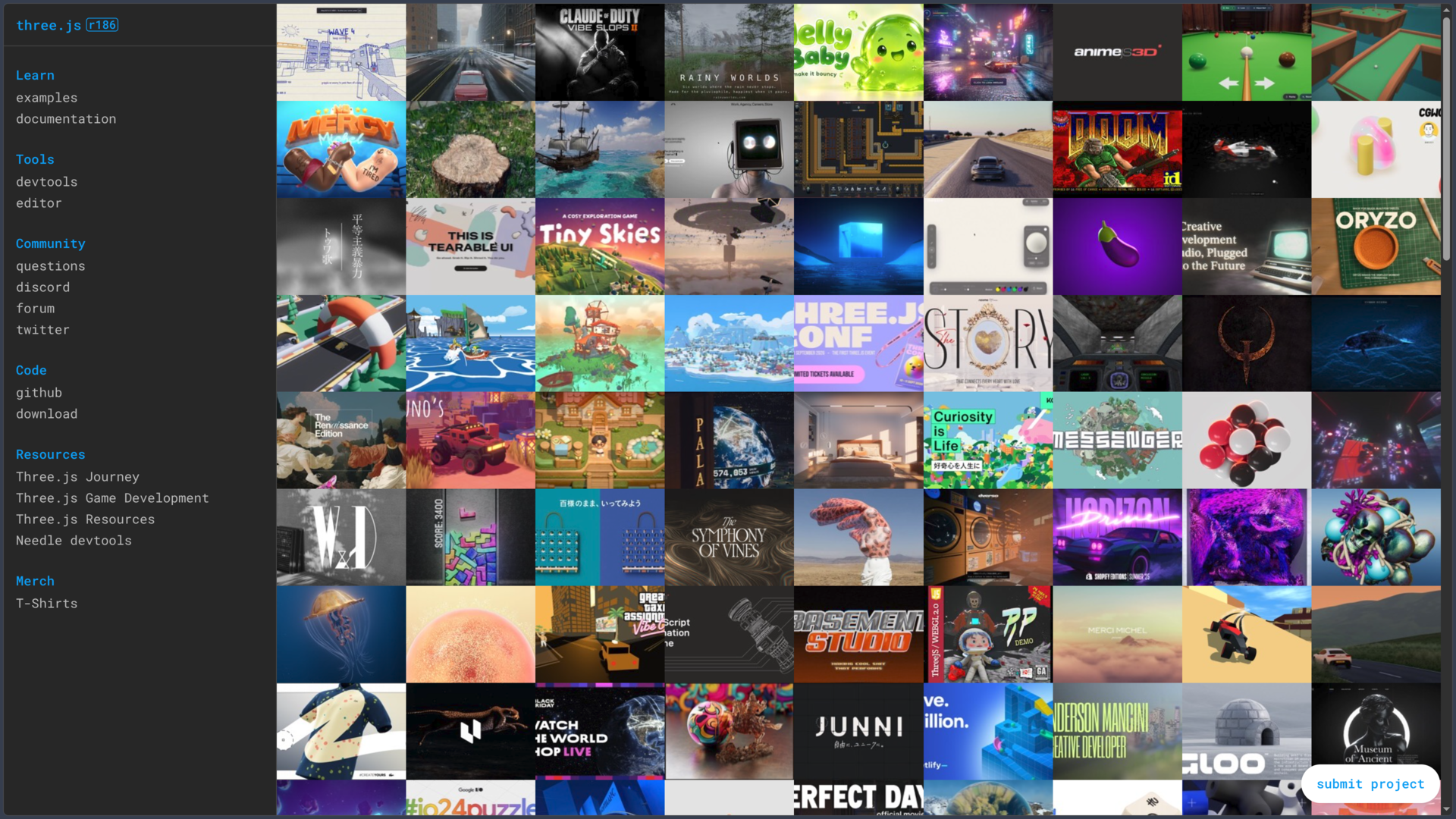
The official site also contains a very large collection of working examples.
These examples are especially important in the Three.js ecosystem: they serve both as demonstrations of the library’s capabilities and as technical references for integrating certain advanced features.
A large part of the learning process therefore involves combining the API documentation, manual and existing examples.
A Web editor, but not a complete visual engine
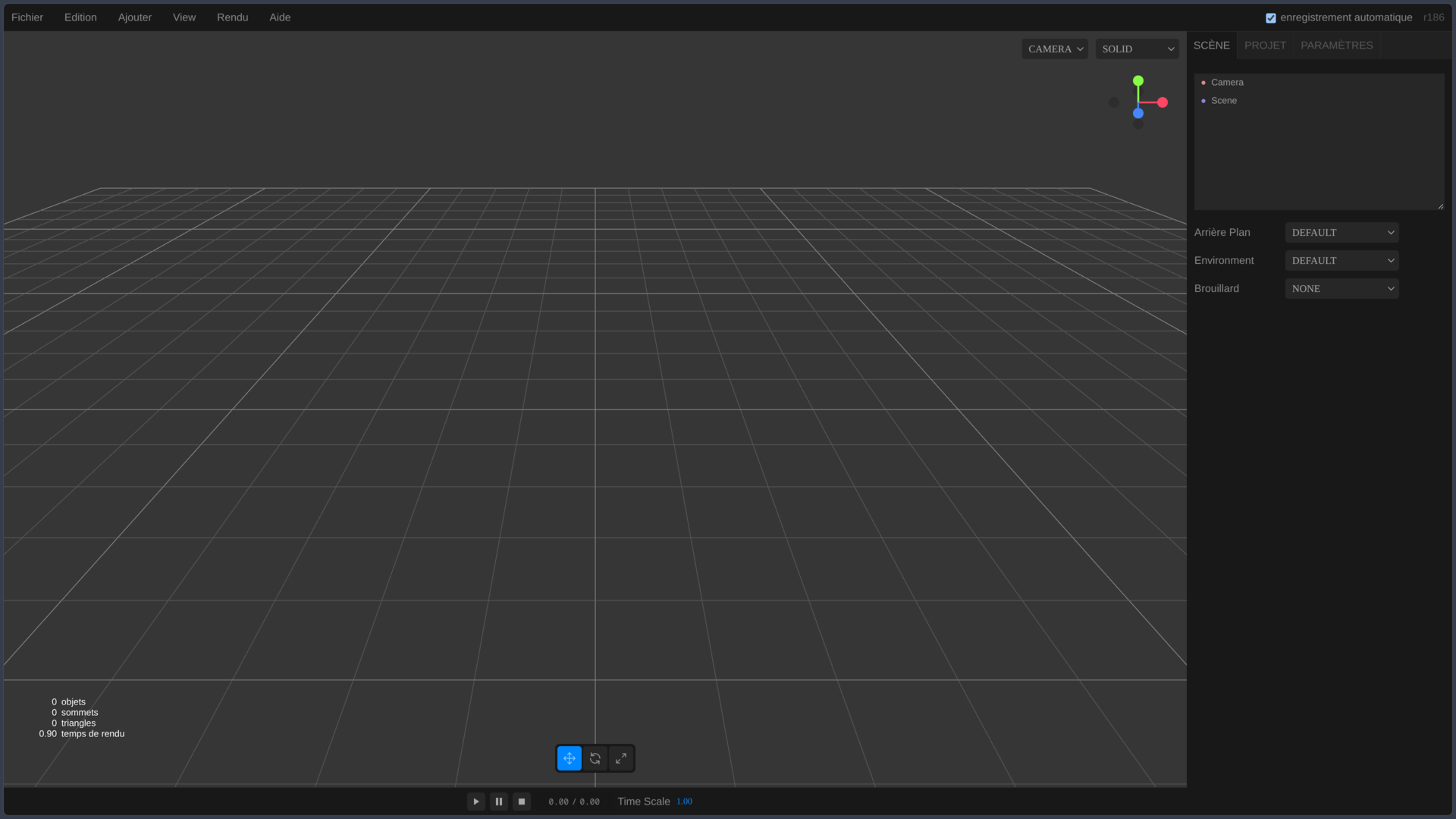
Three.js also provides a Web editor for creating a scene, adding objects, lights and cameras, editing their properties and importing different assets.
This tool is useful for experimenting, preparing a scene or understanding the structure of the engine.
It should not, however, be considered equivalent to the Unreal, Unity or Godot editor.
In a typical Three.js project, most of the logic, interactions and pipeline are still built in JavaScript or TypeScript within an external development environment.
TypeScript available through community definitions
Three.js code is written mainly in JavaScript.
TypeScript projects can nevertheless use the library through the @types/three definitions, maintained by the community in the three-types project and distributed through DefinitelyTyped.
This solution provides autocompletion, type checking and better integration with modern IDEs.
It is important to remember, however, that the TypeScript definitions are a separate project from the main Three.js code. When a new revision is released, there can occasionally be a slight delay before the corresponding types are updated.
Use cases
Creating a 3D product configurator
An e-commerce site can load a product in glTF and allow visitors to rotate it, zoom in and change its color or certain materials.
Interactions are handled through raycasting and the HTML interface, while Three.js handles real-time rendering.
The same principle can be used for furniture, vehicles, shoes, industrial equipment or customizable objects.
The main advantage is keeping the experience directly within the Web page without requiring users to install a 3D application.
Building a portfolio or creative Web experience
An artist or designer can create a fully animated page where projects take the form of objects, environments or 3D transitions.
Three.js can be combined with HTML, CSS, video, audio and other front-end technologies.
This ability to mix the traditional DOM with GPU rendering explains its frequent use on experimental websites, portfolios, interactive campaigns and branded experiences.
The developer retains much more direct control over the interface than with a game engine embedded inside a page.
Visualizing scientific or technical data
An application can represent molecules, buildings, point clouds, trajectories, networks or datasets in a navigable 3D space.
Objects can be generated dynamically in JavaScript rather than only loaded from prebuilt models.
Three.js then becomes a visualization layer connected to application data.
For very large datasets, however, instancing, level-of-detail techniques and GPU optimization become essential.
Developing a Web game or interactive prototype
Three.js can perfectly serve as the foundation for a game running in the browser.
The developer has rendering, animation, raycasting, Web audio, model loading and browser input handling available.
They must, however, build or integrate many of the systems a game engine would provide: physics, navigation, saves, entities, AI behavior or level design tools.
Three.js is therefore particularly suitable for custom Web games and interactive experiences where this freedom is an advantage.
Creating a VR or AR experience accessible from a browser
A WebXR application can display a Three.js environment in a compatible headset or overlay certain content onto the real environment.
The same scene graph, models and a large part of the same logic can be reused between conventional display and the XR session.
This makes it possible to distribute certain immersive experiences directly through a URL.
WebXR compatibility still depends on the browsers and devices used, making fallback solutions necessary when targeting a broad audience.
Conclusion
Three.js remains one of the fundamental libraries for 3D on the Web.
Its main strength is providing a layer high enough to avoid dealing directly with every subtlety of WebGL or WebGPU, while still leaving developers far more control than a complete game engine.
The project now covers a large part of modern 3D rendering needs: PBR, HDR, animation, glTF, compression, post-processing, WebXR and now extensive work around WebGPU and TSL.
The arrival of WebGPURenderer also shows the project’s direction. Three.js is no longer simply maintaining its historical WebGL renderer: it is gradually building an architecture capable of using the browser’s newer GPU APIs while retaining a WebGL 2 backend for devices that do not yet support WebGPU.
This flexibility comes with a trade-off. Three.js provides building blocks rather than a complete production workflow. It does not impose a gameplay system, full physics engine or level editor comparable to Godot or Unreal. Larger projects therefore require more architectural decisions and often several complementary libraries.
Updates are also frequent. Some APIs evolve or disappear across revisions, and an old project should not necessarily jump directly to the very latest version without consulting the migration guide.
For a developer who wants to integrate a genuine 3D scene directly into a Web application, keep control over the code and use WebGL, WebGPU, glTF or WebXR without adopting a complete game engine, Three.js remains a particularly strong reference.
Points to consider
-
Three.js is a JavaScript library, not a complete game engine. Gameplay, application architecture, advanced physics and production tools often need to be added separately.
-
The currently verified version is 0.186.0 / r186. The project evolves regularly and new revisions may change certain APIs.
-
Three.js is completely free and open source under the MIT license, including for commercial projects.
-
The current main builds include WebGLRenderer and WebGPURenderer. SVGRenderer and CSS3DRenderer remain available as addons.
-
WebGPURenderer can use WebGPU and then fall back to a WebGL 2 backend when WebGPU is unavailable, making gradual migration easier.
-
glTF 2.0 is generally the recommended format for modern 3D assets. Three.js nevertheless supports many other formats through its loaders.
-
Draco, Meshopt and KTX2 can significantly reduce the weight of models and textures, but add compression and decoding steps to the pipeline.
-
Scene weight and complexity remain critical on the Web. A scene that runs perfectly on a powerful PC can become too heavy on a smartphone or embedded device.
-
Three.js does not provide a general-purpose physics engine comparable to a game engine’s built-in system. External libraries such as Rapier or other solutions can be combined with the project.
-
WebXR support depends heavily on the browser and device, especially for augmented reality.
-
TypeScript types are maintained separately by the community through
@types/three, and can occasionally lag slightly behind a brand-new revision. -
Older projects should be updated carefully. The Three.js migration guide notably recommends avoiding overly large version jumps to better manage deprecated APIs.
-
Three.js runs mainly in the browser and can be installed with npm, loaded from a CDN or hosted directly with the project.
-
The Three.js Web editor exists but does not replace a complete editor such as Godot, Unity or Unreal Engine. Most of the work remains code-oriented.